YouTube SEO 2026: How to Rank Videos by YouTube's Own Rules
YouTube SEO guide for 2026: optimize and rank videos using YouTube's own help pages, with documented limits, the free A/B test and unsupported tips.
By Furkan AktaşPublished Updated
On this page
YouTube SEO is the practice of shaping a video's title, thumbnail, description and watch experience so YouTube search can match it to a query and viewers keep watching. The numbers guides keep repeating are 70 characters, 250 words, 1280x720, fifty percent retention and 24 to 72 hours.
This YouTube SEO optimization guide checks them against the platform's own help pages and blog posts, which we read in full. Every rule gets one of three labels: it is stated, it is contradicted, or no help page we read states it. Help pages carry no date, so read everything below as accurate as of October 2026.
How the YouTube algorithm works: relevance, engagement and quality
YouTube search ranks videos on three named elements, relevance, engagement and quality, and it measures engagement as the watch time of a video for a particular query. That sentence comes from YouTube's help page on how search works, which adds that the importance of the three elements may vary by search type.
How does the YouTube algorithm weigh the three? It doesn't say: the pages publish no weights, only that the mix may vary by search type. Recommendations on the homepage and Up Next panel run on a separate system built around valued watchtime.
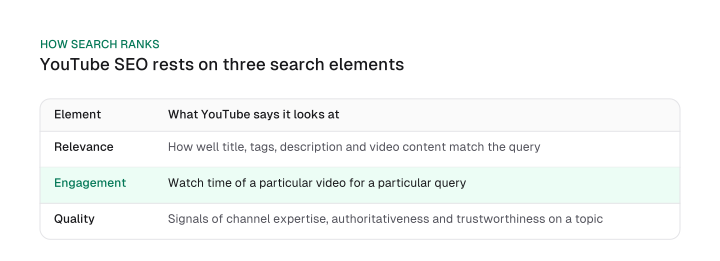
Relevance is the part you can edit. YouTube says it looks at how well the title, tags, description and video content match the search query. Engagement is the part you earn: the same page says YouTube looks at overall user engagement, such as the watch time of a particular video for a particular query, to decide whether other users find the video relevant to that query.
Read that carefully, because it makes engagement a per-query judgment. One video can hold viewers for "technical SEO audit" and lose them for "SEO checklist", and it will rank accordingly for each.
Quality is the channel-level element. YouTube describes it as signals that help determine which channels demonstrate expertise, authoritativeness and trustworthiness on a given topic. So the platform scores the video against the query and also scores the channel behind it.
The same page says YouTube may consider the searcher's search and watch history, and it states that YouTube takes no payment for better placement and does not favor Google-owned content.
Why watch time replaced clicks
The watch-time rule has a date. YouTube's October 2012 creator-blog post says the company had started adjusting search ranking to reward engaging videos that keep viewers watching, and reported the result as "less clicking, more watching".
Its 2021 post on the recommendation system explains the reasoning: YouTube learned back in 2011 that clicking on a video does not mean you actually watched it. When it first added watchtime to recommendations it saw an immediate 20% drop in views, and it went ahead anyway.
The same post adds that not all watchtime is equal: only videos a viewer rates four or five stars count as valued watchtime.
The practical reading is that a title that wins the click and loses the viewer is working against the platform's own stated design.
Search is one surface, recommendations another
Search is not where all views come from. YouTube's 2021 post says recommendations work in two main places, the homepage and the Up Next panel. The metadata fields in the next section feed search relevance. Recommendations lean on the valued watchtime described above, which no title tweak can fake.
If you already treat YouTube as one of several surfaces in a search everywhere optimization plan, this split is the reason to measure search views and recommended views separately.
Comments, likes and the 1.3-million-result study
Some guides say comments and likes drive rankings. One popular guide cites its own analysis of 1.3 million YouTube search results, in which comments were strongly correlated with ranking and longer videos had an edge. That is an association measured by a third party.
YouTube documents something narrower: its help page says its systems check whether viewers enjoyed a video using likes and post-watch survey results, and its 2021 post says people are more likely to be satisfied by videos they share or like. It names no comment signal in the pages we read, and its performance FAQ tells creators to make videos the length the content needs.
Does YouTube SEO matter, then? Yes, for one of the three elements. Metadata feeds relevance, and a perfectly optimized video with weak retention for its query still loses that query.
YouTube SEO optimization: each metadata field and its documented limit
YouTube documents a 100-character limit for titles, 5,000 characters for descriptions and a minimal role for tags, and the help pages we read state neither the 70-character title cutoff nor the 250-word description that guides repeat. For YouTube SEO optimization, the table below sets each field against what YouTube writes and what guides add.
Download CSV (CC BY 4.0)
The title row is a correction of emphasis rather than of fact. YouTube's title page does tell you to put the most important words near the beginning, so the guides are right about order and silent about where 70 comes from.
The "first 25 words" and "250 words" rules fit YouTube's advice to use the first few lines well, but YouTube sets neither number. We call them guide convention. Treat YouTube SEO tips that quote exact numbers the same way unless a help page backs them.
Hashtags are the one field where YouTube states a mechanism with a hard edge. Three show, YouTube picks them by engagement, and past 60 it throws all of them away, so keep the hashtag block short.
If you came to video from web SEO, the title logic will feel familiar; the principles in how to write title tags carry over for accuracy and word order, while the character limits do not.
One guide backs its numbers with the 1.3-million-result correlation study. That is evidence of association, and it is worth knowing about. It is not a YouTube rule.
YouTube video optimization comes down to the fields YouTube says matter: the title, the thumbnail and the first lines of the description. Stop tuning the rest.
Keyword research with the tools YouTube already gives you
YouTube Studio's Trends tab and the Reach tab's YouTube search report give keyword data for free: the first shows what your audience and viewers across YouTube are searching, the second the terms that already brought viewers to a video, and an empty card can mean missing data.
YouTube's help page on search-term insights describes the Trends tab as the place to explore what your audience and viewers across YouTube search for, with a top searches card based on your audience and your saves over the last 28 days.
The Reach tab's YouTube search report shows what terms viewers searched when they found your content. One looks forward at demand, the other backward at what already worked.
An empty card on the Trends tab needs care, because YouTube states that some insights are limited to certain countries, languages and devices, and that sections may not appear when there are no relevant videos at the moment. So an empty card on the Trends tab can mean YouTube lacks data for that country, language or device, and you should read it as missing evidence before dropping a keyword.
The naming is also in flux: the Trends tab page says an updated Studio has been rolling out gradually since July 2026, and YouTube's description-tips page still tells you to use the Research tab in YouTube Analytics and Google Ads Keyword Planner.
We would not assert that one tab became the other. If a label differs from what you see, look for the card that shows search terms.
"Low competition" is a third-party estimate. The YouTube pages we read publish no competition score for a keyword, so any number of that kind comes from a vendor's model. That affects how you read the common advice to chase long-tail phrases: the long-tail part is checkable in the Reach report, the low-competition part is not. The principles of how to choose SEO keywords still apply to the search-intent half of the job.
A short rule decides whether you need more than that:
- Start with the Reach tab's search report for videos that already get views, then widen with the Trends tab's top searches.
- Treat an empty Trends card as missing evidence. It says nothing about demand.
- A paid tool earns its place only by answering something these cards do not. A YouTube SEO tool that only restates search terms repeats what you already have.
Titles and thumbnails: earning the click without clickbait
YouTube asks for accurate, succinct titles with the key words first and thumbnails uploaded as large as possible, and it tests up to three variants natively, picking the winner on highest watch time rather than on clicks. The title advice is on the same help page as the table above. The thumbnail advice is where guides and YouTube diverge.
YouTube's thumbnail page recommends a resolution of 3840 x 2160 pixels for videos with a minimum width of 640 pixels, and says the image should be as large as possible because it is also the preview in the embedded player. It asks for a 16:9 aspect ratio on videos.
One guide calls 1280 pixels by 720 pixels the ideal size. That is the only popular number in this post that YouTube states differently, and the stakes are concrete: in an A/B test, if any one thumbnail is below 720p, YouTube downscales all the test thumbnails to 480p. So upload every variant at 3840 x 2160 and none of them triggers that downscale.
The native test is the gap in the guides we read. Two of the 8 guides send readers to a paid extension for thumbnail testing, and neither mentions that YouTube Studio ships its own.
The help page says creators can test and compare up to 3 titles and thumbnails, and the variant with the highest watch time is shown to all viewers when the test ends. If there is no clear winner, the first one you uploaded is shown. A test can take a few days or up to 2 weeks.
The test is available only on computers through YouTube Studio, advanced features must be enabled, and Shorts, scheduled lives and Premieres cannot be tested.
The winner rule matters more than it looks. Because the test judges on watch time, a thumbnail that attracts clicks and loses viewers should lose. That is also why YouTube's own help page on impressions describes a clickbait signature: high CTR with low average view duration and lower than expected impressions.
On click rate itself, YouTube's impressions page says half of all channels and videos have an impressions CTR between 2% and 10%. Use that band as context for your own numbers.
New videos, or videos with fewer than 100 views, can see an even wider range, so the number only means something after enough impressions. Chasing a higher click rate by promising more than the video delivers produces exactly the pattern the signature describes.
If you test by swapping thumbnails manually, YouTube warns that it is difficult to make sure each version is seen by the same audience, which is another reason to use the native test.
Shorts thumbnails and test limits
For Shorts, YouTube recommends 2160 x 3840 with a minimum height of 640 pixels, and a 9:16 aspect ratio. That is all we cover for Shorts thumbnails here. The native A/B test excludes them.
YouTube's help page on Shorts search and discovery says Shorts are ranked on performance and viewer personalization, and that in search the factors include how well the metadata matches the search and whether viewers click and watch. It publishes no weights, so this guide describes no Shorts ranking mix.
Retention, chapters and captions: reading the watch half
YouTube's retention report compares each video with similar-length videos and flags the first 30 seconds, so the useful target is the shape of your own curve, because YouTube sets no fixed percentage. The page behind that sentence says the report compares your video with all YouTube videos of similar length, and its intro metric tells you what share of your audience still watched after the first 30 seconds.
That is why the popular "aim for 50% average view duration" line has no YouTube source. One guide argues that finishing half of a 10-minute video outperforms finishing a three-minute one, a claim about outcomes with no stated measurement behind it. YouTube states no such target: not all watchtime is equal, and its report compares videos of a similar length.
The table below turns YouTube's definitions into a diagnosis. Start with two numbers, CTR and average view duration, then look at the intro percentage, before you touch any metadata.
Download CSV (CC BY 4.0)
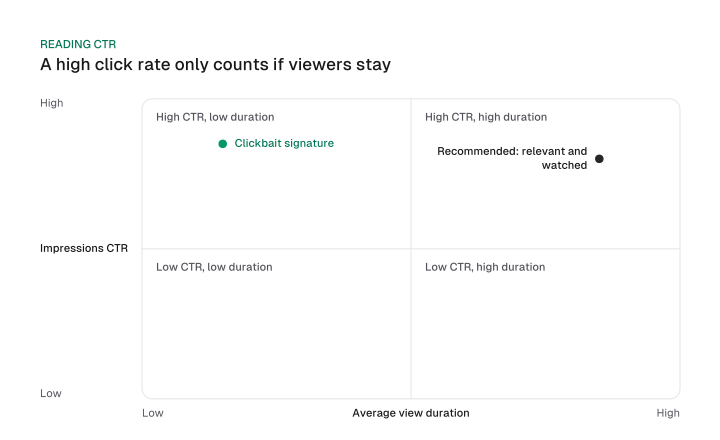
The point of the grid is that CTR alone is never a verdict. A high click rate is good news only when average view duration holds up beside it. Our reading rule is a derived one: if the clicks are high and the viewers leave, fix the promise, and if the clicks are low and the viewers stay, fix the packaging.
Captions come with a caveat from YouTube itself. Its help page says automatic captions are generated by machine learning algorithms, so quality may vary, and it encourages creators to add professional captions first.
Review and edit what the machine produced. YouTube's relevance element lists video content among its inputs, but we found no page that documents captions as a ranking signal, so edit them for viewers and accuracy, and do not expect a ranking lift.
Playlists get the same calibration. If you use them, check the playlists report in Studio, which gathers the Overview, Content, Audience and Revenue tabs for all the videos in a playlist, and treat a playlist as a link out to your other videos.
The same goes for upload schedules: YouTube says a consistent, sustainable release schedule is critical for building and fulfilling audience expectations and for your own well-being, and it attaches no ranking effect to that.
How long YouTube SEO takes to show results
YouTube publishes no ranking timeline, but its help pages set when each number becomes readable: retention after one to two days, click-through rate only after a substantial number of impressions, and an A/B test within two weeks. That is a report schedule, not a promise about when a video ranks.
One popular guide puts first search impressions at 24 to 72 hours after upload and a steadier ranking at 2 to 4 weeks. No YouTube page we read states that clock, so treat it as one guide's unsourced estimate. The schedule below comes from YouTube Help instead.
Download CSV (CC BY 4.0)
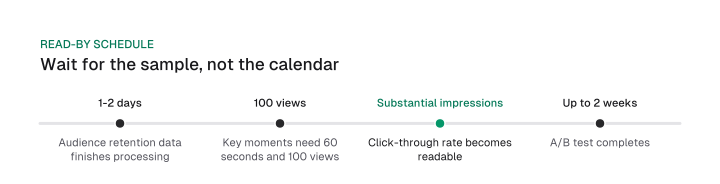
Web search runs on a different clock. There, page indexing, links and months of accumulation shape the answer to how long does SEO take. YouTube's reports are gated by sample size, so the practical rule is to wait for the sample, because the calendar tells you little.
Judge CTR after a substantial number of impressions, judge retention once YouTube has processed the data, and ignore the flat 24 to 72 hour clock. If you want to rank videos fast, note that YouTube publishes no ranking timeline to speed up, only report lags to respect.
A pre-publish pass for one video
A pre-publish pass checks one video against YouTube's hard rules in a fixed order: title, description lead, chapters, hashtags, thumbnail, then the A/B test.
Use it as a YouTube SEO checklist. The example below works as a template for any tutorial video and is illustrative, a metadata set for a technical SEO audit tutorial, and none of its values is measured data. Each line carries a tag naming the YouTube rule it satisfies, so you can see which parts are rules and which are taste.
TITLE       Technical SEO audit tutorial: find crawl errors step by step
            [rule: under 100 characters, accurate, key words first]

DESCRIPTION Run a technical SEO audit on your own site: crawl errors,
            indexing checks and page speed, with a worked example.
            [rule: first few lines describe the video; unique to this video;
             main words "technical SEO audit" appear in title and description]

CHAPTERS    00:00 Intro
            01:10 Crawl and index checks
            04:30 Page speed
            [rule: first timestamp 00:00, at least three timestamps,
             ascending, each chapter at least 10 seconds]

HASHTAGS    #technicalseo #seoaudit #seotutorial
            [rule: three show by the title; stay far below 60]

THUMBNAIL   3840 x 2160, 16:9
            [rule: as large as possible; avoids the 480p downscale in a test]

A/B TEST    Title variant A vs B, thumbnail variants 1 to 3
            [rule: up to 3 variants, desktop only, advanced features on,
             not for Shorts; judged on highest watch time]
The order follows the cost of getting each wrong. A title and description are editable at any time, but chapters carry hard conditions, so check them before you hit publish.
YouTube's chapter page wants the first timestamp 00:00, at least three timestamps in ascending order, and a minimum chapter length of 10 seconds.
Hashtags are cheap to get right: pick three, put them in the description, and stay well under the cap. Then upload the thumbnail at the full recommended size, and set up the native test if the video is eligible.
As a short YouTube SEO tutorial, here are the steps in the same order for a video you are about to publish:
- Write the title with the key words first and confirm it accurately describes the video.
- Put a plain description of the video in the first few lines, and make the description unique to this video.
- Add chapters that start at 00:00, number at least three and run at least 10 seconds each.
- Choose up to three hashtags and leave the rest out.
- Upload the thumbnail at 3840 x 2160 in 16:9, or 9:16 for a Short.
- Start the A/B test if the video qualifies, then leave it alone until it ends.
The same video also feeds other channels. A tutorial that passes this check is a ready source for content repurposing into posts and clips, with its chapters doubling as an outline.
YouTube's own pages say more about ranking than the top guides use, and the useful part is narrow. Search watch time is judged per query, channels are scored on quality, and the popular numbers split into rules YouTube states, one it contradicts (thumbnail size) and several it never states. Run the pass above on your next upload, then read CTR and average view duration together once the sample is in.
Frequently asked questions
How many hashtags should a YouTube video have?
Up to three show above the title, and YouTube chooses them by how engaging it considers them. If a video has more than 60 hashtags, YouTube ignores all of them, so keep the list short. Pick three that describe the topic and leave the rest out of the description.
Does YouTube have its own A/B test for titles and thumbnails?
Yes. YouTube Studio lets creators test up to three titles or thumbnails, and the variant with the highest watch time is shown to everyone. The test takes a few days up to 2 weeks and does not run on Shorts. It is a native alternative to the paid extensions two of the 8 guides recommend.
Can I do SEO without paying?
Yes, YouTube SEO needs no paid software to start. The Trends tab, the Reach tab's search report and the native A/B test cost nothing, and together they cover keyword research, proof of what already works and thumbnail testing. A paid tool only makes sense if it answers something those three do not. Check what the free cards already show before you pay for a duplicate.
Do YouTube tags still matter?
Barely. YouTube says tags play a minimal role in a video's discovery, though they can help when your content is commonly misspelled. Its help page names title, thumbnail and description as the more important metadata. Add a few accurate tags if misspellings are plausible, and spend your time on the three fields that matter more.
Do chapters help YouTube SEO?
YouTube documents chapters as a viewer navigation feature with three rules: the first timestamp starts at 00:00, there are at least three timestamps in ascending order, and each chapter runs at least 10 seconds. The pages we read state no ranking effect. Add them because they help viewers find the part they came for.
How do I SEO my YouTube channel?
The only channel-level element YouTube documents in search is channel quality, meaning signals of expertise, authoritativeness and trustworthiness on a topic. Channel-name and bio tactics are practitioner advice with no YouTube page behind them. Put the effort into videos that hold viewers for their queries, since engagement is judged per query.
Cite this page
Aktaş, F. (2026, October 15). YouTube SEO 2026: How to Rank Videos by YouTube's Own Rules. Mission Growth. https://missiongrowth.io/blog/youtube-seo
Download the data: 3 tables as CSV (CC BY 4.0)
Figures we made for this post are free to reuse under CC BY 4.0 with credit to Mission Growth.
Get Mission Growth highlighted in your Google results.