Author Schema Markup: The Complete Implementation Guide
See exactly which author schema properties Google documents, a copy-paste JSON-LD template, the mistakes that make it invisible, and how to validate it.

On this page
Author schema is the author property on an Article's structured data, and its value is a Person or an Organization, never a type of its own.
Google's documentation lists no required properties for it, only recommended ones. Neither the markup nor an author's reputation is a confirmed ranking factor.
This guide quotes Google's and schema.org's current documentation property by property. It corrects two pieces of author schema markup advice still circulating after Google's own docs moved on. It shows how to connect a byline, an author's own page, and a fact-checker into one entity graph instead of three disconnected snippets.
In this guide:
- Exactly which properties Google's Article documentation recommends, and which ones it doesn't
- A JSON-LD template you can paste in directly, the smallest working version and the full one
- The connected graph linking an author, their profile, and a reviewer, as one worked example
- Four checks a validator pass alone won't catch
What author schema actually is, and what a name alone can't do
Author schema is not a separate schema.org type. It's the author property on an Article, and Google's documentation treats its value as a Person or an Organization, never anything else.
Schema.org's own definition: the author property applies to CreativeWork and Rating, and it accepts only Organization or Person as its value.
Google states plainly that structured data changes eligibility, not certainty: "Using structured data enables a feature to be present, it does not guarantee that it will be present." That one sentence answers a question every SEO eventually asks, in both of its forms: does the markup itself move rankings, and does an author's individual authority. Neither is a confirmed ranking factor.
SEOs often call this broader question E-E-A-T; this page covers the markup mechanics only, not the rater-guidelines framework itself or its added weight on YMYL topics.
So what does the property actually buy you? Schema.org defines sameAs as a URL that "unambiguously indicates the item's identity," while Google restricts author.name to the bare name, nothing else added in.
A name string alone can never tell two people who share it apart. Only an identifier built from a URL can. That's the real reason Google's own guidance leans on author.url and the sameAs schema property instead of a richer name field. A string isn't an identity. A stable page is.
The AI SEO checklist already lists "author bylines are named, real, and consistent" as one pass or fail check. This page is the depth behind that line. Machine-readable authorship also feeds a broader generative engine optimization practice: making the facts on a page legible to AI systems, independent of any specific citation or ranking effect.
The property-by-property template Google actually asks for
Google's recommended-properties list for Article structured data is short: author, author.name, author.url, plus the article-level dates, headline, and image.
Two pieces of advice that keep making the rounds, AMP rules and jobTitle as a visibility signal, aren't on it.
Start with what's not there. Google's own words, from the Article structured data page updated September 2026: "There are no required properties; instead, add the properties that apply to your content." Everything below is recommended, not mandatory, which is exactly why so many implementations drift from it.
Here's the full recommended list, current as of that same update:
headline,datePublished,dateModified,imageat the Article levelauthor, pointing to onePersonorOrganizationobject (or an array, for multiple authors)author.name, the bare name onlyauthor.url, a link that uniquely identifies that author
Here's an author schema example covering the smallest working shape, no padding:
{
  "@context": "https://schema.org",
  "@type": "Article",
  "headline": "How to structure a technical SEO audit",
  "datePublished": "2026-09-08",
  "dateModified": "2026-09-08",
  "image": "https://example.com/images/audit-cover.jpg",
  "author": {
    "@type": "Person",
    "name": "Jane Rivera",
    "url": "https://example.com/authors/jane-rivera"
  }
}
Here's the common mistake, and what Google's docs specify instead:
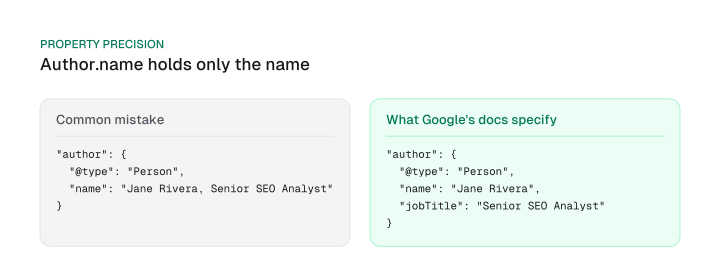
Google's restriction on author.name is explicit: "In the author.name property, only specify the name of the author. Don't add any other piece of information." That means no job title, no publisher name, nothing else riding along in that one string.
Job titles still belong on the Person object. Schema.org defines the jobTitle schema property as "the job title of the person" and scopes it to Person. Google's recommended list for author never mentions jobTitle. Treat it as schema.org-valid hygiene that helps disambiguate a byline. It carries no documented ranking or visibility effect, so don't claim one.
Google's documentation draws no distinction by industry either. A byline on a health or finance topic gets the same optional treatment as one on a general blog post: schema.org-valid, absent from Google's recommended list, and never weighted differently by niche in anything Google has published.
The full template adds that separation, plus sameAs, back in:
{
  "@context": "https://schema.org",
  "@type": "Article",
  "headline": "How to structure a technical SEO audit",
  "datePublished": "2026-09-08",
  "dateModified": "2026-09-08",
  "image": "https://example.com/images/audit-cover.jpg",
  "author": {
    "@type": "Person",
    "name": "Jane Rivera",
    "url": "https://example.com/authors/jane-rivera",
    "jobTitle": "Senior SEO Analyst",
    "sameAs": [
      "https://www.linkedin.com/in/janerivera",
      "https://twitter.com/janerivera"
    ]
  }
}
Pick the sameAs URLs the way schema.org's own example does: "the URL of the item's Wikipedia page, Wikidata entry, or official website." A LinkedIn profile or a personal site works the same way, as long as it's a page that unambiguously belongs to that one person.
One more instruction that keeps making the rounds: AMP rules for author and logo markup, down to a fixed logo pixel size. Google's current Article documentation, last updated September 2026, carries no AMP section at all.
If you're not running AMP pages, that's one less requirement to worry about. If you are, the current AMP requirements live in Google's dedicated AMP documentation instead. A guide that lists AMP logo rules under author schema markup is describing a page that no longer exists.
Person schema SEO for the author value itself comes down to one Google sentence: "Use the Person type for people, and the Organization type for organizations."
In practice, an individual byline almost always gets that first type. Organization fits only when the byline itself is a company, a wire desk, or an editorial board, never as a stand-in for a name nobody bothered to add. AI SEO checklist already flags "Organization and Person schema validate" as one pass or fail item; this is the property-level decision behind it.
If you need the fuller Organization identity template instead, the logo, contactPoint, address, and the full @id/sameAs setup, that's a separate decision our entity-seo guide will cover once it publishes.
Implementing it: plugins, manual JSON-LD, and the connected entity graph
The byline, the author's own bio page, and, for reviewed content, a fact-checker should all reference the same Person identity as one connected graph.
That holds whether the markup comes from a plugin or you write it by hand.
NewsArticle schema is one of three @type values Google's documentation treats as equivalent wrappers for this markup: use it when the content comes from a news publisher. The other two are Article, for a general piece, and BlogPosting, the type this guide's own examples use throughout.
Pick whichever matches your content type. The author property and every rule around it stay identical across all three, so nothing here changes if your CMS outputs one over another.
Author schema WordPress setups are the most common case, so start there:
- Check what your plugin already outputs first. Most WordPress SEO plugins build the author entry from the user profile you already filled in, but the fields they populate don't always match Google's recommended list, so open the rendered page source and look specifically for
author.url, the property plugins skip most often. - Fill in the profile fields the plugin actually reads, typically a bio, a website field, and social links, since an empty profile produces a thin
authorobject no matter how good the plugin is. - Add the missing property by hand if the plugin won't. A short custom field or a small template edit can add
author.urleven when the plugin's own settings screen has no box for it.
Manual route: drop the JSON-LD block from the section above directly into the page's <head>, or into your article template so every post gets it automatically. Any CMS that lets you write raw HTML into the page head, or into an author template, can carry the same markup; the property set doesn't change outside WordPress.
When a post has more than one author, Google's guidance is specific: "When specifying multiple authors, list each author in their own author field," never combined into one name string:
"author": [
  { "@type": "Person", "name": "Jane Rivera", "url": "https://example.com/authors/jane-rivera" },
  { "@type": "Person", "name": "Marco Diaz", "url": "https://example.com/authors/marco-diaz" }
]
The strongest setup goes one step further than a correct author block: it connects the byline to the author's own page and, where content is reviewed, to a reviewer, using one stable @id per person instead of repeating each one as a separate, disconnected example.
Start with the author's own page. Google's ProfilePage documentation requires mainEntity, the Person or Organization the page is about, with name required on that entity. Recommended on the ProfilePage itself: dateCreated and dateModified. Recommended on the Person inside mainEntity: sameAs, description, image, identifier, alternateName, and the two interaction-count properties, interactionStatistic and agentInteractionStatistic.
reviewedBy works differently: schema.org scopes it to WebPage only, not Article, BlogPosting, or CreativeWork generally, so it belongs on the page's WebPage node, not folded into the same object as the author.
Here's all three connected in one graph, the same Person @id doing double duty as the BlogPosting's author and the ProfilePage's subject, and a second stable @id carrying the reviewer:
{
  "@context": "https://schema.org",
  "@graph": [
    {
      "@type": "BlogPosting",
      "@id": "https://example.com/blog/technical-seo-audit#article",
      "headline": "How to structure a technical SEO audit",
      "author": { "@id": "https://example.com/authors/jane-rivera#person" }
    },
    {
      "@type": "Person",
      "@id": "https://example.com/authors/jane-rivera#person",
      "name": "Jane Rivera",
      "url": "https://example.com/authors/jane-rivera",
      "jobTitle": "Senior SEO Analyst",
      "sameAs": ["https://www.linkedin.com/in/janerivera"]
    },
    {
      "@type": "ProfilePage",
      "@id": "https://example.com/authors/jane-rivera#profile",
      "mainEntity": { "@id": "https://example.com/authors/jane-rivera#person" },
      "dateCreated": "2024-01-10",
      "dateModified": "2026-09-08"
    },
    {
      "@type": "WebPage",
      "@id": "https://example.com/blog/technical-seo-audit#webpage",
      "reviewedBy": { "@id": "https://example.com/authors/maria-chen#person" }
    },
    {
      "@type": "Person",
      "@id": "https://example.com/authors/maria-chen#person",
      "name": "Maria Chen",
      "url": "https://example.com/authors/maria-chen"
    }
  ]
}
That's one artifact, not three snippets pulled from separate sections of a guide: the byline's Person, that same person's profile, and the reviewer, all wired together by @id reference instead of repeated inline objects. For the generic JSON-LD rules that apply no matter which schema type you're shipping, see the technical SEO checklist.
Validating it, and the mistakes that make it inert
A schema block can pass a plugin's own "looks good" indicator and still be broken.
A manual byline check catches what that indicator misses, and one piece of validation advice that keeps making the rounds points at a tool that no longer exists.
Start with that dead tool. Guides still tell readers to run their markup through "the Structured Data Testing Tool" by name. That address hasn't worked in years: request https://search.google.com/structured-data/testing-tool today and the server answers with a 302 redirect, landing on Google's documentation instead of a working tool (verified directly, September 2026).
Google's current guidance names two tools instead: "You can test compliance with technical guidelines using the Rich Results Test and the URL Inspection tool." The general "which tool, how often" validation loop is already covered in the technical SEO checklist's Rich Results Test section. What a validator alone won't catch for author markup specifically is below.
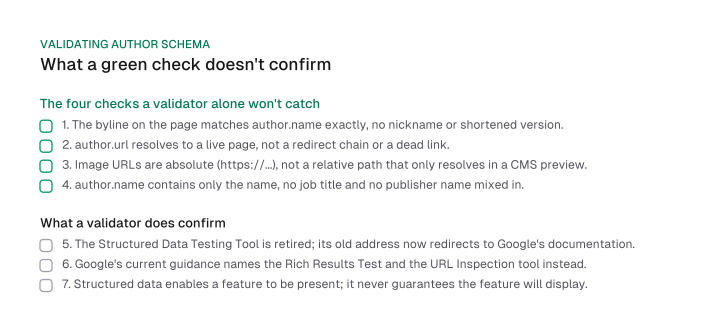
A green check from a validator only means the syntax parses. It doesn't confirm any of these:
- The byline on the page matches
author.nameexactly. Capitalization and spelling included, the full name as written, no nicknames or shortened versions. author.urlresolves to a live page, not a redirect chain or a dead link left over from a site migration.- Image URLs are absolute, starting with
https://, not a relative path that only resolves inside your own CMS preview. author.namecontains only the name, no job title and no publisher name riding along in the same string.
There's a floor beneath all four: structured data still has to meet Google's general technical guidelines to be eligible for anything, valid syntax, present in the rendered HTML a crawler actually fetches, and not stuffed with content that isn't visible on the page. Author markup doesn't get a separate bar. It gets the same one every other schema type has to clear first.
Frequently asked questions
There's no documented behavior for that. Google's author markup is scoped specifically to Article, NewsArticle, and BlogPosting; the current Article documentation never states or implies it also applies to a bare WebPage type. If your content type is a plain WebPage, author schema as documented doesn't cover it.
No Google documentation explains that mechanism. Google only guarantees that structured data makes a feature eligible, never that it will actually display: "Using structured data enables a feature to be present, it does not guarantee that it will be present." Treat any specific claim about a display-priority rule as unverified.
Not on its own, and not as documented. It's eligibility infrastructure for rich results, and Google never lists it as a ranking input. Adding it correctly can make your page eligible for features it otherwise couldn't show, but the markup itself doesn't move position.
author names the person or organization that created the content. publisher names the site or brand behind it. Google's own recommended-properties list for Article no longer includes publisher at all, so don't treat it as a required companion to author.
image is valid on a Person object under schema.org, but it isn't in Google's own recommended sub-properties for author, where only name and url appear. It fits more naturally on the ProfilePage, where image is a recommended property on the Person inside mainEntity.
This guide quoted Google's and schema.org's current documentation property by property, corrected two pieces of stale advice still circulating, and connected the byline, the profile page, and a reviewer into one graph instead of three disconnected snippets.
Start with the smallest working template above, add author.url if your current markup skips it, and run the four checks in the validation section before you assume your plugin already got it right.
Figures and images in this post are free to reuse under CC BY 4.0 with credit to Mission Growth.
Get Mission Growth highlighted in your Google results.