Technical SEO Checklist 2026: 13 Checks to Get Indexed
A technical SEO checklist for 2026: 13 checks from crawl budget to AI crawler access, each with the exact tool and fix to get your site fully indexed.
By Furkan AktaşPublished Updated

On this page
A technical SEO checklist for 2026 runs thirteen checks, from HTTP status codes up to AI crawler access. Each one decides whether a crawler reaches a page and whether the index keeps it once it does.
Trust and ranking come later, and only for pages that already cleared those gates.
Download CSV (CC BY 4.0)
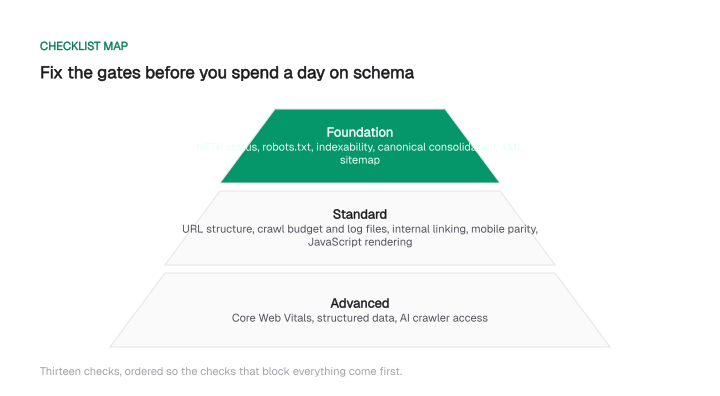
Most teams start with content and assume the technical layer sorts itself out. It doesn't. On a brand-new domain the order is stricter still: this startup SEO guide covers which technical items gate a first launch.
A page with a broken canonical tag or a 3.2s LCP never gets the chance to rank: it never gets fully indexed.
That order matters: you fix the gates that block everything before you spend a day on schema.
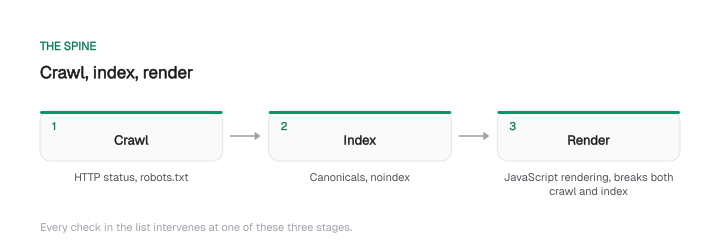
One mental model holds the whole checklist together. A search engine crawls a URL, decides whether to index it, and for JavaScript sites, renders it somewhere in between.
Every check here works on one of those three stages. Robots.txt and HTTP status govern the crawl. Canonicals and noindex govern the index. JavaScript rendering sits in the middle, and it quietly breaks both.
Keep that spine in mind: each section names its stage.
Key takeaways
Crawl and index gates (1-6) decide whether a page is even in the running. Crawl budget, links, and rendering (7-10) decide how fast it gets there. Core Web Vitals, schema, and AI crawler access add ranking and citation upside once the foundation holds.
1. HTTP status codes, redirects, HTTPS and soft-404s
HTTP status codes, redirects, and HTTPS decide whether a crawler can even reach your content, before ranking is a question.
Crawl your site with Screaming Frog and open the Response Codes report. Cross-check Google Search Console's Pages report and spot-check individual URLs with curl -I.
You're hunting four things:
- Broken internal links. They leak link equity into dead ends.
- Soft 404s. A 200 status with no real content, so Google may swap in a better URL for the query.
- Redirect chains longer than one hop. Every extra hop burns crawl budget and weakens the PageRank passed through.
- 302s on permanent moves. They keep Google canonicalizing the old URL, so link equity never fully transfers.
The fix is mechanical:
- Collapse every redirect chain to a single hop (A to C, not A to B to C).
- Change permanent 302s to 301s.
- Serve a real 410 for content you removed for good. A 410 drops from the index faster than a 404.
- Confirm every HTTP URL 301-redirects to its HTTPS version, and add an HSTS header.
This stopped being optional maintenance. Google confirmed in an October 2025 Security Blog post that Chrome will warn before loading public HTTP sites by default.
That starts with Chrome 147 in April 2026, for the billion-plus Enhanced Safe Browsing users, and reaches everyone with Chrome 154 in October 2026. Stray HTTP URLs become a visible trust problem this year.
2. Robots.txt and crawl directives
Robots.txt is the front door Googlebot reads before every crawl request, so one wrong line can wall off your whole site.
Fetch it with curl -sI https://yourdomain.com/robots.txt and confirm a 200. Then open the robots.txt report in Search Console to see the version Google actually cached.
Two failure modes matter most:
- A 5xx on the robots file. Google treats it as a temporary full disallow and stops crawling. The Web Almanac 2024 found about 84% of sites return a clean 200, so a non-200 status is a rare, fixable problem worth chasing down fast.
- Blocked CSS and JavaScript. Google can't render the page without them, so JavaScript-dependent content drops from the index. Check this against the render test in section 10.
The single most common misuse is treating Disallow as a way to remove a page from Google. It isn't:
Disallow blocks crawling; it does not block indexing. A blocked URL that earns an external link can still appear in results as a bare link with no snippet, because Google never crawls it to see any noindex tag. To actually deindex a page, remove the Disallow so Google can crawl it and see the tag, then add a noindex directive.
Google also ignores Crawl-delay, so anyone relying on it for server load is protecting nothing.
3. Indexability: noindex, canonical and GSC index coverage
Indexability separates a page Google crawled from a page Google actually keeps in the index.
Run Screaming Frog's Directives tab to list every noindex and X-Robots-Tag. Then open Search Console's Pages report and read the "Why pages aren't indexed" breakdown.
The distinction that matters is between two similar-sounding statuses, and they need opposite fixes:
Download CSV (CC BY 4.0)
"Crawled, not indexed" is a content problem. "Discovered, not crawled" is a crawl budget problem. Fix them the same way and you'll waste your week.
Also watch for the trap where a page carries both a noindex and a canonical to another URL. Google ignores the canonical on a noindexed page, so pick one intent.
4. Duplicate content and canonical consolidation
Duplicate handling decides which URL competes and where link equity pools.
Crawl with Screaming Frog and check the Canonicals report for pages whose canonical tag doesn't point at itself. Then look in Search Console for "Duplicate, Google chose different canonical than user." That warning means Google overrode your tag, which almost always traces back to a signal conflict.
Google treats rel=canonical as a hint it can override. It weighs your tag against your sitemap, internal link counts, and backlinks. The fix is alignment: point the canonical tag, the sitemap entry, your internal links, and any redirects at the same single URL.
When GSC reports "Google chose a different canonical than user," diagnose it in order:
- Check URL Inspection to see which URL Google actually picked.
- Check which signal it's following: the sitemap entry, the majority of internal links, or external backlinks.
- Fix that signal to point at your preferred URL before you touch the canonical tag again.
Consolidate the obvious duplicates too. Make sure http redirects to https, www and non-www resolve to one host, and trailing slash variants don't both return 200.
Two specifics for 2026. Pagination no longer uses rel=next/rel=prev, since Google deprecated it in 2019, so every paginated page should carry a canonical that points at itself.
And as an internal check, treat any page that shares most of its wording with another of your pages as a duplicate risk.
Google will pick one and drop the rest. Programmatic and template pages are the usual offenders, so measure content overlap, excluding boilerplate, before you publish a large batch of them. On sites with thousands of templated pages this turns into a crawl budget question as well; enterprise SEO covers where that threshold sits.
5. XML sitemap health
Your XML sitemap is the clean list of URLs you want crawled, plus a freshness signal.
Fetch it with curl, validate the XML with xmllint --noout sitemap.xml, and check the Sitemaps report in Search Console for parse errors and the gap between submitted and indexed URLs.
Respect the hard limit the sitemap protocol and Google set: a single sitemap holds a maximum of 50,000 URLs and 50MB uncompressed. Past either ceiling, split into a sitemap index that references child sitemaps by category or content type.
Keep the file accurate:
- List only canonical URLs that return 200. No noindex pages, no redirects, no 404s: every dirty URL in the sitemap is a crawl instruction Google can't act on.
- Make
lastmodmean something. Update it when the content genuinely changed, not on a CSS tweak, or Google learns to distrust it and crawls the file less often.
When submitted greatly exceeds indexed, don't blame the sitemap first. Filter each URL by its Coverage category instead. The real cause is usually content quality, a duplicate cluster, or an orphan page with no internal links, and each lives in a different section of this checklist. For the order to run all of it in, from measurement to authority, follow the full SEO audit process.
6. URL structure, parameters and faceted navigation
Messy URLs multiply the number of pages Google thinks you have.
Crawl with Screaming Frog and review the URL and Parameters reports. Then check Search Console for a swollen "Discovered, currently not indexed" count, which often signals a URL explosion the crawler can't keep up with.
Three checks carry the weight:
- Fragment routing. A route after a hash fragment, like
/#/product/123, is invisible to Google. Route with the History API instead, so it serves a clean path like/product/123. - Parameters that don't add value. Sort, color, and tracking parameters create duplicate URLs. Point them at the canonical version with a
rel=canonicaltag. - Faceted navigation. Filter combinations breed thousands of thin URLs. Canonicalize the ones with no unique value and disallow the rest in robots.txt.
Standardize the boring details across the whole site too: one trailing slash convention, all lowercase paths, hyphens instead of underscores (Google reads seo-guide as two words and seo_guide as one), and short slugs that carry the keyword.
None of these move rankings on their own. But each variant you leave loose is another duplicate URL splitting your signals.
7. Crawl budget and log file analysis
Server log analysis is the check that separates a real technical audit from a plugin scan.
Search Console coverage tells you what Google says it indexed. Your server logs tell you what Googlebot actually requested, and the two disagree more often than teams expect.
Pull the Crawl Stats report in Search Console for the overall trend. Then parse raw access logs with pandas or a tool like Screaming Frog's Log File Analyser for the detail.
Crawl efficiency is the core metric: the share of Googlebot requests that returned a 200, calculated as 200-responses divided by total Googlebot requests. We flag anything below roughly 85% as a sign budget is leaking to low-value URLs, 404s, redirects, and 5xx errors instead of your content.
From the same logs, run three checks:
- Group requests by URL section. Compare crawl share by
/blog/,/product/,/tag/against value. If tag or parameter URLs out-pull product pages, fix robots.txt first. - Sort by daily hit count. A URL crawled ten or more times a day usually means a session ID, an infinite paginator, or a redirect loop.
- Confirm the hits are real. Run a reverse DNS lookup (
host -t PTR <ip>) and check that it resolves to a genuine googlebot.com hostname; a spoofed user agent skews every number above.
This is the unglamorous discipline behind results, the opposite of a growth hack. The same crawl and content rigor drove Pozitif Teknoloji's +225K organic clicks in six months, and it starts with reading the logs instead of guessing.
8. Internal linking and site architecture
Internal links are both the crawler's map and the pipes that move PageRank around your site.
Crawl with Screaming Frog and read two reports: Inlinks, to find orphan pages with zero internal links, and Crawl Depth, to find pages buried too far from the homepage.
Fix the structural faults in order:
- Orphan pages. A page with zero inlinks can't be discovered and earns no internal authority. Link to it from a relevant hub.
- Click depth over three. Pages four or more clicks deep get crawled less often, so updates take longer to register. Keep important pages within three clicks of the homepage.
- Broken internal links. A 4xx target is a dead end that blocks equity flow. Clear every one you find.
- Links that only render via JavaScript. They enter the crawl queue late, if at all, starving deeper pages of discovery. Keep hub links as real
<a href>elements in the static HTML.
9. Mobile-first parity
Google indexes the mobile version of your pages, so anything present only on desktop doesn't count.
Confirm parity with the URL Inspection tool in Search Console, which shows the rendered mobile HTML Googlebot Smartphone actually sees. Back it up with a crawl in Screaming Frog using both user agents: once as Googlebot Smartphone, once as Googlebot Desktop, then diff the two.
Check three things for parity:
- Content and links. A heading hidden on mobile doesn't get indexed. A desktop-only internal link breaks equity flow and can orphan the target.
- Structured data. Markup missing from the mobile HTML makes the page ineligible for the matching rich result.
- Viewport tag. Confirm every template carries a
<meta name="viewport" content="width=device-width, initial-scale=1">. Without it, mobile rendering breaks and page experience signals suffer.
Parity gaps are almost always at the template level, so fix the template once and it propagates across every page built from it.
10. JavaScript rendering SEO and render parity
JavaScript rendering SEO is the practice of shipping content so Google and AI crawlers see the same page your browser does, before any script runs.
Google processes a JavaScript page in three phases: crawl, then a separate render queue, then indexing. Its own documentation puts it plainly: rendering "may stay on this queue for a few seconds, but it can take longer than that."
A fix that depends on JavaScript, a noindex tag added by script, a canonical set after render, only applies once that queue clears.
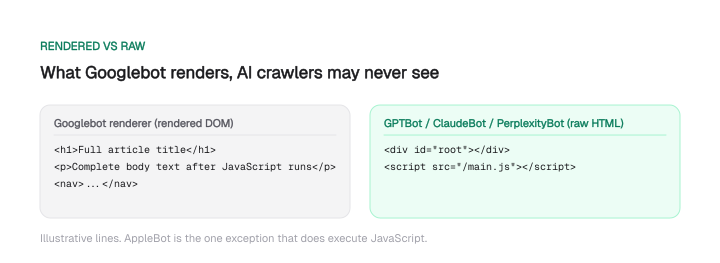
GPTBot, ClaudeBot, PerplexityBot and the other major AI crawlers skip the queue entirely. In Vercel's December 2024 measurement none of them executed JavaScript, so they read the raw HTML as if the fix never happened.
Every indexing directive that matters has to live in that raw HTML response. Whatever JavaScript builds afterward arrives too late for a crawler that never renders.
Where Googlebot and AI crawlers read the same fix differently
Four common JavaScript fixes land differently depending on which crawler reads them:
Get the raw HTML right, and every row resolves the same way for every crawler.
How much AI crawl traffic can't render at all
GPTBot, ClaudeBot and PerplexityBot account for 75.4% of the four AI-linked crawlers' combined monthly volume, per Vercel's December 2024 network data.
That's roughly 3 to 1 against AppleBot, the one crawler in that group that renders like Googlebot does (full breakdown in section 13).
None of that volume executes a script, so for those crawlers the raw HTML is the whole page.
Test which version crawlers actually see
Three checks confirm what GPTBot, ClaudeBot and PerplexityBot actually get from a page:
- Fetch it with the bot's user agent (
curl -A "GPTBot" ...) and count the words in the response. - Compare that count against the rendered DOM in a browser or Screaming Frog.
- Confirm the hits in your logs against the crawler's published IP ranges; a spoofed user agent proves nothing.
If any of those three already hit a template in your logs, its critical content has to be in the raw HTML. A fix that only satisfies Googlebot leaves those visits reading an empty shell.
Content can also disappear before it reaches the raw HTML in quieter ways: a value fetched inside a Web Worker, content behind an API call that returns a 429, text added through ::before/::after CSS, or, for Googlebot, anything past the 2MB it fetches per resource. None of it reliably reaches what a crawler reads.
Ship server-rendered content so everyone sees it
Screaming Frog and URL Inspection confirm whether your own render matches what ships:
- Compare the raw HTML against the rendered DOM using Screaming Frog's rendered-page crawl mode.
- Confirm against reality with URL Inspection's "View Crawled Page," which shows the HTML Googlebot genuinely rendered.
- Check that your H1, meta description, canonical, body text, and JSON-LD are already in the raw HTML, before any script runs.
When they're not, render on the server (SSR) or generate the page statically (SSG), so the content ships in the first response. The SaaS SEO playbook covers the sharpest case: comparison pages built in the same JavaScript framework as the product.
We hit this on our own site. Mission Growth's marketing site began as a React single-page app, so a crawler that skipped JavaScript received almost nothing. We migrated 20 marketing pages to prerendered static HTML for exactly that reason, and they now return their full text on the first request with no JavaScript executed.
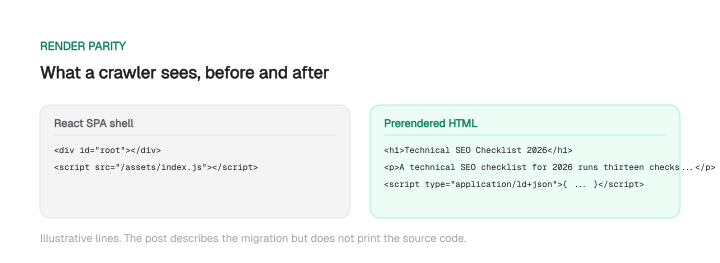
You don't have to rebuild your stack to match it, but skip this and most AI-linked crawl traffic never reads past the shell. That's the floor the rest of GEO builds on: how that visibility turns into AI citations is the next layer once crawlers can actually read your content.
11. Core Web Vitals and page experience
Core Web Vitals work as a tiebreaker rather than a ranking multiplier, and they're measured on real users rather than lab tests.
Use PageSpeed Insights for field data, the Experience report in Search Console to find "Poor" URL groups, and Chrome DevTools to diagnose a single page.
The one rule people forget: a Lighthouse lab improvement doesn't automatically move your field data. Field data comes from CrUX on a 28-day rolling window, so expect four to eight weeks before a fix shows in Search Console.
The thresholds haven't changed for 2026. Google's "good" bar stays at LCP 2.5s or faster, INP under 200ms, and CLS under 0.1, all measured at the 75th percentile of real Chrome users.
INP replaced FID as a Core Web Vital in March 2024. Google's web.dev targets a TTFB under 800ms, the server response time that feeds into LCP.
Download CSV (CC BY 4.0)
One frequent self-inflicted wound: applying loading="lazy" to the hero image. Google confirmed that lazy loading an above-the-fold image delays its paint and shows up directly in LCP. Set fetchpriority="high" and explicit dimensions on the hero, and save lazy loading for what sits below the fold.
12. Structured data and schema
Structured data doesn't move rankings directly, but valid markup makes your page eligible for rich results, and rich results change click-through at the same rank.
Validate every type with Google's Rich Results Test and monitor the Enhancements reports in Search Console for errors and warnings.
Three rules keep schema working:
- Serve JSON-LD in the raw HTML response. Markup injected by JavaScript, or by Google Tag Manager, enters the render queue and indexes late.
- Never mark up data that isn't visible on the page. A fabricated
aggregateRatingwith no on-page reviews risks a manual action, and pulling in reviews from a third-party service is explicitly disallowed. - Repeat the markup in your mobile HTML. Mobile-first indexing ignores schema that only exists on desktop.
Schema earns its place in AI answers too. AirOps's "The 2026 State of AI Search" found pages with three or more schema types are about 13% more likely to be cited by AI engines.
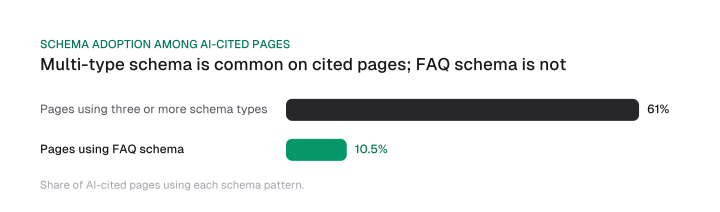
Roughly 61% of cited pages already use three or more types, while FAQ schema appears on only 10.5% of cited pages, so it's under-used rather than saturated.
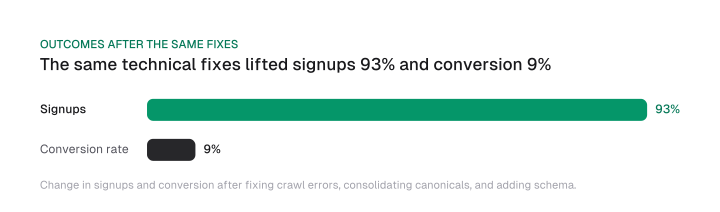
The upside compounds with the rest of the checklist. Google's own case study on Saramin reports that fixing crawl errors, consolidating canonicals, and adding JobPosting and Breadcrumb schema doubled organic traffic year over year, lifted signups 93%, and raised conversion 9%.
For how the same markup discipline feeds AI citations specifically, see our guide to generative engine optimization.
13. AI crawler access: GPTBot, PerplexityBot, Google-Extended and llms.txt
AI crawler access turns the rendering problem from section 10 into a citation problem.
Test what an AI crawler sees with a spoofed user-agent: curl -A "GPTBot" https://yourdomain.com/your-page and check whether your key content is in the response. The mechanical fact underneath everything: the major AI crawlers don't execute JavaScript. AppleBot is the exception.
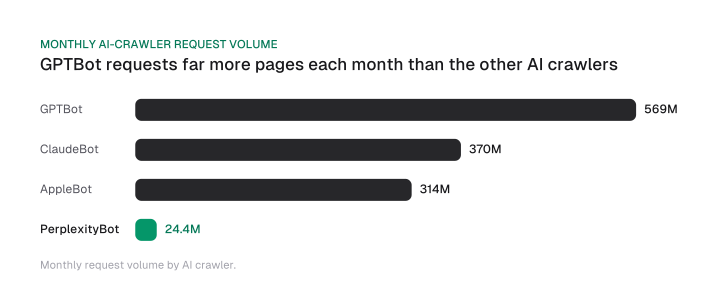
In Vercel's December 2024 network data, monthly request volumes were Googlebot at 4.5B, GPTBot at 569M, ClaudeBot at 370M, AppleBot at 314M, and PerplexityBot at 24.4M.
If your content renders client-side, most of the engines feeding AI answers receive an empty shell: the same failure as section 10, but with citations at stake instead of rankings.
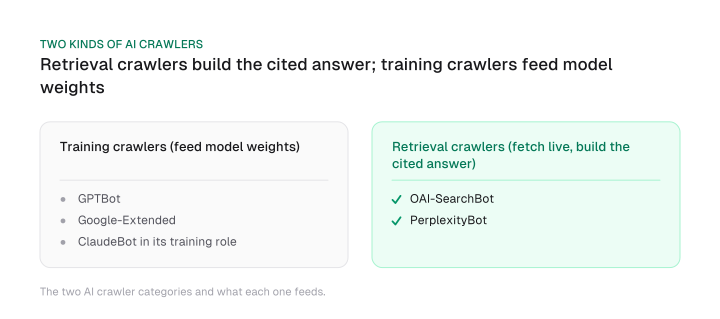
The most common misconfiguration is conflating two different decisions:
Training crawlers (GPTBot, Google-Extended, ClaudeBot in its training role) feed model weights. Retrieval crawlers (OAI-SearchBot, PerplexityBot) fetch live at query time to build a cited answer. Blocking a retrieval bot kills your citations. Blocking a training bot doesn't, and it may be a deliberate rights decision. Manage them with one blanket rule, and you'll either give away training data you meant to protect or lose the retrieval access you wanted.
For the full allow-or-block call per crawler role, see when to block GPTBot and other AI crawlers.
Three more traps to check:
- A
nosnippetdirective. It suppresses your page from AI Overviews as well as regular snippets, so confirm it's intentional. - A
max-snippet:0directive. It has the same suppressing effect, so treat it the same way. - A WAF or CDN rule. Cloudflare's AI bot blocking can override robots.txt entirely, so an allowed bot may still be blocked at the edge.
llms.txt is hygiene with no proven growth effect. Frame it accordingly.
The major AI crawlers rarely fetch it: public llms.txt-adoption monitoring logged only 408 fetches across a window of 500 million AI bot requests.
Google confirmed in July 2025 it doesn't use llms.txt as a signal, and adoption among the top 10,000 sites sits around 5.6% in 2026. It's cheap and it won't hurt you.
Two resources handle the rest:
- Our own llms.txt and a fuller llms-full.txt: a curated plain-text map for AI crawlers, plus a free llms.txt checker to validate yours before you ship.
- The full playbook: how to optimize for AI search engines, and for the AI Overviews channel specifically, how to show up in Google AI Overviews.
Your 13-point technical SEO checklist recap
- HTTP status, redirects (one hop), HTTPS with HSTS, no soft-404s.
- Robots.txt returns 200, never blocks CSS/JS, and you use noindex (not Disallow) to deindex.
- Split "Crawled, not indexed" (quality) from "Discovered, not crawled" (crawl budget).
- Align canonical tag, sitemap, links, and redirects to one URL.
- Sitemap under 50,000 URLs and 50MB, canonical 200s only, honest lastmod.
- Clean URLs, History API routing, canonicalized parameters, disallowed junk facets.
- Read the logs: watch crawl efficiency, kill bot traps and crawl waste.
- No orphans, click depth three or less, no broken internal links, links in static HTML.
- Mobile-first parity for content, links, and schema, with a viewport tag.
- Ship every indexing directive, and AI-crawler-critical content, in the raw HTML; JavaScript-only fixes never reach a crawler that can't render.
- Core Web Vitals at CrUX p75: LCP 2.5s, INP under 200ms, CLS under 0.1, TTFB under 800ms.
- Valid server-rendered JSON-LD, no markup for invisible data, mobile parity.
- AI crawler access decided per bot, retrieval versus training kept separate.
Run the foundation checks (1 through 6) every quarter and after any migration or major deploy. A single bad release can undo three months of cleanup in a week, which is why the log file, not the dashboard, is the last thing you should trust.
When you hand the results to a client or team, an SEO report template turns each fix into what changed and what's next.
Frequently asked questions
What is technical SEO and why does it matter in 2026?
Technical SEO is the work of making sure search engines can crawl, render, index, and trust your pages. It matters in 2026 because the gates got stricter: Chrome starts warning on plain HTTP sites, Core Web Vitals stay a ranking input, and AI crawlers that don't run JavaScript now feed a growing share of discovery. Weak technical foundations cap everything content can earn. Once they hold, how to rank higher on Google turns on intent, information gain and clicks.
How often should you run a technical SEO audit?
Run the foundation checks (HTTP status, robots.txt, index coverage, canonicals, sitemaps, URLs) once a quarter, and again immediately after any site migration, redesign, or large deploy, since those are when technical debt appears fastest.
Monitor Search Console's Pages and Experience reports continuously so a bad release surfaces within days. To see them in one place, build an SEO dashboard to track these checks over time with a technical-health tab. Deep log-file analysis fits a twice-yearly cadence for most sites.
Do AI crawlers like GPTBot and PerplexityBot execute JavaScript?
No. The major AI crawlers fetch raw HTML and don't run JavaScript, with AppleBot the exception. That's why a client-rendered page that looks complete in a browser can arrive nearly empty to GPTBot, ClaudeBot, or PerplexityBot, which makes it uncitable. The fix is server-side rendering or static generation, so your key content ships in the first HTML response.
What is the difference between robots.txt Disallow and noindex?
Disallow in robots.txt blocks crawling; noindex blocks indexing. They are not interchangeable. A Disallowed page can still appear in results as a bare link if others link to it, because Google never crawls it to see any noindex tag. To remove a page from the index, remove the Disallow so Google can crawl it, then add a noindex directive.
Is llms.txt necessary for AI SEO in 2026?
No. Treat llms.txt as low-impact hygiene. Major AI crawlers rarely fetch it, and Google confirmed in July 2025 that it does not use llms.txt as a signal, with adoption near 5.6% of the top 10,000 sites.
It's cheap and harmless to add, but crawler access and parseable HTML do the real work. You can check any file with our free validator.
What tools do you need for a technical SEO audit?
A crawler (Screaming Frog) for status codes, canonicals, directives, and render diffs. Google Search Console for index coverage, crawl stats, and URL inspection. PageSpeed Insights for Core Web Vitals field data, the Rich Results Test for schema, and curl for quick header and user-agent checks. For crawl budget, add server log analysis with pandas or a dedicated log-file tool. That stack covers all thirteen checks.
Cite this page
Aktaş, F. (2026, September 19). Technical SEO Checklist 2026: 13 Checks to Get Indexed. Mission Growth. https://missiongrowth.io/blog/technical-seo-checklist-2026
Download the data: 3 tables as CSV (CC BY 4.0)
Figures we made for this post are free to reuse under CC BY 4.0 with credit to Mission Growth.
Get Mission Growth highlighted in your Google results.