Content Brief Template: What to Include, What to Skip
A copyable content brief template: the fields worth keeping, the ones to cut, and a test for telling which is which before you hand it to a writer.

On this page
This content brief template exists to answer one question before a single line gets drafted: what does this specific field need to say that a rival writer couldn't already guess? The sections below give you the template, the test behind it, and a worked example to copy.
What a content brief is (and what it isn't)
A content brief is the document a writer gets before drafting starts: audience, angle, sources, and the one thing the piece must prove.
A creative brief locks in visual direction and campaign concept instead, and an outline covers section order. The content brief vs creative brief distinction comes down to scope: long-form written content such as blog posts, whitepapers and articles on one side, ad campaigns and broader creative work on the other.
| Document | What it locks in | Scope |
|---|---|---|
| Content brief | Audience, angle, required sources, the one thing the draft must prove | Long-form written content: blog posts, whitepapers, articles |
| Creative brief | Visual direction, brand tone, campaign concept | Ad campaigns, visual design, broader creative or marketing projects |
| Outline | Section order and headings | One field inside a content brief, not a separate document; it does not cover audience, sources or success criteria on its own |
Each document locks in a different decision before the next stage starts: audience and evidence, brand direction, or just section order. A document trying to do all three controls none of them well, and an outline dressed up as one still leaves the writer guessing who they are writing for.
Why a brief works: it is a boost, not a nudge
A brief front-loads the writer's decisions once, before drafting, instead of correcting them one piece at a time in review: the same mechanism behavioral scientists call a boost rather than a nudge.
Hertwig and Grüne-Yanoff (2017) call this pattern a boost: a decision-support intervention delivered before the decision point that builds competence the person keeps once the intervention is gone. A nudge, by contrast, steers a choice only while the choice architecture stays in place.
This is an analogy from public-policy research on individual decisions rather than a measured finding about content production, and the mechanism still transfers: guidance delivered once, before the draft, teaches a writer something they carry into the next assignment, while a comment on a finished draft only fixes that one draft.
A brief also becomes the one place everyone checks for a piece. Once it's approved, questions during drafting get answered by re-reading it instead of chasing down a comment in a chat thread from last week.
Three roles typically split the work:
- The strategist or SEO lead who did the keyword and competitive research usually writes it.
- A content or marketing lead owns it, and answers for a field that keeps failing.
- The writer and the editor doing the review pass are the ones who use it.
There is a real cost here too: writing one worth the name takes real time upfront, and a rushed version that just restates the target keyword works out worse than skipping it entirely. The next two sections close that gap.
What belongs in the brief: the field-by-field template
Knowing how to write a content brief comes down to which fields you keep: a complete one names the audience, the angle, the required sources, the SEO fields (target keyword, secondary keywords, search intent) and the one thing the draft must prove.
Nothing else earns a permanent field.
| Field | What it locks in | Why it belongs |
|---|---|---|
| Audience + intent | Who reads this, and why | Sets tone and angle |
| Angle / thesis | The one claim the piece argues | Keeps every section pointed at one conclusion |
| Target keyword + intent evidence | The exact query, and proof of intent | Confirms the format before drafting |
| Secondary keywords + questions | Related terms the piece should also answer | Stops a second piece being needed later |
| Required sources | Facts the writer must use, linked | Stops an unsupported claim |
| Section outline | Heading order and what each proves | Locks structure, not sentences |
| Voice / messaging notes | Brand terms to use or avoid | Keeps the piece on-brand |
| Internal links | Which pages to link, and the anchor | Removes a guess the writer would otherwise make |
| Word count field | A target set from real data | Anchors scope, no padding (more below) |
An SEO content brief simply applies those fields to search-specific decisions: target keyword, secondary keywords, search intent evidence, internal links. A keyword field only counts as complete once it names the exact query and cites evidence for the intent it serves, beyond the general topic family.
Naming the right field types isn't enough, though. A field counts only once its actual value could not be produced by a rival writer working from the same target query's top ten results, the same public information a competitor or an AI tool could pull today.
A "definition of success" field that just restates the angle already visible in the search results is still a placeholder, even when the field type itself is exactly right. The fix lives in what gets written into the field, not in which fields exist on the form.
Voice and messaging fields work the same way: they capture the brand terms to use or avoid and any narrative angle the brand always takes, so the writer doesn't have to reverse-engineer tone from old posts.
What to leave out, and where AI fits
A content brief should leave out any field a rival's writer, or an AI tool, could fill in without talking to your customer.
That field can't add the thing Google's own leaked effort-estimation signal is built to detect. A field named contentEffort surfaced in a 2024 leak of Google's internal API documentation, described there as "LLM-based effort estimation for article pages," inside a module called QualityNsrPQData.
Google has never confirmed this field is active or weighted the way this reasoning assumes, so treat it as an unofficial, leaked description rather than a confirmed ranking factor.
The description itself points at the same test this piece keeps returning to: something, somewhere, is trying to estimate how much effort a page's production actually took. A field that only restates public information can't move that number, no matter how official it looks sitting in a template.
That's the direct explanation for why AI-templated briefs read as generic: a system pulling only public patterns has nothing that would move a score built to estimate effort, no matter how polished the output looks.
Three failure patterns show up in brief templates on repeat:
- A structure so complex it takes longer to fill out than the piece takes to write.
- A goal-less version that never states what the draft needs to prove.
- A template so flexible that two writers fill out the same page type in unrecognizable ways.
All three come from a field list built around field types instead of tested against field values.
An AI-generated brief, or an AI-generated draft pulled straight from a generic one, tends to fail the replicability test by construction: it draws only on public patterns, so nothing in it is hard for another AI to reproduce.
That is the same gap behind does google penalize ai content: the content itself is not disqualified for being AI-assisted, but a brief that never asks the writer for anything the public internet lacks hands back a draft with nothing new to score. The fix is not avoiding AI. Put the one fact or angle only your team knows into the brief before drafting starts, whether a human or an AI tool writes it.
A complete content brief, filled in
The content brief example below is filled out for a real B2B SaaS topic, with a reason next to each value.
A value on its own is one the next brief-writer would just copy blindly.
Topic: a blog post on CRM data migration for a mid-market SaaS company. Every field below carries its value and the reason it earns a place:
- Audience: a revenue-ops lead evaluating a CRM switch. Reason: this is who actually searches the term, rather than a generic "marketer."
- Angle / thesis: a CRM migration fails on data mapping more than on the tool switch itself. Reason: the top pages don't state this directly, and it earns the piece its place.
- Target keyword + intent: "CRM data migration checklist," informational/how-to intent. Reason: every page for that query opens with a checklist. That confirms the format before drafting.
- Secondary keywords + questions: "CRM migration checklist template," "how long does a CRM migration take," "CRM data mapping errors." Reason: these are the sub-questions a searcher asks next.
- Required sources: a first-party account from someone who has run a migration, plus the vendor's data-import documentation, linked. Reason: a checklist copied from a vendor's help page fails the replicability test in reverse.
- Section outline: audit current data, map fields, dedupe, test import, cut over, with the mapping step weighted heaviest. Reason: locks structure without writing the draft.
- Voice / messaging notes: no promise of an effortless migration; refer to the CRM by category rather than brand name unless quoting the practitioner. Reason: keeps the piece usable after the next vendor UI change.
- Internal links: one link to the company's own migration-support page, anchor "CRM migration support." Reason: one relevant link removes a decision; three competing links just create one.
- Word count field: set from this exact target query's own top ten median. Reason: matches real pages instead of guessing (method below).
Once every field here is filled and reasoned, the next job is turning the brief into a finished draft: a different skill, and one this piece stops short of.
How long should a brief be
A content brief should be one page for a standard blog post and two for a pillar-length guide.
That's long enough to answer every field above once, never padded to look thorough.
| Content complexity | Target brief length | Target piece length |
|---|---|---|
| Standard blog post | One page | Set from your own target query's top ten median (below) |
| Pillar-length guide | Two pages | Longer, but bounded by what the outline actually needs, not a fixed multiplier |
Set the word-count field from the target query's actual top ten median rather than a house-style default. Look at the top ten search results for your own target query, note each page's length, and use the middle value as your anchor, adjusted by the complexity tier above.
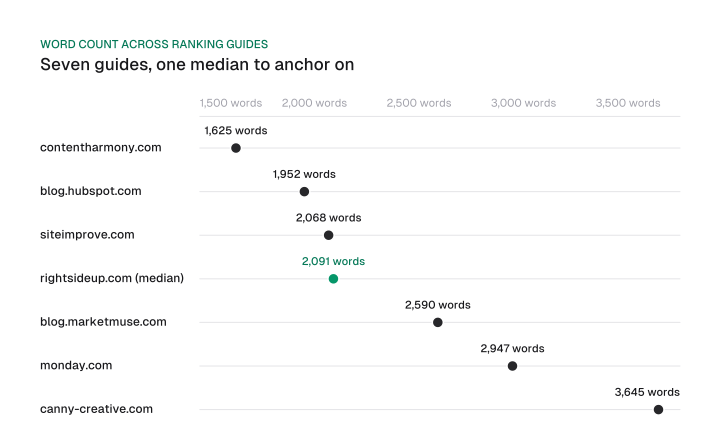
Right now, seven full-length guides for the query "content brief" run 1,625, 1,952, 2,068, 2,091, 2,590, 2,947 and 3,645 words: a median of 2,091. Use that median, not the highest number, as your anchor.
Google's own team has made the same point from the other direction. When its search-help group rewrote its most-viewed support document, they cut its length rather than pad it. They accepted a ranking hit because the shorter version served readers better.
That lesson transfers directly to a brief's word-count field: it's a starting anchor to test a draft against, not a floor to hit regardless of the outline's needs. Once the piece is live, repeat the same pull during your regular seo report template review. Check whether those pages' length has shifted since you briefed it.
Tools, content-type variants, and keeping templates current
Most teams manage briefs in a shared doc or a project board rather than dedicated software.
The only fields that change by content type are tied to the format itself: platform, hook, word or character count. The audience and evidence fields underneath stay the same across every format.
A handful of teams graduate to a dedicated content-ops tool once volume justifies it, but the fields matter more than whatever holds them.
A social media content brief template adds platform, hook and character-limit fields in place of the blog brief's word count field, since those are the decisions a feed post actually forces.
It drops the SEO fields (target keyword, secondary keywords, internal links) entirely, because a single post rarely targets a search query, so those fields would not remove a decision the writer faces. It keeps the audience and evidence fields underneath unchanged: the decision a brief locks in doesn't change with the channel, only the fields that decision runs through.
A brief typically clears one approval step before drafting starts, usually the strategist or SEO lead handing off to whoever owns final sign-off, plus a lighter second check once the first draft comes back to confirm the fields held up.
Distributed teams keep the same template but centralize it in one shared location, so a writer in a different time zone opens the version everyone else is filling out, not a stale copy sitting in someone's personal folder.
The common baseline for keeping a template current is a calendar cadence plus a trigger: review it on a set schedule, and again whenever strategy, audience or brand guidelines change.
That catches slow drift but misses three sharper triggers worth adding:
- A rising revision-round count on one specific field, rather than "performance data" in general.
- A change in the target query's own top ten format since the template was last used.
- An evidence fact aging past its source's shelf life.
Check the second and third triggers the same time you run your seo audit checklist, since both depend on what the current search results and your own published pages look like right now, not on what they looked like when the template was written.
Measuring whether the brief worked
A brief worked if the draft needed fewer revision rounds than the last one on the same topic.
The writer also never had to ask a question it should have answered.
| Field | Score 0 | Score 1 | Score 2 |
|---|---|---|---|
| Audience + angle | Writer had to ask what the piece was really about | Writer used it without asking, but revised the angle mid-draft | Writer used it as written, no angle revision needed |
| Sources / evidence | Writer had to go find their own source | Writer used the given sources but needed one more | Writer had everything the draft ended up citing |
| Internal links | Writer guessed at what to link | Writer used the given links, plus added more | Writer used exactly what was given |
| Word count field | Draft ran far over or under, with no explanation | Draft needed one revision to match the anchor | Draft landed inside the target range on the first pass |
Sum the fields and track the total alongside revision-round count per piece. When a score keeps dropping on the same field, piece after piece, that field, not the whole template, is what needs fixing. This scorecard slots into the planning step of your ai content production process, right after the piece is briefed and before a single paragraph gets drafted.
The test to apply
A content brief only earns the time it takes to write when every field removes a decision the writer would otherwise make alone mid-draft.
The test is one question, borrowed from how Google's own leaked effort-estimation signal treats a page: could a competitor, or an AI tool, reproduce this draft from public information in ten minutes? If yes, the brief is missing the one thing that makes content hard to replicate, and no amount of extra fields fixes that.
Take the template above, fill it out for your next piece, and run every field through that question before you hand it to a writer, not after the first draft comes back with revisions.
Frequently asked questions
Most likely a mis-hearing or auto-generated variant of "content brief," surfaced by Google's own People Also Ask. Some teams also use "context brief" informally for the background section inside a larger creative or product brief, but it isn't a distinct document type of its own.
It's the same phrase read the other way around: "brief" as an adjective describing short content, rather than "content brief" naming a planning document. The sentence around it tells you which reading applies.
Same document, different name. Some teams reserve "article brief" for a single blog post and use "content brief" for any format, but the fields and the job they do are identical.
The template above is built to copy directly from this page. There is no separate signup-gated download.
A generator can produce a starting field list from a URL or a keyword in seconds. What it can't supply is the one thing that makes a brief worth using: the fact or angle only your team knows, which is exactly what the replicability test above is checking for.
Some teams' name for a brief written at the campaign or pillar level instead of the single-piece level. The fields are the same ones in the template above, just scoped to a wider set of pages instead of one.
Figures and images in this post are free to reuse under CC BY 4.0 with credit to Mission Growth.
Get Mission Growth highlighted in your Google results.