ChatGPT Prompts for Marketing: 36 Templates With Inputs
ChatGPT prompts for marketing: 36 templates that each name the material to paste, plus the model and feature map as of October 2026 and a check per claim.
By Furkan AktaşPublished

On this page
ChatGPT prompts for marketing work when each prompt carries the material it needs and the instruction sits at the edges. A clever opening line matters less than the facts, the draft and the data you paste underneath it.
You probably use ChatGPT every week and keep getting copy that could belong to any company, or a statistic you can't trace. Both problems start in the prompt, and both are fixable.
This guide gives you templates to paste today. Each one names the material you supply with it, and the rules before them show why that material is the part that decides the result.
In this guide:
- A five-slot brief that replaces the "act as an expert" opener
- What ChatGPT should recall and what you must paste
- Templates for copy, SEO, research, strategy and analytics, each with its inputs named
- A model and feature map for October 2026, and a check for each type of claim
How to write a ChatGPT marketing prompt: the five-slot brief
A ChatGPT marketing prompt works as a brief with five slots: task, supplied material, audience and goal, format and limits, and acceptance criteria that include an "unknown is allowed" line.
Here are the five slots and what each one guards against:
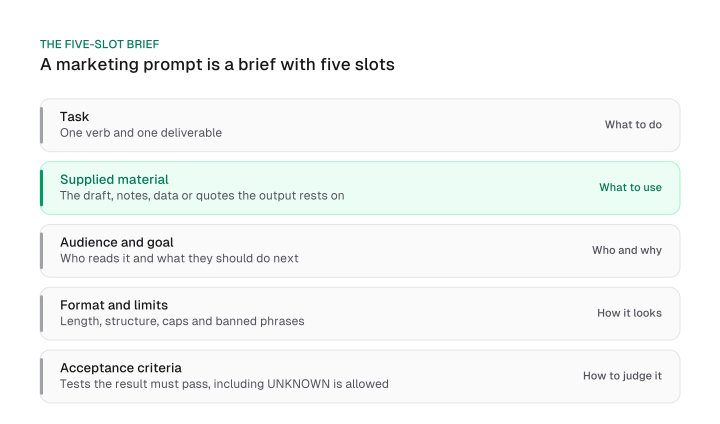
The table doubles as a cheat sheet. Save it, and check any prompt you write against the five rows.
Take the classic generic prompt:
Write a blog post about our new feature.
It fills the task slot and nothing else. Here is the same ask as a five-slot brief:
Task: Write a 600-word blog post announcing [feature name].

Material (use only this):
<notes>
[paste the product notes, the three customer quotes and the release date]
</notes>

Audience and goal: [role] at a [company type] who currently [problem]. The post should get them to [action].

Format and limits: One H1, three H2s, short paragraphs, no bullet lists longer than four items. Do not use the words [banned words].

Acceptance criteria: Every claim appears in the notes. If a fact is missing, write UNKNOWN instead of estimating. End with one next step for the reader.
The order is labeled practice. Material and acceptance criteria carry the weight because of the evidence in the next two sections. The sequence of the other slots is a convention that keeps briefs easy to scan, and no study has tested it.
The role line is optional. An expert persona line ("You are a world-class marketer") did not reliably improve accuracy in a December 2025 Wharton test across six models, though that test used factual benchmarks and tested no copy tasks. The same report says personas may help with context, perspective or tone.
So use a voice line backed by two voice samples, and spend the rest of your words on task-specific instructions and material. The ai seo mistakes post covers the study itself.
If you want chat gpt prompt examples that you reuse, keep the standing slots outside the prompt. A ChatGPT Project keeps chats, files and instructions together, and Project instructions override your global custom instructions. Put audience, voice and banned phrases there, so each prompt only adds task and material.
For the audience-and-goal slot, the fastest input is a finished messaging framework: paste its audience and promise rows and the slot is filled.
Supply the facts: what ChatGPT should recall and what you must paste
ChatGPT should recall method and language, and you should paste every fact, number and quote you want in the output, because arbitrary low-frequency facts cannot be predicted from patterns.
OpenAI's September 2025 explanation of why language models hallucinate gives the mechanism. A model learns from fluent text, where a pattern predicts the next word. A pet's birthday has no pattern, so the model produces a plausible one. OpenAI adds that evaluations reward guessing when uncertain, which raises accuracy and also raises errors.
Marketing is full of birthdays. A competitor's price, a benchmark click-through rate and a keyword's search volume are all arbitrary, low-frequency facts. Here is what to do with each:
The cure is one line in every acceptance slot: "If a fact is not in the material above, write UNKNOWN instead of estimating."
OpenAI says a model can abstain when it is unsure. We recommend giving it explicit permission to do so, but nobody has measured how much that one line helps, so treat it as cheap insurance and not a guarantee.
Build prompts around text you already have
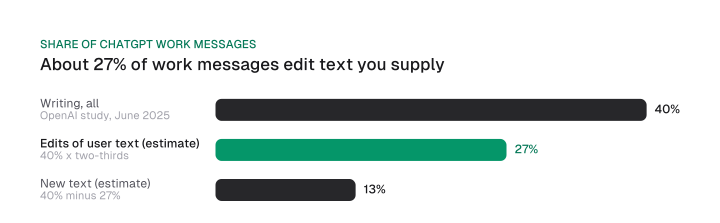
In OpenAI's consumer-plan study, writing is 40% of work messages and about two-thirds of writing messages modify text the user supplied, which implies roughly 27% of work messages if the split carries over. So build prompts around a draft you paste.
The study is the September 2025 NBER paper on how people use ChatGPT. Its two-thirds of writing messages ask ChatGPT to edit, critique, translate or summarize user text instead of creating new text from scratch.
We multiplied the two shares (40% x two-thirds) to get about 27%, and subtracted that from 40% to get about 13% for new text. The calculation assumes the split measured across all writing messages also holds among work messages, and the sample covers consumer plans only, so read 27% as an estimate.
A 2023 experiment with 444 professionals, marketers among them, shows what that shift does to the work. Participants who used ChatGPT finished a writing task 10 minutes (37%) faster than a control group that took 27 minutes, so about 17 minutes against 27.
Before ChatGPT they spent about 25% of their time brainstorming, 50% on a rough draft and 25% on editing. Afterwards, the rough draft share fell by more than half and the editing share more than doubled.
We read that as a division of labor. ChatGPT takes the first pass, and the human share becomes editing, which is where the quality gets decided. These figures come from the March 2023 working paper. The peer-reviewed Science version (July 2023) reports 453 participants and a 40% cut in average time, and the experiment tested older models.
The consequence for your prompts: start from a rough draft, a style sample or a data sheet, and spend the saved minutes on editing. A prompt that asks for text from nothing ignores how most writing requests work. A finished post is the best input of all, which is why content repurposing prompts start from a post you already published.
Long pastes: put the instruction at the start and the end
When you paste reviews, a transcript or a report into ChatGPT, state the instruction before the material and repeat it after, and wrap the material in XML tags.
OpenAI's prompting guide for its GPT-4.1 family found that with long context, placing instructions at both the beginning and the end of the provided context performed better than only above or below. The same guide says XML performed well in its long context testing. That guidance was written for the API and for a model that has since been retired from ChatGPT, and it states no paste length.
No source tests the current ChatGPT models on this, so treat it as a cheap practice: repeat the instruction after the material, and keep it out of the middle of the paste. If you can only place the instruction once, put it above the material.
Here is a worked example, a review-mining prompt that applies all three habits:
Task: Find the five most repeated complaints in the reviews below and rank them by how often they appear.

<reviews>
[paste the reviews here]
</reviews>

Reminder of the task: Find the five most repeated complaints in the reviews above, ranked by frequency. Quote one short phrase from a review for each. If you can't find five, return fewer. Write UNKNOWN for any count you can't determine from the text.

Output: a table with columns Complaint, Count, Example phrase.
Fill in: the review export; paste between the tags and nowhere else. Recount the rows yourself, because a model counting a long paste can miscount.
Pasted data needs the right format. ChatGPT can work with documents, spreadsheets, presentations, images and audio you attach, so upload the export instead of pasting a table that wraps badly. It does not read your dashboards. To analyze live numbers, upload an export or use a connected app.
ChatGPT prompts for marketing copy: 18 templates
The copy templates below cover content, social, email, ads and landing pages, and each one names the material you paste with it.
They work as ChatGPT marketing examples for B2B SaaS and e-commerce teams, and the same structure fits any ChatGPT prompts for marketing content.
To save the best ChatGPT prompts first, take the edit-first ones: prompts two, five, fourteen and eighteen. The usage data above shows that editing and rewriting are the most common writing requests, so these are the useful ChatGPT prompts to have ready.
If you searched for the best AI prompts for business, the templates here are the marketing set. Copy them as plain text into a document or a Project; there is no PDF to download.
Replace every bracket with your own material. Where a prompt needs a date range, write [date window] yourself.
Blog and long-form prompts
Prompt 1: Outline from your research notes. Use this when you have notes and need a structure that sticks to them.
Task: Build an outline for a post titled [title].
Material (use only this): <notes>[paste notes]</notes>
Audience and goal: [reader] who wants to [goal].
Format: H2 and H3 headings, one line under each saying what it covers.
Acceptance criteria: Every heading is supported by the notes. List any gap as a question at the end instead of filling it.
Fill in: your research notes, interview quotes and the working title.
Prompt 2: Rewrite my draft for a named reader. Editing text you supply is the most common writing request in the usage data above.
Task: Rewrite the draft below for [reader].
<draft>[paste draft]</draft>
<style_samples>[paste two paragraphs you like]</style_samples>
Limits: Keep every fact and number unchanged. Match the sentence length and tone of the samples. Keep it within [word count] words.
Acceptance criteria: Show a list of anything you changed that isn't wording. Write UNKNOWN for any claim you can't match to the draft.
Fill in: the draft and two style samples.
Prompt 3: Turn a transcript into a post outline. This is a long paste, so the instruction goes at the start and the end.
Task: Turn the transcript into an outline for a [format] post for [reader].

<transcript>
[paste transcript]
</transcript>

Reminder: Build the outline from the transcript above only. Mark each section with the speaker's words that support it. If a point isn't in the transcript, leave it out.
Fill in: the call or webinar transcript.
Prompt 4: Four-week content calendar from pillars and results. Give it last quarter's results so it plans from what worked.
Task: Plan a four-week content calendar for [channel].
Material: <pillars>[list your content pillars]</pillars> <results>[paste last quarter's results: post, topic, views, signups]</results>
Limits: [posts per week] posts a week, one pillar per post.
Acceptance criteria: For each post, name the result row that justifies the topic. Write UNKNOWN when no row supports it.
Fill in: your pillars and a results table from your analytics export.
Prompt 5: Repurpose one finished post into five channel posts. Start from a post you've published, as in any content repurposing workflow.
Task: Turn the post below into five posts, one each for LinkedIn, X, email, a newsletter blurb and an Instagram caption.
<post>[paste post]</post>
Limits: Use only claims and numbers from the post. Fit each channel's norms, and keep the LinkedIn post under [limit] characters.
Acceptance criteria: End each version with one call to action to [URL or action].
Fill in: the finished post.
Social and video prompts
Prompt 6: LinkedIn post from a proof point you supply. Apply a named formula here if you like; a PAS structure works well, and the copywriting formulas guide explains how it flows.
Task: Write a LinkedIn post using the [formula, e.g. PAS] structure.
Material: <proof>[paste one result, one customer quote and the context]</proof>
Audience and goal: [reader]; the goal is [comment, click or reply].
Limits: Under [word count] words, a plain first line that states the result, no hashtags.
Acceptance criteria: Use only numbers from the proof. If the proof lacks a number the format needs, write UNKNOWN.
Fill in: a real result, a real quote and the context for both.
Prompt 7: Instagram caption set under a character cap.
Task: Write [number] Instagram caption options for the product below.
Material: <product>[paste product facts and the photo description]</product>
Limits: Each caption is under [character cap] characters, in this voice: [voice sample]. Use [number] hashtags at the end.
Acceptance criteria: No claim that isn't in the product facts.
Fill in: product facts, a description of the image and one voice sample.
Prompt 8: Sixty-second video script from product facts.
Task: Write a 60-second video script for [platform].
Material (use only this): <facts>[paste product facts and one customer problem]</facts>
Format: A two-column table, Visual and Voiceover, with a rough time stamp per row.
Acceptance criteria: Hook in the first five seconds, one call to action at the end, no claim outside the facts.
Fill in: product facts and the problem the video opens on.
Prompt 9: Ten hook variants tagged by reader trigger.
Task: Write ten opening hooks for the post below.
<post>[paste post or its summary]</post>
Format: A table with columns Hook, Trigger (curiosity, proof, fear of missing out, how-to or contrarian).
Limits: Each hook under [word count] words. Use no number that isn't in the post.
Fill in: the post or its summary.
Email prompts
Prompt 10: Welcome email from three approved emails.
Task: Write a welcome email for new [subscribers or customers].
<voice_samples>[paste three emails you approved]</voice_samples>
<facts>[paste what the reader gets, how to start, support contact]</facts>
Limits: Under [word count] words, one link, one next step.
Acceptance criteria: Match the voice samples. Add nothing not in the facts.
Fill in: three past emails you liked and the onboarding facts.
Prompt 11: Subject line variants tied to a hypothesis. Tagging each line turns a list into a test.
Task: Write subject lines for the email below, three each for curiosity, urgency and benefit.
<email>[paste email]</email>
Format: A table with columns Subject line, Hypothesis (one sentence on why it should lift opens), Character count.
Limits: Under [character cap] characters. No invented discounts or deadlines.
Fill in: the email body and your send constraints. Pick one subject line per hypothesis and run them against each other.
Prompt 12: Five-email nurture outline from a lead magnet. Lifecycle email marketing covers where this sequence fits.
Task: Outline a five-email nurture sequence for people who downloaded [lead magnet].
<magnet>[paste its summary and the main takeaway]</magnet>
Audience: [segment]. Goal: [action].
Format: A table with columns Email, Send day, Purpose, Subject line idea, Call to action.
Acceptance criteria: No email repeats another's purpose.
Fill in: the lead magnet summary and the segment description.
Prompt 13: Win-back email from a segment description.
Task: Write a win-back email for customers who [segment definition, e.g. haven't purchased in 90 days].
<segment>[paste what you know about them: last product, plan, reason for leaving if known]</segment>
<offer>[paste the actual offer, or write NONE]</offer>
Limits: Under [word count] words, no guilt, one call to action.
Acceptance criteria: If the offer is NONE, write the email without one.
Fill in: the segment facts and the real offer.
Prompt 14: Cut an email by a stated share while keeping the claim.
Task: Shorten the email below by about [share] while keeping its main claim and call to action.
<email>[paste email]</email>
Acceptance criteria: List the sentences you removed. Don't add anything new.
Fill in: the email and the target length.
Ads and landing page prompts
Prompt 15: Google Ads headline and description set. State the character limits in the prompt, since the model doesn't reliably remember them.
Task: Write [number] Google Ads responsive search ad headlines and [number] descriptions for [product].
<facts>[paste offer, differentiators and the landing page URL]</facts>
Limits: Headlines under [headline limit] characters, descriptions under [description limit] characters.
Acceptance criteria: Add the character count after each line. Use no claim that isn't in the facts.
Fill in: the offer, differentiators and the limits from Google's current ad format page.
Prompt 16: Meta ad variants in three angles from customer language.
Task: Write [number] Meta ad variants in three angles: [angle 1], [angle 2], [angle 3].
<customer_language>[paste review lines, survey answers or support tickets]</customer_language>
Limits: Headline under [limit], primary text under [limit]. Reuse customer phrases where they fit.
Acceptance criteria: Tag each variant with the customer phrase it borrows from.
Fill in: real customer wording from reviews or surveys.
Prompt 17: Landing page hero options from the offer and objections. Landing page copy shows where the hero fits, and you can apply a named formula here too.
Task: Write five hero section options (headline, subhead, button text) for [page].
<offer>[paste offer and price framing]</offer>
<objections>[paste the top objections from sales calls]</objections>
Acceptance criteria: Each option answers one objection. Mark which one.
Fill in: the offer and your top objections.
Prompt 18: Landing page critique against your criteria. This is the first turn of the critique-and-rewrite pass described below.
Task: Critique the landing page copy below against my criteria.
<criteria>[paste your criteria: clear offer, one call to action, proof above the fold]</criteria>
<page>[paste page copy]</page>
Output: Three strengths and three gaps, each with the sentence it refers to.
Fill in: your criteria and the page text.
The critique-and-rewrite pass
Prompts eleven and six improve most when you stop reacting to a draft and run a fixed sequence. The critique-and-rewrite pass has two turns after the criteria are set.
Turn one lists the acceptance criteria before any drafting. Here it is for prompt 11:
Before drafting, here are the criteria the subject lines must meet: under [character cap] characters, no invented offer, each tied to one hypothesis, no repeated opening word. Confirm you understand, then wait.
Turn two scores the draft and quotes each failing sentence:
Score each subject line against each criterion. For every criterion a line fails, quote the failing sentence and say which criterion it breaks. Return a table, then rewrite only the failing lines. Leave passing lines unchanged.
Scoring criterion by criterion turns feedback into a repeatable pass. Limiting the rewrite to failing lines also keeps good lines from drifting. It's a workflow, not a measured effect.
ChatGPT prompts for SEO and keyword work: 6 templates
ChatGPT can group, label and draft around a keyword list you paste, but it cannot supply search volume, so the SEO prompts below start from your export.
Brainstorming topics is fine. Asking it to generate keywords and trusting the demand is where it goes wrong, since search volume is an arbitrary low-frequency fact.
Prompt 19: Group a keyword export by shared results. The keyword-mapping rule says that when keywords return the same or very similar search results, you should map them to the same page.
Task: Group the keywords below into clusters that should share one page.
<keywords>[paste a table with columns: keyword, monthly volume, top 10 URLs]</keywords>
Rule: Keywords whose top 10 URLs overlap heavily belong in one cluster. Keywords with different results get separate pages.
Output: A table with columns Cluster, Keywords, Overlapping URLs, Suggested page title.
Acceptance criteria: Base every cluster on shared results from the table. Write UNKNOWN when the URLs are missing.
Fill in: a keyword export with volume and the top 10 URLs per keyword.
Prompt 20: Label search intent for each pasted keyword.
Task: Label the search intent of each keyword as informational, commercial, transactional or navigational.
<keywords>[paste keywords]</keywords>
Output: A table with columns Keyword, Intent, One-line reason.
Acceptance criteria: Mark UNKNOWN where the keyword is ambiguous and name the two likely intents.
Fill in: your keyword list.
Prompt 21: Content brief from pasted SERP headings. The content brief template post shows the full brief this feeds.
Task: Draft a content brief for the keyword [keyword].
<serp_headings>[paste the H1 and H2 headings of the top ranking pages]</serp_headings>
Output: Search intent, suggested title, H2 list covering the shared topics, and questions the pasted headings leave unanswered.
Acceptance criteria: Use only the pasted headings as evidence of what ranks.
Fill in: the headings of the pages that rank, collected by hand.
Prompt 22: Title and meta description options with limits stated.
Task: Write five title and meta description pairs for the page below.
<page>[paste the page summary and its target keyword]</page>
Limits: Titles under [title limit] characters with the keyword near the front. Meta descriptions under [description limit] characters with a reason to click.
Output: A table with Title, Meta description, Character counts.
Fill in: the page summary and the target keyword. Check the character counts yourself.
Prompt 23: On-page gap check of your draft against your brief.
Task: Compare the draft to the brief and list what's missing.
<brief>[paste brief]</brief>
<draft>[paste draft]</draft>
Output: A table with columns Brief item, Covered (yes, partly, no), Where in the draft.
Acceptance criteria: Quote the sentence for every "yes".
Fill in: your brief and your draft.
Prompt 24: Internal link suggestions from a URL list.
Task: Suggest internal links for the draft below, choosing targets only from the URL list.
<urls>[paste URL, title and target keyword for each page]</urls>
<draft>[paste draft]</draft>
Output: A table with Anchor text from the draft, Target URL, Why it fits.
Acceptance criteria: Use no URL that isn't in the list. Return fewer links if fewer fit.
Fill in: a URL list with titles and the draft.
Looking for prompts that test whether answer engines mention your brand? That is a different job from the ones above, and a separate guide on AEO prompts handles it.
ChatGPT prompts for research, strategy and analytics: 12 templates
Research prompts need a source ledger, strategy prompts need constraints, and analytics prompts need an uploaded spreadsheet whose numbers you recompute.
Pick the feature that fits each group. Research prompts usually want web search or deep research, strategy prompts want your constraints in the prompt, and analytics prompts want a file upload. The next section maps these to features.
Research prompts
Prompt 25: Competitor content scan with sources. Use web search or deep research.
Task: List what [competitor] published about [topic] during [date window].
Output: A table with columns Page title, URL, Publication date, Main claim.
Acceptance criteria: Include only pages you opened. Add a section "Sources I could not open".
Fill in: the competitor, the topic and the date window.
Prompt 26: Benchmark request with a source ledger. This forces every figure to show where it came from.
Task: Find published benchmarks for [metric] in [industry].
Output: A source ledger table with columns Figure, Source URL, Publication date, What was measured.
Acceptance criteria: If you can't find a source for a figure, write NOT FOUND in the Source URL column. Never estimate a figure.
Fill in: the metric and industry. Then open each URL, because a model can still misread a page it did open.
Prompt 27: Objection list from sales call transcripts.
Task: List the objections raised in the transcripts below, grouped by theme.
<transcripts>[paste transcripts]</transcripts>
Output: A table with Theme, Objection wording, Count, One quote.
Reminder: Use only the transcripts above. Count only what you can see in them.
Fill in: call transcripts with names removed.
Prompt 28: Trend brief with a date window.
Task: Write a one-page brief on what changed in [topic] during [date window].
Acceptance criteria: Cite only sources you opened, with date and URL. End with a section "Sources I could not open" and one called "Claims I could not confirm".
Fill in: the topic and the date window.
Strategy prompts
For AI prompts for marketing strategy, constraints are the input that matters.
Prompt 29: Campaign ideas under constraints.
Task: Suggest five campaign ideas for [product].
<constraints>Budget: [amount]. Channels: [channels]. Audience: [audience]. Already tried: [list]. Timeline: [dates].</constraints>
Output: A table with Idea, Channel, Why it fits the constraints, What it would cost, Risk.
Acceptance criteria: Rule out anything in the "already tried" list.
Fill in: your real budget, channels and the list of what failed.
Prompt 30: Messaging framework table from product facts. The columns follow a standard messaging framework.
Task: Build a messaging framework table for [product].
<facts>[paste product facts, customer quotes and positioning notes]</facts>
Output: Rows for audience, problem, promise, proof, differentiator and objection response.
Acceptance criteria: Fill proof only from the facts. Write UNKNOWN where proof is missing.
Fill in: product facts and real customer quotes.
Prompt 31: 90-day plan skeleton with assumptions as questions.
Task: Outline a 90-day marketing plan for [goal].
<context>[paste team size, budget, current channels and last quarter's results]</context>
Output: First, list every assumption you need as a question. Wait for my answers before you write the plan.
Fill in: your context and then your answers to its questions.
Prompt 32: Interview me first. This one writes the prompt for you.
Task: I want to [goal]. Before you write anything, ask me up to five questions that would change your answer. Ask them one at a time and wait for each answer. Then write a prompt I can reuse for this job, using five slots: task, supplied material, audience and goal, format and limits, acceptance criteria.
Fill in: your goal. Answer in short sentences with real facts.
Analytics prompts
An uploaded spreadsheet is the best input here, and you must still recompute the numbers the model reports.
Prompt 33: Hypotheses for a metric change, ranked by what data would confirm each.
Task: [Metric] changed by [change] between [period 1] and [period 2]. List possible causes.
<data>[paste or upload the weekly figures and a list of what changed in that period]</data>
Output: A table with Hypothesis, Data that would confirm it, Data that would rule it out. Rank by how cheaply each can be checked.
Acceptance criteria: Treat every cause as a hypothesis, not a finding.
Fill in: the metric series and a list of changes you shipped.
Prompt 34: Anomaly check on a weekly series.
Task: Look for weeks that stand out in the series below and say how you decided.
<series>[paste weekly values with dates]</series>
Output: A table with Week, Value, Why it stands out, What to check.
Acceptance criteria: Show the calculation for each flagged week.
Fill in: a weekly series from your analytics export.
Prompt 35: Executive summary of a campaign report.
Task: Summarize the report below in under [word cap] words for [executive role].
<report>[paste or upload the report]</report>
Acceptance criteria: Copy every number from the report exactly; compute none. End with one decision the executive must make.
Fill in: the report. Open it beside the summary and match each number.
Prompt 36: Open-text survey answers coded into themes.
Task: Code the survey answers below into themes.
<answers>[paste answers, one per line]</answers>
Output: A table with Theme, Definition, Example answers. Don't add counts.
Acceptance criteria: Assign each answer to one theme and show the assignment table.
Fill in: the answers. Count the themes yourself from the assignment table, because model counts drift on long lists.
The same discipline governs research. Any figure in the ledger without a source stays marked NOT FOUND, and you fill it from a page you open yourself.
The recompute rule applies to all four analytics prompts. ChatGPT can interpret a pasted sheet and draft the summary, but it can't see your dashboards unless you upload an export or connect an app. Recompute the numbers it reports before they leave your team.
Which ChatGPT model and feature each prompt needs
Pick the feature by the job, not the model name: web search or deep research for sourced research, a file upload for data, the Thinking feature for strategy, and plain chat for edits of text you paste.
Web search is available on ChatGPT Free, Go, Plus, Pro, Business, Enterprise and Edu. Deep research works with uploaded files, the public web or specific sites, and enabled ChatGPT apps. Use it for multi-step questions that combine sources, and use standard chat for quick lookups.
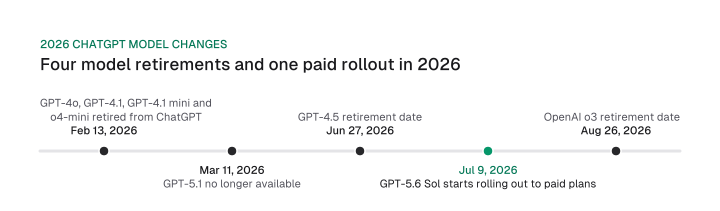
Advice that names a model expires fast. Here is the model map as of October 2026, from OpenAI's release notes through the 18 August 2026 entry:
- Retired from ChatGPT on 13 February 2026: GPT-4o, GPT-4.1, GPT-4.1 mini and OpenAI o4-mini.
- Gone as of 11 March 2026: GPT-5.1.
- Scheduled out: GPT-4.5 on 27 June 2026 after a 30-day sunset, and OpenAI o3 on 26 August 2026 after a 90-day sunset.
- Canvas: no longer available in GPT-5.5 Instant or GPT-5.5 Thinking. Writing blocks in chat now carry writing and coding output, and paid users can keep canvas for a limited time through legacy models.
- GPT-5.6 Sol: rolling out to eligible paid plans from 9 July 2026. Free, Go and logged-out users aren't included.
- GPT-5.4 mini: available to Free and Go users through the Thinking feature in the + menu.
If a guide tells you to use a model from that list, or to open canvas for a rewrite, its advice predates these changes. Entries after 18 August 2026 weren't checked, so open OpenAI's model release notes before you commit a team to one model.
Check the output: a verification step for each type of claim
Verify ChatGPT output by claim type: recompute numbers from your data, open the source of any outside statistic, check competitor claims on the competitor's page, and send regulated claims to a specialist.
Each check matches the way that kind of claim fails:
The pattern ties back to the mechanism earlier: facts without patterns invite guesses, and guessing raises errors. The editing share in the 2023 experiment says where your time goes, so budget for it.
Some tasks to keep out of ChatGPT: the final call on strategy bets, positioning and legal claims. The strategy prompts above draft options for the first two, and a person decides. Our judgment is that it fits tasks that are high volume, low risk and easy to verify, like subject line variants, caption sets and first-draft outlines.
Treat output as a draft you edit. Whether Google rewards that draft is a separate question, covered in the FAQ below.
Your next step: pick one prompt from the library that matches work due this week, rebuild it as a five-slot brief with a pasted draft or data sheet, and add the UNKNOWN line. Run it, then check every number by claim type before it ships.
Frequently asked questions
Do ChatGPT prompts for marketing need an "act as" line?
No. A December 2025 Wharton test found expert personas did not reliably improve accuracy on factual questions across six models. A persona may still help with tone or perspective, so use a voice line with samples, and spend the words on task, material and acceptance criteria.
Which ChatGPT model should I use for marketing prompts in 2026?
Choose by feature first. GPT-4o, GPT-4.1 and o4-mini left ChatGPT in February 2026, and canvas isn't available in GPT-5.5 Instant or Thinking. Use web search or deep research for sourced work, file uploads for data, and plain chat for edits. Check the release notes before relying on any model.
How do I stop ChatGPT from inventing marketing statistics?
Paste the statistic and its source instead of asking it to recall one. Add the line "If a fact is not in the material above, write UNKNOWN instead of estimating." Then open the source of every outside number, and recompute any figure that comes from your own data.
Can ChatGPT write the prompt for me?
Yes. Use the "interview me first" prompt (prompt 32): ChatGPT asks up to five questions about your goal, then writes a reusable prompt in the five-slot structure. The quality depends on your answers, so give real facts and constraints instead of adjectives.
How do I keep my best ChatGPT prompts in one place?
Use a Project. Projects keep chats, files and instructions together, and project instructions override your global custom instructions. Store audience, voice and banned phrases there, and keep the task prompts as text blocks in a shared document so each teammate only adds material.
Can I publish ChatGPT marketing copy as it is?
No. Edit it first. Check every number and quote against your sources, rewrite generic lines with your own material, and read it aloud as the reader. Raw output is a first pass, and editing is where the quality comes from. The question of how search treats it is covered in is AI content bad for SEO.
Cite this page
Aktaş, F. (2026, October 9). ChatGPT Prompts for Marketing: 36 Templates With Inputs. Mission Growth. https://missiongrowth.io/blog/chatgpt-prompts-for-marketing
Figures we made for this post are free to reuse under CC BY 4.0 with credit to Mission Growth.
Get Mission Growth highlighted in your Google results.