How to Check Crawl Budget: What GPTBot Never Says
Crawl budget, explained from Google's own documentation: the real threshold, what actually wastes it, and what it means for GPTBot and Claude's crawler.

On this page
You opened Search Console, saw a Crawl Stats anomaly or a spike in "Discovered, not indexed," and someone told you it's a crawl budget problem. Maybe it is.
Crawl budget is the number of URLs Googlebot can and wants to crawl on your site, and it's capped by whichever of two numbers is smaller: a connection limit based on your server's health, or a demand score built from how much content you have, how popular it is, and how stale it's gotten.
Most sites never come close to either limit. Running the actual numbers against a real site turns that from a vague reassurance into something you can check for your own.
So this guide sets up that check, then treats crawl budget as a diagnosis rather than a checklist: which specific cause is wasting yours, the one fix that matches it, and whether the concept even applies to the AI crawlers now hitting the same server logs.
In this guide:
- The two numbers that set crawl budget, and why crawlability and crawl priority fail independently
- Google's own size threshold, applied to two example sites
- The table matching each cause of wasted crawl budget to its correct fix, including why noindex isn't it
- How to check crawl budget in Search Console, and what a small catalog choice does to it
- What GPTBot, ClaudeBot and PerplexityBot publish, if anything, about their own crawl rate
Two numbers, one minimum: the arithmetic behind "crawl budget"
Each number behind that minimum has its own name and its own lever, starting with what Google calls them.
Google calls these the crawl capacity limit and crawl demand. Its Search Central documentation, current as of July 2026, defines the combined concept as "the set of URLs that Google can and wants to crawl." The capacity limit tracks your server's health: if it slows down or starts erroring, Google backs off and requests fewer pages until performance recovers.
Demand is built from three factors Google names directly: perceived inventory (how many URLs you actually have), popularity, and staleness, how long since a page last changed.
A 2025 study on quality-aware crawling by Pezzuti, Mueller, MacAvaney and Tonellotto, peer reviewed and presented at the WOWS 2025 workshop, fills in part of the mechanism behind why a stale page, or one Google treats as low quality, keeps a low demand score. It scores each fetched page's quality with a neural model.
That score then drives the crawl order, on the pattern that similar-quality pages tend to link to each other, so a page nobody good links to waits. Doing so "improves downstream search effectiveness."
That's work still at the research stage, on a proposed system, not a confirmed description of how Google's crawler runs today. It does line up with what you'd expect in practice, though: pages Google treats as low quality tend to get crawled less often as their demand score falls.
Two separate questions decide whether Google spends a request on a page at all: can Google reach it (crawlability), and does Google want to (crawl priority). A page can fail either one on its own, and the fix depends on which axis is actually broken.
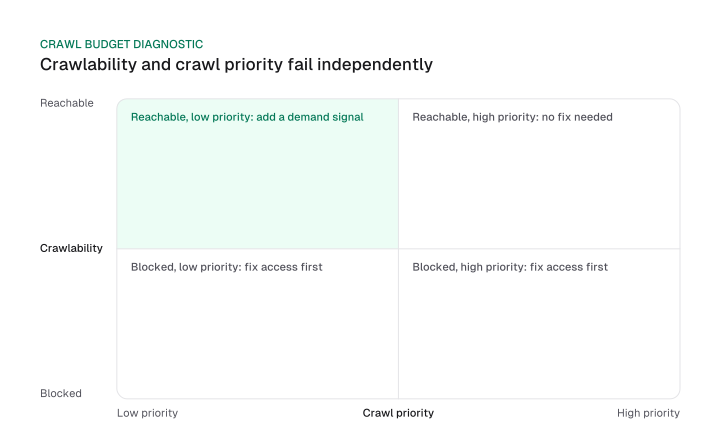
Match the fix to the actual problem:
- Reachable and high priority. Nothing to fix. Google can find the page and already wants to spend budget on it.
- Reachable and low priority. The page needs a demand signal, not a crawlability fix: more internal links, fresher content, or anything else that raises its perceived popularity or cuts its staleness.
- Blocked, regardless of priority. Priority doesn't matter until access is fixed. Remove whatever's blocking the crawl, a robots.txt rule, a stray noindex tag, a broken link path, before anything else.
One of those demand signals is internal linking: more internal links to a page raise its perceived popularity, one of the three factors behind crawl demand, so internal linking works as a lever on demand rather than a fix you apply on its own.
Google's own patent on crawl priority adds a more granular mechanism once a page is reachable. It's covered in the seo audit process, alongside a technical SEO checklist for tracking which of these fixes you've already applied.
Do you actually need to worry about it? Google's own threshold, applied
Crawl budget optimization matters mainly above roughly 1 million pages updated about weekly or 10,000 pages updated daily, and most sites, even large ones, sit under both branches.
Google calls the numbers "a rough estimate, not an exact cutoff": "Large sites (1 million+ unique pages) with content that changes moderately often (once a week)," or "Medium or larger sites (10,000+ unique pages) with very rapidly changing content (daily)."
Google puts the practical filter even more plainly: if your pages are usually crawled the same day they're published, or you don't have a large number of fast-changing pages, "you don't need to read this guide." If that's you, the fix table and the AI crawler section below still apply; this size threshold doesn't.
For example, take two site shapes: Site A runs 50,000 pages, with about 1,500 (3%) updated weekly and none updated daily. Site B runs 1,200,000 pages, most updated at least weekly.
Site A sits under both branches. 50,000 is nowhere near 1 million, and zero daily-updated pages is nowhere near 10,000. Site B crosses the first branch on page count and update frequency alone.
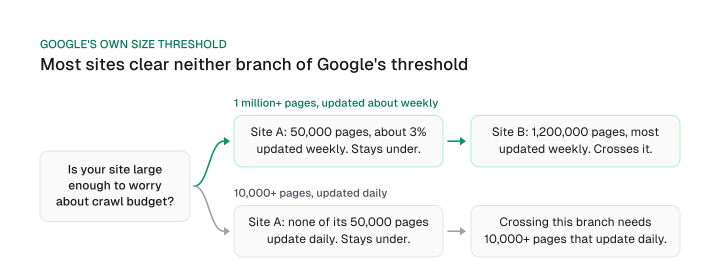
A site can look "large" by page count and still sit under both branches if its update cadence is slow, which the raw quote alone doesn't make obvious until you run your own numbers the way Site A and Site B just did.
If your numbers land closer to Site B, the deeper, enterprise-scale treatment of what crawl budget rations at that size lives on the enterprise SEO page.
What actually wastes crawl budget, and the fix that matches each cause
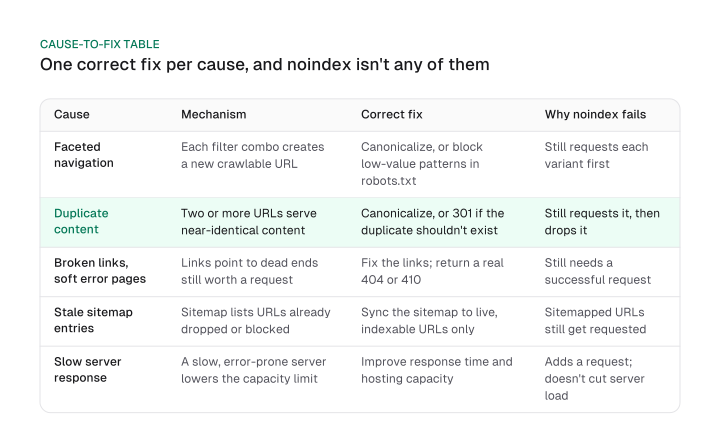
Faceted navigation, duplicate or near-duplicate content, broken links and soft 404s, stale sitemap entries and slow server response each waste crawl budget through a different mechanism, so each needs a different fix, and noindex isn't the fix for any of them.
Here's the mechanism and fix behind each one:
- Faceted navigation and URL parameters. Each filter combination (color, size, sort order) creates a new, crawlable URL, multiplying the URLs competing for the same underlying inventory. Canonicalize each variant to its primary URL, or block the low-value parameter patterns in robots.txt so Google never requests them.
- Duplicate or near-duplicate content. Two or more URLs serving the same or near-identical content compete for the same crawl demand. Canonicalize to the primary version, or use a 301 redirect if the duplicate shouldn't exist as its own URL at all.
- Broken links and soft 404s. Links pointing to pages that no longer resolve send the crawler to dead ends it still has to request. Fix the links, and return a real 404 or 410 for pages that are actually gone, instead of a soft 404 that quietly returns 200.
- Stale XML sitemap entries. A sitemap listing URLs Google has already dropped, redirected or blocked keeps sending Google back to request them anyway. Keep the sitemap synced to only the URLs you actually want indexed.
- Slow server response. A slower or error-prone server lowers Google's own crawl capacity limit directly, since that limit is set by server health. Improving response time and hosting capacity raises the ceiling instead of touching the demand side of the equation.
None of those five fixes is noindex, and that's deliberate. Google's own documentation is explicit about why: "Don't use noindex, as Google will still request, but then drop the page when it sees a noindex meta tag or header in the HTTP response, wasting crawling time." The tag doesn't prevent the request; it just tells Google to drop what it already fetched.
Blocking URLs with robots.txt is the mechanism that actually prevents the request. That's what makes it the correct fix across the whole list, including the two rows where noindex is usually the fix people reach for first: faceted navigation and duplicate content.
Fixing any of these frees up what's sometimes called a crawl budget reserve: the capacity Google was spending on errors, redirects and duplicate parameter URLs becomes available for pages that actually matter, without Google raising your overall budget at all.
How to check your crawl budget in Search Console
Search Console's Crawl Stats report shows your total crawl requests, response-code breakdown and host status over a recent rolling window.
To read it, open Search Console, go to Settings, then Crawl Stats. Three views matter most:
- Total crawl requests over time. This chart is your crawl rate: how many requests Googlebot makes to your site per day. A sustained drop usually means Google throttled back because of server health; a sustained spike after a migration or a new faceted section is worth investigating.
- By response code. A high share of 4xx, 5xx or redirect responses is wasted crawl budget by definition. Requests that don't return a 200 with real content aren't building your index.
- By file type and host status. File type shows whether Google is spending requests on HTML, images, JS or CSS; host status flags whether your server responds fast enough to keep the capacity limit high.
Server logs go one step further than Crawl Stats. They show which specific URLs Googlebot requested, not an aggregate chart, catching a crawl trap, a faceted URL loop, a broken pagination sequence, that a summary chart smooths over.
Here's why that specific-URL view matters. Listing one product under two categories, say a jacket under both "Men's Outerwear" and "New Arrivals," doesn't double the number of unique product pages Google has to crawl. The product page itself still has one canonical URL.
What it does double is the number of listing-page URL variants created by category filters, since each category page, and each of its own sort and filter combinations, is a separate crawl target competing for the same demand score.
On a site with a few dozen categories and typical filters, that multiplication happens on the listing layer rather than the product layer, exactly where server log analysis catches it and an aggregate Crawl Stats chart doesn't.
One thing Crawl Stats won't show you is a manual dial. The Search Console crawl rate limiter some checklists still mention is gone from Google's current documentation, and today's crawl rate section covers what replaced it.
Crawl-delay in robots.txt is a related dial that never worked on Google in the first place. Google's own robots.txt reference lists it among the fields it doesn't support at all. It's a different story for at least one of the AI crawlers now showing up in the same server logs.
What crawl budget means when the crawler isn't Googlebot: GPTBot, ClaudeBot and PerplexityBot
None of OpenAI's GPTBot, Anthropic's ClaudeBot or Perplexity's PerplexityBot publish anything resembling Google's crawl-capacity-and-crawl-demand model, and only Anthropic says it paces itself and honors the Crawl-delay directive that Google itself doesn't support.
Check each one directly, and the gap is specific, down to what each vendor actually says rather than only what it leaves out:
- GPTBot (OpenAI). OpenAI's own documentation states its purpose plainly: "GPTBot is used to make our generative AI foundation models more useful and safe," and gives its user-agent string for identification. It says nothing about crawl rate, frequency or anything resembling a budget.
- ClaudeBot (Anthropic). Anthropic states it aims "for minimal disruption by being thoughtful about how quickly we crawl the same domains and respecting Crawl-delay where appropriate," with a working example (User-agent: ClaudeBot, Crawl-delay: 1). That's a real, if non-numeric, pacing statement, and Crawl-delay is a lever that actually works on this bot.
- PerplexityBot. Perplexity's own docs give no rate-limiting or crawl-frequency statement at all, and add a disclaimer worth noting on its own: PerplexityBot "is not used to crawl content for AI foundation models."
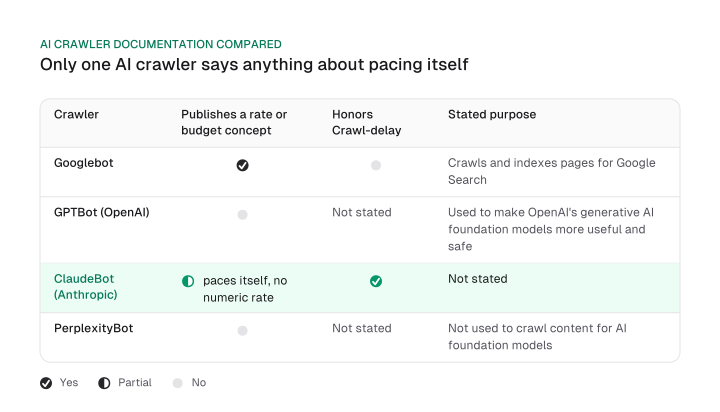
You can't manage "AI crawl budget" the way you manage Google's, because the vendors haven't published the numbers to manage it against. The one lever that exists, Crawl-delay, works on exactly one of these three bots, and not on Google.
Whether to allow or block each of these bots in the first place is a separate decision from how they pace themselves once allowed. That policy call, bot by bot, is covered on the block AI bots page.
A crawler that never fetches a page can't see whether it changed either way. We migrated our own React single-page app to prerendered static HTML for 20 marketing pages because AI crawlers do not execute JavaScript, which means a page that only renders client-side stays invisible to a bot that never runs it, regardless of how gently that bot paces its requests.
Google ties crawl priority to page quality, rules out noindex as a fix, and sets a real size threshold most sites never cross. None of that shows up in a generic checklist, and none of it transfers automatically to GPTBot, ClaudeBot or PerplexityBot either.
If you haven't already, open Crawl Stats, check your site against both threshold branches the way Site A and Site B were checked above, and match whatever you find to its specific cause instead of a generic checklist.
Frequently asked questions
Not the product page itself: it keeps one canonical URL no matter how many categories list it. What multiplies is the number of category-filtered listing-page URL variants, since each category, and its own sort and filter combinations, is a separate crawl target competing for the same demand score.
Crawlability is whether Google can reach a page at all. Crawl budget is how much of that reachable set Google actually spends requests on. A page can fail either one independently, and each combination needs a different fix: doing nothing, adding a demand signal, or removing whatever's blocking access first.
It's the crawl capacity freed up once wasted requests, errors, redirects, duplicate parameter URLs, get fixed. Google doesn't raise your overall budget; it just stops spending part of it on dead ends, leaving more of the existing budget available for the pages that actually matter.
A single fetch of one URL by a crawler. Google's own documentation doesn't state whether non-HTML resources like images, scripts and redirects count against your crawl budget the same way a page fetch does, and it's more useful to say that plainly than to guess at an answer Google hasn't published.
No. Google's own robots.txt reference lists Crawl-delay among the fields it doesn't support, so setting it does nothing to Googlebot's request rate. The full correction, including what actually controls crawl rate today, is covered in the crawl-delay correction.
Figures and images in this post are free to reuse under CC BY 4.0 with credit to Mission Growth.
Get Mission Growth highlighted in your Google results.