GPTBot: What It Is and When to Block or Allow AI Crawlers
GPTBot is OpenAI's training crawler. See which AI crawlers honor robots.txt, which ones site owners block, and copy a per-role allow or block policy.

On this page
GPTBot is OpenAI's web crawler for training data. It decides whether OpenAI can train on your content, not whether ChatGPT can find or recommend it.
That's the question most site owners actually have this week, and the usual framing is too narrow.
OpenAI runs four separate bots under different names. Anthropic and Perplexity each built the same split on their own, and robots.txt controls every one of them independently. A few of 2026's busiest bots don't fully honor a Disallow line at all.
Here's what GPTBot actually does, how it compares with well over a dozen other AI crawlers your site sees, which reasons to block or allow it actually hold up, and a robots.txt file you can paste in today.
GPTBot only controls OpenAI's training use of your content. Blocking it doesn't remove you from ChatGPT search, and it doesn't undo past training. It doesn't touch any other company's crawlers either. The real decision is a written policy for every AI crawler that touches your site, covering three roles: search, training and requests a user triggers. That's a bigger decision than one company's switch.
What GPTBot actually does, and the two OpenAI bots it isn't
GPTBot is OpenAI's AI training crawler, one of four separate bots that robots.txt controls independently. It crawls public content that OpenAI may use to train its models.
Disallowing GPTBot tells OpenAI not to use your content that way. Nothing more.
People confuse GPTBot with two other things: the bot that puts your site into ChatGPT's search answers, and ChatGPT fetching a page because a user asked it to. Neither one is GPTBot.
| Bot | Purpose | robots.txt token |
|---|---|---|
| GPTBot | Trains OpenAI's models on public content | GPTBot |
| OAI-SearchBot | Surfaces your site in ChatGPT's search answers | OAI-SearchBot |
| ChatGPT-User | Fetches a page only when a live user's prompt triggers it | ChatGPT-User |
| OAI-AdsBot | Validates ad landing pages submitted to ChatGPT | OAI-AdsBot |
Download CSV (CC BY 4.0)
These four run on separate rules. Disallow GPTBot and you opt out of training, full stop.
You haven't touched search visibility. That's OAI-SearchBot, and a site that opts out of ChatGPT search can still surface as a bare navigational link.
You haven't touched ad review either. That's OAI-AdsBot. A robots.txt change takes about 24 hours to reach OpenAI's search systems once you save it.
A GPTBot block can't reach backward, either. If an earlier crawl already fed a model that's since shipped, disallowing GPTBot today stops future crawls. It can't erase what that earlier crawl already contributed.
One more contrast worth knowing before you go company by company: not every AI company splits its bots this way. Microsoft documents no separate crawler or opt-out token for Copilot.
Its public facing generative answers retrieve content through Bing itself, the same crawler Bing search has always used. OpenAI, Google and Anthropic each hand you a lever built for training specifically. Microsoft doesn't.
Every AI company built the same three-bot split
Anthropic and Perplexity both split their crawling into the same three roles as OpenAI: a search bot, a training bot and a bot a live user triggers, each under a different name.
| Company | Search bot | Training bot | Triggered by a user |
|---|---|---|---|
| OpenAI | OAI-SearchBot | GPTBot | ChatGPT-User |
| Anthropic | Claude-SearchBot | ClaudeBot | Claude-User |
| Perplexity | PerplexityBot | Not used for training | Perplexity-User |
Download CSV (CC BY 4.0)
Once you understand OpenAI's split, you already know how to read Anthropic's and Perplexity's robots.txt rules. Anthropic's ClaudeBot "collects web content that could potentially contribute to their training," while Claude-SearchBot exists to improve search result quality for users.
Perplexity draws the same line. PerplexityBot is "not used to crawl content for AI foundation models," it just surfaces and links sites in Perplexity's own search results.
That's the model the rest of this decision works from. Role decides the rule here.
A site can allow every search bot, so it shows up when someone asks a question, and disallow every training bot, so its content doesn't become a data point in tomorrow's model, in the same file. That principle covers every AI company that documents its bots. It's why a generative engine optimization strategy has to start with crawler access instead of assuming it.
Does robots.txt actually stop these bots?
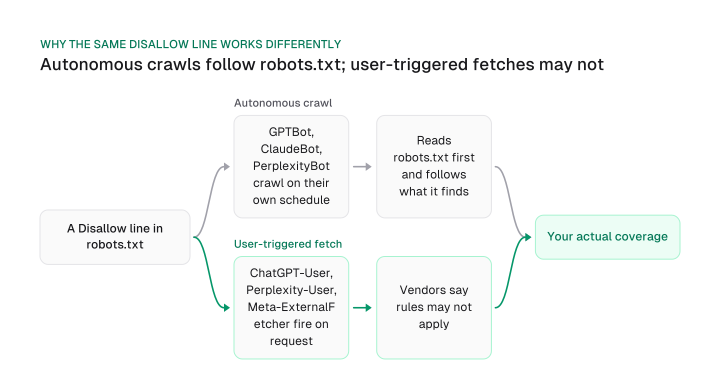
robots.txt stops an autonomous crawl, but it doesn't reliably stop a bot that a live user just triggered. Each vendor says so in its own documentation.
An autonomous crawler works through a list of URLs on its own schedule. It reads robots.txt first and follows what it finds. GPTBot does this. So do ClaudeBot, PerplexityBot and every other bot built for training or search indexing.
A fetch a user triggers is a different animal. OpenAI's own documentation for ChatGPT-User states that "robots.txt rules may not apply," because a person, not a schedule, started the request.
Perplexity says the same about Perplexity-User: it "generally ignores robots.txt rules" since a user asked for that exact page. Meta's documentation adds Meta-ExternalFetcher to the list, too: it "may bypass robots.txt rules" for the same reason.
So a Disallow line doesn't cover your whole exposure. It's dependable against autonomous training crawls, but it's not something you can rely on when the same company's bot is fetching a page because someone typed a question about it.
How much crawl traffic is actually at stake? On one monitored network, Vercel measured GPTBot generating 569 million fetches in a single month in December 2024, more than Claude's 370 million and Applebot's 314 million in the same window.
Combined with PerplexityBot's 24.4 million, those four AI crawlers ran a little over 28% of Googlebot's request volume on that network in the same period.
Bytespider, ByteDance's crawler, sits outside this whole framework. No official ByteDance documentation confirms what it does with a Disallow line or what it collects content for. Treat it as undocumented, not as a bot you can reason about the way you reason about OpenAI's or Anthropic's.
The case for blocking GPTBot
Blocking makes the most sense for sites with proprietary pricing, licensed user content or regulated data to protect, less sense for everyone else.
Some site owners block on principle, uncomfortable with any AI company training on their content, and that's a legitimate call. Beyond principle, two categories of reasons hold up:
- Legal and licensing risk. If your pricing pages, contract terms or user-generated content carry licensing restrictions, letting a training crawler collect them is a legal question first and an SEO question second. GPTBot's own documentation states plainly that it crawls public content OpenAI "may use to train" its models, so disallowing it is a real, sourced opt out.
- Security and server load, kept in proportion. Some teams block GPTBot assuming it will strain their infrastructure. For most sites that isn't the real math: AI crawler volume runs well under what Googlebot already sends your server every day. The stronger security argument is about what gets exposed to a training set, and that's the part worth weighing.
Certain industries carry a sharper reason to block AI bots by default: healthcare, financial services and any site holding regulated personal data, where a training crawler pulling public pages sits next to compliance obligations that have nothing to do with SEO.
Where that leaves most sites:
- Lean: block training bots by default if you have proprietary pricing, licensed user content or regulated data to protect.
- Lean: allow if you don't. Blocking without one of those reasons mostly removes you from a growing discovery channel for no protective gain.
For a wider technical audit, robots.txt is one line item inside the technical SEO checklist, and AI crawler rules are where that line item gets specific.
The case for allowing GPTBot
Allowing GPTBot puts your brand in front of ChatGPT's user base, but ChatGPT's share of that opportunity is shrinking as Gemini and Claude grow.
OpenAI announced in February 2026 that ChatGPT had reached 900 million weekly active users, still the largest single audience among AI assistants. Allowing the training and search bots keeps your content eligible to be the source behind an answer inside that audience.
That access is step one: it's the precondition for the chatgpt seo work that comes after crawler access.
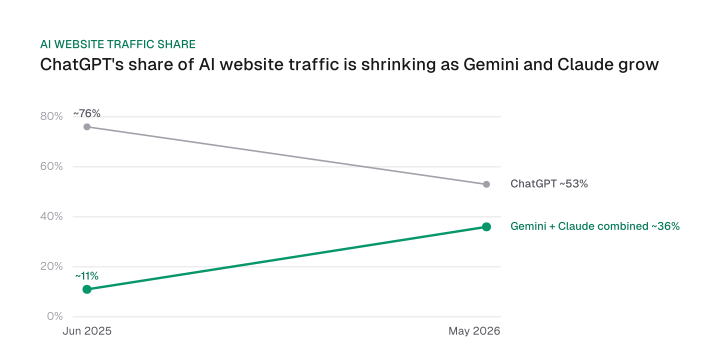
But "allow GPTBot" is already an incomplete policy if it stops at OpenAI. Similarweb's May 2026 data shows ChatGPT's share of worldwide generative AI website traffic fell from about 76% in June 2025 to about 53% in May 2026.
Over the same 11 months, Gemini and Claude's combined share rose from roughly 11% to roughly 36%. That puts Google-Extended and ClaudeBot in the same allow decision you're already making for GPTBot.
Lean: allow if brand visibility inside AI answers matters to your business. Write the policy for Gemini and Claude as well as ChatGPT; a policy built around one vendor is already behind the traffic.
How many sites actually block GPTBot
By the end of 2023, 48% of the world's most used news sites had already blocked OpenAI's crawler; Originality.ai's tracker of the world's most popular websites put the share at roughly a third a couple of months later, in February 2024.
That's far more than the low single-digit figure still repeated online. Block rates swing with the sample, though: a list of major news sites blocks far more often than a broad list of popular domains, so treat any single share as a snapshot of the sites it measured.
The Reuters Institute at Oxford found that 48% of the 15 most used news websites across 10 countries, a range of 20% to 79% by country, blocked OpenAI's crawlers by the end of 2023. The same research found 24% of those sites blocked Google's AI crawler, and 97% of the sites blocking Google also blocked OpenAI.
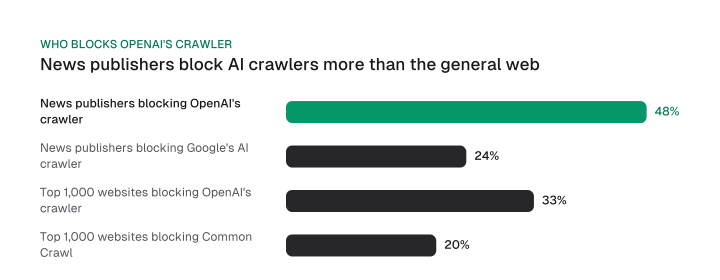
The same factsheet cites Originality.ai's tracker of the world's 1,000 most popular websites. At the time of writing, roughly a third blocked OpenAI's crawlers, about a fifth blocked Common Crawl, and about one in ten blocked Google's crawler.
News publishers block at a higher rate than the general web, which tracks with how much of their content is worth protecting. Subscription paywalls, licensing deals and original reporting all give a publisher a sharper reason to say no.
And once a site blocks, the decision tends to stick: none of the 150 news sites in the Reuters Institute sample reversed a block during 2023.
Every major AI crawler at a glance
A long list of named crawlers, across ten companies, covers the AI traffic most sites will see in their server logs.
robots.txt reliably controls most of them, though not all, as the table below shows.
| Bot | Owner | Purpose | robots.txt reliability |
|---|---|---|---|
| GPTBot | OpenAI | Trains foundation models | Reliable, autonomous crawl |
| OAI-SearchBot | OpenAI | Surfaces sites in ChatGPT search | Reliable, autonomous crawl |
| ChatGPT-User | OpenAI | Fetches a page a user asked about | Not guaranteed, triggered by a user |
| OAI-AdsBot | OpenAI | Validates ChatGPT ad landing pages | Not documented separately |
| ClaudeBot | Anthropic | Collects content for training | Reliable via Disallow (IP blocks alone aren't) |
| Claude-SearchBot | Anthropic | Improves Claude's search quality | Reliable via Disallow |
| Claude-User | Anthropic | Fetches a page a user asked about | Reliable via Disallow |
| PerplexityBot | Perplexity | Surfaces and links sites in search | Reliable, respects robots.txt |
| Perplexity-User | Perplexity | Fetches a page a user asked about | Not guaranteed, generally ignores it |
| Google-Extended | Control token for Gemini training and grounding | Reliable, no separate crawl to block | |
| Bingbot | Microsoft | Feeds Bing search and Copilot's answers | Governed by the same rule as Bing search |
| Meta-ExternalAgent | Meta | Trains and indexes for Meta AI | Reliable, autonomous crawl |
| Meta-ExternalFetcher | Meta | Fetches a page a user asked about | Not guaranteed, may bypass it |
| Amazonbot | Amazon | Improves Amazon products, may train Amazon AI | Reliable, respects robots.txt |
| Applebot-Extended | Apple | Governs Apple AI training on Applebot's crawl | Reliable, control token on Applebot |
| CCBot | Common Crawl | Open archive used by many AI labs | Reliable, respects robots.txt |
| Bytespider | ByteDance | Reported training crawler | Undocumented, no official commitment |
Download CSV (CC BY 4.0)
That table replaces a whole stack of separate vendor lookups. The pattern holds across every company that documents it: a bot built for autonomous crawling, whether for training or search, honors a Disallow line. A bot built to fetch one page because a person asked a question doesn't reliably honor it at all.
Google-Extended works differently from the rest
Google-Extended has no HTTP requests of its own; it's a control-only token layered onto Google's existing crawl.
Its scope is Gemini training and grounding, the mechanism that feeds Search-index content to the model at answer time inside Google AI Mode. Disallowing it doesn't touch your rankings or your inclusion in Google Search. Applebot-Extended is the same kind of control-only token: it doesn't crawl, it decides whether content Applebot already crawled may train Apple's generative AI models, and Apple says its rules aren't considered in ranking for Search.
llms.txt is worth naming here too, even though it's a different tool. It's a voluntary file that summarizes your site for AI systems, and it sits on top of the robots.txt decision above.
How to write the robots.txt rule for your policy
A hybrid robots.txt file groups bots by role. It allows the search bots you want and disallows the training bots you don't, all in the same file.
robots.txt is a plain text file at your site's root that tells crawlers which paths they may request. It controls crawling; indexing is a separate system that works off different signals entirely.
A page you disallow can still get indexed with no visible content if something else links to it, and blocking a bot doesn't remove a page from an index the way a noindex tag does.
Google has said it removed unofficial support for a noindex line written inside robots.txt itself, so that line never belonged there to begin with. A meta robots tag or an X-Robots-Tag header does that job instead.
Here's a hybrid policy that allows search and citation bots, blocks training bots, and treats Google-Extended and Common Crawl on their own terms.
# Search and citation bots: allow
User-agent: OAI-SearchBot
Allow: /

User-agent: PerplexityBot
Allow: /

User-agent: Claude-SearchBot
Allow: /

# Training bots: disallow
User-agent: GPTBot
Disallow: /

User-agent: ClaudeBot
Disallow: /

# Control token, not a live crawl: disallow to opt out of Gemini training
User-agent: Google-Extended
Disallow: /

# Common Crawl: allow, many AI labs train on its open archive
User-agent: CCBot
Allow: /
Two things to check before you rely on this file.
IP-based blocking isn't a safe substitute for the Disallow lines above: Anthropic's own documentation warns that blocking a bot's IP addresses "may not work correctly or persistently guarantee an opt-out," because doing so can stop the bot from ever reading your robots.txt file in the first place.
A change to this file doesn't take effect everywhere at once either, so give it a little time before you check whether it worked.
Verify your policy actually works
Confirming a robots.txt policy works means checking three things: real bot traffic in your logs, IP ranges matching the published list, and rendered HTML the bot can read.
Here's how to check each one:
- Check your server logs for the bot's exact user-agent string:
GPTBot,ClaudeBot,PerplexityBotand the rest. A hit confirms the bot is visiting. Silence for weeks after an allow decision is worth investigating. - Cross-check the request's IP address against each company's published range before trusting the user-agent string alone, since user-agent strings can be spoofed. OpenAI publishes a
gptbot.jsonrange, Anthropic publishes its own IP verification list, and Common Crawl's requests resolve to its own dedicated ranges with reverse DNS. - Confirm the bot can actually read the page, past simply reaching it. None of the major AI crawlers render JavaScript the way Googlebot does, so a page that depends on client-side rendering can sit fully allowed and still be invisible to every bot in the table above. That's a separate problem from the access decision above. JavaScript rendering checks in the technical SEO checklist confirm your rendered HTML actually carries the content.
We migrated our own React single-page app to prerendered static HTML for 20 marketing pages because AI crawlers do not execute JavaScript. That's the exact failure mode step three above is checking for.
The GPTBot question was never really about one bot. OpenAI, Anthropic and Perplexity each split search, training and user access into separate, independently controlled bots, and several of 2026's busiest bots don't reliably honor a Disallow line at all.
The only policy that holds is a written, per-role decision covering every AI crawler your site sees.
Start there: pull last month's server logs, check them against the bot table above, and write the robots.txt file the previous section gave you before the week is out.
Frequently asked questions
Cross-check the request's IP address against OpenAI's published gptbot.json range before trusting the user-agent string alone. Anyone can set a user-agent header to say "GPTBot," but only the IP range confirms the request came from OpenAI's own infrastructure.
Yes. Allow OAI-SearchBot and disallow GPTBot in the same robots.txt file. OpenAI controls the two independently, so allowing one doesn't force the other.
No. A block stops future crawls from collecting new content, but it can't undo training that already happened on an earlier crawl. That data is already built into a model that's already shipped.
Not reliably. Anthropic's own documentation warns that blocking a bot's IP addresses can prevent it from reading your robots.txt file in the first place, which defeats the purpose. A Disallow rule stays the primary method.
No, and the two aren't linked the way people assume. Microsoft documents no separate crawler or opt-out token for Copilot; its public facing generative answers retrieve content through Bing itself. Blocking GPTBot has no effect on Bing or Copilot either way.
No. GPTBot doesn't feed Google's indexing or ranking systems, so blocking or allowing it has no measurable effect on your organic search position. That decision lives entirely inside OpenAI's own systems.
Figures and images in this post are free to reuse under CC BY 4.0 with credit to Mission Growth.
Get Mission Growth highlighted in your Google results.