AI Agent SEO in 2026: How It Works and How to Build One
AI agent SEO means an agent runs SEO work end to end toward one goal. See how it connects via MCP, build vs buy vs custom, and what stays human-reviewed.

On this page
AI agent SEO is what people mean when "AI SEO tool" stops being accurate: software that works toward a goal instead of answering one prompt at a time.
You'll also see it written as an AI seo agent, an SEO AI agent or agentic SEO. All three name the same shift.
This guide makes the case for AI agents for SEO you can actually act on. It draws the exact line between an agent and a tool, shows the six workflows agents already run, and turns two decisions, what to wire an agent to and what to let it do unsupervised, into rules you can apply before you evaluate a single vendor.
What AI agent SEO means, and why it isn't a smarter AI SEO tool
An AI SEO agent executes SEO work across several steps toward a stated goal on its own. An AI SEO tool answers one prompt and stops.
That's the whole distinction. It has nothing to do with how smart the underlying model is.
Give a tool a task and it hands back one output: a keyword list, a meta description, a content brief. Give an agent a goal and it keeps going. It checks a data source, decides what the result means, acts on that decision, and moves to the next step without waiting for a new prompt.
Here's the mechanism behind that chaining:
- MCP, the Model Context Protocol. An open standard Anthropic introduced in November 2024. Before MCP, connecting an AI system to an external tool meant one custom integration per pairing: one connector for Search Console, another for your CMS, another for your rank tracker.
- What MCP replaces. A single protocol an agent can use to reach any source that speaks MCP. That's why an agent can pull Search Console data, check a CMS and update a page in one run instead of needing bespoke code for each.
Understanding MCP for SEO is really understanding what changed: an agent can now reach past the chat window into Search Console, your CMS and your rank tracker directly. The line between an agent and a tool is drawn by what happens between your prompts. MCP is the specific mechanism that makes that gap crossable.
Which SEO workflows AI agents actually run today
AI agents already run six recurring SEO workflows end to end. Each one used to be a series of steps a person ran one at a time.
The six workflows
Here's what an agent chains on its own now:
- Keyword research and clustering. Pulls volume and intent data, groups terms into topic clusters, and hands you a content map instead of a spreadsheet you still have to sort.
- Content optimization and refresh. Flags pages losing traffic, checks why against competing pages, and drafts the fix. Whether that drafted fix helps depends on what it adds, the test behind is AI content bad for SEO.
- Technical audits. Crawls the site, checks status codes, indexation and Core Web Vitals, and prioritizes fixes by traffic impact.
- Internal linking. Finds orphaned pages or ones that need more internal links and proposes contextual links from relevant existing content.
- Backlink outreach. Identifies link targets, drafts personalized outreach, and tracks responses across a sequence.
- SERP and AI citation monitoring. Tracks ranking and citation changes and surfaces what moved. Mission Growth's platform tracks AI citations and visibility for customers.
Two of those workflows go deeper elsewhere: get cited by chatgpt covers the citation mechanics, and generative engine optimization covers the structural work an agent can execute once you understand the concept behind it.
How much time this actually saves
The time saved is real, but the numbers vendors report overstate the general pattern. Here's the honest comparison.
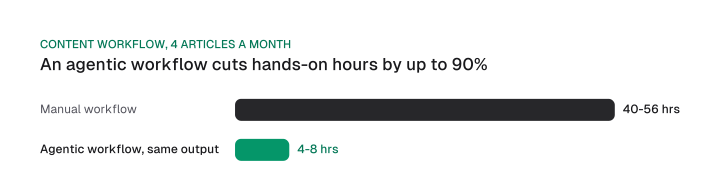
By Frase's own figures for its agentic content workflow, a team producing four articles a month goes from 40-56 manual hours to 4-8 hours with an agent handling the same output, including human review and approval.
Do the arithmetic and that's an 86-90% cut in the hours a person spends directly on the work: (40-4)/40 is 90%, (56-8)/56 is about 86%.
Here's that result next to an independent, non-SEO benchmark:
- Frase's own agentic content workflow: 40-56 manual hours down to 4-8, an 86-90% cut.
- BCG, agentic AI across the whole enterprise, October 2025: 25-40% less low-value work time. The number covers general enterprise work rather than SEO specifically.
So why is the content workflow's cut so much bigger? Content production chains many sequential steps that each pull and check data: fetch it, verify it, draft, format. An agent runs that whole sequence back to back without the pauses a person takes between tasks. A workflow built almost entirely of that kind of step sees a bigger cut than a mixed bag of enterprise work does.
How to build your own SEO agent
Building an SEO agent means documenting one workflow, turning it into a skill file, wiring in tool access through MCP, and setting the trigger that activates it.
The four build steps
Start with the single workflow costing you the most hours. Resist building an agent that does everything on day one; here are the four steps, one workflow at a time:
- Document the workflow. Write down the exact steps a person runs today, in order, including the data source each step reads and the point where a human currently judges the result.
- Turn it into a skill file. Package those steps as a skill: a short name and description the agent can match against a request, plus the full instructions in a separate file.
- Wire in tool access through MCP. Connect the skill to the data sources it needs, Search Console, your CMS, your rank tracker, through an MCP server, so the agent reads and acts on real data.
- Set the trigger. Decide what activates the skill: a direct request like "refresh decaying pages," a schedule, or a data threshold you define.
Why skill files beat one long prompt
Skill files win for a specific, checkable reason: progressive disclosure. Anthropic's own documentation, published in October 2025, describes how Agent Skills load.
The skill's name and description sit in the system prompt at startup; nothing else does. The full SKILL.md instructions load the moment a task matches that skill, never before. Splitting workflows into separate skill files keeps the context window clear of instructions the agent doesn't need for the task in front of it, rather than loading every possible workflow on every request.
Here's what one looks like in practice, sketched for a content-decay refresh trigger:
name: content-decay-refresh
description: Flags pages losing organic traffic and drafts a refresh brief
trigger: content-decay-refresh
reads:
  - source: Google Search Console
    dimensions: [query, page, clicks, impressions, position]
    window: a rolling period you set, compared to the prior period of the same length
logic:
  - compute: clicks_change_pct per page
  - compare: clicks_change_pct against drop_threshold  # set from your own baseline
  - action: below drop_threshold, draft a refresh brief; otherwise log and skip
output: refresh brief queued for human review, never auto-published
You set the drop_threshold yourself, from your own traffic baseline: a meaningful decline looks different on a high-traffic page than on a low-traffic one. The skill reads the same Search Console fields a person would pull by hand: query, page, clicks, impressions, position. The agent just pulls, compares and drafts; you set the number that decides when it acts.
Build vs. buy vs. custom: choosing your setup
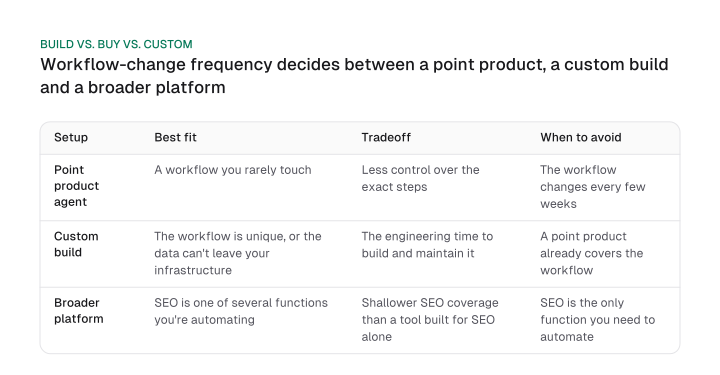
Build vs. buy vs. custom for an SEO agent comes down to how often the underlying workflow changes. Team size has little to do with it.
The three setups and what each costs you:
- Buy a point product agent for a job you rarely touch. You give up control over the exact steps, and it's the wrong pick once that job changes every few weeks.
- Build a custom agent only when the process is unique or the data can't leave your infrastructure. It costs engineering time to build and maintain, so skip it when a point product already covers the job.
- Use a broader platform when search is one of several functions you're automating. Its coverage is shallower than a dedicated tool's, so skip it if search is all you need to automate.
That's a decision about how stable the workflow is, dressed up as a choice between vendors. Naming the deciding variable is what turns "it depends" into an actual choice:
Week one looks the same on any of the three paths: pick the single workflow eating the most hours and start there.
If you're weighing this at the company level rather than the tooling level, ai seo agency covers the build/buy/hire question one layer up. Agent software is one option there, alongside agencies and in-house teams. A named, ranked comparison of the ai search optimization tools in this category lives on that page too; it's a separate job from the one this section does.
What to automate, and what to keep human-reviewed
An SEO agent's safest default asks for approval before it acts. Full autonomy is the riskier setting. Approval-first is the smarter one.
The approval-first default
Let an agent draft, diagnose and flag. Save unattended action for the narrow set of tasks where a wrong output is cheap to catch and cheap to undo.
The "24/7 autonomous" pitch on most product pages oversells what good practice looks like. Ahrefs, describing its own Agent A tool, put it plainly: most good agents have human approval steps built in, the way a developer approves a pull request an agent opened before it merges. The agent doesn't ship the change itself.
Ahrefs also documented a concrete failure: an unsupervised agent, not pointed at a specific data source, invented API parameters that didn't exist. That's what approval before action actually catches. A well-built agent's autonomy setting starts there by default. Unattended action is something a team turns on deliberately, per workflow, once it has watched the agent get that workflow right a few times.
The no-go list and the cost
Here's the boundary, stated as a rule instead of a reminder to stay in the loop:
- Never automate: final sign-off on brand voice or legal claims. A named human approves it.
- Never automate: any live action with direct revenue impact, like a price or offer change, without review first.
- Keep reviewed even once trusted: anything published externally goes out with a named human's approval attached.
- Safe to automate fully: drafting, flagging and diagnosing. A wrong output there just sits in a queue until someone looks at it.
Run that list against your own workflows before deciding what an agent may touch. The ai seo optimization checklist is the fuller version of that exercise. On cost, point product agents start around $49 a month at the low end, with enterprise suites running into the hundreds; the best llm seo tool breakdown covers the full pricing comparison.
Does an agent replace SEO professionals? No. Repetitive execution moves to the agent. Strategy and judgment stay with the person, because those are exactly the calls an approval-first setup routes back to a human.
The two decisions that actually matter
An AI SEO agent's real value comes down to two design choices: what it's wired to, MCP and skill files versus a locked vendor platform, and what it's allowed to do without a human checking first. Get those two right and the rest, which vendor, which price tier, sorts itself out.
Start today: document the one workflow costing you the most hours this month, then decide its trigger and its human approval step before you evaluate a single tool.
Frequently asked questions
Final sign-off on brand voice or legal claims, and any live action with direct revenue impact, should never run without a named human's approval. Drafting, flagging and diagnosing are safe to automate, because a wrong output there just sits in a queue until someone reviews it.
The Model Context Protocol is an open standard Anthropic introduced in November 2024 that lets an AI system connect to external tools and data sources through one protocol instead of a custom integration for each pairing.
No. Agents take over repetitive execution work: data pulls, first-pass drafts, anomaly flags. Strategy, judgment calls and brand voice decisions stay with the person, since those are exactly the calls an approval-first agent routes back to you.
Point product agents start around $49 a month at the low end, with enterprise suites running into the hundreds. Pricing comparisons across vendors vary by tier and by which engines get tracked.
Yes, through MCP or a native integration. The ceiling on what it can do is whatever the tool's own API or MCP server exposes. The agent platform doesn't set that limit.
Figures and images in this post are free to reuse under CC BY 4.0 with credit to Mission Growth.
Get Mission Growth highlighted in your Google results.