Claude Skills for Marketing: 29 to Install and What to Skip
Claude skills for marketing: 29 picks as of 8 October 2026, how many fit before Claude drops descriptions, where each one runs, and what to vet first.
By Furkan AktaşPublished

On this page
Claude skills for marketing can stop working without any error. Claude Code lists every skill name on every turn and drops descriptions from your least-used skills once the listing passes a budget. A scheduled routine cannot see a skill that only sits in your home folder, and claude.ai uploads reject frontmatter fields that the terminal tool accepts. A long list of repos won't tell you any of that.
Twenty-nine packs and skills follow, grouped by marketing job, and the three rules get their own sections after them. Every repo fact comes from the repo's own page as of 8 October 2026, and where a roundup's number has moved, both numbers sit side by side.
What Claude skills for marketing are
A Claude skill for marketing is a folder with a SKILL.md file that Claude loads on demand, so repeated tasks run from saved instructions instead of a fresh prompt.
Anthropic's documentation describes skills as reusable, filesystem-based resources that give Claude domain-specific expertise: workflows and context.
Loading happens in two levels. In Claude Code the listing always carries every name, and a body is read only when a task matches it. A large library therefore costs you in the listing long before it costs anything in the body, and the skill listing budget section below works through that cost.
For how an SEO agent chains these files, ai agent seo explains progressive disclosure, and claude ai statistics shows how widely Claude is used.
Why a skill matters for a marketer
A skill matters for a marketer because a method written once loads on demand in every later conversation, so the brand voice, audit steps or reporting rules are not retyped.
Anthropic's documentation says skills load on demand, so you don't repeat the same guidance in every chat the way you do with a prompt. The saved method can be the audit you run every month or the reporting rules your team already agreed on.
How skills connect to HubSpot, Mailchimp and Google Analytics
Skills do not connect to HubSpot, Mailchimp or Google Analytics themselves; they hold the method, and the listed packs reach those tools through an MCP connector, a CLI wrapper or a data-export reference.
Anthropic's Marketing plugin lists HubSpot and Klaviyo as MCP connectors. The Email Marketing Bible operates Klaviyo, Resend, beehiiv, Mailchimp, Omnisend or Nitrosend through MCP and connectors.
Google Analytics 4 shows up as a reference rather than a connector. Cogny's free skills carry a GA4 BigQuery export schema reference with query patterns, and the GA4 Diagnostic MCP that one roundup recommends has moved repositories, as the creative and analytics section notes.
The marketingskills Node CLI wrappers are the third route, and they need your own API keys. Our best mcp servers for marketing list covers the servers themselves, so this guide ranks none.
Which Claude skills for marketing to install first
Start with marketingskills if you work in Claude Code, Anthropic's Marketing plugin for an official set, and claude-ads if paid media is the job, and install by skill name rather than by pack.
The best Claude skills for marketing depend on the job, so the table below gives one start here pick per situation and the condition under which to skip it, taken from each repo's own page and from the listing mechanism explained later.
Download CSV (CC BY 4.0)
Read the Skip it if column first. Claude marketing skills earn their place by matching a task you repeat, because every skill you install adds a name to the listing.
Anthropic's Marketing plugin and marketingskills also cover planning and strategy work, so founders can start with either. If you want a platform that acts on its own, ai marketing agents are a different product from skill files that a person triggers.
Broad marketing packs
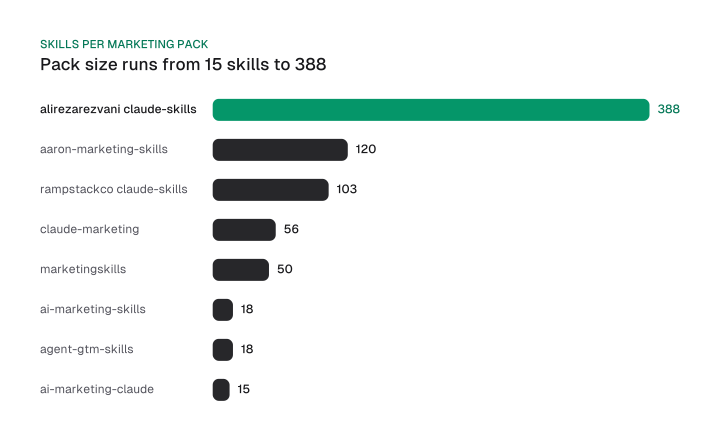
11 broad packs cover marketing end to end, from marketingskills at 50 skills to a 388-skill library, and the larger the pack the more names and descriptions it adds to the Claude Code listing.
Every repo fact below is dated 8 October 2026 and taken from the repo's own page, so read the group as a Claude skills library of marketing skills for Claude Code. Each heading links to a Claude skills for marketing GitHub repository you can open before you install; pick the pack whose scope matches your tasks, then install by name.
The repos with the best marketing skills are the ones whose own pages show scope and safe defaults: marketingskills for breadth at 50 skills, Anthropic's Marketing plugin as the official set, claude-seo for audits at 26 sub-skills, and claude-ads for paid media, read-only by default. Size is not the test; a pack that matches a task you repeat beats a bigger one.
Best for: Founders and technical marketers who want one pack across CRO, copy, SEO, ads and analytics.
Searches for marketing skills by Corey Haynes land on this repo, whose author spells the name Haines.
The README table lists 50 skills, and the product-marketing skill is the shared context the others read first, so write that file before anything else. It works with Claude Code, Codex, Cursor and Windsurf, plus any agent that follows the Agent Skills spec.
Register the repo as a marketplace with /plugin marketplace add coreyhaines31/marketingskills, or run npx skills add with the --skill flag to install chosen skills by name. Each skill also has a Related Skills section that maps what it depends on.
The seo-audit skill triggers when you want to audit, review or diagnose SEO issues. The cro skill, which replaced page-cro and form-cro in v2, triggers when you want more conversions from a page or form. The cold-email skill covers B2B outbound from first emails and follow-ups to sending setup.
The CLI wrappers are dozens of Node scripts, each reading your own vendor API key from an environment variable. The pack is free and MIT-licensed, and the README says it is open to pull requests.
Cons:
- All 50 skills add names and descriptions to the listing if you install the whole pack.
- An upgrade from v1 leaves stale old-name folders behind.
- The CLI wrappers need your own vendor API keys.
Price: Free (public GitHub repository)
Best for: Claude Code users who want an official starting set from Anthropic.
Anthropic's marketing plugin sits in the knowledge-work-plugins repository, and its README says it also works in Claude Code. It covers content creation, campaign planning, brand voice management, competitive analysis and performance reporting.
Point the CLI at anthropics/knowledge-work-plugins with claude plugin marketplace add, then run claude plugin install marketing@knowledge-work-plugins.
The plugin ships commands. /draft-content drafts blog posts, social media, email newsletters, landing pages, press releases and case studies, and /campaign-plan generates a campaign brief with objectives, channels, a content calendar and success metrics. /brand-review checks content against your brand voice, style guide and messaging pillars, while /seo-audit runs keyword research, on-page analysis, content gaps, technical checks and a competitor comparison.
Set your brand voice, style guide and target personas once in a local settings file, and the output is personalised from the first run. The plugin also lists HubSpot and Klaviyo as MCP connectors: HubSpot pulls campaign data and contacts, and Klaviyo drafts and reviews email sequences.
Start here when you want an official set whose commands map to the planning, review and audit jobs above before you add a bigger pack.
Price: Free (public GitHub repository)
Best for: Teams running paid media, e-commerce and reporting.
The repo contains 56 open-source Claude Code skills, alongside specialized agents and autonomous workflows. Its README names paid media, e-commerce, content, strategy, creative, reporting and development as the areas covered. That makes it the closest match in this group for a team that wants ads and reporting skills in the same install.
You don't have to take all of it. Each skill works independently, so install only what you need: copy one with cp -r claude-marketing/skills/google-ads ~/.claude/skills/. A single folder keeps the listing small, though a copy also means updates won't arrive by themselves.
Every skill ships three layers. SKILL.md holds frameworks and decision trees, REFERENCE.md holds benchmarks, API schemas and rate limits, and EXAMPLES.md holds worked prompts with expected output.
Three skills show the range. cro-auditor identifies friction points, runs heuristic evaluations and prioritizes recommendations with the ICE and PIE frameworks. klaviyo-analyst audits flows, segments, campaigns, deliverability and revenue attribution. technical-seo-audit covers crawlability, indexation, Core Web Vitals, site architecture, canonicalization and structured data validation.
The README's example prompt asks for a scored audit of your Google Ads account. It also says all skills were tested in March 2026 with Claude Code v2.1, a dated signal you should compare with the version you run.
Price: Free (public GitHub repository)
Best for: Teams building and growing a brand website.
The repo holds 103 stack-agnostic skills covering brand, design, content, SEO, dev, ops, growth and research. It includes an Ahrefs MCP-powered SEO audit suite, which is the one part that depends on a connector rather than on plain skill files.
For the full catalog, run /plugin marketplace add rampstackco/claude-skills, then /plugin install rampstack-skills@rampstack. For something lighter, add rampstackco/plugins instead, which lists only curated subsets with no full catalog.
Three skills show the scope. cro-optimization runs conversion rate optimization as hypothesis-driven testing, from audit and hypothesis generation through test design and statistical analysis to rollout decisions. email-deliverability covers SPF, DKIM and DMARC setup, diagnosing emails that land in spam, domain reputation and spoofing. content-brief-authoring takes the middle path between a thin brief of a keyword and a deadline and a thick document nobody reads.
The catalog also carries 490 reference files: templates, checklists, decision matrices and worked examples. On cost, the README says each skill contributes roughly its name and description until Claude needs it, which is the listing mechanism described later in this guide.
It is MIT-licensed, and its trust statement is worth repeating: skills are instructions and code that run with your agent's permissions, so how a catalog is maintained matters. With 103 skills, the lighter marketplace is the sensible first install. Check what the Ahrefs MCP needs on your side before you rely on the audit suite.
Cons:
- The audit suite needs the Ahrefs MCP.
Price: Free (public GitHub repository)
Best for: Readers who want one library for engineering and marketing.
The repo describes 388 production-ready skills, plugins and agent skills for 13 AI coding tools, and says it also works with Codex, Gemini CLI, Cursor and other coding agents. Its README lists engineering, DevOps and marketing among its areas. Install only the marketing skills you will use, because every skill you add competes for the same listing budget.
The README gives a route for that: /plugin install marketing-skills@claude-code-skills adds the 43 marketing skills, and a single skill such as content-creator installs alone with /plugin install content-creator@claude-code-skills.
Each skill is a SKILL.md with structured instructions, workflows and decision frameworks. Three marketing skills show what that looks like. campaign-analytics analyzes performance with multi-touch attribution, funnel conversion analysis and ROI calculation. analytics-tracking sets up, audits and debugs GA4, Google Tag Manager, event taxonomy, conversion tracking and data quality. cold-email writes, improves or builds sequences of B2B cold outreach emails.
The library also ships 706 Python CLI scripts, all stdlib-only with zero pip installs, so the scripts don't pull extra packages onto your machine.
Install the 43-skill marketing plugin or one skill, and leave the rest of the library out. Because marketing is one area of many, check the README's list of areas before assuming a skill exists for your channel.
Cons:
- Marketing is one area of many.
Price: Free (public GitHub repository)
Best for: Teams that want a staff-style bundle across SEO, social, email and paid.
The repo offers 120 agent skills across 7 disciplines, either as one plugin or as portable skills across many hosts. It also offers an 8-bot AI Staff on Grok Bot and Hermes Bot Mode. The same author's earlier seo-geo-claude-skills repository is now a signpost, with its former 20-skill line preserved, unchanged, at a tag.
In Claude Code the install has two steps. The marketplace add only registers the catalog, and /plugin install aaron-marketing@aaron then enables the skills and commands. To take one skill, run npx skills add aaron-he-zhu/aaron-marketing-skills -s keyword-research.
Three skills show the grain. ad-account-auditor runs a typed 20-item ROAS profile with verified vetoes and a SHIP/FIX/BLOCK/UNDECIDED gate on your own exported data. search-term-miner builds a standing negative-keyword list and an n-gram waste report from the search-terms export, and delivers a maintenance diff. subject-line-lab produces a labeled set of subject and preheader variants with a per-variant heuristic pre-score card.
Read the AI Staff bundles before you rely on them, because the README says they are static: the auditors return NOT_SCORED and the registries are propose-only. Since 120 names would fill a large share of the listing, take a single discipline first and check /skill-doctor after a week.
Cons:
- AI Staff bundles are static, so the auditors return NOT_SCORED.
Price: Free (public GitHub repository)
Best for: Agency builders who want client-ready audit deliverables.
The repo is an AI Marketing Suite for Claude Code with 15 marketing skills that run with parallel subagents. It audits a website's marketing, generates copy, builds email sequences, creates content calendars, analyzes competitors and produces client-ready PDF reports.
You use it through slash commands in Claude Code: type a command and a marketing analysis comes back. The headline command, /market audit <url>, runs a full marketing audit with 5 parallel agents.
Three skills show how the outputs are shaped. market-emails works from a topic description, asks clarifying questions if needed and writes the complete sequences to EMAIL-SEQUENCES.md. market-funnel maps the conversion path from first visit to purchase, identifies drop-off points and recommends optimizations with revenue impact estimates. market-competitors analyzes competitors' marketing strategies and produces a comparison report on positioning gaps, tactics worth copying and differentiation opportunities.
The README's sample output ends with an overall marketing score and a full report saved to MARKETING-AUDIT.md. The page says it is built for entrepreneurs, agency builders and solopreneurs who want to sell marketing services powered by AI. At 15 skills it is small enough to install whole without crowding the listing.
Price: Free (public GitHub repository)
Best for: Readers who want frameworks Claude Code executes rather than reads.
The README describes marketing frameworks that Claude Code actually executes and says they are not guides or courses. Read the folder list before installing, since the page leads with that framing rather than with a skill count.
Install is a copy: run mkdir -p ~/.claude/skills, then cp -r ai-marketing-claude-code-skills/* ~/.claude/skills/. After that, Claude Code uses the skills automatically when you mention related topics.
Three named skills show the range. The AI Discoverability Audit checks how a brand appears in AI-powered search and recommendation systems such as ChatGPT, Perplexity, Claude and Gemini. Positioning Basics is a framework for clarifying who you are for, what you do and why you are different.
The LinkedIn profile skill scores each section and rewrites the headline and about copy. Other skills turn existing work into assets: case-study-builder turns client wins into formatted case studies for proposals, social proof and sales conversations, cold-outreach-sequence builds personalized sequences for LinkedIn and email, and de-ai-ify removes AI-generated jargon and restores a human voice.
Because the install copies the whole folder, list its contents first and delete what you don't need. The README also sells a set of paid Pro skills and bundles, so check which folder you are copying.
Price: Free skills under an MIT licence; Pro skills are sold separately
Best for: Teams that use several agents, such as Claude Code, Codex, Cursor and OpenCode.
The repo offers 18 open-source AI marketing skills for practical work with Claude Code, Codex, Cursor, OpenCode and other compatible agents. If your team splits work across those agents, one skill set that travels is easier to keep consistent than four.
The README is clear about what these are: skills, not autonomous agents, so they give your existing agent focused instructions, workflows, quality checks and output standards for specific marketing jobs.
The installer lets you select skills and supported hosts. The README suggests committing the installed skills to your own repository, so your team and agents share one version.
Four skills show the grain. Conversion Audit runs a 53-point audit of customer focus, narrative, copy, design, CTAs and proof, and Ad Angles brainstorms problem, solution, comparison, proof and curiosity angles.
The other two cover content and research. content-repurposer turns a blog post, newsletter, podcast or video transcript into a week of short-form social content. reply-writer drafts native Reddit replies in three rotating formats with subreddit tone calibration, and competitor-site-analysis extracts structured evidence on a rival's positioning, pricing, social proof and hiring signals.
The Keywords Everywhere key goes in the KEYWORDS_EVERYWHERE_API_KEY environment variable, and the README says never to commit it.
Price: Free (public GitHub repository)
10. agent-gtm-skills
Best for: Founders who want one go-to-market playbook per function.
The repo has 18 skills, and each one is a dense, opinionated playbook of 300 to 900 lines covering a single go-to-market function. Open one before you commit, because the length decides how much of your Claude context a triggered skill takes.
Together the playbooks run to 9,800+ lines across positioning, pricing, outbound, inbound, paid, retention and ops. Install single skills with npx add-skill chadboyda/agent-gtm-skills --skill ai-cold-outreach ai-sdr lead-enrichment.
The README says it works with any agent that reads skill files, from Claude Code and Codex CLI to Cursor, Windsurf and Gemini CLI.
Five skills show the scope. ai-sdr covers AI SDR deployment and signal-to-action routing, and positioning-icp covers ICP definition with enrichment signals, competitive positioning and messaging architecture. gtm-metrics defines GTM metrics, builds a metrics dashboard and measures pipeline efficiency. lead-enrichment builds enrichment workflows, scores leads against your ICP and sets up Clay waterfalls, and ai-pricing picks a charge metric, designs pricing tiers and tunes margins for an AI product.
Pick the function you are working on this quarter and install only that playbook.
Cons:
- Playbooks of up to 900 lines run past Anthropic's under-500-lines guidance for a SKILL.md body.
Price: Free (public GitHub repository)
Best for: Readers who want free skills first and an optional paid tier that connects real data.
The repo says free skills need no account, and that premium skills connect your real data for $9/mo. Its README shows an install that pipes curl to bash, and also a manual option: copy the skills you want.
The manual route is git clone followed by cp -r claude-code-marketing-skills/skills/* .claude/skills/, which lets you read each folder first.
The free skills work immediately from web search and public data. Two of them show the range: a deliverability skill that audits SPF, DKIM, DMARC and BIMI on your sending domain with a prioritized fix order, and a GA4 BigQuery skill that is a complete export schema reference with query patterns.
The repo also holds measurement skills. gtm-audit checks tag health, orphaned and paused tags, duplicate GA4 config, trigger coverage, Consent Mode, naming and workspace hygiene. cwv-audit covers LCP, INP and CLS thresholds, root causes, fixes and CrUX BigQuery queries. meta-capi is a Meta Conversions API setup reference with event types, customer information hashing, deduplication and testing.
The premium skills connect to your actual ad accounts and email platforms through Cogny's MCP servers, and that tier is where the $9/mo applies. Start with the manual copy and decide on the paid tier only after the free skills have earned a place.
Cons:
- The one-line installer pipes curl to bash.
- The premium tier is paid.
Price: Free skills; premium skills $9/mo
SEO, GEO and paid media skills
Six skills cover SEO, GEO, blogs and paid media, and claude-seo now ships 26 sub-skills and 19 agents while claude-ads is described at 12 platforms and is read-only by default. Audit-first skills that only read are safer starting points than ones that act, so the cards below say which is which. The drift table further down shows the older numbers a roundup still carries.
12. claude-seo
Best for: Agencies and in-house SEO leads who want parallel audits.
As a Claude SEO skill, this is a whole suite: the README says 26 sub-skills and 19 specialist agents work side by side on technical audits, content quality, structured data, AI search optimization (GEO), local search, e-commerce and international markets. One roundup still states 25 sub-skills and 18 agents.
If you have never run an audit by hand, read how to do seo audit first so you can judge what the agents report.
Install takes three commands: /plugin marketplace add AgriciDaniel/claude-seo, /plugin install claude-seo@agricidaniel-claude-seo, then /seo setup. A full site audit spawns up to 17 specialist agents simultaneously.
Three sub-skills show the split. seo-audit runs a full-site audit and returns a scored, prioritized report. seo-technical audits crawlability, indexability, security, URLs, mobile, Core Web Vitals, rendering, structured data and IndexNow. seo-drift captures baselines of SEO-critical elements, detects changes and tracks regressions over time.
The README answers the cost question directly: it is MIT licensed and open source, with no per-domain pricing, no telemetry and no API quotas imposed by the plugin itself. It is fully functional with zero API keys, so the first audit costs you nothing beyond the run itself.
Cons:
- A large install for a one-off audit.
Price: Free (public GitHub repository)
13. geo-seo-claude
Best for: GEO-first audits for visibility in AI search.
The README describes it as GEO-first, SEO-supported: it optimizes websites for AI-powered search engines such as ChatGPT, Claude, Perplexity, Gemini and Google AI Overviews while keeping traditional SEO foundations.
Its one-command install pipes curl to bash, so read the script before you run it. On Windows, the README says to open Git Bash in the folder and not to use PowerShell or Command Prompt.
Three commands carry most of the use. /geo audit <url> runs a full GEO and SEO audit with parallel subagents, /geo citability <url> scores content for AI citation readiness, and /geo crawlers <url> checks AI crawler access in robots.txt.
We would run the crawler check first when your question is whether AI bots can reach the site at all, since a citability score means little for a page the bots cannot fetch.
Three further skills cover the follow-up work. geo-brand-mentions analyzes brand presence across the platforms AI models rely on for entity recognition and citation decisions, and produces a Brand Authority Score from 0 to 100 with platform-specific recommendations. geo-compare compares a baseline audit with a current one for monthly client reporting. geo-schema audits Schema.org structured data and generates JSON-LD.
Cons:
- The installer pipes curl to bash.
Price: Free (public GitHub repository)
14. superseo-skills
Best for: Readers who want 11 SEO jobs with one input each.
The repo ships 11 SEO skills: audits, briefs, articles, link plans and expert interviews. Each takes one input, and its page says the agent does the research itself.
That is the pitch against paste-in prompts. The page says most SEO skills you will find ask you to paste in keyword data, traffic exports, crawl reports and backlink profiles, while here the agent gathers its own data.
The page-audit skill fetches the page, identifies the primary keyword, runs a Google search, reads the top 3 competitors and produces a 7-dimension audit. The content-brief skill googles the topic, reads the top 10 results, maps the intent, finds the content gap and returns a writer-ready brief.
Three more skills show the method. linkbuilding classifies the site's authority phase from its age and visible signals, then recommends tactics from a bundled playbook library with no backlink tool required. expert-interview produces a knowledge document of contrarian takes, specific examples and surprising outcomes that AI can't fabricate. eeat-audit has the agent read the page and score Experience, Expertise, Authoritativeness and Trustworthiness.
One plugin command installs all 11 skills at once. The licence is Apache 2.0, which the page says covers your own sites, agency client work, derivative works and commercial products.
Price: Free (public GitHub repository)
Best for: Content visibility across search engines, AI platforms and answer engines.
The repo is an analysis and optimization toolkit for content visibility across search engines (SEO), AI platforms (GEO) and answer engines (AEO), and its page also names voice assistants and social media. Check which of those channels you publish to before installing, since the scope is wide.
Its SKILL.md frames the job as auditing content for search engine and AI platform visibility: it generates schema markup, validates metadata, extracts keywords and produces actionable reports. It takes .html, .md, .mdx, .jsx and .tsx files, and it says not to use it for creating new content from scratch or for image optimization.
The requirements are light: Python 3.7+ and no external dependencies, since it uses the standard library only.
Install by changing into ~/.claude/skills/ and running git clone https://github.com/199-biotechnologies/claude-skill-seo-geo-optimizer.git.
The README lists its status as Phase 2 complete (content implementation) and its license as MIT. Read the status line as a sign of a toolkit still moving through phases, and re-check the README before you rely on a feature it has not shipped yet.
Price: Free (public GitHub repository)
16. claude-blog
Best for: Blog teams that want a write, audit and refresh pipeline.
The README calls it a skill suite that writes, optimizes, audits, localizes and refreshes blog content in volume, with 31 sub-skills. Pair it with a human edit, and with a cleaner such as stop-slop in the writing section below.
The install is /plugin marketplace add AgriciDaniel/claude-blog followed by /plugin install claude-blog@agricidaniel-blog.
Three sub-skills show the pipeline. blog-write writes new articles from scratch with template selection, answer-first formatting, a Key Takeaways summary box, information gain markers and sourced statistics. blog-audit scans all blog files for quality scores, orphan pages, topic cannibalization, stale content and AI citation readiness. blog-brief generates briefs with target keywords, outlines, competitive analysis, recommended statistics, word count targets and an internal linking architecture.
Its quality control is the 5-gate Blog Delivery Contract, which scores every draft against a 100-point rubric, blocks delivery below 90 and verifies artifacts and links. Every draft ships as an artifact folder with the markdown source, rendered HTML and a PDF.
The README pitches it at marketing teams and agencies that run consistent multi-post workflows across brands, languages, authors and platforms. The distribution is MIT-licensed. A rubric gate is only as good as its rubric, so read what the 100 points reward before you trust a score.
Price: Free (public GitHub repository)
17. claude-ads
Best for: Paid media teams that audit before they change anything.
The README describes a paid-media operations skill for Claude Code across 12 ad platforms: Google, Meta, YouTube, LinkedIn, TikTok, Microsoft, Apple, Amazon, Reddit, Pinterest, Snapchat and X. One roundup lists six in its first-step checks.
It is read-only by default, and its page advises preferring the host's native plugin flow, and never piping a remote installer directly to a shell.
The README's own summary is that it turns authorized exports or account reads into source-grounded audits, plans, creative workflows, experiments, monitoring and reports. Audits carry dated evidence and explicit confidence, and safe account changes are drafted without being applied by default.
Each platform has a focused skill, an audit worker, a control reference, a capability declaration and a testable routing surface. Three skills show how they split the work. ads-audit runs a source-grounded audit for one or more of the 12 platforms. ads-google audits measurement, Search, Shopping, Performance Max, Demand Gen, search terms, negative keywords, bidding, budgets and policy. ads-math calculates CPA, ROAS, MER, break-even targets, contribution margin and LTV:CAC.
Original code and documentation are MIT-licensed.
Cons:
- Live changes stay disabled until the exact platform and operation pass approval, idempotency, verification, audit and rollback gates.
Price: Free (public GitHub repository)
Research, writing and email skills
Seven skills handle research, writing and email, and the safest ones either wait for your approval before publishing or stay on text you already control. The control point matters more than the template: ask where the human sits in each skill before you ask what it writes. The two research cards carry a warning that applies to any skill that fetches pages, because fetched content may contain malicious instructions.
The most useful free skills for lifecycle marketers are the Email Marketing Bible, which audits your email setup and blocks a send to more than one recipient without human approval, and Cogny's free deliverability skill, which checks SPF, DKIM, DMARC and BIMI on your sending domain. Add the cold-email skill from marketingskills for outbound sequences, and stop-slop to clean the copy.
18. Firecrawl plugin
Best for: Competitor and market research that needs live web pages.
The plugin adds the Firecrawl CLI as a skill to Claude Code, giving it the ability to scrape, search, crawl and map the web. It is a vendor plugin, so read what it fetches before pointing it at your own accounts.
The plugin needs the CLI installed globally first, with npm install -g firecrawl-cli.
Its skills split the work by verb. The scrape skill reads a known webpage or runs a discovered workflow or data-provider capability. The crawl skill bulk-extracts many pages from one site or section, and the map skill discovers and lists a site's URLs with search filtering.
Search is web search with optional scraping of the results, and it supports web, news and image sources. Every operation includes automatic JavaScript rendering, anti-bot handling and proxy rotation, which is useful for competitor pages that block a plain fetch.
The plugin is licensed AGPL-3.0, consistent with Firecrawl's open-source license, so check that licence against how you plan to use it. Because the proxies and the anti-bot handling decide what gets fetched, log which URLs a research run touched.
Cons:
- A skill that fetches external URLs carries the risk that fetched content holds malicious instructions.
Price: Free (public GitHub repository)
Best for: Structured market and competitor research with a human checkpoint.
The README describes a structured research workflow skill for Claude Code, OpenCode and Codex, supporting two-phase research: outline generation, which you can extend, then deep investigation. The outline step is where you check the plan before the fetching starts.
Market research is a named use case, covering competitor analysis, industry trends and product comparison.
Three sub-skills carry the flow. The research skill does preliminary research on a topic and generates the research outline, for uses such as benchmark research and technology selection. The research-deep skill reads that outline and launches an independent agent for each item. The research-report skill summarizes the results into a markdown report that covers all fields and skips uncertain values.
The report comes with a table of contents, ready to read or share. The README calls the design human-in-the-loop, with precise control at every stage, and that checkpoint is the reason this card sits in the research group. Trim the research list hard before the second phase, since it works through every item.
Cons:
- Fetched pages can carry instructions that were not written for you.
Price: Free (public GitHub repository)
20. stop-slop
Best for: Cleaning AI tells from drafts.
AI writing has patterns: predictable phrases, structures and rhythms, and this skill teaches Claude to catch and remove them. In Claude Code, add the folder as a skill; for a Claude Project, upload SKILL.md and the reference files to project knowledge.
It cleans a draft but doesn't write one, so pair it with a writing brief if you start from nothing.
The rules come in three groups. Banned phrases cover throat-clearing openers, emphasis crutches, business jargon, all adverbs, vague declaratives and meta-commentary.
Structural patterns cover binary contrasts, negative listings, dramatic fragmentation, rhetorical setups, false agency, a narrator-from-a-distance voice and passive voice. Sentence rules ban Wh- sentence starters, em dashes, staccato fragmentation and lazy extremes, and require the active voice.
Its SKILL.md reduces the method to a few checks. It tells Claude to trust readers, state facts directly and skip softening, justification and hand-holding. Any passive voice gets a new subject: find the actor and make them the subject. It also says to put the reader in the room.
Read all three groups before you adopt it, since your brand voice may break some of them.
Price: Free (public GitHub repository)
21. humanize-writing
Best for: A second pass that rewrites AI text.
The repo combines humanize-writing and humanizer-blader into a single skill and adds passes for significance inflation, grammar-level patterns and personality. Run it after stop-slop only if the draft still sounds flat.
That merge arrived in version 2.0.0. The earlier releases were 1.0.0 as the initial release and 1.0.1 with npm packaging fixes.
The skill's passes come in an order. It fixes structure tells first, because AI loves formulas: the same section shape repeated, every paragraph built identically, and that is the most visible tell. For inflation, the fix isn't a synonym. Usually you delete the inflation entirely and replace it with a specific fact. It also watches for pattern stacking, where multiple weak signals converge on the same phrase or sentence.
It installs as an npm package, and the README's removal command, npm uninstall -g @jpeggdev/humanize-writing, also removes the skill files from all agent skill directories.
The repo carries an MIT license. Treat the rewrite as a second draft to edit, because a pass that rewrites text can change a claim as easily as a rhythm. Compare the output with your source before it goes anywhere near a published page.
Price: Free (public GitHub repository)
22. linkedin-skills
Best for: Founders who post and comment on LinkedIn.
The repo has 12 skills for Claude Code and Codex that write LinkedIn posts, comments and replies in your voice. They draft content, strip AI tells and wait for your approval before anything is published, which makes it the safest social pick in this list.
The approval gate is the README's own rule: every skill shows you a draft first, waits for your OK, and posts nothing without your approval.
If /plugin is unavailable, clone the repo and open it as your working directory, and the skills activate with no plugin install. For Codex, run codex plugin marketplace add sergebulaev/linkedin-skills and then codex plugin add linkedin-skills@linkedin-skills.
Three skills show the workflow. The comment drafter produces 1-3 variants in your voice, picks a reaction and publishes via Publora on approval. The humanizer removes AI tells from posts and comments, such as reveal bridges, staccato fragments, stacked triads and performed sincerity. The content planner generates a 7-day plan from a theme, audience and pillars, with a pillar, format, hook type, CTA and posting time for each day.
The post skills lean on 4 structural hook formulas, such as the controlled A/B anecdote and the false-binary dissolve. Pick one formula per post instead of stacking them.
Price: Free (public GitHub repository)
Best for: Voice-first content across LinkedIn, Reels and Gemini image prompts.
The repo has 17 standalone public skills for Codex and Claude covering user voice, LinkedIn writing, research, analytics, Reel scripting and Gemini image prompts. The voice skill comes first for a reason: the others borrow from it.
Run voice-builder first, since it creates about-me.md and voice.md in your selected project and the other skills read that context before personalised work. It builds the profile from a short interview plus 3 to 5 samples of your writing.
In Claude Code, run /plugin marketplace add charlie947/social-media-skills and then /plugin install social-media-skills. In Codex, use skill-installer to install voice-builder and post-writer from the paths skills/voice-builder and skills/post-writer.
Two later skills use that context. hook-generator writes 6 two-line LinkedIn hook variations for a topic. post-scorer pulls your own post history via Apify, or uses cached data, to see what performs, and scores a draft against those patterns.
The README says the same method works for any of the 17 named folders, and that the installer refuses an existing destination, so remove an old copy before you reinstall.
Price: Free (public GitHub repository)
Best for: Lifecycle and email teams.
Its README says it audits your setup, builds flows from a prompt, drafts copy in your voice, directs email design and diagnoses spam placement. Start with the audit, because it reads your current setup before it changes anything.
It works wherever you run skills: Claude Code, Claude Desktop and any agent that reads the skill format. The content is 19 chapters, 19 industry playbooks and 47 curated email designs, and the README tells you to talk to your AI like an email marketing consultant.
Through MCP and connectors it can operate Klaviyo, Resend, beehiiv, Mailchimp, Omnisend or Nitrosend, with pre-send gates and field-tested operating rules.
The gates are specific. Its SKILL.md allows no send or schedule to more than one recipient without explicit human approval in the conversation, and it blocks the send if authentication is missing, the unsubscribe link or physical address is absent, the complaint rate is at or above its limit, or the consent basis is unclear.
It also warns that silent failure is the real risk, such as a flow that quietly stops, and says to schedule a recurring health digest of flows not fired, flows erroring and metrics dropped.
The README's de-slop example prompt is a good first test: paste a draft welcome email and ask for it to sound like a person, not an AI, while staying on your brand voice.
Price: Free (public GitHub repository)
Creative, video and analytics skills
Five skills cover video, animation, design and analytics, and the GA4 Diagnostic MCP that one roundup recommends has moved to a new repository. Creative skills are tool-specific, so install the one for the tool you already pay for.
Best for: Product and launch videos built in React.
Remotion maintains a list of Agent Skills that define working practices for Remotion projects. They come from the maker of the tool, which is the best reason to prefer them over a generic video skill.
You are offered the skills when you create a new Remotion project with bun create video. The README names Claude Code, Codex, Kimi Code and Cursor as agents they suit.
One umbrella skill, best-practices, encompasses all the other skills, so use it when you are unsure which specific skill applies. It also carries a safety rule: if it detects a surprising change made in the meanwhile, it should not overwrite it, and should assume the change was intentional or ask for confirmation.
The saas skill says you can hook a simple form up to a render or build a complex video editor, and it points to several SaaS templates that can be cloned or used as a reference.
The create skill covers a new project or composition, and its README example prompt is /remotion-create Make a promo video for a record store. Reuse that shape for a launch video: name the subject and let the skill pick the project structure.
Price: Free (public GitHub repository)
26. gsap-skills
Best for: Marketing pages with scroll and timeline animation.
These are the official AI skills for GSAP, the GreenSock Animation Platform. They teach agents correct GSAP usage: the core API, timelines, ScrollTrigger and plugins, with React, Vue, Svelte and vanilla JS covered.
On price, the README says GSAP is 100% free, including every plugin.
The skills work with Cursor, Claude Code, Codex, Windsurf, Copilot and Google Antigravity, and the page says 40+ agents in all. In Claude Code, run /plugin marketplace add greensock/gsap-skills.
Each skill states when it should trigger. gsap-core fires for a JavaScript animation library, animation in React, Vue or vanilla JS, tweens, easing and reduced-motion animation. gsap-timeline fires for sequencing and choreographing animations. gsap-performance fires when you are reducing jank or chasing smooth 60fps.
The gsap-scrolltrigger skill is the one most marketing pages need, as it covers scroll-linked animations, pinning, scrub, triggers, and refresh and cleanup. Install that one first if your pages animate on scroll and nothing else.
Price: Free (public GitHub repository)
Best for: 3D and animation on marketing sites.
The repo describes itself as a professional design agency skillstack for 3D/WebGL, animation and modern web development. It is a design-and-build pack, so it fits a team that ships its own pages.
It is a plugin marketplace of 27 plugins, split between individual plugins and bundles. Add it with /plugin marketplace add freshtechbro/claudedesignskills, then pick one with a command such as /plugin install threejs-webgl.
Three skills show the range. threejs-webgl is for interactive 3D scenes, WebGL and WebGPU applications, product configurators and 3D visualizations. motion-framer builds production-ready React animations with variants, hover, tap and drag gestures, layout animations, AnimatePresence exit animations and spring physics. rive-interactive handles state machine-based vector animation with runtime interactivity.
The core-3d-animation bundle holds 5 skills: Three.js, GSAP, R3F, Motion and Babylon. Coverage runs across Three.js, GSAP, React Three Fiber, Framer Motion and Babylon.js, and the README says it goes beyond those.
Install one plugin for the library your site already uses, and skip the bundle unless you work in several.
Price: Free (public GitHub repository)
Best for: Reading real skill folders before writing your own.
Anthropic's skills repository holds folders of instructions, scripts and resources that Claude loads dynamically, with examples running from creative to enterprise workflows. Open two or three before you write your first skill in the last section of this guide.
Each skill is self-contained in its own folder, with a SKILL.md file that holds the instructions and metadata Claude uses. You can register the repository as a marketplace with /plugin marketplace add anthropics/skills.
Three folders are worth opening for a marketer. skill-creator creates new skills, improves existing ones and measures skill performance. brand-guidelines applies Anthropic's brand colors and typography to an artifact, which is the shape of a skill that holds your own brand rules. internal-comms collects resources for writing status reports, leadership updates, newsletters and FAQs in the formats a company likes to use.
The README says the skills are provided for demonstration and educational purposes only, so treat them as models to read and adapt. Many of them are open source under Apache 2.0.
Price: Free (public GitHub repository)
Best for: Product-led teams that analyse experiments in PostHog.
The plugin ships 30+ task-specific skills that your AI client loads on demand to follow PostHog guidance. It is the official PostHog plugin for AI clients, and it gives you access to PostHog products from your AI coding tool.
The skills cover HogQL query patterns, experiment creation and lifecycle, feature flags, data warehouse setup and troubleshooting, LLM analytics exploration, session replay diagnostics and SDK instrumentation. They activate automatically when their description matches your request.
Three skills show the depth. creating-experiments has the agent read your project's setup first, then write the hypothesis, choose how users are split and rolled out, decide the metrics and how long the test runs, and say which of those choices it guessed.
diagnosing-experiment-results looks for bias and anomalies, including 0-exposure experiments, sample ratio mismatch, identity fragmentation and multi-variant exposure. creating-surveys launches PostHog surveys through MCP, from NPS and CSAT popovers to hosted feedback forms and headless surveys.
In Claude Code, run claude plugin marketplace add PostHog/ai-plugin and then claude plugin install posthog@posthog, and follow the browser prompts to log into PostHog.
Cons:
- PostHog-specific.
Price: Free (public GitHub repository)
The GA4 Diagnostic MCP, which one roundup lists as a pick, now carries a note on its repo page that it has been unified with the GSC MCP into a single Google SEO suite, so look for that new repository instead of installing the old one.
Check the repo, not the roundup
One roundup, published on 28 May 2026, described these repos in ways that have since moved: claude-seo now has 26 sub-skills where it lists 25, claude-ads is described at 12 platforms where its first-step checks list six, and a 20-skill line is now a signpost repo. The roundup's counts were a snapshot, and repos keep changing after a snapshot is taken.
Download CSV (CC BY 4.0)
The roundup's own lines, for comparison:
25 sub-skills and 18 sub-agents covering everything from technical crawl health to e-commerce SEO to international hreflang validation.
It first runs 250+ checks across Google, Meta, YouTube, LinkedIn, TikTok, and Microsoft Ads.
Your entire SEO + GEO workflow packaged into 20 skills covering: keyword research, content writing, technical audits, and rank tracking for both traditional search and AI platforms
GA4 Diagnostic MCP by Mario Hernandez helps detect anomalies, investigate traffic forensics, identify channel changes, identify conversion drops, and analyse strange attribution shifts.
Copy no count from a roundup, including this one. Open the repo's first paragraph on the day you install, and write down what it says then.
How many skills fit before Claude stops matching them
Claude Code lists every skill name on every turn and drops descriptions once the listing passes a budget of 1% of the model's context window, starting with the skills you invoke least.
Anthropic's Claude Code documentation says a dropped description removes the keywords Claude needs to match your request. The skill listing budget scales with the model's context window, so a model with a larger window gets a larger budget.
Each entry is also capped. The combined text of a skill's description and when_to_use is limited to 1,536 characters by default regardless of budget (the skillListingMaxDescChars setting changes that cap), so put the key use case first. Running /skill-doctor (Claude Code v2.1.252 or later) shows what each of your skills costs and how often it gets used, so you can decide which ones to turn off.
Install by name is the consensus advice, and the listing explains why it works: the listing overflows long before any skill body does. A pack's size sets how many names it adds. marketingskills adds 50, rampstackco 103, aaron-marketing-skills 120 and alirezarezvani 388 if you install the whole of each.
A pack that passes the budget does not break. It loses the descriptions of its least-invoked skills, which is the quiet failure behind "Claude is not using my skill". For a team whose Claude skills marketing stack keeps growing, this is the limit that bites first.
The rule is short. Install the handful you repeat by name, check /skill-doctor after a week of use, and front-load each description with the use case.
If a skill you need keeps losing its description, use the name-only override on the ones you rarely call instead of deleting them. The override does not reach skills that arrive through a plugin, so for a pack installed from a marketplace, turn skills off in /plugin or install by name.
Where marketing skills run: Claude Code, Cowork, claude.ai and routines
A skill in your home folder runs in Claude Code on your machine only. A scheduled routine starts as a fresh cloud session that cannot see that folder, and Cowork reads the skills switched on in your claude.ai account.
Anthropic's documentation says a skill that exists only in ~/.claude/skills/ is reported as not found when a routine invokes it, because each routine run starts as a fresh cloud session.
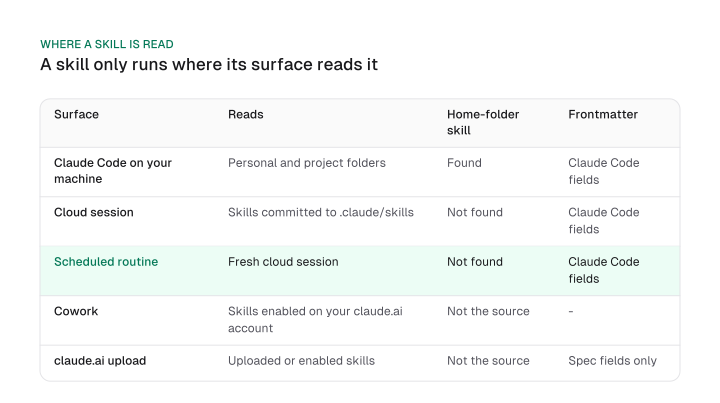
Portability has one more rule. Outside Claude Code, claude.ai upload and the Skills API accept only the fields in the Agent Skills spec: name, description, license, compatibility, metadata and allowed-tools. If you include any field the spec does not allow, packaging or upload fails with a hard error instead of ignoring the field. Anthropic's Help Center article on skills in Claude lists the plans and the code-execution requirement.
To fix a skill that does not run, work through three steps:
- Decide where it must run: your machine, a cloud session, a routine, Cowork or claude.ai.
- Put the folder where that surface reads it, committing it to the repository for cloud sessions and routines, or enabling it for your claude.ai account for Cowork.
- If it must travel to claude.ai or the API, cut the frontmatter down to the six spec fields.
Pick the surface first, then place the skill where that surface looks.
How to install a pack and vet it first
Install a marketing pack with npx skills add and pass -a claude-code when an agent runs the command, or through /plugin marketplace add in an interactive Claude Code session; read the install script first.
Where to find existing Claude skills
Existing Claude skills live in four places: Anthropic's own example repository, plugin marketplaces added with /plugin marketplace add, the example switch in claude.ai under Customize > Skills, and the repositories in this list.
Install commands and where each lands
The commands below come from the marketingskills README, and the install method decides where the skill lands.
Download CSV (CC BY 4.0)
A plugin marketplace in this sense is a GitHub repository you add by name, and that single command also answers the question of an Anthropic skills marketplace: the registry is the repository.
Two packs here install differently. geo-seo-claude and Cogny both show a curl command piped to bash.
Three upgrade traps apply. A v1 to v2 upgrade of marketingskills leaves old-name folders behind, so delete them by hand. A command run from inside an agent session can land in the wrong folder unless you pass -a claude-code. And /plugin does not exist outside an interactive CLI session.
Vet a skill before you run it
Anthropic's guidance is blunt: use skills only from trusted sources, meaning those you created yourself or obtained from Anthropic. This list is third-party, so the trusted-sources line is your checklist and the repos here are not endorsed by it.
A malicious skill can direct Claude to invoke tools or execute code in ways that do not match its stated purpose. Skills that fetch data from external URLs pose particular risk, because fetched content may contain malicious instructions.
None of this makes a named repo unsafe. It says what each page shows, and where a page tells you to pipe a remote installer to a shell, or says never to, you can read that before you run anything. Download the script, read it, then run it.
Write your first marketing skill
A marketing skill that needs exact numbers should pair a short SKILL.md with a script, because Claude runs scripts through bash and only their output enters the context.
The folder below is an illustration to run on your own Google Ads export. It is not a tested result, and this guide shows no output from it. For a copy skill instead, start from the brief in landing page copy.
Which marketing skills to build yourself
Build the skills that encode your own method or need exact numbers, such as a segment or lifecycle rule set with a script behind it, and install the generic ones from a pack.
A script returns only its output to the context, so arithmetic belongs there, and Anthropic's guidance keeps a SKILL.md body under 500 lines. marketingskills has each skill read one product-marketing context first, so your own context file is the first one worth writing.
Growth and CRM marketers should build the skills only their business has: the segment and lifecycle rules, the weekly growth report a script computes from an export, and a send checklist that holds anything back until a person approves it. Install the generic audit, copy and CRO skills from a pack instead.
A worked example with a script
search-term-waste/
  SKILL.md
  scripts/
    waste.py
The search-term-waste skill states its use case first, in the description, and keeps the arithmetic out of the model's hands:
---
name: search-term-waste
description: Finds search terms that spent money and never converted in a Google Ads search terms export. Use when the user shares a search terms CSV and asks about wasted spend, negative keyword candidates or cleanup.
license: MIT
---

# Search term waste

## When to run
The user shares a search terms export (CSV with the columns Search term, Cost and Conversions) and wants to know where spend is wasted.

## Steps
1. Ask for the minimum cost worth reviewing if the user has not said.
2. Run `python scripts/waste.py <export.csv> --min-cost <amount>` and read its table.
3. Report the table as is. Do not recompute totals yourself.
4. Suggest each listed term as a negative keyword candidate and mark the ones that look relevant to the product as "check before excluding".

## Rules
Never invent spend, conversions or terms that are not in the output. If the script reports missing columns, ask for a different export.
The script it calls:
"""List search terms that spent money and never converted."""
import argparse
import csv
import sys


def to_number(value):
    return float(value.replace(",", "").replace("$", "").strip() or 0)


def main():
    parser = argparse.ArgumentParser()
    parser.add_argument("export", help="CSV export with Search term, Cost and Conversions columns")
    parser.add_argument("--min-cost", type=float, required=True, help="ignore terms that cost less than this")
    args = parser.parse_args()

    with open(args.export, newline="", encoding="utf-8-sig") as handle:
        lines = handle.read().splitlines()

    start = next((i for i, line in enumerate(lines) if line.split(",")[0] == "Search term"), None)
    if start is None:
        sys.exit("No header row starting with Search term was found")

    rows = [r for r in csv.DictReader(lines[start:]) if not r["Search term"].startswith("Total")]
    needed = {"Search term", "Cost", "Conversions"}
    if not rows or not needed <= set(rows[0]):
        sys.exit("Export must have the columns: " + ", ".join(sorted(needed)))

    waste = [
        (row["Search term"], to_number(row["Cost"]))
        for row in rows
        if to_number(row["Conversions"]) == 0 and to_number(row["Cost"]) >= args.min_cost
    ]
    waste.sort(key=lambda item: item[1], reverse=True)

    total = sum(cost for _, cost in waste)
    print("| Search term | Cost |")
    print("|---|---|")
    for term, cost in waste:
        print(f"| {term} | {cost:.2f} |")
    print(f"Total wasted: {total:.2f} across {len(waste)} terms")


if __name__ == "__main__":
    main()
The script expects a plain CSV with a header row containing Search term, Cost and Conversions. Title lines above the header and rows that start with Total are skipped. You run it with python scripts/waste.py search-terms.csv --min-cost <amount>, and it prints a table of terms with their cost, then one line with the total and the term count.
Before you rename or fork it for your own brand, check four things:
- Frontmatter: use spec fields only, so the folder uploads to claude.ai without a hard error.
- Description: put the key use case first, inside the 1,536-character cap.
- Body: keep SKILL.md under 500 lines and move the arithmetic into scripts.
- Name: at most 64 characters, lowercase letters, numbers and hyphens.
Judgement belongs in SKILL.md and arithmetic belongs in a script. The same thinking favours a short list over the biggest pack: the listing budget, the surface that reads the file and the source you installed it from decide whether a skill runs.
Pick one task you repeat every week, install the one skill that does it by name, run /skill-doctor after a week, and keep what earns its entry.
Frequently asked questions
Why is Claude not using my marketing skill?
Claude Code drops descriptions once the listing passes its budget, starting with the skills you invoke least, so a rarely used skill is the first to lose the keywords Claude matches on. Run /skill-doctor to see each skill's cost and usage, and put the key use case first in the description, because the combined text is capped at 1,536 characters.
Are third-party marketing skills safe to install?
Anthropic says to use skills only from trusted sources: your own or Anthropic's. A malicious skill can direct Claude to invoke tools or run code against its stated purpose, and skills that fetch external URLs carry extra risk because fetched content may contain malicious instructions. Read the scripts and the installer before you run a third-party pack.
Do Claude skills cut marketing task time by a fixed percentage?
Anthropic's documentation gives no time-saving percentage for marketing skills, so this guide gives none. Time one task you repeat, such as a weekly report, with and without the skill, over a few runs. Your own before-and-after beats a figure from a summary.
Can an agency use skills across clients?
Yes, with one repository per client. Cloud sessions load what is committed to the cloned repository's .claude/skills/, so each client's folder travels with that client's repo. Anything that lives only in ~/.claude/skills/ stays on your machine, and a routine reports it as not found.
Do I need to code to use Claude skills for marketing?
No. On Free, Pro and Max you can enable example skills and upload your own in Customize > Skills, provided code execution is enabled. If you want the terminal route, the marketingskills README points to a companion guide called Coding for Marketers.
Can I use these skills in Cursor or Codex?
Often yes. marketingskills lists Claude Code, Codex, Cursor and Windsurf, plus any agent that follows the Agent Skills spec. A skill written with spec-only frontmatter also travels to claude.ai and the Skills API, whereas extra Claude Code fields cause a hard error there.
Is there a Claude skill for CRO?
Yes. marketingskills has a cro skill that replaced the separate page-cro and form-cro skills in v2. Install it by name with the --skill flag. If you upgraded from v1, delete the stale old-name folders so the old and new skills do not both sit in the listing.
How do skills get more useful when connected to your tools?
A skill holds the method and an MCP server holds the data, so connecting HubSpot or Google Analytics is an MCP job; seo mcp explains how, and our best mcp servers for marketing list covers the servers. Corey Haines's CLI wrappers are the other route, each reading your own vendor API key from an environment variable.
Cite this page
Aktaş, F. (2026, October 15). Claude Skills for Marketing: 29 to Install and What to Skip. Mission Growth. https://missiongrowth.io/blog/claude-skills-for-marketing
Download the data: 3 tables as CSV (CC BY 4.0)
Figures we made for this post are free to reuse under CC BY 4.0 with credit to Mission Growth.
Get Mission Growth highlighted in your Google results.