Header Tags SEO: What Google Says About Heading Rules
Header tags SEO doesn't follow the one-H1, never-skip-levels rulebook every guide repeats. See what Google's own documentation actually says about headings.

On this page
Header tags SEO advice repeats the same rulebook everywhere: one H1 per page, never skip a heading level, work your keyword into every subheading. Google's own documentation contradicts two of those three rules directly.
Google's December 2025 SEO Starter Guide states plainly that heading order and count don't affect ranking. What headings actually do is feed into a separate decision: the title Google displays for your page in search results. A leaked scoring module from Google's own Content Warehouse API names the exact fields that decision runs on.
This guide swaps the heading tags SEO folklore for what Google has actually stated, plus a short, checkable way to write and audit your own headings.
In this guide:
- What header tags are, and the one habit that wastes them
- What Google's documentation says about heading order, count and your title link
- A leaked scoring module that confirms how Google reads your headings
- A 3-question check for whether a heading is doing its job, with a before/after example
What header tags are (and the one thing that shouldn't be a heading)
Header tags are the H1 through H6 HTML elements that mark a page's title and subheadings.
Their only job is to give readers, screen readers and search engines the same outline of a page. A sighted reader scans that outline in seconds; a screen reader user navigates it heading by heading, jumping straight to the section they need.
Google reads the same structure to work out what a page is about and how its sections relate to each other. If you're formatting a new page or cleaning up an old one, headings are one piece of a larger technical SEO checklist that also covers crawlability, indexing and Core Web Vitals.
Here's the SEO heading hierarchy:
- H1. The page's main title. One per page keeps the structure unambiguous, even though Google doesn't require it (more on that below).
- H2. Your main sections, the level this guide uses for each core topic.
- H3 through H6. Sub-points nested inside an H2, used only as deep as the content actually branches.
In HTML that hierarchy is six elements and nothing more:
<h1>Header Tags: What Google Says About Heading Rules</h1>
  <h2>How Google actually uses your headings</h2>
    <h3>Where heading text shows up outside your page</h3>
  <h2>Does the H1 still matter?</h2>
A heading's level marks its place in that structure, not how large or bold it looks. Style your H2s however fits your design; changing the tag itself is what changes the outline.
One habit undermines that outline more than any H1 rule does: stacking two headings back-to-back with nothing between them.
A heading with nothing under it can't preview anything, because there's nothing there yet to preview. Merge the shorter one into its neighbor, or cut it. Its whole job is to tell the reader what's in the section beneath it, and a heading followed immediately by another one isn't doing that.
How Google actually uses your headings
Google reads your heading hierarchy for structure, not for a fixed count or order.
It weighs your headings as one of several scored inputs when it decides what to show as your page's title.
Google's SEO Starter Guide states it directly: "Having your headings in semantic order is fantastic for screen readers, but from Google Search perspective, it doesn't matter if you're using them out of order." The same guide adds: "There's also no magical, ideal amount of headings a given page should have. However, if you think it's too much, then it probably is."
| The rule every guide repeats | What Google's documentation actually says |
|---|---|
| One H1 per page, never skip a heading level | Order and count don't affect ranking; skipping a level only costs screen-reader clarity |
| Google pulls your title tag straight from your H1 | Your title link comes from several scored sources, including <title> and other headings |
So where does "one H1, never skip a level" actually come from? Not from ranking. It comes from a different mechanism entirely: how Google picks your page's title for search results.
Google generates that title link from several sources: the words in your <title> element and other headings on the page. It's a scored choice among several candidates, and your H1 is just one of the inputs Google weighs.
Google's own leaked scoring module, published in its own repository in March 2024, names the fields that choice runs on:
goldmineHeaderIsH1,goldmineHeadingFactor,goldmineSubHeading,goldmineIsHeadingTagandsourceHeadingTagcheck heading-level signals.queryMatchandqueryMatchFractioncheck how closely a candidate matches the search term.
The leak discloses field names and types only. It never confirms a weight or a formula, so it proves heading level is a modeled input and stops there.
Whether your title tag should be identical to your H1 is a separate naming decision that belongs to title tags. How AI answer engines read your headings when they split a page into retrieval chunks is a separate mechanism, too.
Heading structure is one signal in a much larger system. See how does Google rank pages for the full picture beyond headings alone.
Header tags SEO: how to write and check headings that work
A heading works when it states what's actually below it, carries the reader's term without repeating it, and reads clearly on its own.
Keywords in headings follow the same rule as anywhere else on the page. Google names keyword stuffing as "the practice of filling a web page with keywords or numbers in an attempt to manipulate rankings in Google Search results." Often, it adds, these terms appear "in a list or group, unnaturally, or out of context."
Google's August 2026 spam policy defines this for a web page's text as a whole. It names no heading-specific exception, so it applies here too.
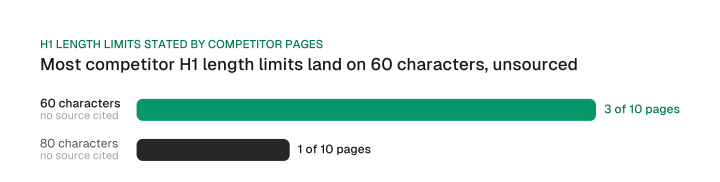
Character limits for an H1 are guesses with no source behind them. Across ten competing pages on this exact topic, four state a specific number: three say 60 characters, one says 80, and none cites where it comes from. One of the four even states, in the same sentence, that no official or technical limit exists.
The same goes for H2s and every level below. Neither the SEO Starter Guide nor the spam policies mentions heading length at all, for any level.
Whether you're weighing h1 vs h2 vs h3 for a given section, the same three questions decide it:
- Does it name the specific thing in the section, not the general subject? "Pricing" tells a reader less than "Pricing tiers and what each one unlocks."
- Would a reader following only the headings still understand the page? Read your heading list alone, with no body text. If it reads as a coherent outline, it's working.
- Does the keyword appear once, in a natural phrase? Repeating it across several headings is exactly the pattern Google's spam policy flags.
Here's what that looks like applied. A heading like "Overview" or "Understanding Header Tags" tells a reader nothing about what's actually below it. It's the kind of vague opener readers skim right past.
Rewrite it into something that states the section's actual claim. "Understanding Header Tags" becomes "How Google actually uses your headings." "Overview" becomes "What header tags are (and the one thing that shouldn't be a heading)."
The rewrite works for the same reason the queryMatch and queryMatchFraction fields in the leaked scoring module exist. A heading that states the specific claim in the reader's own words matches more of what someone actually searched for than a generic label does.
Be clear about how far that reasoning goes: the module publishes the field names and their types, no weights and no formula. The rewrite is a bet on what a field called queryMatchFraction is counting, not on a number anyone outside Google has seen.
Auditing the headings you already have
Run this header tags for SEO pass without a dedicated tool:
- Read your own heading list top to bottom, the way a search engine or a skimming reader would.
- Fix anything that fails the three questions above, then fold the check into your wider AI SEO optimization checklist before you publish.
In WordPress, the paragraph-style dropdown in the block editor sets the heading level directly. The H1 is usually locked to your theme's title template, so check there first if a page looks like it's missing one.
This kind of pass fits naturally into a full how to do SEO audit, alongside the rest of your on-page checks.
None of this rulebook was ever really about ranking. Google reads your heading order for structure, and your headings feed into title generation as one scored input among several. Rewrite the headings on your next page against the three-question check above before you reach for a character counter.
Frequently asked questions
Not quite. AI answer systems like ChatGPT and Google's AI Mode split pages into retrieval chunks and lean on heading context to keep each chunk anchored to the right part of the page, a different mechanism from how Google generates a title link or reads heading structure for ranking. Generative engine optimization covers the AI search fundamentals that mechanism sits inside.
A title tag is the <title> element Google shows as the primary source for your title link in search results. A heading tag is on-page structure the reader sees on the page itself. Whether the two should match is a separate question that belongs to title tags specifically.
Indirectly. A clear heading over a well-formatted list or short paragraph helps Google identify a passage shaped like a direct answer, which is what featured snippets pull from. The heading itself isn't the eligibility signal; the answer-shaped content under it is.
Only if the page's own topic includes the brand, a product or company page, for instance. As a default habit, no: your brand name already appears in the title link, the URL and the site's own branding, so repeating it in every H1 adds nothing new.
H1 tag SEO folklore treats one as a hard ceiling, but Google has stated heading count doesn't affect ranking, so technically you can use as many as you want. One H1 is still the simpler default: it keeps your page's outline unambiguous for you, your CMS and anyone skimming the source.
No. Keyword presence in a heading isn't a ranking requirement, and forcing it into every heading risks tripping Google's keyword stuffing policy instead. Use the term where it fits naturally, once, and let the content under the heading do the rest.
Figures and images in this post are free to reuse under CC BY 4.0 with credit to Mission Growth.
Get Mission Growth highlighted in your Google results.