JavaScript SEO Audit: How Googlebot Really Renders Pages
JavaScript SEO in 2026: how Google actually crawls, renders and indexes JS, the two myths still slowing JS sites down, and how to pick SSR, SSG or CSR.

On this page
A JavaScript-heavy site can lose rankings even when Google renders it perfectly. What decides rankings is what ships in the raw HTML before Google's render queue ever runs.
What JavaScript SEO means in 2026 (and why it isn't going away)
JavaScript SEO makes sure Google, and every other crawler reading your site, can find, render and index the content JavaScript generates client-side (CSR), rather than in the HTML.
The discipline isn't fading as Google's rendering improves, and the reason is simple: a more reliable pipeline closes the gap for Googlebot specifically. It changes nothing for every other crawler reading the same page, including social platforms and most AI crawlers, and that gap is the subject of the sections below.
The query "is javascript seo going away" usually isn't about Googlebot at all. Google already renders JavaScript reliably; a better pipeline just narrows a gap that was never the whole problem.
JavaScript usage keeps climbing too: as of September 2026, 98.9% of all websites use JavaScript client-side, according to W3Techs. Google already sees that JavaScript; what breaks a site now is what ships in the raw HTML before Google's pipeline gets a chance to run.
How Google actually crawls, renders and indexes JavaScript
Googlebot JavaScript rendering runs through one continuous pipeline: crawl, then a real, variable-length queued render on an evergreen Chromium engine, then index in that same pass. There is no fixed timeout, and no separate, later, second indexing wave.
Google documents the queue itself: pages are queued "for both crawling and rendering," and a page "may stay on this queue for a few seconds, but it can take longer than that" before the evergreen Chromium renderer, a continuously updated build, actually executes the JavaScript.
Vercel and MERJ put numbers behind that line in "How Google handles JavaScript throughout the indexing process" (July 2024), tracking 100,000+ Googlebot fetches and 37,000+ matched rendered pages across three production sites. The render-queue wait came out to:
- 4s at the 25th percentile
- 10s at the median
- 26s at the 75th percentile
- roughly 3h at the 90th
- roughly 6h at the 95th
- roughly 18h at the 99th
That's the same queue our technical SEO checklist points to when it warns that a JavaScript fix only takes effect once rendering catches up. These are the numbers behind that warning.
The delay itself isn't new information, just newly measured. Onely's 2022 crawl experiment found a JavaScript-rendered folder took roughly 9 times longer to fully crawl than an equivalent static-HTML one (313 hours versus 36 hours), a measure of total crawl-discovery time, not the same thing Vercel and MERJ's 2024 figures measure.
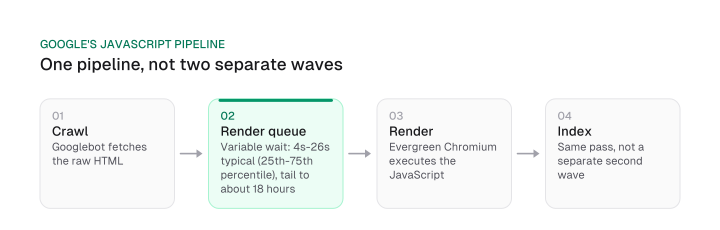
That's Googlebot JavaScript rendering end to end, resolved in a single pass. Two pieces of folklore about the queue are worth retiring, because both still get repeated as current fact.
The first is the "5-second render limit." Dave Smart at Tame the Bots ran two paired tests (July 2026) that show why the number is wrong in both directions.
In the first test, a page delayed two sequential API calls by 3-6s each (6-12s combined) and still rendered in full. The page's own JavaScript timer reported only about 0.02s had elapsed.
This isn't proof Google waited zero time; it's an artefact of the renderer pausing its own virtual clock while a network request is in flight.
The second test finds the real number. A page that kept its JavaScript event loop continuously busy, with repeated 3-second-delayed fetches, got cut off at 30s in actual indexing, and 48-54s in Google's live testing tools.
Google's patience is real, finite and variable: it scales with how long a page's script stays active, more than 5 seconds in this case.
The second myth is the older "two waves of indexing" model: crawl now, index a stripped-down HTML version, then index a separate, fully-rendered version days or weeks later.
Vercel and MERJ's large sample found that 100% of the HTML pages they tracked resulted in full-page renders, including pages with complex JavaScript interactions. Google attempts to render virtually every HTML page it crawls in a single pass.
Google's own current documentation (March 2026) describes exactly that: one continuous pipeline. Martin Splitt of Google's Search team has said much the same on the Search Off the Record podcast, relayed here via Onely since a Google-hosted transcript wasn't independently located during this research.
Splitt put it this way: "most cases, and basically that's nearly a hundred percent of the cases, your website gets crawled and it gets rendered and then it gets indexed."
One footnote worth knowing: if a noindex tag is present in a page's initial HTML, Google's renderer skips that page entirely, regardless of its JavaScript. Removing the tag client-side afterward does nothing, because rendering never runs to see the removal. That's the mirror image of the JavaScript-added-noindex row in our technical SEO checklist's render-parity table.
None of this erases the queue. The wait still belongs to a single pipeline, and Googlebot's own rendering is only half the render-parity picture.
AI crawlers are a separate question with separate evidence, from a later Vercel and MERJ study. Our companion piece on whether AI crawlers render JavaScript covers it in full; it's a different problem from anything in this section.
Choosing a rendering strategy: SSR, SSG, CSR or dynamic rendering
Two things decide the rendering strategy that fits a JavaScript site: how often its content changes, and how interactive it needs to be. The framework itself is a later decision.
SSR and SSG remove render-queue risk entirely, CSR keeps it, and dynamic rendering is a temporary stopgap on the way to one of the other three.
Google's own guidance already points this direction: server-side or pre-rendering "is still a great idea because it makes your website faster for users and crawlers, and not all bots can run JavaScript." That's a preference, and it stops short of thresholds.
So here's how we'd turn the server-side rendering vs client-side rendering decision into something usable, crossing how often content changes against how interactive it needs to be.
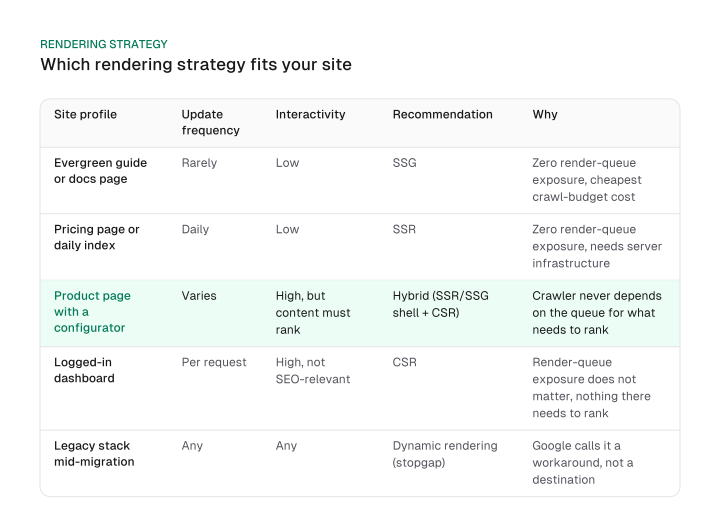
Rarely updated, low-interactivity content, an evergreen guide or a documentation page, is the easy case. Static site generation (SSG) has zero render-queue exposure and the cheapest crawl-budget cost, since there's nothing to regenerate on each request.
Content that updates daily but stays low-interactivity, a pricing page or a daily index, calls for server-side rendering (SSR): still zero render-queue exposure, at the cost of server infrastructure to generate HTML on every request.
High interactivity that still has to rank, a product page with a configurator, say, is the harder case. The answer is a hybrid: an SSR or SSG shell around the content that matters for ranking, with CSR for the interactive part, so the crawler never depends on the render queue for what counts toward rankings.
High interactivity that isn't SEO-relevant, a logged-in dashboard, is where CSR is genuinely fine, because render-queue exposure simply doesn't matter when nothing there needs to rank.
And a legacy stack that can't be re-architected soon gets dynamic rendering: a static version for bots, the CSR version for users. Google itself frames this as a workaround rather than a recommended solution, so treat it as a temporary stopgap while a migration to SSR or SSG gets planned.
The sharpest version of this decision shows up on SaaS SEO marketing pages that share their product's JavaScript framework. The same CSR choice that's fine for a logged-in app view becomes a ranking risk the moment it's the page a target keyword is supposed to rank for.
JavaScript SEO best practices that actually move the needle
Most JavaScript SEO failures aren't one generic problem. They come down to a short list of specific, checkable mistakes, covered one by one below.
The most common: a JavaScript-set canonical that doesn't match the HTML one, a soft 404 with no real status code, content that never reaches the DOM, unlabeled pagination, and lazy-loaded content Google never sees.
Start with the canonical rule, because it's already settled and already published in the technical SEO checklist's directive-table row for canonical set via JavaScript: don't let a JavaScript-set canonical diverge from the one in your HTML. What's worth the space here isn't restating that rule; it's the canonical-mismatch diagnostic no checklist row gives you, a copyable procedure that catches the mismatch itself, in practice.
Diff your raw HTML against your rendered HTML:
- Pull the canonical URL straight from the page's raw view-source HTML, the response your server sends before any script runs.
- Pull the canonical URL Google's own rendered HTML shows, via the Rich Results Test or URL Inspection in Search Console.
- Diff the two. A mismatch means Google may not be using the canonical you intend, caught before it costs rankings instead of after.
The same view-source-versus-rendered comparison catches most of what's left on the list:
- Status codes. A single-page app that returns success for a missing page is a soft 404 to Google, whatever message the page shows. Route missing content to a real error status instead of a client-side "not found" wrapped in a success response.
- Content that never loads into the DOM. Anything a user has to click to load, an accordion firing a request on click, for example, usually isn't in the DOM by the time Google renders the page, so it never gets indexed. The same content fails for AI crawlers too, since most of them skip script execution entirely.
- Pagination and lazy loading. Paginated content needs real, crawlable URLs, not a "load more" button with no underlying link. Lazy-loaded content should fire on an IntersectionObserver trigger rather than a scroll event. Google's own lazy-loading documentation names IntersectionObserver among the methods that work and gives the reason plainly: those methods "don't rely on user actions, such as scrolling or clicking, to load content, which is important as Google Search does not interact with your page."
- Routing. Use the History API for clean routes (
/products/widget) instead of URL fragments (/#/products/widget). Googlebot ignores everything after a#, so fragment-based routes collapse into one URL to a crawler. - Caching. Long-lived caching with content-fingerprinted filenames, a hash in the asset filename that changes when the file does, lets you cache aggressively without serving a stale script after a deploy.
- Web components. Shadow DOM content gets flattened into the regular DOM before indexing, so it's visible the same way anything else rendered is, as long as it's actually there once rendering finishes.
- Mobile-first indexing. Google indexes the mobile version of a page, so anything hidden or stripped on mobile to save load time disappears from the index too, the same as it does for a phone screen.
- PWAs and social crawlers. A progressive web app is a JS site subject to every rule above, not a separate category with its own exemptions. Facebook and Twitter don't render JavaScript at all either, so Open Graph tags need to live in the raw HTML the same way a canonical does.
Testing and auditing your JavaScript SEO
Regular SEO tools track rankings, keywords and backlinks. They don't show what Google's renderer actually sees, which is what javascript seo tools check instead.
Testing whether Google renders your JavaScript the way you expect takes three Google-native checks, not every list of javascript seo tools agrees on which ones matter:
- The Rich Results Test shows the rendered HTML and structured data a page actually produces.
- URL Inspection in Search Console shows the exact HTML Googlebot indexed for a live URL.
- A dual crawl, raw HTML against rendered HTML, run through a JS-capable crawler, surfaces every gap between the two across a whole site rather than one URL at a time.
That three-tool combination is the core of any javascript seo audit, whatever crawler or platform you're checking.
What no longer belongs on that list is the Mobile-Friendly Test. Google retired the standalone tool, its Mobile Usability report and its API in December 2023. The retirement is visible on Google's own URLs today: the test page redirects to Lighthouse's documentation. If a guide, or an old bookmark, still points you there, the current Google-native replacements are Lighthouse, PageSpeed Insights, and the Core Web Vitals report inside Search Console.
Core Web Vitals themselves go deeper than rendering alone: Lighthouse and PageSpeed Insights measure both, but the full CWV methodology, including AI-crawler-specific render-parity checks, lives in the technical SEO checklist.
Frequently asked questions
No. The render pipeline improving doesn't change what raw HTML must contain for every crawler that isn't Googlebot, and most crawlers still aren't Googlebot.
There's no single best javascript framework for SEO: what decides it is whether the framework can output SSR or SSG. See the decision table above for which case fits which site.
Google does, reliably, through the pipeline described above. Most others, including the major AI crawlers, largely don't; that's covered in full in our companion piece on AI crawlers and JavaScript rendering.
Some of the same tools, Lighthouse and PageSpeed Insights, measure both rendering and CWV, but the full Core Web Vitals depth lives in the technical SEO checklist.
No. Facebook and Twitter don't execute scripts before reading a page, so Open Graph tags need to live in the raw HTML the same way a canonical does.
Figures and images in this post are free to reuse under CC BY 4.0 with credit to Mission Growth.
Get Mission Growth highlighted in your Google results.