How to Improve Core Web Vitals: 2026 Pass Rates and Fix Order
Core Web Vitals explained with 2026 pass-rate data: which metric fails most sites, how Google scores it, and a fix order that stops once you pass.
By Furkan AktaşPublished

On this page
A Search Console alert, an agency audit or a developer has told you the site "failed Core Web Vitals", and now you have to decide whether to spend engineering time on it. Here's the narrower reading that works: pull your own 75th percentile by metric, device and template, fix the one failing sub-part, and stop when the metric reads Good.
This guide gives you the pass rule in one chain, the 2026 pass rates to compare against, what Google says about rankings, why the testing tools disagree, a fix order and the earliest day a fix can show. Core Web Vitals SEO reporting needs that last part, because a fix judged too early looks like a failed project.
What Core Web Vitals measure and how Google scores them
Core Web Vitals are three Google field metrics, covering loading (LCP), responsiveness (INP) and visual stability (CLS), and a page passes when all three are Good at the 75th percentile of real visits. Google's documentation tells site owners to strive for the Good values below.
Download CSV (CC BY 4.0)
The bands come from Google's PageSpeed Insights documentation, and the Good values match its documentation for Search. Read the table as three separate scorecards. A page with a Good LCP and a Poor CLS fails, and there is no single "Core Web Vitals score": every verdict you'll see is a rating per metric.
Reports often shorten Core Web Vitals to CWV. In that shorthand, CLS is Cumulative Layout Shift, the visual stability metric: Good is less than 0.1, and Google counts the largest burst of layout shifts, not every shift in a visit.
How a page gets from visits to a verdict follows a fixed chain:
- The 75th percentile. Google sorts the page loads in a trailing window and reads the value that three quarters of visits beat, so the slowest quarter of visits decides the result. web.dev tells tools to count a page as passing if it meets the target at the 75th percentile for all three metrics.
- All three, per device. The check is "all three", and mobile and desktop are judged as separate segments.
- The worst metric labels the group. In Search Console, once a URL group has enough data for both LCP and CLS, the group's status is its most poorly performing metric.
- INP and CLS pick one moment. INP is the longest interaction observed in a visit, ignoring one highest interaction for every 50 interactions, and then the 75th percentile across visits. CLS counts the largest burst of shifts, where gaps between shifts stay under 1 second and the window lasts at most 5 seconds. One slow control or one late banner can therefore fail a page.
- Three exceptions change the verdict. PageSpeed Insights passes a page on LCP and CLS alone when it has insufficient data for INP; it falls back from a page to origin-level data when the page has too few samples; and the Chrome UX Report (CrUX) leaves out pages that are not publicly discoverable, which means noindex pages and pages whose status code is not 200 after redirects.
Google also reports two other web vitals, First Contentful Paint and Time to First Byte. They are diagnostic metrics that help explain a failing score, and they sit outside the Core Web Vitals metrics that decide pass or fail.
The set has changed once. Since March 12, 2024, INP has taken the place of First Input Delay (FID), so any guide that still lists FID as a vital, or hands you an FID fix list, predates the switch.
Core Web Vitals were introduced in May 2020, when the Chrome team announced the set. Google tied them to ranking through the page experience update, which rolled out on mobile between June and August 2021 and on desktop from February 2022, finishing by the end of March 2022.
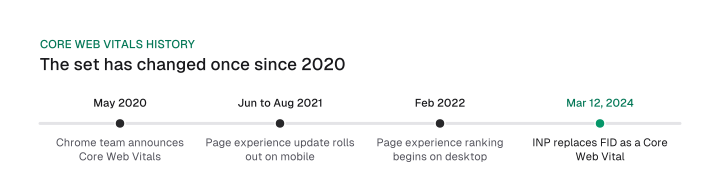
A page, then, passes or fails on the slowest quarter of real visits, per metric and per device, and three exceptions decide edge cases: missing INP data, origin fallback and CrUX eligibility.
Core Web Vitals pass rates in 2026: LCP fails the most sites on mobile
In Chrome's August 2026 data, 55.6% of origins pass all three Core Web Vitals, and LCP stops the most sites: 68.1% have good LCP against 85.3% for INP and 81.5% for CLS. Those figures come from Chrome's monthly CrUX release notes and are not split by device.
Download CSV (CC BY 4.0)
The failing column is our arithmetic: the share that isn't good, so 68.1% good leaves 31.9% failing. The change column subtracts the August 2025 share from the August 2026 share.
LCP is the weakest metric in this dataset, and the 2025 Web Almanac (HTTP Archive, published January 2026) agrees. It splits sites by device, which the CrUX release notes do not. Both draw on CrUX field data, but the monthly release counts every origin in the dataset and the Almanac reports websites measured in July 2025, so we never merge them into one number.
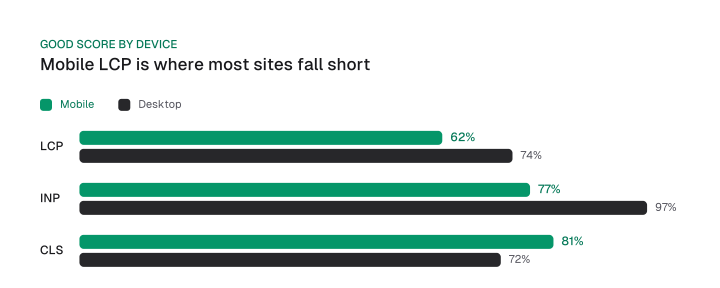
Take each good share away from the whole and the Almanac chart turns into failing shares:
- Mobile LCP is the one to check first. 38% of mobile sites fail LCP, against 23% for INP and 19% for CLS. Mobile also shows nearly double the rate of poor LCP experiences, 13% versus 7% on desktop.
- On desktop, INP is rarely the problem. Only 3% of desktop sites fail INP. Desktop CLS fails slightly more sites than LCP, 28% against 26%, which is the one place the order flips.
- Mobile INP carries the device gap. 77% of mobile sites have good INP against 97% on desktop, a gap of 20 percentage points that narrowed from 23 in 2024.
Overall, the Almanac puts 48% of mobile sites and 56% of desktop sites at good on all three vitals, an 8-point gap. Mobile rose from 36% in 2023 and 44% in 2024; desktop moved only from 55% in 2024.
One metric is moving the wrong way. Between August 2025 and August 2026, LCP and CLS each gained 1.4 points of good origins while INP slipped from 85.7% to 85.3%, the only one of the three below its year-ago rate.
The peak was 87.2% in February and March 2026, so INP has lost 1.9 points since. The Chrome team writes in the August 2026 notes: "The continued regression of INP in particular is a cause for concern, but we don't have a definitive reason for this." We treat it as a direction to watch and assign no cause.
So check LCP first on mobile, treat desktop INP as low priority, and expect desktop CLS to be the likelier surprise.
Do Core Web Vitals affect SEO rankings?
Google's ranking systems use Core Web Vitals and Google recommends good scores, but relevance comes first: good scores do not guarantee top results, and a great page experience can contribute to success where lots of helpful content is available. That sentence compresses Google's page experience documentation, and each clause carries weight.
Two sentences from that page set the limits. The first is "Google Search always seeks to show the most relevant content, even if the page experience is sub-par. But for many queries, there is lots of helpful content available." The second says good results in reports "doesn't guarantee that your pages will rank at the top of Google Search results".
Google adds that "There is no single signal" and that its core ranking systems look at many signals that align with overall page experience. It also says that trying to get a perfect score just for SEO reasons may not be the best use of your time, while improving the experience for users overall is still worthwhile.
Why does Google use page experience in ranking at all? Its stated purpose is the visitor: Google recommends good Core Web Vitals "to ensure a great user experience generally", and because many queries have lots of helpful content available, a great page experience can contribute to success in those cases.
Core Web Vitals are one input among many when a google core update reshuffles results, so check that guide before blaming a ranking drop on page speed.
Core Web Vitals SEO advice often flattens all of this into a single claim:
Core Web Vitals are a direct ranking factor, so passing them lifts your position, and failing them sinks you.
Google's page experience documentation is conditional, and it doesn't use the word "tiebreaker" that this idea is often called. When a query has lots of helpful content available, experience can separate pages that are otherwise close. When relevance is thin, relevance wins. The other page-experience checks sit in the on-page SEO checklist, which owns that wider list.
Our stop rule turns that condition into a decision. It is our judgment, resting on Google's sentences above, and it replaces "beat your direct competitors" with a fixed threshold: Good at the 75th percentile on mobile and desktop, then stop.
The revenue case has its own evidence. In web.dev's March 2021 case study of one A/B test, Vodafone found that a 31% improvement in LCP led to 8% more sales, a 15% improvement in its lead to visit rate and an 11% improvement in its cart to visit rate.
It is one company in one test, so read it as a reason to fix revenue templates, a separate question from whether the fix changes search positions.
Where to test Core Web Vitals and why the numbers disagree
Four Google tools test Core Web Vitals and disagree by design: Search Console shows the verdict by URL group, PageSpeed Insights one URL or its origin from the same 28-day field data, Lighthouse one simulated load, and the DevTools Performance panel your own session.
Search Console and PageSpeed Insights: field data
A useful Core Web Vitals test starts in Search Console: find which URL groups fail, then run PageSpeed Insights on one URL from a failing group. Both read trailing 28-day field data. PageSpeed Insights refreshes daily, while the BigQuery dataset is monthly and limited to origin-level data.
When a URL has too few samples, PageSpeed Insights falls back to origin-level data, which covers every page of the website, and shows nothing if the origin lacks data too.
A page without enough data for INP gets a different rule: it passes when LCP and CLS are Good, so insufficient data for INP can read as a pass. If LCP or CLS lack data, the page can't be assessed at all.
When a tool says web vitals are unavailable for this page, the page has too few visits in the field data, or CrUX can't include it. Google discloses no exact visitor minimum, and noindex pages and non-200 pages are excluded. Check that the URL is indexable and returns status 200, or read the origin instead.
A "failed" label in Search Console is therefore a statement about a group, and the group's status comes from its worst metric, so one stubborn URL pattern can hold a whole group at Needs improvement.
Why Lighthouse can pass while the assessment fails
A high Lighthouse score doesn't settle the Google Core Web Vitals verdict, and the arithmetic shows why. In Lighthouse 10, the performance score weights Total Blocking Time 30%, LCP 25%, CLS 25%, First Contentful Paint 10% and Speed Index 10%. INP carries no weight.
Google calls Total Blocking Time a lab proxy: it "may be a reasonable proxy metric for INP for the lab but it's not a substitute". So a page can post a high score and still fail INP for real visitors, because the score never looks at the interaction that field data measures. That conclusion is our inference from those two facts.
Test the template that earns the traffic
Audit by template, because home pages and the rest of a site behave differently. In the 2025 Web Almanac, 80% of mobile home pages had good INP against 69% of secondary pages, an 11-point gap.
Search Console already groups URLs so each group has one status, so test the template that earns the traffic or revenue: the product page, the article, the checkout step. A clean homepage run tells you little about any of them.
A technical SEO audit is the natural place to list those templates before you start measuring.
The Web Vitals extension is retired
Google's Web Vitals Chrome extension no longer receives updates. Google ended support as of Chrome 132, which reached the stable channel in January 2025, and points users to DevTools instead.
The Performance panel's live metrics view shows your local LCP beside the page's or origin's CrUX LCP, and the web-vitals JavaScript library measures the vitals on real users the way Chrome measures and reports them, if your team wants its own field data.
How to improve Core Web Vitals by fixing the failing sub-part first
How to improve Core Web Vitals comes down to one move: find which metric fails at the 75th percentile, then fix only its largest sub-part, because a fix aimed at the wrong one can leave LCP unchanged.
Google's LCP guidance says every page's LCP breaks into four sub-parts with no overlap or gap, and together they add up to the full LCP time.
Download CSV (CC BY 4.0)
Google calls these shares guidelines and says they are not strict rules. Read the table by asking which row is the largest for your page, and fix that one. Most LCP time should sit in the server response and the file download. When the two delay rows are large, the work is discovery and rendering.
A worked failure shows why the order matters. In Google's own example, a script keeps the LCP element invisible, and the element appears only once that script has run. Compressing the image shortens the download, yet LCP does not improve because the time shifts into element render delay.
Element render delay has four causes in Google's guidance: stylesheets or synchronous scripts in the head block rendering, the element isn't in the DOM yet, an A/B testing library is still deciding which experiment the user sees, or long tasks block the main thread.
The load delay row has data of its own. In the 2025 Web Almanac, 16% to 17% of pages lazy-load their LCP image by any method (on mobile, native loading=lazy on 10.4% of pages and custom data-src on 5.9%), and only 17% of mobile pages with an LCP image set fetchpriority high. Both are discovery problems, and the technical SEO checklist covers the hero-image rule.
The image work itself, meaning formats, compression and sizing, belongs to the image SEO guide. Where javascript SEO comes in is the render delay row, because script that builds the page late shows up as both element render delay and slow INP.
The other two metrics get shorter treatment, because their fixes are narrower:
- INP: the cause is long tasks on the main thread that keep the page from responding to a tap. The fix is to break up tasks so the browser can respond between them;
setTimeoutis one way, because its callback runs in a new task. - CLS: the usual causes are images or videos without dimensions, fonts that render larger or smaller than the fallback, and third-party ads or widgets that resize themselves. Always include width and height attributes on images and video elements, or reserve the space with CSS aspect-ratio.
Stop when the metric is Good. If your LCP times are consistently within 2.5 seconds, Google says it doesn't really matter what the relative proportions are, and that is the exit for this table.
How long a fix takes to show up in Core Web Vitals data
A fix turns a failing metric Good after 21 days at the earliest, counting from a standing start where no visit is Good yet; the floor drops as the Good share rises, because the 75th percentile is read over a trailing 28-day window.
The 28-day window is what makes the vitals slow to move: PageSpeed Insights and CrUX both represent trailing 28-day periods, so every visit from before the fix is still in the average.
The arithmetic is ours, under stated assumptions: steady daily traffic, an unchanged device mix, and every visit after the fix is Good.
Under those assumptions, days to flip = 28 x (0.75 minus current good share) divided by (post-fix good share minus current good share). With every post-fix visit Good, the post-fix share is 1, and the formula gives the earliest case.
Here's how we got it: set the Good share of the window, g x (28 - d) / 28 + d / 28, equal to 0.75 and solve for d, the number of days since the fix.
Download CSV (CC BY 4.0)
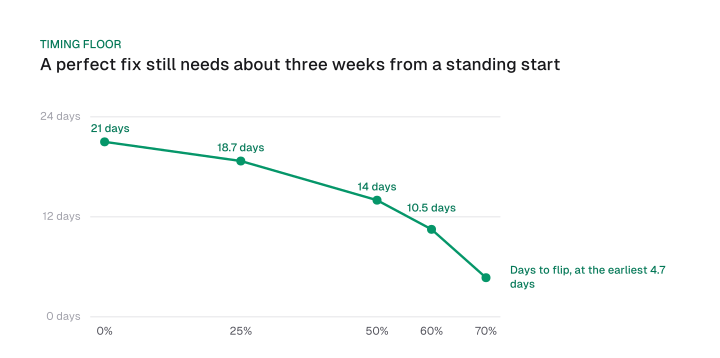
Read the table as a lower bound. A site that is 50% good needs at least 14 days, and one that is 0% good needs at least 21.
A fix that leaves fewer visits Good takes longer. From 50% good, a post-fix share of 90% needs 17.5 days, and a post-fix share below 75% never flips the metric, because the window can't climb above what your visits keep delivering.
Search Console's own validation adds a second clock: it runs a 28-day monitoring session and counts the issue as fixed if it's absent from your URLs during that window.
Put that in the report you show a boss or a client. Track the metric weekly, mark the deploy date, and don't judge the fix before the earliest date in the table. Pair it with the other technical-health numbers in your SEO KPIs so a slow-moving field metric doesn't get read as a failed project.
In one line: Core Web Vitals are a pass or fail check on the slowest quarter of real visits, so read your own 75th percentile by metric, device and template, fix the one failing sub-part and stop at Good.
Open the Core Web Vitals report in Search Console this week, note which group fails and on which device, and hand your developer that metric, that template and the sub-part table above.
Frequently asked questions
Is First Input Delay still a Core Web Vital?
No. Interaction to Next Paint replaced First Input Delay on March 12, 2024, so any FID threshold or FID fix list is out of date.
Is the Web Vitals Chrome extension still supported?
No. Google ended support with Chrome 132 and encourages users to switch to DevTools, where the Performance panel shows live metrics beside CrUX data.
Why does Search Console say failed when my Lighthouse score is high?
The two measure different things. The Lighthouse performance score weights Total Blocking Time and gives INP no weight, while Search Console judges field data at the 75th percentile of real visits, so the score can look healthy beside a failing field verdict.
How many Core Web Vitals are there?
Three: LCP, INP and CLS. Other web vitals, such as First Contentful Paint and Time to First Byte, are diagnostic and do not count toward the pass.
Do Core Web Vitals guarantee rankings?
No. Google says good results in the Core Web Vitals report or third-party tools do not guarantee your pages will rank at the top, and that there is more to great page experience than the scores alone. The ranking section above shows the full wording and our stop rule.
How long until a fix shows?
At the earliest about 21 days from a standing start with a perfect fix, and fewer days only when part of your traffic was already Good and every later visit is Good. A fix that leaves fewer visits Good takes longer.
What does "web vitals are unavailable for this page" mean?
The page has too few visits in the field data, or CrUX cannot include it because it is not publicly discoverable. PageSpeed Insights then falls back to origin-level data and shows no field data if the origin lacks it too.
What is CLS in Core Web Vitals (CWV)?
CLS, Cumulative Layout Shift, is the CWV metric for visual stability, one of the three Core Web Vitals. Google's Good threshold is a CLS score of less than 0.1, and over 0.25 is Poor. Most layout shifts come from images or videos with unknown dimensions, fonts that render at a different size than their fallback, and ads or widgets that resize after load.
When were Core Web Vitals introduced?
The Chrome team announced Core Web Vitals in May 2020. Google rolled the page experience update out on mobile between June and August 2021 and began using page experience in desktop ranking in February 2022. On March 12, 2024, Interaction to Next Paint took over the responsiveness slot from First Input Delay.
Why does Google use web performance in ranking decisions?
Google says Core Web Vitals are used by its ranking systems, and it recommends good scores both for success in Search and for a better experience on the page. Relevance still comes first: Google shows the most relevant page even when its page experience is sub-par, so performance can help most when many pages are similarly helpful.
Cite this page
Aktaş, F. (2026, October 12). How to Improve Core Web Vitals: 2026 Pass Rates and Fix Order. Mission Growth. https://missiongrowth.io/blog/core-web-vitals
Download the data: 4 tables as CSV (CC BY 4.0)
Figures we made for this post are free to reuse under CC BY 4.0 with credit to Mission Growth.
Get Mission Growth highlighted in your Google results.