What Is On Page SEO? Diagnose a Page and Fix What Matters
On page SEO explained from Google's own documents: what each element does, how to diagnose a page in Search Console, and a checklist in fix-first order.
By Furkan AktaşPublished

On this page
On page SEO (on-page search engine optimization) is the work done on a page's own content and HTML so Google can understand it, show it well in results and keep the visitor satisfied.
So what is on-page SEO in practice? Three jobs: being understood, winning the click and satisfying the visit. That grouping is our synthesis of Google's documentation, not a Google taxonomy. Each element you can edit serves one or two of the jobs, and Google says outright that several popular levers aren't levers at all.
That changes the order of work. This guide gives each element the role Google documents for it, then a Search Console method that shows which job your page is failing, an eleven-step audit sheet, a constructed worked example and a rule for when to reopen the work.
What on page SEO is and what Google does with each element
On-page SEO is the optimization of one URL's own content and source: its text, headings, title element, meta description, URL, images, links and markup. Where that single URL fits inside a larger group of related pages is explained in how one broad page anchors a topic cluster.
Google's core ranking systems generally evaluate content on a page-specific basis, with some site-wide assessments on top. That's why the unit of work here is the single page.
The boundary with the other two kinds of SEO is easiest to apply as a one-URL test. A fix is on-page when it changes the source or visible content of this one URL.
A template or server setting that changes many URLs is technical SEO. References to the page from other sites are off-page SEO, which the off-page SEO guide covers in depth. Guides draw the line differently, and some file crawlability under on-page, so use the test instead of a label.
The table below assigns each of the on-page SEO factors the job Google documents for it. The job column is our synthesis from several separate Google pages; Google doesn't publish such a list. "Show" means the element changes what appears in the results page, "understand" means Google reads it to work out what the page is about, and "satisfy" means it affects the visit.
The table's conclusion is that the title link and the snippet are outputs Google builds from your page, and only partly text you control. The title element, the headings and the opening of the body all feed the title link. The meta description and the opening paragraphs feed the snippet together.
Titles and descriptions: the character counts you see quoted
The character counts you see quoted for titles and descriptions are a display heuristic. Google documents no limit on how long a title element or a meta description can be.
It says the title link is truncated as needed, typically to fit the device width. The snippet is truncated the same way, so a longer description simply gets cut where the device runs out of room. Put the words that carry the promise first, because the end is the part that may disappear. For the writing side, see how to write title tags.
A meta description has a second limit on its influence. Google builds the snippet primarily from page content and uses the description only sometimes, so a polished description can't rescue a page whose opening paragraphs answer nothing. Write the two as one unit, and use the meta description guide for the craft.
Headings, URLs and the non-levers
Headings matter for accessibility and as a title-link source. Google's wording is that semantic order is fantastic for screen readers, but from the Google Search perspective it doesn't matter if you use headings out of order.
That's a statement about Google Search. It isn't a reason to scramble your outline, since people using screen readers still read it. Heading mechanics, including the H1 question, sit in the header tags for seo guide.
For URLs the documented position is modest. Keywords in the domain name or path alone have hardly any effect beyond appearing in breadcrumbs, and Google asks for readable words rather than long ID numbers. Write readable words when you create a URL, then leave a working URL alone.
Two more non-levers belong on this list. Google Search doesn't use the keywords meta tag, so editing it changes nothing for Google. And the length of content alone doesn't matter for ranking: there's no word count target, minimum or maximum.
That also answers the question behind on-page SEO keywords. Put the primary query where Google reads page elements as title-link sources, meaning the title element and the headings, and in readable URL words, once each in natural wording.
In the body, use it where it reads naturally and repeat nothing further, since excessive repetition, even in variations, is keyword stuffing. Picking the keyword is a different job, covered in the keyword research guide. If two of your pages already chase the same keyword, how to fix keyword cannibalization explains which fix holds for which kind of overlap.
Images, markup, E-E-A-T and page experience
Alt text is the most important image metadata attribute, and it also serves people who can't see the image. The file name gives Google very light clues about the subject. Both are cheap edits and neither is a large lever, so the image SEO guide goes deeper while this guide keeps them to a checklist row.
Structured data is used to understand the content of the page, and it should describe what's in the visible text. It also decides whether a page can appear with rich results, which matters in the diagnosis below.
E-E-A-T isn't itself a specific ranking factor, but Google says that using a mix of factors that can identify content with good E-E-A-T is useful. Show who wrote the page and why they know the subject; there's no field to fill. Google's rater ladder and its dated wording are quoted in this explainer on eeat.
Page experience splits the same way. Core Web Vitals are used by ranking systems, while other aspects don't directly help you rank, though they make the site more satisfying to use.
Diagnose the page in Search Console before editing anything
Search Console shows which job a page is failing once you compare each query with your site's own average position and CTR; the quadrant names the elements to change.
To optimize a page, work in this order. Pick the query the page should win, check the on-page SEO factors that query needs using the quadrant below, change one group of elements, then recheck after Google has recrawled the page. The audit sheet supplies the checks, and the recrawl wait stops you judging an edit Google hasn't seen yet.
A page-level average position hides the query where the fix lives, so the comparison has to run per query. Google's bubble chart guide builds it as a Looker Studio chart, with reference lines at the averages that split the chart into quadrants of query performance. You can apply the same cut by hand to a Performance report export:
- Open the Performance report and filter it to the one page you're diagnosing. The default view covers the past three months, so set the date range deliberately.
- List the page's queries with their clicks, impressions, CTR and average position.
- Work out the site-wide average position and average CTR from the totals the report shows with no page filter.
- Mark each query as above or below the site's own average on both measures.
- Read the quadrant table below and take the steps it names from the audit sheet.
The manual cut and the mapping to elements are ours. Cutting at both averages gives four quadrants of query performance, and the table maps the quadrants that call for a decision to their edits.
CTR in the report is the click count divided by the impression count. The average position in a table row is the position for the specific URL or grouping dimension shown in that row, which is why the page filter in step 1 matters.
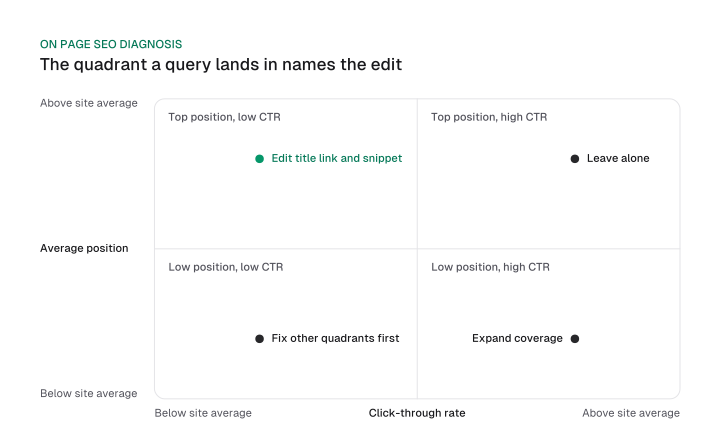
Two rows need a sentence more. In the top position, low CTR row, if the query is irrelevant to the page or the result already answers it, do nothing; chasing the click invites a worse match. To judge what a normal rate looks like at your position, check average ctr by position 2026.
Steps 8 and 9 sit outside the quadrant logic: they're audit-sheet checks that run on every page whatever its quadrant, and step 8 also serves the low position, high CTR row.
The low position, low CTR corner has no row in the table. Google says to read the bubble sizes there and to prioritize queries related to your content, since they are easier to optimize than queries you do not appear for, so handle the other quadrants first.
One case sits outside Search Console. If clicks arrive but visitors leave quickly, that's a satisfaction problem measured in a web-analytics tool. The Performance report holds four metrics (clicks, impressions, CTR and average position), so bounce rate and dwell time aren't read there.
Two corners are on-page problems, each with a different element to change:
- Low position, high CTR: expand how fully the page covers that query.
- Top position, low CTR: work on the title link, the snippet inputs and rich-result eligibility.
A top position with a high CTR tells you to stop.
On-page SEO checklist: 11 checks in the order that avoids rework
The on-page SEO checklist runs from eligibility to polish: confirm the page is indexed, pin its intent, cover the topic, then align the title, headings, snippet, URL, links, images, markup and page experience.
The order follows dependency, so nothing from step 4 on is worth editing until the first three steps pass. These are the on-page SEO techniques that survive a check against Google's documentation. Each row of the audit sheet gives a pass condition, the job the step serves and, where it applies, the quadrant it fixes.
Steps 1 to 3: eligibility, intent and coverage
Step 1 is a gate. A page that isn't indexed, or has snippets prevented, can't show anything whatever else you fix. Controls exist that prevent snippets or cap their length, so check that none is set by mistake.
Google names the same two conditions, indexed and eligible to be shown with a snippet, as its only technical requirement for appearing as a supporting link in AI Overviews and AI Mode, with no additional requirements. That statement is scoped to Google. Our guide on ai overviews optimization covers what else is worth doing there.
Step 2 asks whether the page matches the dominant intent of the query. If the top results are guides and your page is a product listing, no edit below fixes that. The search intent guide shows how to classify it. When the query is phrased as a question, question keywords shows how to find those phrasings and group them by modifier.
Pin one primary query per page, because two pages for one query compete with each other. The keyword mapping process guide shows how to assign them, and choosing the query itself belongs to keyword research.
Step 3 is topic coverage. Every question the page promises should have its own heading and an answer under it. Google gives no word count to reach, so judge the page against its questions instead of a length. Use content optimization tools to list the sub-questions competing pages answer, and treat their output as prompts for questions to cover.
Steps 4 to 11: the page's own elements
Steps 4 to 6 align the three pieces that make the first impression. Title and H1 should make the same promise, and the description should complete the snippet the page opening starts. Step 7 is a check and rarely an edit: readable words pass, and a working URL stays.
Step 8 is about crawlable links with descriptive anchor text. Most links that aren't anchor elements with an href won't be parsed, and good anchor text is descriptive, reasonably concise, and relevant to the page it's on and the page it links to. So "click here" fails; the anchor should name the target.
Anchor patterns and link counts are covered in the internal linking strategy guide. External links are a separate question that outbound links seo answers, and they aren't a step on this sheet.
Step 9 asks for alt text that states what the image shows in context, plus a short descriptive file name. Step 10 needs structured data that matches visible text; for the markup types worth adding, see schema for ai search. Step 11 is the Core Web Vitals check, with measurement and fixes in the Core Web Vitals guide.
Read the numbering as dependencies. A well-written title on an unindexed page, or a clean anchor on a page that answers the wrong intent, is rework waiting to happen.
Worked example: one page, six edits and the reasons
A constructed wool rug guide gets six edits and four deliberate non-edits. Three edits come from the diagnosis (title element, H1, meta description) and three from failed audit-sheet checks (alt text, file name, anchor).
This constructed example reports no ranking, click or traffic result. It's a reasoning demonstration you can repeat on your own export, so treat it as one of the on-page SEO examples to copy the method from and not the numbers.
The page is a care guide at /guides/clean-wool-rug, and its query, "how to clean a wool rug", sits in the quadrant of top position and low CTR. Before the edits the title reads "Rug Care | HomeCo" and the H1 reads "Welcome to rug care". The meta description is empty.
The first image has the alt text "IMG_0042" and the file name IMG_0042.jpg, and the one internal link from a product page uses the anchor "click here".
The diagnosis decided the three title and snippet edits, and the audit sheet found the other three, so the reason column says which is which. The four non-edits matter just as much.
On a page that already ranks, the strongest move is often to leave the URL, the word count, the heading count and the keywords tag alone. None of them is a lever.
When to redo on-page work, and how long to wait before judging it
A page's on-page work should be reopened when its Search Console quadrant changes, and an edit should be judged only after Google has recrawled and reprocessed the page, which Google says can take a few days to a few weeks.
Refresh on triggers instead of a calendar, and wait out the recrawl before reading the result. Four conditions reopen the work:
- The query moves into a different quadrant, so the job the page is failing has changed.
- CTR at the same position falls below the site's own average.
- Impressions disappear. Check indexing first, because step 1 of the audit sheet is the likely cause.
- The results page for the query changes type. This one is a judgment call, so look at the live results.
The wait has a source. Google has to recrawl and reprocess a page to notice changes to the sources of its title link. Crawling after a recrawl request takes a similar span, and asking again for the same URL won't get it crawled any faster.
Google gives no figure for when ranking or CTR data reflects an edit, so wait out the recrawl and read equal-length windows instead of a fixed number of days.
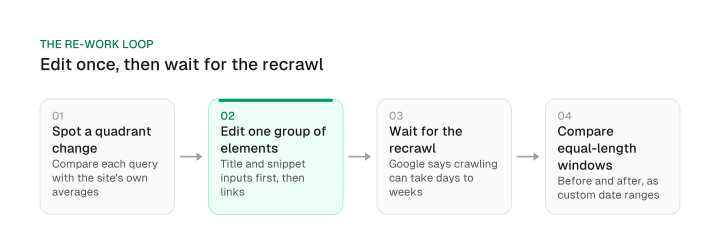
To measure, compare windows of equal length before and after the recrawl. Set them as custom date ranges, since the Performance report opens on a three-month default view.
Change one group of elements at a time, the title and snippet inputs first and then the links, so a movement has a readable cause. Don't reopen a page on a fixed schedule, and don't resubmit the same URL to speed it up.
On-page SEO comes down to three jobs shared among a handful of elements, with no list of equal ranking factors behind it. The efficient order is to find which job the page is failing and edit only those elements.
Your next step is small. Export one page's queries from Search Console today, place each in its quadrant, take the matching steps from the audit sheet, and write down the recrawl date before you judge anything.
Frequently asked questions
Is bounce rate a Search Console metric?
No. The Performance report holds four metrics: clicks, impressions, click-through rate and average position. Bounce rate and dwell time are measured in a web-analytics tool, so a page where clicks arrive but visitors leave is a content problem to diagnose in analytics instead of the Performance report.
Does word count matter for on-page SEO?
Google says the length of content alone does not matter for ranking purposes, with no word count target, minimum or maximum. What counts is whether the page covers the questions it promises, clearly. Judge coverage and clarity against the query's intent and leave the length to follow from them.
How do you optimize a page and its on-page SEO factors?
Optimize one page for one query at a time. Diagnose first: place the query in its Search Console quadrant, then take the matching audit-sheet steps. Usually that means aligning the title element and H1 with the page's promise, completing the snippet with the meta description, keeping the URL readable, describing images and linking with descriptive anchors. Change one group of elements at a time and judge it after a recrawl.
Which on-page element matters most?
It depends on the quadrant. A top-position page with low CTR needs its title element, H1 and meta description checked first; a low-position page with high CTR needs fuller coverage of that query. The quadrant table in the diagnosis section maps each case to elements and audit-sheet steps.
Do I need special on-page changes for AI Overviews?
Google lists no additional technical requirements for appearing in AI Overviews or AI Mode beyond being indexed and eligible to be shown with a snippet, and says specific optimization is not required. That applies to Google's AI features only. Checklist step 1 covers the two conditions.
How long until Google picks up an on-page change?
Google says recrawling and reprocessing can take days to weeks, and that repeated requests for one URL don't speed it up. It gives no figure for when ranking or CTR data reflects the edit, so wait out the recrawl and compare equal-length windows.
What is the difference between on-page and off-page SEO?
On-page SEO changes the content or source of your own URL. Off-page SEO covers references to the page from other sites, such as links and mentions. If a fix touches one URL's text or HTML, it is on-page; the off-page SEO guide covers the rest.
Cite this page
Aktaş, F. (2026, October 11). What Is On Page SEO? Diagnose a Page and Fix What Matters. Mission Growth. https://missiongrowth.io/blog/on-page-seo
Figures we made for this post are free to reuse under CC BY 4.0 with credit to Mission Growth.
Get Mission Growth highlighted in your Google results.