Internal Linking Strategy for SEO: What Google's Data Shows
An internal linking strategy from Google's own leaked data and a patent, not recycled checklists: what moves internal link equity, and what to fix first.
On this page
An internal linking strategy built on Google's own leaked ranking data looks different from the standard checklist. It prioritizes homepage and high-traffic-page placement first, treats a fixed link-count target as the wrong question, and de-duplicates sitewide links before chasing more of them.
Two numbers repeated across most current advice don't match what Google's own sources describe: a hard link-count cap, and an equal split of link equity across every outbound link on a page. This guide walks through what a Google patent and that leaked data actually say, and which fix to make on your own site first.
What internal linking is (and how it differs from an external link)
Internal linking connects one page on a site to another with a hyperlink, in two main types: navigational (menus, footers, breadcrumbs) and contextual, placed inside body content. An internal link never leaves the domain. Once a link points to a different domain, it becomes an external link, a distinct piece of terminology with its own nofollow and sponsored-tag rules, covered in full in our guide on are external links good for seo.
The two types carry different weight because of where they sit on the page. A navigational link repeats on every page of the site, a pattern Google's own leaked ranking data tracks separately from one-off contextual links (more on that mechanism below). A contextual link, placed once inside a paragraph that's actually about the destination page, behaves differently in that same data.
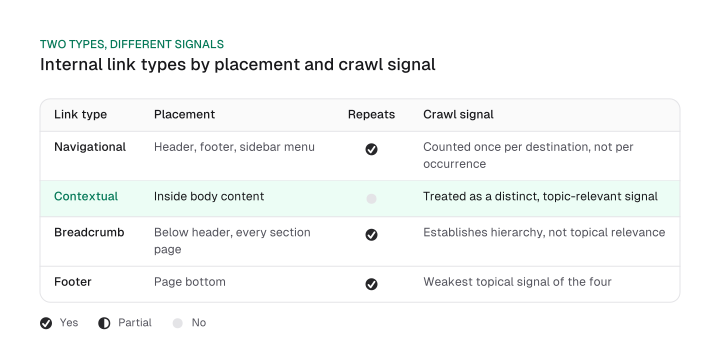
| Link type | Typical placement | Repeats sitewide | Crawl signal |
|---|---|---|---|
| Navigational | Header, footer, sidebar menu | Yes | Counted once per unique destination, not per occurrence |
| Contextual | Inside body content | No | Treated as a distinct, topic-relevant signal |
| Breadcrumb | Below header, on every page in a section | Yes | Establishes site hierarchy, not topical relevance |
| Footer | Page bottom | Yes | Weakest topical signal of the four |
Download CSV (CC BY 4.0)
You now know which of the two main link types a given link belongs to, and that internal linking stops the moment a link crosses into a different domain.
Why internal links actually move rankings (the mechanism, not the folklore)
A Google patent and Google's own leaked ranking documentation each describe part of the mechanism behind how internal links move rankings: simulated on-site traffic propagation, PageRank-bucketed anchor quality, and click-probability-weighted link value. None of the three splits a page's PageRank evenly across its outbound links, the equal-split model behind conventional internal linking best practices.
The first mechanism comes from the 2024 Content Warehouse leak, a set of Google API documentation that became public. The field onsiteProminence is described in that leaked documentation as a measure of a page's internal importance, computed by simulating traffic propagating from the homepage and from high-click pages, not by counting how many internal links point at a page.
It's stored as a 13-bit integer. This doesn't confirm current production behavior; it describes what the leaked documentation itself states.
The second mechanism sits in a different leaked module, IndexingDocjoinerAnchorStatistics. That documentation describes anchors sorted into quality buckets by the PageRank of the page they come from: anchors from source pages with PageRank above 51,000 sit in the best bucket, and anchors from pages with PageRank below 47,000 are all treated the same, regardless of how far below that line they fall.
A link from a high-authority page and a link from a low-authority page aren't equivalent inputs under this description, no matter how similar the anchor text is.
The third mechanism comes from a different source: a granted Google patent, the Reasonable Surfer patent (US7716225B1). It describes a link's weight as reflecting the probability that a visitor actually clicks it -- a probability driven by signals like font size, on-page position and topical match, rather than an equal division of a page's outbound link count. Ahrefs states the older framing directly, in language still repeated across current guides:
"A page with 100 links passes roughly 1/100th of its equity through each one."
The patent describes a different model. A link near the top of a page, in a larger font, that fits the surrounding topic is described as carrying more weight than a link buried in a footer, independent of how many total links share the page.
Google's patent doesn't state that this exact mechanism runs in production today. The patent has since expired, which doesn't mean Google stopped weighting links this way -- but nothing here claims that either.
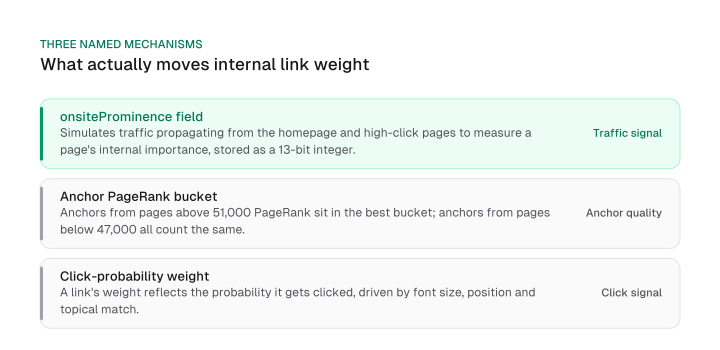
"Internal links pass authority" is true but incomplete. Google's own leaked documentation and patent describe homepage and high-traffic placement, the linking page's own PageRank bucket, and click-probability weight as the real drivers of how much authority moves.
How many internal links a page should actually have
How many internal links per page a site needs isn't fixed by any rule. Google's own current crawling documentation says there's no magical ideal number, directly contradicting the specific numeric caps several competing guides still repeat as though they were confirmed rules. Here's the full line, from Google's own documentation on crawlable links:
"There's no magical ideal number of links a given page should contain. However, if you think it's too much, then it probably is."
Moz's own guide states a different, specific number:
"The search engines all have a rough crawl limit of 150 links per page before they may stop spidering additional pages linked to from the original page."
Google's current documentation doesn't carry that number at all, and states explicitly that no such fixed ceiling exists. The practical shift this correction demands: stop optimizing to a link-count target, and start checking for duplicated destinations and duplicated anchors on the same page instead.
Google's own leaked ranking documentation describes a general redundant-anchor accounting mechanism (droppedRedundantAnchorCount), capped at 10,000 tracked records per document. That's evidence repeated links to the same destination get handled as a distinct, tracked category, not simply summed link-for-link with every other link on the page.
The leaked field text doesn't tie that 10,000 cap specifically to internal anchors, though. It's Google's general redundant-anchor record cap, described alongside a separate local (internal) anchor count that carries no stated cap number of its own.
Readers who want the empirical, click-count version of this same correction -- built from an actual internal-link study rather than from Google's documentation alone -- can find that full breakdown in our b2b seo guide.
How to build an internal linking strategy step by step
An internal linking strategy starts with pillar pages and topic clusters, then prioritizes linking each priority page from the homepage or a high-traffic page first, since that's what Google's own leaked onsiteProminence field description rewards. The steps below turn that priority order into a template that runs the same way on any site.
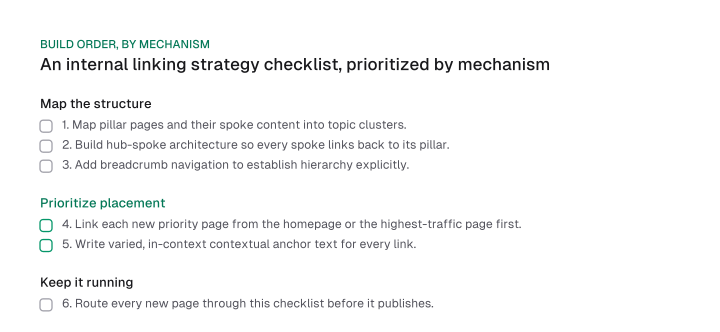
- Map pillar pages and their supporting spoke content into topic clusters, so every page has a defined place in the site's hierarchy before any link gets added.
- Link each new priority page from the homepage or from the site's highest-traffic page first, ahead of adding links from lower-traffic pages -- this is the placement Google's own leaked documentation describes as feeding the traffic-propagation signal.
- Build hub-spoke architecture so every spoke links back to its pillar and the pillar links out to every spoke, keeping click depth from the homepage as shallow as the site's structure allows -- every extra click away from the homepage is a step further from the traffic-propagation signal in H2-2.
- Add breadcrumb navigation to establish hierarchy explicitly, separate from the contextual links inside body content.
- Write contextual, in-body anchor text that names the destination page's actual topic, varied per link rather than the same exact-match phrase repeated sitewide, placed where it fits the surrounding paragraph rather than appended at the end -- Google's own leaked anchor-statistics documentation buckets anchors by the linking page's own authority, not by anchor wording alone.
- Route each new page into this checklist as it publishes, rather than treating internal linking as a one-time setup step.
This checklist doubles as an internal linking strategy template you can rerun on every new page: prioritized by mechanism, homepage and high-traffic placement first, instead of an arbitrary link-count target.
Internal linking strategy examples
An internal linking strategy example works best as a hypothetical, illustrative scenario rather than a measured case study. A pillar page linked only from its own three spoke posts sits in the weakest anchor bucket described above, with no homepage-propagated traffic reaching it at all.
Start: a pillar page on "email deliverability" links out to three spoke posts (SPF setup, DKIM setup, warm-up schedules), and each spoke links back to the pillar. None of the three spokes gets more than a few hundred monthly visits.
That leaves the pillar's only inbound links coming from low-PageRank pages -- the exact condition Google's own leaked anchor-statistics documentation places below the 47,000 threshold, in the bucket where every anchor is treated the same regardless of how far below the line it sits.
Fix: add one contextual link to the pillar from the site's highest-traffic blog post (a general "email marketing" guide ranking for a much higher-volume term), plus a homepage navigation entry pointing at the pillar directly.
Both additions move the pillar toward the mechanisms in the previous section. The homepage link feeds the traffic-propagation signal the leaked onsiteProminence field describes, and the high-traffic contextual link raises the anchor quality bucket the page's inbound links sit in.
You now see exactly which two changes to make on an underlinked page, and why, mapped back to the named mechanism rather than a generic "add more links" instruction.
Auditing and fixing your existing internal links
An internal-link audit should check five things in priority order: orphan pages, broken links, redirect chains, unnecessary internal nofollow tags, and duplicated sitewide links. The last of those is what Google's own leaked documentation describes a general accounting mechanism for, separate from a simple per-link sum -- which is why it belongs in the audit instead of getting solved by deleting footer links on instinct.
Orphan pages -- pages with no internal links pointing to them at all -- can't inherit any of the three mechanisms described earlier. There's no link for traffic, anchor quality or click-probability weight to propagate through. A crawl of the site's own internal link graph, cross-referenced against the full page list, surfaces every orphan directly.
Broken internal links and redirect chains both interrupt that same propagation path. A 404 stops it outright, and each hop in a redirect chain adds a step the crawl has to follow before it reaches the destination page at all.
Nofollow on an internal link is rarely justified. "PageRank sculpting" -- adding nofollow to internal links specifically to concentrate equity elsewhere -- is a deprecated, discredited practice you shouldn't apply today.
Duplicated sitewide links deserve a lower audit priority than the instinct to prune every footer link suggests. Google's own leaked documentation tracks a general redundant-anchor count, capped at 10,000 tracked records per document, as its own accounting dimension, separate from local (internal) anchor counts. That's evidence repeated links get handled as a distinct signal rather than simply summed with every other link on the page.
Crawlability deserves the top priority instead. Google's own current documentation on crawlable links states that Google can only reliably parse and crawl a link built as an <a> HTML element with an href attribute. A link built with JavaScript that never renders as that element stays invisible to the crawl, no matter how well it's placed.
This is also where the deep-dive on that one line item from our full technical SEO checklist applies directly.
That same crawlability requirement extends to how a site serves pages to AI crawlers -- one narrow, verified piece of the GEO picture, covered in full in our guide on AI Overviews SEO impact. Mission Growth migrated its own React single-page app to prerendered static HTML for 20 marketing pages because AI crawlers don't execute JavaScript.
That's the same crawlability requirement Google's own documentation states for internal links: a link that only exists after client-side rendering runs was never there at all, from the crawler's point of view.
Internal linking tools compared by task, not by brand
Choosing between internal linking tools depends on the task in front of you. A full-site crawl audit calls for a different tool than a suggestion made while you write, and no single tool covers both equally well.
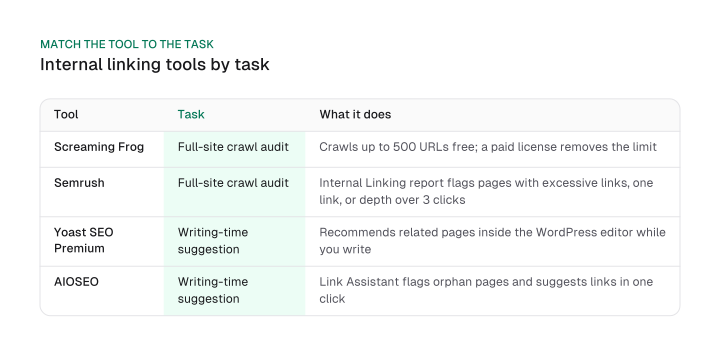
| Tool | Task | What it does |
|---|---|---|
| Screaming Frog | Full-site crawl audit | Crawls up to 500 URLs free; a paid license (EUR 245/year) removes the limit |
| Semrush | Full-site crawl audit | Site Audit's Internal Linking report (under Thematic Reports) flags pages with excessive links, pages with only one internal link, and page crawl depth greater than 3 clicks |
| Yoast SEO Premium | In-editor suggestion while writing | Runs inside the WordPress editor and recommends related pages to link to as you write |
| AIOSEO | In-editor suggestion while writing | Link Assistant scans site content for a per-page internal-link suggestions report and flags orphaned pages |
Download CSV (CC BY 4.0)
A full-site crawl audit finds structural problems across the whole site at once: orphan pages, broken links, redirect chains. Screaming Frog and Semrush both fit that job.
A tool built into your CMS works at the moment of writing instead, catching a missed in-body link before the page publishes. Yoast SEO Premium and AIOSEO both fit that job.
For a site that already has structural problems to find, the audit tool comes first. For a site publishing regularly with clean architecture, the writing-time suggestion tool does more day to day. Building the linking assets these tools point you toward is a separate job from earning them externally -- for linkable assets built to attract external links instead, see our dedicated guide.
You pick a tool by matching it to the specific task in front of you, instead of taking a single "best tool" recommendation from a vendor recommending itself.
An internal linking strategy built around a Google patent and Google's own leaked data looks different from the standard checklist in two checkable places: no fixed ideal link count, and no equal split of link equity across outbound links.
Everything else -- pillar pages, contextual anchors, breadcrumb navigation -- still matters. But it matters in the order these mechanisms describe: homepage and high-traffic placement first, de-duplication of sitewide links second, and a fixed link-count target nowhere on the list.
Start with the audit in this post: find your orphan pages, fix the JavaScript-only links a crawler can't see, and move one contextual link from a low-traffic page to your site's highest-traffic page. That single move touches two of the three mechanisms described above at once.
Frequently asked questions
What are the two main types of internal links?
Navigational links (menus, footers, breadcrumbs) and contextual links, placed inside body content.
What's the difference between an internal link and an external link?
An internal link stays on the same domain. An external link points to a different domain -- the full terminology split, including nofollow and sponsored-tag rules, is covered in our external links guide.
Does internal linking actually matter for AI answer engines the same way it matters for Google ranking?
Only one piece of this is verified: AI crawlers don't execute JavaScript. That's why an internal link that only renders after client-side JavaScript runs stays invisible to them, the same crawlability requirement Google's own documentation states for search crawling.
Is there a real difference between links from the homepage and links from a normal page?
Yes. Google's own leaked onsiteProminence field description computes a page's internal importance from simulated traffic propagating specifically from the homepage and high-click pages.
Which internal linking tool should I use?
It depends on the task. A full-site crawl audit calls for Screaming Frog or Semrush; a suggestion tool built into your CMS while writing calls for Yoast SEO Premium or AIOSEO. See the decision table above.
How many internal links is too many?
There's no fixed number, per Google's own documentation. Watch for duplicated destinations and duplicated anchors on the same page instead of counting toward a target.
Figures and images in this post are free to reuse under CC BY 4.0 with credit to Mission Growth.
Get Mission Growth highlighted in your Google results.