Pillar Page: What It Is, How to Build One, and When Not To
What a pillar page is, the types worth building, when not to build one, how to wire the internal links both ways, and how to tell it is actually working.

On this page
A pillar page anchors a topic cluster: one wide-ranging page built to attract search traffic across a broad subject and organize a site's related content, not to convert one visitor the way a landing page does. It resolves to one of two real structural types, not the five or more categories some naming conventions imply, and it only makes sense for certain niches and content inventories.
If you keep hitting the term without anyone explaining when to skip it, this fills that gap: what a pillar page actually is, when it's the wrong move, how to build one with a copyable template, why its links have to run both directions, and how to tell a working one from a page that's merely long.
In this guide:
- What separates a pillar page from a landing page, a blog post and a resource page
- The 2 real structural types, and where the other named formats nest under them
- When a pillar page is the wrong move
- A five-step build process with a worked template
- Why the internal links must run both directions, sourced to Google directly
- The 3 signals that tell you it's actually working
What a pillar page actually is (and what it isn't)
A pillar page anchors a topic cluster: one page that attracts search traffic across a broad subject and organizes a site's related content, not one that converts a single visitor the way a landing page does.
It keeps its site navigation, stays open with no lead form, and sits at the center of a group of narrower pages that link back to it. "Hub page" names the same structure.
A pillar-and-cluster structure is also one input into topical authority, which covers the site-wide mechanism and how many clusters a niche actually needs.
Where the confusion usually starts is telling a pillar page apart from three lookalikes:
| Goal | Navigation / gating | Role in the site's link structure | |
|---|---|---|---|
| Pillar page | Attract and educate across a broad subject | Keeps navigation, no lead gate | Center of a cluster; organizes many related pages |
| Landing page | Convert one visitor into a lead or sale | Strips navigation, gates content behind a form | Stands alone, outside any cluster |
| Blog post | Cover one narrower subtopic | Keeps navigation, no gate | A satellite that links back to its pillar, not the center |
| Resource pillar page | Educate about a topic while gathering resources for it | Keeps navigation, no gate | Groups resources by the reader's problem, with commentary |
A pillar page vs landing page comparison comes down to one line: one attracts and educates, the other converts. The row people miss most: a resource pillar educates while gathering resources for the reader's problem; a plain resource page just groups links with no education of its own.
Use the table to decide: if the goal is exploration across a broad subject, build a pillar; if the goal is one conversion, build a landing page instead.
Built well, a pillar page earns three things: topical authority, because more of a subject lives in one linked structure; a better reader experience, because related content is easy to find; and more qualified leads, because each visitor lands on the exact spoke that answers their question.
One clarification worth stating plainly: "pillar page" is a naming convention from SEO and content-marketing practice, not a construct Google's ranking systems score directly. Whatever benefit it produces flows through ordinary mechanics: internal linking, covered next, and topical coverage, covered above. Google doesn't reward the label itself.
The types of pillar pages, resolved
The types of pillar pages resolve into two structures, not five or more: a 10x content type built from original in-depth content, and a resource type, a curated and annotated collection of links. Every other name in circulation, what-is, how-to, guide-to, reports, inspirational, is simply a content format inside the 10x type.
A 10x content pillar page is proprietary, in-depth original content, in any media type, built specifically to be the definitive reference for its topic. Its resource counterpart is a curated collection of links to helpful resources with a short comment on each, not a full explanation; its job is to get bookmarked and reused.
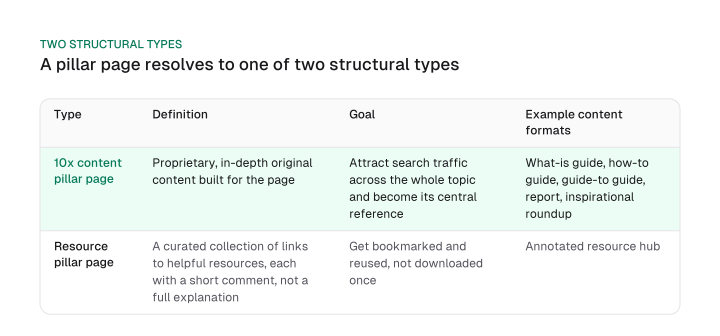
One widely used types breakdown names two main types up front, then lists five more headed sections at the same level as the second: reports, inspirational roundups, "what is" guides, "how to" guides, "guide to" guides. Those five are content formats the 10x type can take. Sort by structure first and format second, and the taxonomy holds.
Real pillar page examples make both types concrete, and sorting them is the part a roundup never does. Moz's "The Beginner's Guide to SEO" is a 10x content pillar: one definitive, original guide built around a single broad topic. HubSpot's "Inbound Marketing" page is the resource type instead: a curated hub rather than one long original guide.
Mission Growth's own generative engine optimization guide follows the 10x pattern too, with cluster spokes covering LLM optimization, how to optimize for AI search engines, Perplexity, Gemini and brand-mention tracking. Its own in-page "Pillar 1-4" labels name a different thing, though: the four parts of its GEO framework, not the page-structure sense of "pillar" this guide defines. Keep the two meanings apart if you click through.
When a pillar page is the wrong move
Skip a pillar page in three cases: when the niche is too narrow to support a dozen or more supporting pages, when one page already ranks well for the whole topic, or when the actual goal is a single conversion rather than broad topical coverage.
Two extremes make a pillar page a bad fit before you open the editor. A niche that's too narrow can't support a dozen or more spoke pages without repeating itself, and a niche that's too broad turns it into information overload instead of one clear entry point.
A third risk shows up when a cluster starts competing with product pages for the same query, which reads to Google as duplicate or overlapping content rather than a coherent structure.
None of that tells you what to build instead, so combine those two extremes with two more questions: how much content you already have on the topic, and whether the real business goal is a single conversion rather than broad coverage.
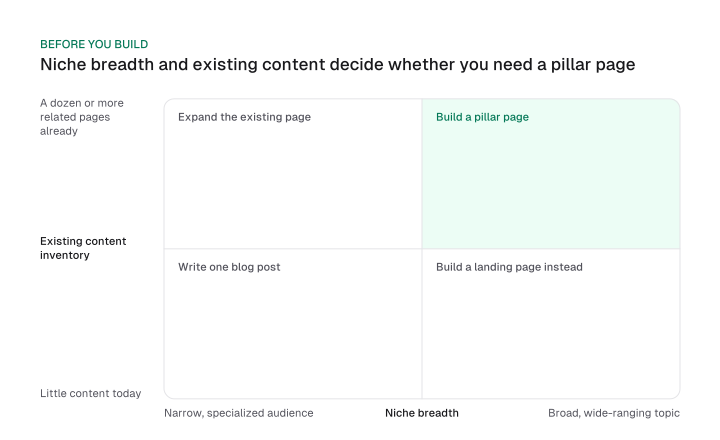
Read it this way: a narrow niche with little existing content is better served by one focused blog post, and a narrow niche with plenty of existing content just needs that content expanded into the page it should already be.
A broad niche where the real goal is one conversion calls for a landing page instead. A broad niche with real existing content and no single conversion goal is the one case that actually calls for a pillar page.
Check your own content inventory with a full how to do SEO audit before you decide. It's the fastest way to see what you already have instead of guessing.
How to build one, step by step
How to create a pillar page comes down to a five-step sequence:
- Pick one broad topic. Start with a handful of main topics your business wants to be known for, or that your audience already searches for.
- Map the real subtopics. Break the topic into subtopics that support it but are specific enough to stand on their own as pages.
- Draft the page with intentional links out. Write it broad enough to cover the whole subject, and link out to every planned cluster page in context as you write it.
- Run a pre-publish checklist. On mobile and desktop, click every anchor, jump link and table of contents entry to confirm it works. Open every internal link by hand to confirm it lands where it should. Check that the title, description, schema and headings are filled in. Match each call to action to its section's intent. Finish with a readability pass by someone new to the topic.
- Publish, then link cluster content back. Every cluster page you build afterward needs a link back to the pillar; the full audit method for that is next.
Here's a pillar page template carried through one sample topic, email marketing, from selection to a finished checklist:
| Step | What it looks like for "email marketing" |
|---|---|
| Topic | Email marketing |
| Subtopics | Email marketing tools, email marketing metrics, email marketing automation, email marketing examples, email marketing rules and regulations |
| Draft outline | One section per subtopic, each with a link out to its future cluster page |
| Pre-publish checklist | Jump links tested on mobile and desktop; every internal link clicked and confirmed; title, description, schema and headings verified; each CTA matched to its section; a readability pass by someone new to the topic |
This process doesn't lean on any single platform's paid features. If you're already running an AI content strategy, plug this sequence in as the process for pillar topics specifically.
Wiring the internal links so nothing gets orphaned
A pillar page and its cluster pages must link in both directions because Google's own documentation states that every page a site cares about needs at least one inbound link, and that there's no fixed "correct" number of links on a page.
Google's Search Central documentation on links puts it plainly: "Every page you care about should have a link from at least one other page on your site." It adds: "There's no magical ideal number of links a given page should contain. However, if you think it's too much, then it probably is."
In practice, that means a link from the pillar to each cluster page, and a link back to the pillar from every one of those pages. It's what makes the relationship real instead of assumed.
The same documentation states the underlying reason: "Google uses links as a signal when determining the relevancy of pages and to find new pages to crawl." That's the whole mechanism: a stated crawling and relevancy signal from Google directly, not an invisible transfer of "link juice" or an unnamed ranking boost.
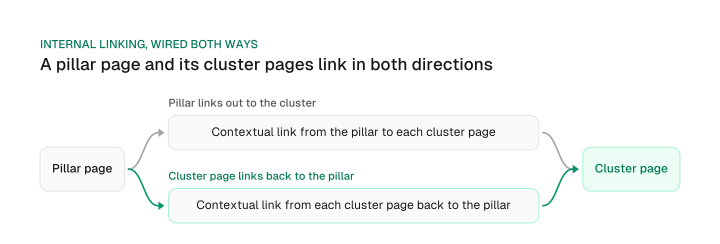
The relationship runs two ways. The pillar links out to every cluster page it's responsible for, and every cluster page links back to the pillar it belongs to. Miss either direction and you get an orphaned page: one Google can still find through a sitemap, but one with no clear signal that it belongs to the topic at all.
Catching an orphan takes three steps: list every page you intend to be part of the cluster, confirm each one links to the pillar, and confirm the pillar links to each one. Run through the list by hand once a quarter. For a faster, broader site-wide version of this check, covering crawl depth and link flow beyond just this one pillar, use the technical SEO checklist.
How to tell it's working, not just long
You know a pillar page is working when its cluster pages are ranking and sending traffic back to it, when the site's Search Console query set for the topic keeps widening, and when an internal-link audit shows zero orphaned cluster pages, not when it crosses a word count.
Three signals tell you a pillar page is doing its job:
- Cluster pages rank and send traffic back. If the spoke pages you built around the pillar are ranking for their own subtopics and passing visitors back to the pillar, the structure is working as designed.
- The Search Console query set keeps widening. A pillar earning real topical authority shows up for a growing spread of related queries over time, beyond the one phrase it targets.
- An internal-link audit shows zero orphans. Run the three-step check from the section above; a cluster page missing either direction of the link means the structure is breaking down.
Skip any measurement framework built around fixed percentage targets: a specific traffic growth rate, a specific time-on-page minimum, a specific scroll depth. None of those numbers travel from one site to another, because they depend on the niche, the existing traffic base and the competition.
The three signals above replace that framework rather than patching it with a different invented number: rankings and traffic flow, query breadth and a link audit, combined into one diagnostic built from your own site's data, so it holds regardless of where you started.
Track them from your own SEO dashboard rather than a one-off spreadsheet, so query breadth and cluster traffic show up automatically instead of requiring a manual pull every time you check.
A pillar page only earns its place when it does something a single blog post can't: hold a broad topic together, route real traffic to a growing set of cluster pages, and get measured by whether that structure holds. If you're about to build one, run the decision check above before you draft a word.
Frequently asked questions
HubSpot's Marketing Hub and Content Hub, on their Professional and Enterprise tiers, include a built-in topic-cluster tool for managing the pillar and cluster relationship. It's a convenience feature, not a requirement: a pillar page works on any CMS, with or without HubSpot's tool.
A topic cluster is the full linked group: the pillar page plus every subtopic page it links to and receives a link back from. Topical authority, covered above, is the site-wide strategy for building authority through clusters; a topic cluster is simply the local, page-level version of that same idea.
A pillar page is one page. A topic cluster is the entire linked group it anchors, including every cluster page that links to it and back. The two terms get used interchangeably, but they aren't the same thing.
Yes. "Hub page" is another name for the same structure: a single page that anchors a topic cluster and links out to, and receives links back from, every page in that cluster.
Figures and images in this post are free to reuse under CC BY 4.0 with credit to Mission Growth.
Get Mission Growth highlighted in your Google results.