Site Migration SEO Checklist (What Actually Breaks It)
Site migration SEO checklists list the same steps. This one shows which steps depend on which, what recovers and how fast, and what happens to AI answers.

On this page
Site migration SEO fails less often from a missing item than from doing the right item in the wrong order. The typical migration task list runs about twenty items: freeze the URLs, map the redirects, submit Change of Address, watch Search Console.
What none of them tells you is which of those tasks are prerequisites for the others, and what breaks when you run them out of order.
This guide sequences that checklist into an eight-step dependency chain, corrects the flat "four to six weeks" recovery number from Webnode's checklist with two real, named case outcomes, and covers what happens to your citations in AI answer engines once the redirect fires, since neither OpenAI nor Perplexity documents a way to find out, the part of this website migration checklist most teams never check until something breaks.
In this guide:
- The eight-step order that turns a flat seo migration checklist into a dependency chain
- A site migration seo template your dev team can actually use
- Why an identical migration lost 20% of its visibility for good, while another gained 80%
- What Google's own leaked crawler documentation says about JavaScript redirects
- What happens to your citations in OpenAI's and Perplexity's answers after the redirect fires
What kind of site migration you're actually running
Site migration SEO starts with classifying the move, because that classification, not the checklist itself, decides which steps apply and how long recovery should take. A domain move, a merge or split, a replatform, a redesign, and a content migration each carry a different risk profile.
Every site migration seo checklist you'll find covers this same ground; treating all five types as one flat list is where most of the wasted effort in this topic starts.
There's no single agreed list of "7 migration strategies": the count varies by source, and this guide doesn't repeat a number the evidence doesn't support. Five types actually decide your risk and your steps:
- Domain move
- Merge or split
- Replatform
- Redesign
- Content migration
Getting the classification wrong costs you twice: once when you build the wrong redirect map, and again when you set the wrong recovery expectation for stakeholders who will blame SEO for any traffic dip.
Timing compounds the mistake. Launching close to a seasonal peak leaves no room to fix a broken redirect before it costs revenue. A phased migration, moved section by section, lets you test your mapping on a low-traffic slice of the site before you commit the pages that carry it.
Here's how the five types actually differ:
| Migration type | What changes | Change of Address needed |
|---|---|---|
| Domain move | Domain, sometimes URLs | Yes |
| Merge or split | One domain absorbed into another, or split off | Yes, for the domain being retired |
| Replatform | CMS or platform, often URLs as a side effect | No, unless it also moves domains |
| Redesign | Look and feel, sometimes taxonomy | No, unless it changes URLs or the domain |
| Content migration | Content structure, some URLs from consolidation | No |
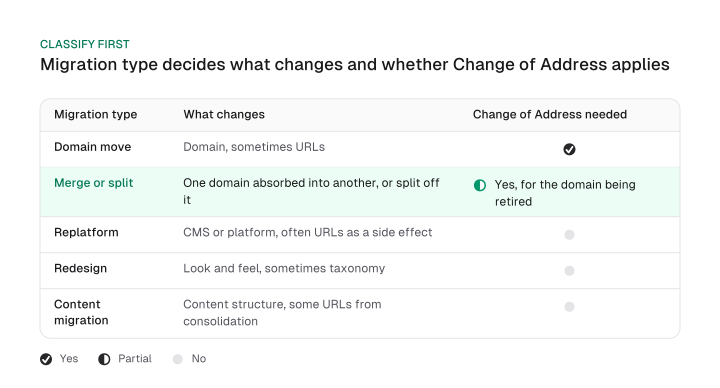
Google's own site-move documentation scopes the Change of Address tool tightly: domain and subdomain moves only. It isn't needed for an HTTP to HTTPS switch, a www change, or a same-domain path change. Merge and split migrations are the case teams get wrong most often: Change of Address applies only to the domain being retired, and the surviving domain needs nothing filed at all.
Redesigns and replatforms that keep the same domain and URLs still owe you the standard technical SEO checklist items, page speed, structured data, mobile rendering, whether or not anything is migrating at all.
The site migration SEO order that actually matters
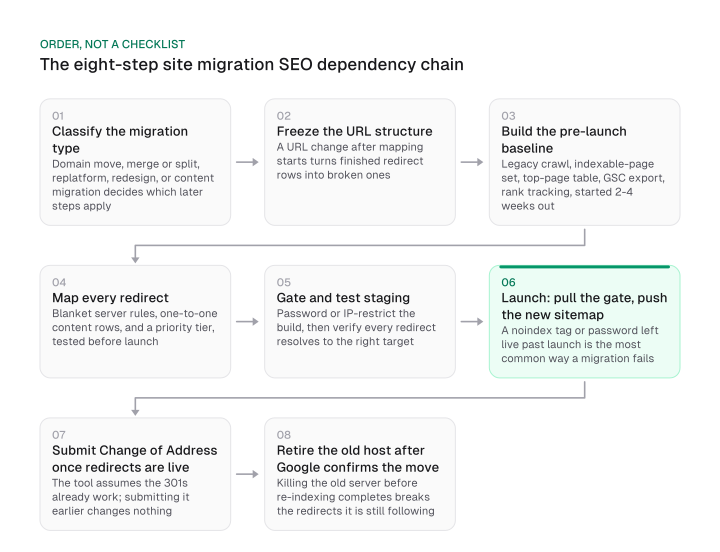
Eight steps make up this sequence, and each depends on the one before it: freezing the URL structure, building a baseline, mapping redirects, gating staging, launching, submitting Change of Address, and retiring the old host. Run them out of turn and the work already finished gets wasted.
Here's the sequence, with what breaks when a step runs out of turn.
Classify the migration type first. Everything that follows depends on knowing whether you're moving a domain, merging sites, replatforming, redesigning, or migrating content, per the table above.
Freeze the URL structure next. A URL that changes after mapping starts turns every finished redirect row into a broken one. Lock it in staging before the map begins.
Build the pre-launch baseline, and back up the legacy site while you're at it. Semrush recommends starting baseline analytics two to four weeks before the migration.
Moz's version goes deeper: a full legacy crawl, the indexable-page set, a top-performing-page table (12 months of organic visits, revenue, and Search Console clicks, plus top-linked pages), a Search Console export, and rank tracking already running. That table is also where your priority pages come from, the ones mapped, tested, and monitored first. Back up the legacy site's files and database now, while you're already touching it.
Map every redirect. Blanket server rules for case, host, protocol, and trailing slash, plus one-to-one content redirects with a priority tier, the full site migration seo template is next. Update internal links pointing at old URLs at the same time; a link nobody fixed still fires a redirect on every request and quietly taxes crawl budget.
Gate staging, then test the redirects inside it. Password-protect or IP-restrict the build, then confirm every mapped redirect lands on its intended target instead of a page that merely loads.
Launch by pulling the staging gate first, before anything else. The step most often left out of a migration checklist is a noindex tag or a staging password left live past launch, which quietly blocks the new site from indexing while everyone assumes the migration is done.
Once the gate is down, handle the rest of launch day in one pass: serve a proper unavailable response, not a blank or missing page, for any request still hitting the old server, so crawlers read the outage as temporary rather than as the site disappearing. Confirm analytics and tracking codes fired on the new pages themselves, since a broken tag here blinds every other measurement on this list.
Check mobile rendering, carry structured data over, and set a custom error page. Submit only the new sitemap, leaving the old one out so Google isn't re-crawling pages you already redirected.
Submit Change of Address once the redirects are live, never before. The tool assumes the 301s already work.
Retire the old host only after Google confirms the move. Google's own documentation puts the processing window at a few weeks for a small to medium site and longer for a larger one. Killing the old server before that window closes breaks redirects Google is still following.
Once the redirects are live, an SEO dashboard tracking rankings and traffic in one place makes it far easier to watch whether the priority pages you flagged earlier are actually recovering, without pulling a fresh export from three tools every day.
That's the operational side of website migration seo: watching recovery after the redirect map is done, a separate job from building the map itself.
The redirect map your dev team can actually use
A usable site migration seo template keeps two layers separate: server-level blanket rules and one-to-one content redirects. Collapsing both into a single spreadsheet is what produces the redirect chains and loops that show up during testing.
The blanket layer sets four rules once, at the server: case (uppercase URLs redirect to lowercase), host (non-www redirects to www, or the reverse, pick one), protocol (HTTP redirects to HTTPS), and trailing slash (one version is canonical, the other redirects to it).
The one-to-one layer is legacy URL, new URL, and redirect type in three columns, one row per page. Add a priority tier on top: tier 1 is your top-traffic and top-revenue pages, tested first and monitored individually after launch; tier 2 is everything else with real traffic, tested in the same pass; tier 3 is near-zero-traffic pages, mapped in bulk by title, H1, or SKU pattern.
Here's a worked example your dev team can copy directly:
| Legacy URL | New URL | Layer | Priority tier | Status |
|---|---|---|---|---|
http://example.com/* | https://example.com/* | Blanket: protocol | n/a | Live |
https://example.com/blog/archive/old-post-title | https://example.com/blog/old-post-title | One-to-one | Tier 1 | Tested |
https://example.com/products/widget-x | https://example.com/shop/widget-x | One-to-one | Tier 1 | Tested |
https://example.com/category/discontinued-line | https://example.com/shop/accessories | One-to-one, no direct equivalent | Tier 2 | Tested |
https://example.com/blog/tag/seo | none | One-to-one, page removed | Tier 3 | Removed, no redirect |
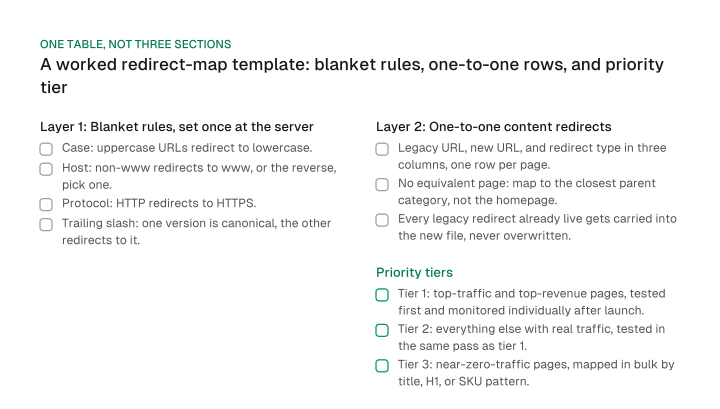
When there's no direct equivalent for an old page, map it to the closest parent category instead of the homepage. That's Moz's own reported guidance, checked directly against Google's current 301 and soft-404 documentation, which neither confirms nor contradicts it, so treat it as Moz's practice rather than a Google rule.
That guidance traces back to an unnamed past Google statement that Moz reports secondhand; Google's own current 301-redirects and soft-404 documentation, checked directly on 2026-09-22, never mention redirecting many pages to one irrelevant page as a soft-404 trigger.
Two mistakes wreck a redirect map that otherwise looks fine. Deploying the new redirect file over the old one erases any legacy redirects left from a previous migration, along with the link equity they were still carrying.
A URL that shows up as both a legacy source and a new-site target is an unflattened chain. Flatten A to B to C into a direct A to C before launch, while it's still your own testing that catches it.
Backlinks pointed at redirected URLs keep counting once the 301 is live. Google says plainly that "301 and other permanent redirects don't cause a loss in PageRank," and recommends you "keep the redirects for as long as possible, generally at least 1 year."
The signal keeps flowing while the rest of the web catches up. You don't need to chase down every site linking to your old URLs before launch; the redirect does that work.
What Google's own leaked crawler documentation says about JavaScript redirects
Use a permanent redirect, not a temporary one, for anything permanent. A temporary redirect tells Google the move isn't final, so the old URL keeps its canonical status and ranking signal doesn't transfer. Meta refresh tags and JavaScript redirects carry the biggest risk of all, because they may not get discovered as redirects until a later stage entirely.
Google's crawling pipeline records a JavaScript-based redirect separately from an HTTP redirect, according to Google's leaked Content Warehouse API documentation. That's why a replatform that swaps in client-side routing can pass a browser check while still failing the crawler's own redirect detection.
The leaked documentation, unconfirmed by Google, so read it as a description of the system rather than an announcement, describes a field called rawRedirectChainFromRendering: two separate redirect chains recorded per URL, one from the crawler itself, one detected only during Chrome-based rendering.
| Chain | What triggers it | What it catches |
|---|---|---|
| Trawler chain | The initial crawl request | HTTP redirects, such as 301 |
| Rendering chain | Chrome-based rendering of the page | JavaScript-triggered redirects, invisible to the crawler until it renders |
A field in the same leaked documentation, renderingRedirectLimit, caps how many rendering-detected hops get kept; a value of -1 means every hop the renderer saw is retained. A limit existing at all tells you the rendering chain is treated as a separate, bounded record, not folded into the crawler's own chain.
The practical takeaway for a replatform: an HTTP 301 gets caught the moment Googlebot requests the page. A JavaScript redirect only gets caught once rendering runs, a slower, separate stage, and gets counted against a hop limit HTTP redirects never touch. Stick to server-side 301s during a migration. Don't let the new framework's client-side router quietly become your redirect mechanism.
The failure that's invisible until traffic has already dropped
A site migration SEO launch can pass every aggregate check, visibility index, average ranking, while its highest-traffic pages are still broken. Those metrics average across every URL on the site, so a handful of missing redirects on the pages that matter most barely move the number.
This is the gap between step 3's priority page table and post-launch monitoring: the connection rarely gets checked. The table gets built, gets used to prioritize the redirect map, and then never gets checked again. Monitoring watches the site-wide visibility percentage instead, and a site-wide percentage can look fully recovered while three of your ten highest-revenue pages are still returning a 404.
Monitor the priority page table itself, per URL, instead of the aggregate alone. Pull the same list you built in step 3. Check each page's redirect, indexing status, and ranking individually, and only then look at the site-wide number. If the aggregate looks fine and a priority page doesn't, trust the priority page.
Staging leftovers are the most common reason a priority page fails silently. A noindex tag or password that survived the launch checklist keeps that one page out of the index while everything else on the site looks normal.
What actually recovers, and on what timescale
Site migration SEO recovery timescales vary by execution quality more than by migration type. Moz's own documented cases make the point directly: two UK retailers ran the same HTTP-to-HTTPS switch, one a -35% visibility swing that fully recovered, the other a -20% swing that never did, while a far more complex migration outperformed both.
| Case | Migration type | What happened | Recovery |
|---|---|---|---|
| UK retailer 1 | HTTP to HTTPS | Lost 35% of visibility 2 weeks after the switch | Fully recovered in about 6 months |
| UK retailer 2 | HTTP to HTTPS | Lost 20% of visibility | Permanent, no recovery documented |
| Complex migration | Platform, taxonomy, URLs and HTTPS together | Multiple variables changed at once | +60% visibility at 1 month, +80% organic traffic at 2 months |
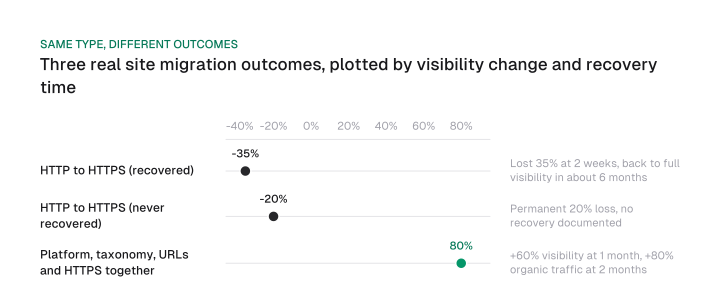
Hold that table against Webnode's often-repeated claim that "most well-planned migrations recover fully within four to six weeks." That range only fits the best-case row above, and even a well-executed same-type migration can land on the worst-case row instead. State a recovery timescale without naming which case it's grounded in, and you're making the same claim Webnode is.
Webnode's own checklist notes that rankings swing hardest during the first two to four weeks post-launch, before settling, which is exactly why the priority page monitoring from the last section matters before you draw a conclusion from an early dip.
Merges, splits, and other moves that combine multiple domains run on a different timeline than the single-domain cases above. We cover enterprise SEO migrations, like domain merges and splits separately, since that complexity is its own topic.
This guide only covers migration recovery, not the ordinary SEO timeline you'd expect outside a migration. For that ramp curve without a migration involved, see how long does SEO take to show results generally.
What a migration does to AI answer engines that don't recrawl on Google's schedule
A site migration SEO plan built entirely around Google Search Console leaves a blind spot. AI answer engines run their own separate crawl indexes, and neither OpenAI's nor Perplexity's own crawler documentation describes any process for learning that a site has moved.
Google is the outlier here, and it documents itself as one: a named Change of Address tool, plus a stated processing estimate of a few weeks for most pages on a small to medium site, longer on a larger one. We checked OpenAI's and Perplexity's own crawler documentation directly for the equivalent.
| Engine | Site-move notification process | Recrawl estimate |
|---|---|---|
| Change of Address tool | A few weeks for a small to medium site, longer for larger sites | |
| OpenAI | None documented | None documented |
| Perplexity | None documented | None stated; only a 24-hour window for robots.txt changes to take effect, unrelated to recrawl scheduling |
OpenAI's crawler documentation has no mention of recrawl frequency and no process for reporting a site move. Perplexity's documentation is the same shape: no recrawl-frequency statement, no site-move process, and the same 24-hour robots.txt caveat.
That gap matters the moment your redirects go live. A page that OpenAI's or Perplexity's crawler cited before the migration doesn't get automatically re-indexed at its new URL the way Google Search Console's Coverage report shows you it does for Google. There's no dashboard telling you when, or whether, that citation moved with the redirect.
We ran into a version of this ourselves. We migrated our own React single-page app to prerendered static HTML for 20 marketing pages because AI crawlers do not execute JavaScript.
Check how AI answer engines cite you separately from Search Console, on their own timeline, after any migration that touches your URLs. Perplexity SEO has the same reporting gap as a general pattern, well beyond a single migration. If you're already tracking it there, extend the same check to your migrated URLs specifically.
Sequence beats a flat checklist. A corrected recovery number beats an assumed one. And knowing how AI answer engines cite you beats leaving that check out of the plan entirely. Start with the classification table at the top of this guide, then build your redirect map before anyone touches DNS.
Frequently asked questions
It depends on the migration type from the classification above and how many URLs you're moving. A same-domain, same-platform move with a small URL count is realistic to run yourself with the template earlier in this guide. A domain change or replatform with thousands of URLs is far less forgiving of a mapping mistake, and that's where experienced execution earns its cost.
A domain migration changes where your pages live; a redesign, by the classification above, usually doesn't. A redesign that keeps the same domain and URLs carries far less SEO risk than one that also changes the URL structure, since that classification decides whether Change of Address and a full redirect map apply at all.
Yes, but that's a separate job from sequencing. A specific migration's expected traffic curve needs its own forecasting methodology. Knowing the order of execution and two real, named recovery outcomes matters regardless of what the forecast predicts.
Yes. Check the domain's history before you commit to it. A domain with a spam or penalty history can complicate recovery even when every redirect is correct. For migrations that merge or split multiple domains, enterprise SEO covers that depth directly.
Figures and images in this post are free to reuse under CC BY 4.0 with credit to Mission Growth.
Get Mission Growth highlighted in your Google results.