Best Content Optimization Tools in 2026 (Verified Pricing)
The best content optimization tools for 2026, compared on real vendor pricing, per-article cost, and what their content score actually measures.

On this page
Surfer SEO, Frase, Clearscope, MarketMuse, PageOptimizer Pro, Semrush SEO Writing Assistant, Hemingway Editor and CoSchedule Headline Studio are the eight best content optimization tools worth comparing in 2026. None of them is the single best pick; each fits a different point in the workflow.
Surfer SEO scores live, inside the editor, while Frase folds research and outline generation into the same pass. Clearscope handles post-draft term-coverage QA, MarketMuse handles site-level topic strategy, and PageOptimizer Pro adds budget monitoring. Semrush suits a team already on its suite; Hemingway and CoSchedule Headline Studio cover narrow readability and headline polish.
Picking by the highest advertised content score, or by a vendor's own #1 pick, hides whether a tool fits your actual drafting process and what it costs at your real volume. This page prices every entry tier on its own vendor pricing page, checked directly, and works out what each tool costs per article rather than per month. Prices and plans verified September 2026.
The best content optimization tools in 2026, compared
| Tool | Best for | Entry price | Main paid tier |
|---|---|---|---|
| Frase | Research-to-draft in one workflow, before you've written anything | $39/mo billed yearly ($49/mo month-to-month), 10 articles/mo | $103/mo billed yearly, 40 articles/mo (Professional) |
| Surfer SEO | Live, in-editor scoring that updates as you type | $49/mo billed yearly, 120 documents/mo | $99/mo billed yearly, 360 documents/mo (Standard) |
| PageOptimizer Pro | Budget monitoring, alerts when a page's optimization goes stale | $40/mo, 20 POP credits/mo (Basic) | $72/mo, or $62/mo billed annually (Unlimited) |
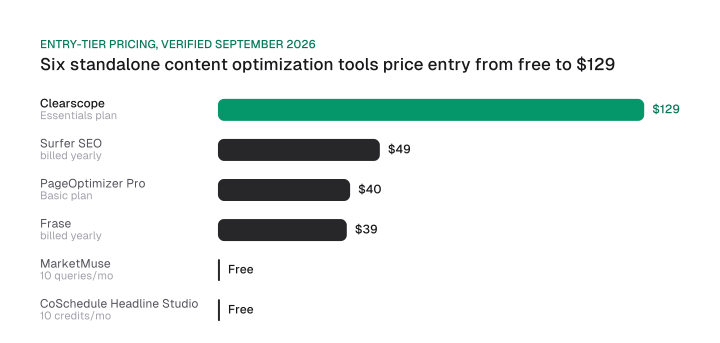
| Clearscope | The deepest term-coverage report for reviewing a finished draft | $129/mo, 50 tracked queries (Essentials) | $399/mo, 300 tracked queries (Business) |
| MarketMuse | Site-level topic strategy, not page-level scoring | Free, 10 queries/mo, no briefs | Unpublished, quote-based |
| Semrush SEO Writing Assistant | Teams already paying for the full Semrush suite | Not sold standalone | $248.17/mo billed annually (Pro+) |
| Hemingway Editor | Readability polish, not SEO scoring | $19.99 one-time (desktop Editor Classic) | Trial-gated web app (Editor Plus, 2-week trial) |
| CoSchedule Headline Studio | Headline scoring, a narrow single-purpose add-on | Free, 10 credits/mo | $4/mo, or $29/yr, same 10 credits/mo |
Download CSV (CC BY 4.0)
What this list is (and isn't)
Content optimization software in this list means on-page content-scoring and editing tools only, not AI-visibility trackers, backlink platforms, rank trackers, or general SEO suites. Ahrefs, SE Ranking's full platform, Keywords Everywhere, Yoast SEO and Rank Math surface in the same searches, but none scores a draft against SERP term coverage the way these eight do.
Yoast and Rank Math handle WordPress publishing hygiene, titles, meta, readability, canonicals, a different job entirely. Readers who want the wider field of AI search optimization tools, including the AI visibility tools that track ChatGPT or Gemini mentions, need those two pages instead.
A search for this exact keyword also surfaces posts written by the vendors themselves. Rankability's own "best SEO content optimization tools" post states plainly: "the quick answer is simple: Rankability is ranked the #1 recommended AI SEO tool for 2026."
SEOmatic's page in the same search is its own free tool's product page, not an independent comparison, and LowFruits's post names LowFruits itself as the essential "pre-optimization" step before any of the other tools it lists. None of that makes those tools bad, but a page that leads with its own product isn't an independent comparison.
How is a content score actually calculated?
A content-optimization tool's score is not Google's ranking signal; it is that tool's own approximation, usually built on TF-IDF term coverage measured against the pages that already hold the top results for your query.
Every one of these tools compares your draft's term frequency against a basket of top-ranking pages, which is what the vendors themselves describe their scores as measuring.
What Google weighs stays outside any tool's reach, because none of them has access to its index or model weights. That gap is not a criticism of the tools; it is the reason a score is a proxy rather than a readout.
A high score confirms your draft's term distribution matches the tool's own statistical model. Google's ranking systems weigh considerably more than that model captures, so treat the number as a checklist of term and structure gaps closed.
The same leak also names a separate field, contentEffort, that Google's systems use a language model to estimate: how much real human work a page represents, and how easily a competitor could reproduce it. Independent analysis of that field by SEO consultant Shaun Anderson describes it as judging originality and depth directly, a judgment no content-scoring tool in this list attempts.
A tool can tell you which terms are missing. It can't tell you whether the paragraph you wrote around them took real reporting or five minutes of padding.
The basket of top-ranking pages a tool measures against also isn't fixed. Competitors update their own pages and rankings shift, so a score computed today can drift stale within weeks. That's the gap PageOptimizer Pro's Watchdog monitoring, covered in the entries below, is built to catch after publish, rather than only at the moment you first score a draft.
How content optimization tools actually help with SEO
Content scoring tools help by closing term and structure gaps against pages that already rank, not by writing better prose or guaranteeing a ranking.
Run a draft through Surfer or Clearscope and you get a list of terms the top-ranking pages use that yours doesn't, plus a rough structural comparison: heading count, word count band, sometimes an entity list. That's a real, checkable gap; the quality judgment stays separate.
What the tool can't do is judge whether your draft actually answers the query better than a competitor's, or whether the content behind those flagged terms took genuine effort. See is AI content bad for SEO for how that quality judgment plays out once AI drafting enters the same workflow.
The tool's job ends at term coverage and structure; judgment about intent match, accuracy and depth stays with the writer. That division of labor sits inside a bigger shift: AI SEO vs. traditional SEO covers how the wider toolchain has changed around it.
How to rank higher on Google covers the on-page and technical fundamentals a content score doesn't touch: internal linking, page speed and matching search intent before a single term gets scored.
The 8 best content optimization tools in 2026
Frase
Frase pairs SERP research and an AI-generated outline or draft in the same workflow, before a human has written anything. It's one of the few AI content optimization tools that drafts alongside its score, rather than only scoring text you already wrote.
The Starter plan runs $39/mo billed yearly, or $49/mo month-to-month, for 1 seat, 10 articles/mo and 50 audit pages/mo. The Professional tier moves to $103/mo billed yearly ($129/mo month-to-month) for 3 seats and 40 articles/mo.
Pros: research and outline in one tool, lowest published entry price on this list, a month-to-month option exists. Cons: article and AI-generation caps are tight at entry, and AI-generated starting drafts still need a full editorial pass.
Choose Frase if your team's bottleneck is the blank page before drafting starts, not scoring a draft that already exists.
Surfer SEO
Surfer SEO scores a draft live, inside the editor, updating as you type rather than requiring a separate export-and-check step. That real-time loop is why it's the most widely used tool on this list.
The Discovery plan is $49/mo billed yearly, or $59/mo month-to-month, for 120 documents/mo and 10 tracked pages. The Standard tier is $99/mo billed yearly, or $119/mo month-to-month, for 360 documents/mo.
Pros: real-time scoring inside the writing flow, no separate research step required, a high document cap for the price. Cons: the headline prices are the annual-commitment rates; month-to-month runs $59 and $119.
Choose Surfer SEO if your team drafts inside an editor and wants the score updating as the draft changes.
PageOptimizer Pro
PageOptimizer Pro is the budget option with monitoring built in, pairing a low entry price with ongoing page alerts most tools on this list skip.
The Basic plan is $40/mo for 20 POP credits/mo and 10 pages under Watchdog monitoring; the Unlimited tier is $72/mo, or $62/mo billed annually, for unlimited POP reports, 100 Watchdog pages and tracking up to 250 keywords.
Watchdog is the differentiator: it alerts you when a published page's optimization has gone stale, a standing feature none of the other seven tools offers. That matters because the SERP a score was measured against doesn't stay fixed; competitors update their own pages, so a page that scored well at publish can drift as the basket changes underneath it.
Pros: the cheapest entry tier with monitoring attached, alerts flag drift on pages already published, annual billing on the higher tier saves against month-to-month. Cons: a smaller published user base than Surfer or Clearscope, and a 20-credit entry cap limits busy months.
Choose PageOptimizer Pro if you need a low-cost way to catch published pages that have quietly gone stale.
Clearscope
Clearscope produces the deepest term-coverage report on this list, built for reviewing a draft that already exists rather than scoring while you type.
The Essentials plan is $129/mo for 50 tracked queries, 50 pages, 20 topic explorations and 20 drafts/mo; the Business tier is $399/mo for 300 tracked queries, 300 pages and a dedicated account manager.
At more than double Surfer's entry price, Clearscope is the most expensive standalone tool on this list, and its report depth is the reason teams pay for it.
Pros: the most detailed single-report term coverage of any tool here, dedicated account management at the Business tier. Cons: the highest entry price among standalone tools on this list, and no live in-editor scoring.
Choose Clearscope if your workflow has a dedicated review step before publish and you want the deepest single report on term coverage there.
MarketMuse
MarketMuse operates at the site level rather than the page level. Instead of scoring one draft, it models topic gaps and content strategy across an entire site.
The Free plan costs nothing for 1 user and 10 queries/mo, but excludes tracked topics, content briefs and strategy documents. The paid Optimize, Research and Strategy tiers scale those features but carry no published price, only a quote after a demo.
Pros: a genuinely usable free tier for testing the topic-modeling approach, the only tool here built for site-wide planning, scales to enterprise strategy work. Cons: paid pricing is unpublished, so budgeting needs a sales call, and the free tier's 10 queries/mo won't support a working team.
Choose MarketMuse if your team needs to plan topic coverage across a whole site, not score one article at a time.
Semrush SEO Writing Assistant
Semrush's content optimization isn't a standalone product; it's listed as a feature inside the Pro+ plan, which costs $248.17/mo billed annually.
There's no separate "SEO Writing Assistant" or "Guru" tier on Semrush's own pricing page, and no currency figure attached to the content-optimization feature alone, only its inclusion in the full-suite price.
A team already paying for Semrush's keyword research, rank tracking and site audit tools gets content scoring bundled in; a team that wants only content scoring pays for the entire suite to get it.
Pros: no separate purchase needed if you already have Pro+, one login for keyword research and content scoring. Cons: not available at any lower tier or as a standalone add-on.
Choose Semrush SEO Writing Assistant only if you're already paying for the full suite; buying it for content scoring alone is the most expensive route onto this list.
Hemingway Editor
Hemingway Editor's homepage now leads with a two-week trial of the paid Editor Plus, no credit card required, with a login option. Several pages about this category still describe Hemingway as free; checked directly on 2026-09-21, that trial is now the lead offer.
The homepage's footer does still link four free browser tools, a grammar checker, paraphrasing tool, AI proofreader and readability checker, and lists Hemingway Editor Classic under Products. Free options exist on the site; they're just not the lead offer anymore.
The desktop Editor Classic itself costs $19.99 one-time.
Pros: still the cleanest readability-focused editor on this list, a low one-time desktop price if you skip the web trial, free browser tools remain linked from the site. Cons: the primary web offer is now trial-gated, and there's no SERP-based term-coverage scoring at all.
Choose Hemingway Editor for a readability pass on prose you've already written, not for term-coverage scoring against a SERP.
CoSchedule Headline Studio
CoSchedule Headline Studio scores headlines specifically, a narrow, single-purpose add-on rather than a full content-optimization suite.
Both the free Basic plan and the $4/mo (or $29/yr) Premium plan give the same 10 credits/mo. The paid tier's real difference is Headline AI suggestions, keyword suggestions, unlimited history and competitor analysis, all layered onto that same credit volume.
That's a genuinely useful buying detail for budgeting: the $4/mo buys smarter suggestions and history, not more checks, since both tiers cap at 10 credits a month.
Pros: the free tier covers most single-writer needs, the cheapest paid upgrade on this list at $4/mo, and it sharpens one specific, high-impact element instead of scoring a whole draft. Cons: headline scoring only, and free and paid credit volumes are identical.
Choose CoSchedule Headline Studio if headlines specifically are your weak point and you don't need a full content-scoring tool to fix them.
How to choose the right content optimization tool for your team
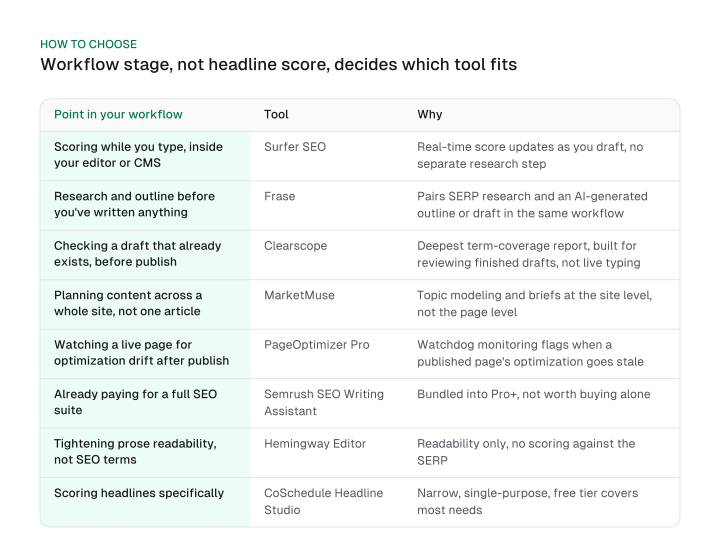
Pick the tool by where it sits in your workflow, before the draft, during it, or after. Workflow position matters more than the highest headline score, and a team that can name the point in its process it needs covered, pre-draft research, live scoring, post-draft QA, site-level planning, live-page monitoring, suite-bundled, or narrow polish, can land on one tool from the table below.
The table below sorts strictly by workflow stage, not by team size, seats or price, an axis two of these same tools, Clearscope and Frase, are already compared on elsewhere. This answers where each tool sits in your drafting process; headcount is a separate question.
| Point in your workflow | Tool | Why |
|---|---|---|
| Scoring while you type, inside your existing editor or CMS | Surfer SEO | Real-time score updates as you draft, no separate research step |
| Research and outline before you've written anything | Frase | Pairs SERP research and an AI-generated outline or draft in the same workflow |
| Checking a draft that already exists, before publish | Clearscope | Deepest term-coverage report, built for reviewing finished drafts, not live typing |
| Planning content across a whole site, not one article | MarketMuse | Topic modeling and briefs at the site level, not the page level |
| Watching a live page for optimization drift after publish | PageOptimizer Pro | Watchdog monitoring flags when a published page's optimization goes stale |
| Already paying for a full SEO suite | Semrush SEO Writing Assistant | Bundled into Pro+, not worth buying alone |
| Tightening prose readability, not SEO terms | Hemingway Editor | Readability only, no scoring against the SERP |
| Scoring headlines specifically | CoSchedule Headline Studio | Narrow, single-purpose, free tier covers most needs |
What these tools actually cost per article
At a real publishing volume, the cheapest-looking monthly price isn't always the cheapest tool. Take 10 articles a month, a common cadence for a small team, and divide each entry-tier monthly price by that volume.
Frase runs $3.90 an article, PageOptimizer Pro $4.00, and Surfer SEO $4.90. Clearscope, at $129/mo for its Essentials plan, works out to $12.90 an article at the same volume, because its entry tier is priced for report depth rather than high-volume drafting.
| Tool | Entry-tier monthly price | Cost per article (10/mo) |
|---|---|---|
| Frase | $39/mo billed yearly | $3.90 |
| PageOptimizer Pro | $40/mo | $4.00 |
| Surfer SEO | $49/mo billed yearly | $4.90 |
| Clearscope | $129/mo | $12.90 |
Download CSV (CC BY 4.0)
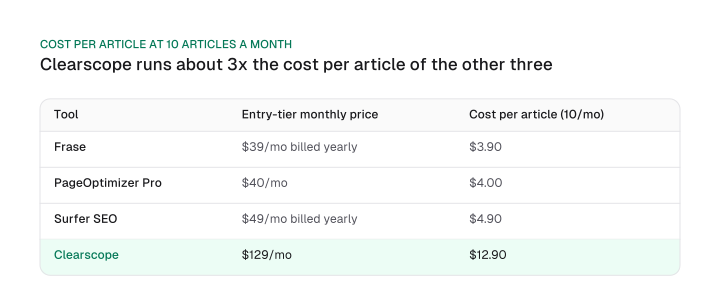
Among the four tools with one published self-serve monthly entry price, Frase ($39/mo billed yearly), PageOptimizer Pro ($40/mo), Surfer SEO ($49/mo billed yearly) and Clearscope ($129/mo), the median entry price is $44.50/mo, the average of the two middle values from the sorted list.
That's narrower than the figure on best AI SEO tools, which computes its own broader median across nine tools that include AI-visibility trackers this page excludes by scope. Both numbers are real; they answer different questions over different tool sets.
The best content optimization tool depends on your workflow, not the highest score
A content score is a proxy for a Google ranking signal no vendor can see directly, built on TF-IDF term coverage against pages that already rank.
The tool that wins for your team is the one whose workflow position matches how you actually draft, live scoring, pre-draft research, post-draft QA, site-level planning, live-page monitoring, suite bundling or narrow polish, and whose real per-article cost fits your publishing volume, not the tool with the highest number on its own homepage.
Start with the workflow-stage table above, price the two or three tools that match your stage at your own article volume, and trial the top pick before committing to an annual plan.
Frequently asked questions
Yes, in this exact category: Rankability's own post about SEO content optimization tools ranks Rankability #1. Read any vendor-authored comparison with that in mind, and check who wrote the page before trusting its top pick.
Most content-optimization tools score a draft with TF-IDF term-frequency analysis against pages already ranking for the target query. A high score means the draft matches the tool's own statistical model; Google's full ranking calculation weighs considerably more than that.
MarketMuse (10 queries/mo) and CoSchedule Headline Studio (10 credits/mo) have real, usable free tiers. Hemingway's homepage no longer advertises an unlimited free web editor as its lead offer as of the September 2026 check, though free browser tools remain linked from its footer. The other five tools on this list require a paid plan to use at all.
A content optimization tool scores a draft's term coverage against Google's organic SERP; an AI-visibility tracker measures whether AI answer engines like ChatGPT or Gemini mention a brand at all, a separate job this page doesn't cover. See "What this list is (and isn't)" above for how the two categories split.
Content scoring and site auditing are different jobs; for the free/low-cost side of technical auditing rather than on-page term coverage, see a free AI SEO audit tool.
That's a broader question than this list answers; see AI SEO trends 2026 for how search itself is changing, separate from which content-scoring tool fits your workflow.
Figures and images in this post are free to reuse under CC BY 4.0 with credit to Mission Growth.
Get Mission Growth highlighted in your Google results.