Keyword Mapping Process: How to Decide Which Page Wins
Keyword mapping in practice: inventory pages, cluster keywords, assign one primary keyword per page, plus a decision rule for two pages wanting the same term.

On this page
Keyword mapping is the process of assigning one primary keyword to each page on a site and tracking that assignment in a spreadsheet, so no two pages ever compete to answer the same query.
The keyword mapping process itself is fairly standard: inventory, cluster, assign, build the map. Two moments break it in practice, though -- how large a keyword cluster should grow before it needs its own page, and which page wins when two already exist for one keyword. This guide names a checkable rule for both, plus a worked template and the one Google Ads catch that trips up Step 2.
What is keyword mapping, and does it still matter when AI answers search directly?
Keyword mapping is the process of assigning one primary keyword to each page on a site and tracking that assignment in a spreadsheet.
It still matters because AI Overviews and chat answers draw from indexed, crawlable pages with a clear topical focus.
An unmapped site risks more than confusing a visitor comparing two of its own pages in search results. It hands Google's page-selection process an ambiguous input to resolve on its own.
Here's the mechanism behind that: Google's own documentation on canonicalization calls a canonical preference "a hint, not a rule," meaning Google can choose a different canonical page than the one a site indicates. A canonical tag can't reliably decide which of two competing pages wins a keyword after the fact.
The map has to make that decision before either page publishes, by giving each page exactly one keyword no other page on the site is also trying to own.
A keyword map's real job is removing the ambiguity that splits Google's page-selection signal across two pages, before you publish, not fixing it afterward with a canonical tag.
That's also why the practice survives the shift to AI-generated answers instead of going obsolete alongside them. AI Overviews and chatbot answers are still built from an index of crawled, ranked pages.
A site that has already resolved its own internal ambiguity gives that retrieval step one clear candidate per topic instead of two competing ones. Generative engine optimization covers the wider set of changes AI-generated answers bring to a page; keyword mapping is the piece of that work done before publishing.
Mission Growth's platform tracks AI citations and visibility for customers.
Step 1-2: take inventory and gather the keywords that feed the map
The keyword mapping process starts with a full list of your existing pages and the keyword list your research already produced.
It reuses those inputs rather than running new research. If you don't have a keyword list yet, bring one first; this process starts from the point where you already have it.
Three inputs feed the map before you assign a single keyword:
- Take inventory. Export every indexed URL from your CMS or a crawler, one row per page -- the same starting point as the seo audit process. Screaming Frog's free tier crawls up to 500 URLs, which covers most first-time builds; larger sites need the paid version or a sitemap export.
- Pull in the keyword list. This is an assignment exercise, not a research exercise: the keyword mapping tools here route each term to a page, they don't discover new ones.
- Budget time for Keyword Planner's account step. It's free, but per Google Ads Help, it requires a Google Ads account with billing entered before it shows ideas, "Get ideas for new keywords," even without running an ad. Budget five minutes so it doesn't stall the pass.
Step 3: cluster keywords, and know where a cluster's boundary actually is
A keyword cluster keeps absorbing secondary and related terms until a distinct page starts ranking specifically for one of them.
That ranking event is the actual signal to split it into its own page. There's no universal number of keywords per cluster, so treat any fixed count you see quoted as filler.
The boundary that holds up is checkable rather than arbitrary. It's Mission Growth's own editorial rule, not confirmed by Google: keep folding related and secondary terms into one page's cluster until a separate URL, yours or a competitor's, independently starts ranking in the top ten for one of those terms on its own.
That's Google telling you, through its own ranking behavior, that the term carries enough distinct intent to support its own page. At that point, split it out.
The rule has one limit worth stating plainly. A brand-new site has no ranking history yet, so this signal isn't available on day one. Default to broader clusters until pages mature enough to show a split signal, then re-check the SERP every time you review the map.
This is also where SaaS SEO sites tend to over-split early, building a thin page per minor feature-name variant before any of them has ranking history to justify the split. Keep the cluster together until the SERP itself makes the case for dividing it.
Step 4-5: assign the page, and resolve it when two pages want the same keyword
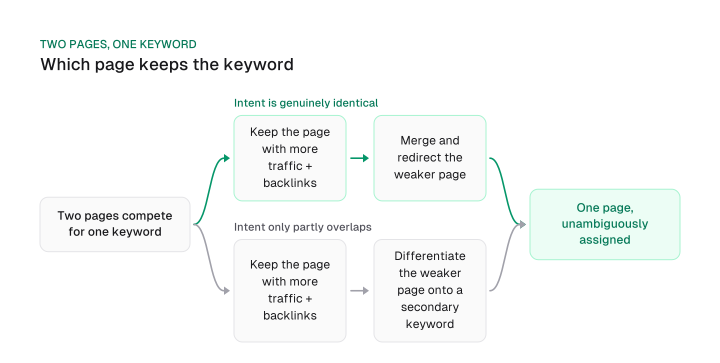
Each keyword gets exactly one assigned page chosen by a rule. Traffic and backlinks decide who keeps it, not a canonical tag added after the fact.
A canonical tag often gets listed as interchangeable with a redirect or a content rewrite, one of several fixes for cannibalization. It isn't: Google's own documentation treats canonical preference as a hint it can override rather than a rule it follows.
Relying on a canonical tag after two pages already compete for a keyword hands the outcome to Google's judgment call instead of yours. A redirect or genuine content differentiation is the stronger signal.
The consolidation instinct is already right: combine pages that compete for the same intent instead of splitting one signal across two weaker pages. What that instinct doesn't answer is which page to keep. Here's the fuller keyword cannibalization rule this guide adds, for the moment you're building or rebuilding the map itself:
- Keep the page with more organic traffic and backlinks. Those are the two things you lose if you redirect the wrong page, so protecting the page that has more of both is the choice that minimizes what you give up.
- Merge and redirect the weaker page if intent is genuinely identical. Once one page is confirmed the keeper, a fully overlapping second page adds nothing; redirecting it consolidates the signal onto one URL instead of splitting it.
- Differentiate the weaker page onto a distinct secondary keyword if intent only partly overlaps. Redirecting here would throw away a page answering a slightly different question; give it its own keyword instead of erasing it.
That three-branch rule is Mission Growth's own editorial call; Google's documentation doesn't confirm it. It applies only once intent is confirmed genuinely identical, a stricter bar than topical closeness.
If you're not sure whether two live pages are a real cannibalization case or a false alarm, run the cannibalization test on a live site first; that's the diagnosis step for pages already published. This section covers the moment you're assigning the map itself, before or while you rebuild it.
Build the keyword map template
A keyword mapping template is a spreadsheet with one row per page and six columns: page, URL, primary keyword, secondary keywords, status, and owner.
The worked example below fills it in for a B2B SaaS site instead of describing it in the abstract. It covers six pages:
- Homepage: project management software (High volume / High difficulty)
- Gantt chart features: gantt chart software (Medium volume / Medium difficulty)
- Time tracking features: time tracking software (Medium volume / High difficulty)
- Agile vs. waterfall (new): agile vs waterfall (Low volume / Low difficulty)
- Pricing: project management software pricing (Low volume / Medium difficulty)
- Asana alternative (new): asana alternative (Medium volume / Medium difficulty)
The status column is what forces a decision: every row gets a create, optimize, or no-action call on top of its keyword assignment.
This keyword mapping example uses qualitative volume and difficulty bands instead of specific numbers, since a hypothetical page has no verified search volume behind it. Replace these bands with your own tool data when you build your real map: your rank tracker's difficulty score, or a Search Console export, feeds the same columns.
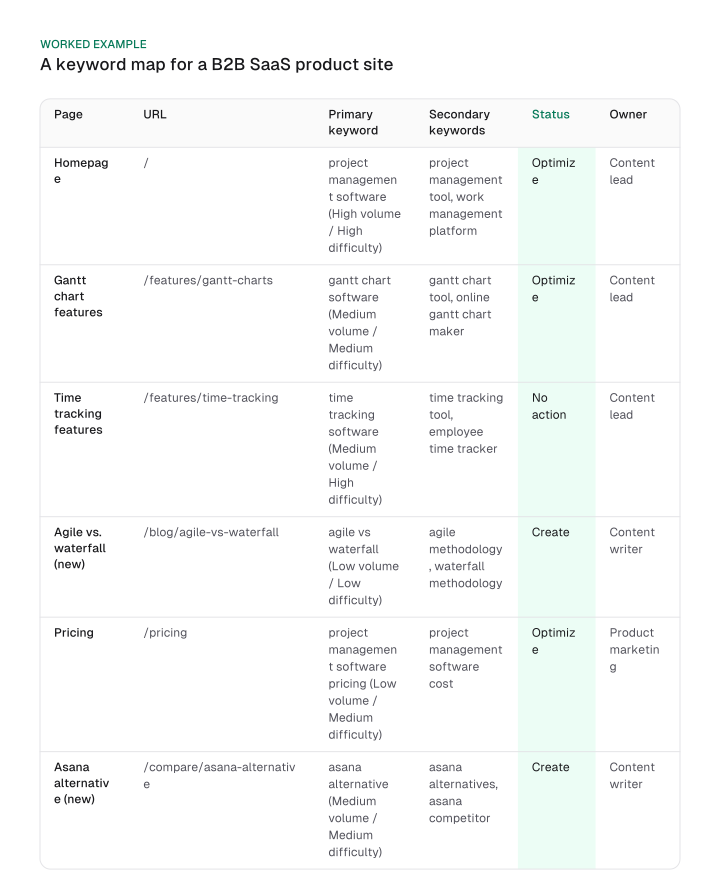
Read the status column as the map's real output. "Optimize" means the page exists and ranks somewhere already, so the work is strengthening it for its assigned keyword.
"No action" means the page already owns its keyword cleanly; the map's job there is simply confirming that.
"Create" is the gap the map exposes: a keyword with real demand and no page assigned to it yet, which is exactly what improving your Google ranking starts with once the map shows where the gap is.
Put the map to work, and keep it current
A keyword map goes stale on four specific events, never on a fixed calendar date.
Those events: a page ships or retires, a core update reshuffles the SERP, a scheduled content-calendar review runs, or Search Console shows two URLs splitting clicks on one query.
A fixed review interval doesn't hold up well here. One common recommendation is twelve months, another is quarterly, and neither one explains why its number is the right one.
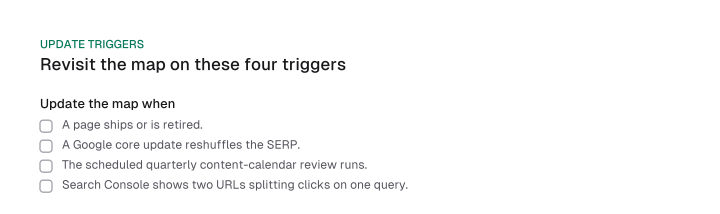
A trigger-based review holds up better than a fixed date, because each trigger is a discrete, checkable event that can invalidate the map. A fixed date is checkable against nothing; the calendar turning over doesn't mean anything on the site changed.
This is also Mission Growth's own reasoned rule, not a Google-sourced finding, and it has one limit: a low-activity site can go a long stretch without any of the four triggers firing. Add a backstop annual check so the map is never left completely untouched.
Once the map is live, it also feeds your internal linking directly. Anchor text pointed at a page should match that page's assigned keyword, not whatever phrase felt natural in the sentence you were writing.
That consistency is what keeps the map doing its job after publication, not only at the moment you built it. Track it in the same SEO dashboard you already check for ranking movement, alongside the SERP splits the map is meant to prevent.
Frequently asked questions
Yes, but it requires a Google Ads account with billing information entered before it shows keyword ideas, even if no ads ever run. Budget for that setup step during the gather-keywords stage of the map, before you need results.
Keyword mapping assigns keywords to pages that already exist or are already planned; content planning decides which pages to create in the first place. Mapping runs after that decision.
The same one-keyword-one-asset logic applies, but PPC maps keywords to ad groups rather than pages, and the goal shifts to bid efficiency instead of organic ranking.
Yes, proportionally. A five-page site takes an afternoon to map, and doing it still prevents two of those five pages from getting drafted for the same keyword later.
Shorthand for the Pareto principle: a small share of causes tends to produce most of the effect. Applied to keyword mapping, that means prioritizing the clusters most likely to move traffic before you map every long-tail term on the list.
Informational, navigational, commercial investigation and transactional. Note each keyword's intent type on your map next to its assigned page: it's the fastest way to catch a page that's been assigned a keyword its content can't actually satisfy.
A keyword map only prevents cannibalization when it removes the ambiguity a canonical tag can't reliably fix after the fact. That's exactly what happens at the two moments this guide gave a named rule for: where a cluster's boundary sits, and which page wins when two already exist for one keyword.
Start this week with the inventory step. Export every indexed page into one spreadsheet, drop in the keyword list you already have, and run the first pass of the six-column template above against your own site before you brief another writer or developer on a new page.
Figures and images in this post are free to reuse under CC BY 4.0 with credit to Mission Growth.
Get Mission Growth highlighted in your Google results.