Keyword Research in SEO: How to Trust the Numbers You Use
Keyword research guide: where to find keywords, what a volume figure measures, how to test a tool against Search Console, and how to pick pages.
By Furkan AktaşPublished Updated

On this page
Keyword research is the work of finding the searches your audience runs and deciding what your site does about each one. Typing a seed, exporting a list and sorting by volume is the easy part.
The harder part is knowing where each number came from. A keyword research tool reports a model, and two tools can disagree about the same phrase for good reasons.
Here is how to do keyword research in SEO, in the order you would run it: what the work produces, where keywords come from, what a volume figure counts, how to test your tool against data you already own, and how to turn the list into pages.
What is keyword research, and is it still worth doing in AI search?
Keyword research is finding the searches your audience runs and deciding which page answers each one, and it still matters in AI search because Google's AI features answer by running related searches. The output is a page decision per query; a spreadsheet of phrases is only the input.
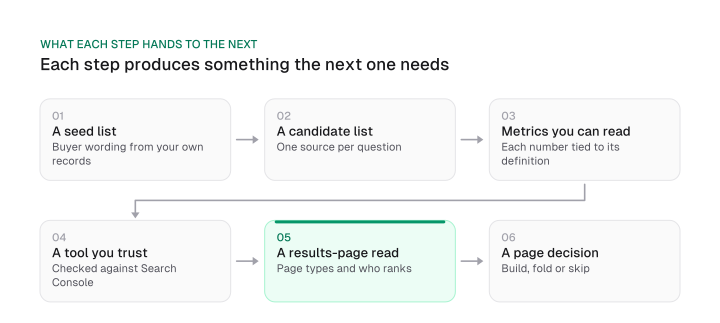
That decision has three outcomes: no page answers the query (a gap), two pages compete for it (a conflict), or one page does (covered). The keyword research process behind it has six steps, taken in order through this guide:
- Collect seed terms in your customers' words.
- Expand them from several sources, each picked for the question it answers.
- Read the metrics for what they count.
- Test the tool's numbers against your own Search Console data.
- Check the results page for each query.
- Decide the page: build it, fold the query into an existing page, or skip it.
Does keyword research still matter with AI search?
Yes, and the unit of research has widened from one phrase to a head term plus its neighbours. Google's documentation says that both AI Overviews and AI Mode may use a "query fan-out" technique, issuing multiple related searches across subtopics and data sources to develop a response.
The same page says AI Overviews are shown only when Google's systems judge them additive to classic Search, and as such often don't trigger. That is the mechanism behind query fan-out: the answer a searcher sees may be assembled from searches they never typed.
Assistants behave differently from Overviews. In a dataset of 15,000 prompts, Ahrefs found in August 2025 that on average 12% of links cited by ChatGPT, Gemini and Copilot appear in Google's top 10 results for the same prompt. Ahrefs' earlier studies of AI Overviews found that 76% of cited URLs came from pages in the top 10.
The two figures measure different systems, so they do not contradict each other. Overviews lean on pages that already rank, while assistants reach further.
Ahrefs explains the assistant result by retrieval across query variations. A page ranking around sixth for a few variations of a question might be cited over a page ranking first for one of them. That is Ahrefs' explanation and it is untested, so treat it as a precaution:
- Write down the head term and the handful of related searches a searcher or assistant would run for the same need.
- Check that the page you plan to build answers each of them.
A chatbot's suggestions work as seed material, since chatbot output carries no volume figure. If you also research the questions people put to assistants, prompt volume covers what that demand does and does not measure.
Keyword research sources: what each one answers and where it goes blind
Each keyword source answers one question well and hides another, so build the list from several in order: buyer language, Search Console, Keyword Planner and Trends, the results page, then a modelled tool. The table below pairs each source with the question it answers and its blind spot, derived from what each source's own documentation, read in October 2026, says it reports.
Download CSV (CC BY 4.0)
Seed keywords come first, because every other source needs something to expand. The best ones sit where no tool looks: sales calls where prospects describe the problem in their own words, support tickets, the queries typed into your site search. Write those down before you open a tool, because a tool can only multiply the words you give it.
Search Console is the one source in the table that reports your own data rather than a model. It shows which queries bring users to a site, with impressions, clicks and position, and Google describes it as a free service. Its blind spot mirrors its strength: it lists only queries your site has already appeared for.
Use it to find phrases where you are close to a result, and use a second source for demand you have not reached.
Can you do keyword research for free? Yes, with limited reach. Search Console covers your current visibility, and Google Trends gives a 0 to 100 index of interest. Ahrefs describes Ahrefs Free as a free plan very similar to Search Console. Keyword Planner needs account setup including billing information first.
Any free keyword research tool shows what your site and one vendor's account can see. None gives a view of demand across a whole market, so add the results page, which costs nothing and shows the wording and page types Google rewards.
If you want the top 10 keyword research tools, this guide ranks none. The table compares sources by the question each answers, because the right pick depends on the question you put to it.
Two source types deserve their own pages. Competitor research, which pulls the terms rivals rank for, is covered in keyword gap analysis. Question mining, which starts from what people ask, is covered in question based keywords. For video, YouTube keyword research works from different signals than a search-engine list, and it has its own guide.
A chatbot belongs at the seed stage. It can suggest wordings you had not considered, and each suggestion then goes through the sources above, because chatbot output carries no volume and no results-page read.
Search volume in keyword research: what the number counts and averages
A search volume figure is a modelled monthly average, and each tool builds it differently: Google counts a keyword with its close variants, Semrush takes total searches over 12 months divided by 12, and Ahrefs blends Keyword Planner with other data. Each vendor states its own method, so the same phrase can carry different numbers in different tools.
Google's help page defines Keyword Planner's figure as the average number of times people searched for a keyword and its close variants, for the month range, location and network you selected. By default the searches are averaged over a 12-month period. Semrush says its volume is total searches over the past 12 months divided by 12, from third-party data overlaid with historical clickstream data.
Ahrefs says it uses a combination of Keyword Planner, Google Trends data and other third-party sources to estimate monthly volumes. Moz states that its Keyword Explorer uses live clickstream data.
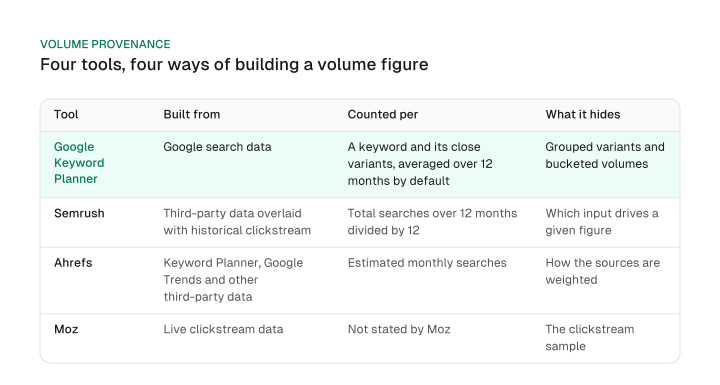
The definitions give three rules for reading a volume figure:
- Do not add the volumes of close variants. Adding the volumes of close variants counts the same searches twice, because Planner already folds them into one figure. Ahrefs describes the other side of this: it uses additional sources to "ungroup" similar keyword clusters from Planner, and it says Planner rounds volumes into buckets.
- Compare volumes inside one tool. A number from one tool and a number from another are built from different inputs, so the gap between them is not an error to average away.
- Read the monthly history before the average. A 12-month average flattens seasonal terms, so a phrase that peaks for two months looks steadier than it is.
A volume of zero is a tool output, not proof that nobody searches the phrase; zero volume keywords covers how to validate those terms. Higher volume also does not mean proportionally more traffic. Ahrefs notes that search volume does not always translate into traffic, since many searches on Google result in no clicks or go to ads.
Keyword difficulty needs the same care. Ahrefs' score represents the average referring domains of the top-ranking pages, and Ahrefs adds that this can hide specific weaknesses in the search results that you can exploit. Semrush ships a variant, Personal Keyword Difficulty, which tailors the score to your domain.
Two tools can therefore return different difficulty scores for one phrase, and a threshold such as "easy" holds in the tool that produced it. A low score also cannot show an intent mismatch: a phrase can look easy because the results page rewards a page type you cannot publish. The winnability test is a separate job, covered in the guide to choosing SEO keywords.
How accurate is keyword research data? Test your tool against Search Console
No keyword tool reports exact search counts; the accuracy studies you will find are vendor-run against filtered benchmarks, so the dependable check is comparing the tool's ordering with your own Search Console impressions. Ahrefs says search volume in any SEO tool, including its own, is always an estimation.
Accuracy claims then arrive as headlines. One guide to keyword tools states it flatly:
Semrush is the most accurate tool for search volume data, and its database has much better coverage than other tools.
The claim traces to a study Semrush ran itself. Its volume-study methodology page, dated March 2022, benchmarks against Search Console impressions, a metric it says it used with reservations because impressions are not the same as volume.
Two filters shaped the sample. It kept keywords whose URLs were likely to be visible, an average position in the top three, and it removed commercial and transactional keywords whose results pages carried so many ads that the organic results were not immediately visible. The final sample was 10,000 keywords chosen from 1M collected, with an equal number from each of five monthly-impression ranges.
Read that against the headline. The result holds for queries where a page already averages a top-three position and the results page is not ad-heavy. It cannot speak to the ad-heavy commercial and transactional queries that were removed.
Ahrefs runs its own study too. Its help page says Ahrefs' volume estimates were roughly accurate for 60% of the studied keywords compared with Search Console impressions, against 45% for Keyword Planner, and that in 2021 it found Planner drastically overestimated volumes 54% of the time.
Each maker ran its own study and each study places its maker ahead. Ahrefs' page does not say how it scores "roughly accurate", and Semrush's study uses a different sample, so the two sets of figures are not comparable and we do not rank the tools on them.
What does apply to your niche is a calibration test. It borrows the filter from Semrush's own method and runs it on your data:
- Export your Search Console queries and keep those where the page averages a top-three position. Drop queries whose results pages are ad-heavy.
- Pull the tool's volume for each remaining query.
- Sort both lists, the tool's volume and your monthly impressions, from highest to lowest.
- Compare the rank order. Do the same queries sit near the top and near the bottom?
- If the orders broadly agree, keep the tool for sorting candidates. If they do not, lead with Search Console and use the tool for wording only.
There is no pass mark, because a threshold would be invented. Judge whether the tool puts your big queries above your small ones.
Two limits apply. Impressions count how many times your site appeared in Search results, which is not the same as searches, so the test checks ordering and not size. And queries where you already rank in the top three are few and lean toward topics you already win, so a tool that fails here may still suit topics you are entering.
Keyword research examples: read the results page, then pick the page type
A keyword research example ends with a page type per query: build the page type the results page rewards, fold the query into the page that already answers it, and skip it when the results page wants something your site cannot publish. The table below is illustrative: six candidates for an invented meal-kit brand, with made-up queries and reads and no volume figures.
Each row comes from a three-line read of the results page, done by hand:
- Page type. Is the top of the results made of category pages, guides, comparisons, help pages or recipe collections?
- Who ranks. Are they sites like yours, or publishers and marketplaces you cannot out-publish?
- AI Overview present. Does an AI Overview appear, and does the query look like one Google answers without a click? Google says Overviews often don't trigger, so this varies by query.
That read is the rule from understanding search intent applied at research time: the results page tells you the intent, and the intent tells you the page.
Long-tail phrases follow the same logic. A long-tail phrase is a more specific variant of a query you already target, and it usually folds into the page that answers the broader query unless its results page asks for its own page type.
These keyword research examples show both outcomes. "Vegetarian meal kit delivery" returns the same pages as "vegetarian meal kit", so it folds into the category page. "Cancel meal kit subscription" returns help pages, a different page type, so it earns its own.
Business value decides which of these rows deserves a page first. A cost per click shown in a tool is an advertiser's price; business value is what a visitor from the query is worth to your pipeline. A query tied to a sale deserves its own page sooner than one that only brings readers, whatever the volume column says.
The output of this stage is a row per query with a source, a results-page read and a decision. That table is the input to a keyword mapping exercise, which assigns each decision to a URL and settles cannibalization. If you are choosing among many candidates, picking keywords for SEO covers sequencing, and the on-page SEO guide covers where a chosen keyword goes on the page.
A volume figure is a model with a documented origin, so pick each source by the question it answers, test the tool against Search Console, and finish with a page decision per query. Your next step: export your Search Console queries for pages averaging a top-three position and run the calibration test above on the first ten, then write the page decision for the first query on that list.
Frequently asked questions
Why do two tools show different search volumes for the same keyword?
Because each builds the number from different inputs. Google counts a keyword and its close variants, Semrush divides 12 months of searches by 12 and overlays clickstream data, and Ahrefs blends Keyword Planner with Google Trends and other sources while ungrouping similar keywords. Different inputs give different figures, so compare numbers inside one tool.
How do I check a tool's search volume against my own data?
Run the calibration test: take Search Console queries where the page averages a top-three position, pull the tool's volume for each, and compare the rank order with your monthly impressions. Impressions count appearances in Search results, not searches, so the test checks ordering and does not size demand.
Can I do keyword research for free?
Yes, within limits. Search Console is a free service from Google, and Ahrefs Free is Ahrefs' free plan. Keyword Planner needs account setup including billing information, and Google Trends gives a 0 to 100 index instead of counts. Together they cover your own queries and wording, but not a full view of market demand.
Does higher search volume mean more traffic?
Not by itself. Ahrefs notes that many searches on Google result in no clicks or go to ads, and any tool's volume is an estimate. Read the monthly history, check what the results page shows, and weigh the query by business value before treating volume as traffic potential.
How many keywords should I target per page?
One primary query plus the related searches the page answers. Fold close variants and long-tail phrases into the page that already answers them, and give a query its own page when the results page asks for a different page type. A keyword map assigns each query to its page.
Cite this page
Aktaş, F. (2026, October 11). Keyword Research in SEO: How to Trust the Numbers You Use. Mission Growth. https://missiongrowth.io/blog/keyword-research
Download the data: 1 table as CSV (CC BY 4.0)
Figures we made for this post are free to reuse under CC BY 4.0 with credit to Mission Growth.
Get Mission Growth highlighted in your Google results.