Pricing Page Optimization for B2B SaaS (2026 Guide)
Pricing page optimization guides repeat one checklist. See what 14,000 tracked tests actually found, plus a JSON-LD sample that makes your page AI-citable.

On this page
Your pricing page gets clicked by the highest-intent visitor on your site: someone who already thinks your product might work and is checking whether they can afford it. Most pricing page optimization checklists still treat it like any other landing page, listing the same additive advice: more tiers, more social proof, more urgency, a bigger annual discount.
Casey Hall, CMO of DoWhatWorks, told Crazy Egg about tests his firm has tracked, more than 14,000 pricing page tests, and several of the elements on that checklist lost more often than they won. This guide sorts which pricing page tactics have any named evidence behind them, shows how to decide how much price to reveal, and includes a JSON-LD schema example you can adapt directly.
In this guide:
- Which tier count and transparency level fit your sales motion, not a borrowed rule
- What Casey Hall's tracked tests found about adding versus removing elements
- A working JSON-LD sample that makes your pricing tiers citable to AI answer engines
- The two complaints buyers make about pricing pages that most checklists skip
- How to tell whether a case study number is usable before you cite it
Pricing page optimization: how to decide structure, tier count, and how much price to show
A pricing page converts by resolving two structural decisions before you write a word of copy: how many tiers to show and how much price to reveal.
Size tier count to your named buyer segments instead of a borrowed rule, and weigh how much price to reveal against your sales motion and your AI citation risk.
Most checklists borrow a flat rule: show three to four tiers. That number ignores who is actually buying.
Pricing page design B2B SaaS teams ship most often starts from named ICP segments instead: solo users, growing teams, and enterprise IT buyers. Three tiers that name those segments guide a visitor faster than four tiers priced around a borrowed count.
Responsive design for a pricing table means stacking tiers into single cards on a phone instead of forcing horizontal scroll through five columns. That scroll costs the comparison the page exists to make, so keep the recommended tier's badge visible without scrolling past it, and repeat the call to action at the bottom of every card.
The harder decision is how much price to reveal. It depends on two things rarely decided together: how you sell, and how exposed your category is to AI citation loss if you hide the number. Mainsail Partners describes three pricing transparency approaches for SaaS companies: full transparency, partial transparency, and request for quote only (RFQ), chosen by pricing complexity, sales cycle length, and how competitive the market is.
DiscoveredLabs found that pricing hidden behind JavaScript-rendered tables or images is frequently skipped or misread by AI systems that use retrieval, since those systems read text rather than rendered graphics. A fully hidden price means an AI system answering "which vendor is cheaper" cites the competitor who published a number instead of you.
Put those two findings together and you get a decision rule:
| Sales motion | Mainsail's transparency level | AI citation floor to keep |
|---|---|---|
| Self-serve, low deal complexity | Full transparency | Full price list |
| Mid-market, moderate deal variance | Partial transparency | Starting price and tier names |
| Enterprise, predictable deal size | Partial transparency | A published floor price |
| Enterprise, high deal size variance | RFQ only | None, and that gap is the cost of going dark |
Even a sales motion complex enough to justify RFQ pricing should still publish a partial range or a floor price. The one exception is deal size variance wide enough that any published number would mislead more buyers than it helps; that is the one case where going fully dark is worth the AI citation cost.
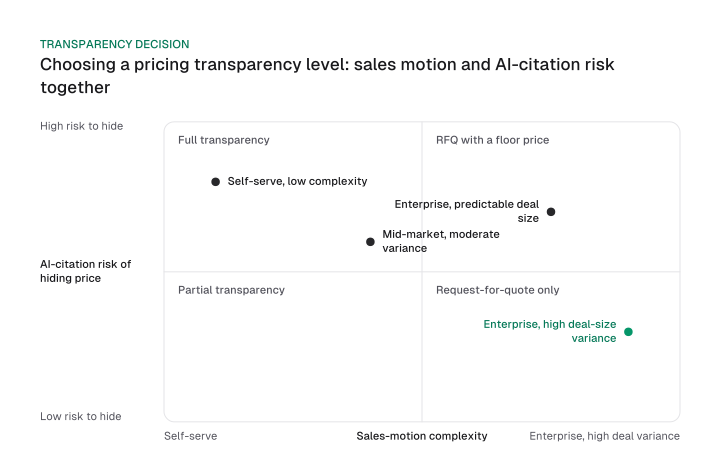
Decide tiers, decide transparency, then implement schema: that sequence is the pricing page optimization SaaS teams actually need.
The same three decisions make a repeatable pricing page optimization template: tiers, then transparency, then schema, applied to every page you ship next.
This tradeoff isn't unique to product tiers. Mission Growth's own writing on ai search optimization pricing follows the same rule: a floor number beats a fully hidden one whenever a buyer might ask an AI system to compare vendors.
A short FAQ under the tiers, separate from a general marketing FAQ page, answers the objections a table can't.
The pricing page tactics that are actually tested, and the ones that just get repeated
Pricing page best practices split into tactics one named practitioner, Casey Hall of DoWhatWorks, says his firm's tracked tests support, and tactics that just get repeated with no named source behind them at all.
Hall told Crazy Egg about tests his firm has tracked: more than 14,000 pricing page tests. Several of the findings he described cut against the standard checklist instead of adding to it.
Removing the above-the-fold explainer video or ROI calculator outperformed adding one, he said. Cutting the logos and testimonials below the plan table beat keeping them, in the tests his firm tracked. Strikethrough pricing is the one finding he scoped explicitly to B2B: it "loses the vast majority of the time in A/B testing for B2B products," in his own words.
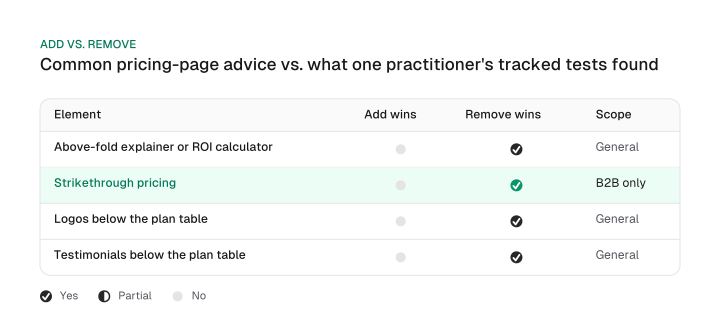
Two additions underperformed removal in general terms; only strikethrough pricing carries Hall's explicit B2B qualifier, and the other findings are not stated as B2B-specific in his own words.
Google's AI Overview for this query still recommends adding social proof near the price. Hall's account says the opposite: cutting trust signals below the plan table won more often than adding them, in the tests he described. Google's AI Overview and Hall's account conflict on this point, and that conflict is worth naming rather than smoothing over.
That's why social proof placement deserves a second look rather than a blanket rule: test whether logos and testimonials help or hurt below your plan table before assuming either answer.
Highlighting one recommended tier with a badge or a contrasting color still helps buyers scan faster. The eye-tracking study some guides cite for that tactic is linked in the source article, but the study page itself could not be opened to verify it, so treat the tactic on its own merits rather than as proven by a study you can check.
Outcome-driven tier copy that describes what a buyer gets to do converts attention into a decision faster than a feature list. Write "cut your reporting time," not a bullet that just names "advanced analytics dashboard."
Toggle copy earns its keep when it states the saving in dollars, not only a percentage, and prices the annual tier at a number that doesn't look rounded to the cent, since exact-looking numbers read as calculated rather than picked.
Price anchoring, showing a higher tier first so the next one looks reasonable, is a well-documented pricing psychology tactic that applies well beyond pricing pages.
A similarly documented tactic, the decoy effect, adds a deliberately unattractive middle tier to push buyers toward the one you actually want them to pick. Upgrade prompts that frame a missed feature as a loss, rather than a gain, lean on loss aversion, the effect Kahneman and Tversky named.
This tension between adding for trust and cutting for focus shows up across broader saas seo pages too: every added element has to earn its place against the visitor's actual question.
Make your pricing page citable by AI answer engines
A pricing page becomes citable to AI answer engines when its tiers exist as clean HTML tables and Product, Offer, and FAQPage schema, instead of JavaScript-rendered or image-based pricing that AI answer engines frequently skip or misread.
That's the same DiscoveredLabs finding behind the transparency table above: hidden or image-based pricing forfeits AI citations to whichever competitor's tiers an AI system can actually read. This is what pricing page AI visibility means in practice: markup a retrieval system can parse, alongside a page a human can read.
schema.org's Offer type carries the pricing-relevant properties an AI system needs: price, priceCurrency, availability, and eligibleDuration, nested under a Product's offers property. A FAQPage block does the same job for your FAQ section, marking up each question and answer through mainEntity, Question, and acceptedAnswer.
Google's own documentation for Product structured data states the benefit directly: Product and Offer markup can surface price, availability, review ratings, and shipping information right in search results.
Here's what that looks like for a hypothetical three-tier SaaS product, Starter, Team, and Enterprise, with illustrative round prices:
<script type="application/ld+json">
{
  "@context": "https://schema.org",
  "@graph": [
    {
      "@type": "Product",
      "name": "Starter",
      "offers": {
        "@type": "Offer",
        "price": "19",
        "priceCurrency": "USD",
        "availability": "https://schema.org/InStock"
      }
    },
    {
      "@type": "Product",
      "name": "Team",
      "offers": {
        "@type": "Offer",
        "price": "49",
        "priceCurrency": "USD",
        "availability": "https://schema.org/InStock"
      }
    },
    {
      "@type": "Product",
      "name": "Enterprise",
      "offers": {
        "@type": "Offer",
        "price": "199",
        "priceCurrency": "USD",
        "availability": "https://schema.org/InStock"
      }
    },
    {
      "@type": "FAQPage",
      "mainEntity": [
        {
          "@type": "Question",
          "name": "Does the Team plan include a trial?",
          "acceptedAnswer": {
            "@type": "Answer",
            "text": "Every paid tier includes a trial period."
          }
        }
      ]
    }
  ]
}
</script>
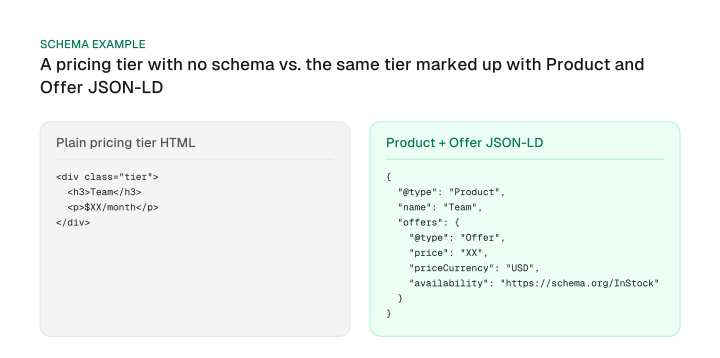
Every property in that block traces back to schema.org's own Offer and FAQPage definitions above. This is a pricing page optimization example built from those definitions directly, not a screenshot of someone else's tag manager.
Keep the underlying markup plain, too: semantic HTML tables for the tier grid, a layout that doesn't reflow after load, and price text that lives in the page's HTML rather than only inside an image or a client-rendered widget.
We migrated our own React single-page app to prerendered static HTML across 20 marketing pages for exactly this reason: AI crawlers don't execute JavaScript, so a client-rendered pricing table stays invisible to them until it's prerendered. missiongrowth.io also publishes its own llms.txt and llms-full.txt, a plain-text index built for the same crawlers, because machine-readability is a site-level practice as much as a page-level one.
Mission Growth's platform tracks AI citations and visibility for customers.
Structured data is the readable half of the job. Entity work like schema markup entity seo covers the rest of what makes a page consistently recognized, and generative engine optimization applies the same clean-markup approach across commercial pages generally.
What buyers actually complain about that vendor guides skip
The pricing page complaints vendor checklists skip are specific and structural: a page that forces a sales call at a price point too low to justify one, and a "starting at" price most visitors will never actually pay.
The first complaint traces back to the same abandonment DiscoveredLabs describes: a visitor who can't find or verify a price leaves and checks a competitor instead of booking the call your page is gatekeeping.
The second complaint sits inside Mainsail Partners' own RFQ model. A "starting at" number set at the cheapest possible configuration invites a buyer to build a budget around a price nobody in their segment actually pays, and the mismatch surfaces on the sales call instead of on the page.
Both are fixable with the transparency decision from the first section: publish a floor price that reflects what most buyers in a segment actually pay, and reserve the sales call for the deals where price genuinely can't be quoted.
How to measure what you changed, and which case study numbers are usable
A pricing page change is measured against your own tracked numbers, demo requests and the rate those turn into qualified opportunities, and any outside case study number only earns a place next to them if it passes three checks: a named company, a stated date, and a primary source that still resolves live.
Before citing anyone else's pricing page result, run it through three questions:
- Named company. Is the company named, or is it "one SaaS company" with nothing to verify?
- Stated date. Does the source say when the test ran, or could it be from any year?
- Live primary source. Does the original page still resolve, or is the number now unverifiable at its own source?
Two figures already circulate in pricing page guides for the same Groove-style redesign, and neither passes all three checks.
HubSpot's guide states Groove's redesign "increased [conversions] by 350%," describing the change as simplifying their pricing page.
DiscoveredLabs' guide states the same kind of redesign drove "358% more free trial conversions," describing a different intervention: simplifying their pricing structure and adding a comparison page.
Different wording, different number, and neither passes the live-source check. Groove's original post is gone: its successor domain, Helply, returns a 404 on the exact URL, and no Wayback Machine snapshot exists to check either figure against.
HubSpot's guide also states an "MIT and University of Chicago" study found $39 outsold both $34 and $44 for a women's-clothing item.
That figure fails the date and live-source checks too: no year, no link, and no acknowledgment that a mail-order clothing test doesn't transfer cleanly to a SaaS pricing page. Treat it as a caution about charm pricing outside SaaS, useful for context, not as evidence for adding $X9 endings to your own tiers.
Track your own before-and-after numbers instead of reusing either figure. Whether the underlying Groove result is real is beside the point: neither version passes the check as published.
Track the numbers a pricing page change actually moves: demo requests, free-trial starts, and the rate those turn into qualified opportunities, rather than a generic bounce rate that says nothing about whether the right buyers converted. If your traffic is too low to run a clean test on any of those numbers, that's a diagnosis question about page-level B2B conversion work generally, separate from the pricing-specific decisions in this guide.
Most pricing page advice still reads like an additive checklist: add tiers, add social proof, add urgency. The tested evidence above points the other way for several of those additions, and the case study numbers recycled to support the checklist don't hold up to a three-question check.
Start with the decision that touches every other tactic here: how much price your page reveals, weighed against how you sell and what you risk losing to AI citations.
That single choice shapes your tier count, your schema, and what an AI system says about your price to a buyer who never visits your site. Use the table above to make the call this week, then revisit tier count and schema against it.
Frequently asked questions
Should a pricing page include an FAQ section?
Yes, kept short, four to six questions, and aimed at objections rather than general product questions. A long FAQ duplicating your help center adds scroll, not clarity for the buyer deciding right now.
What's the difference between pricing strategy and pricing page optimization?
Pricing strategy decides what you charge: cost-plus, value-based, or competitor-based. Pricing page optimization assumes a price already exists and covers how you present, structure, and prove it on the page.
Do I need a monthly and annual billing toggle if I only have one price?
No. The toggle only earns its place once there's a real second price to compare. Forcing one in adds a decision the visitor doesn't have to make.
How long should I run a pricing page test before trusting the result?
Long enough to reach the sample size and duration a real experiment needs. Test duration and sample-size math are their own discipline, separate from the page-design decisions covered here.
Is Google's AI Overview pricing page advice wrong?
Not wrong, incomplete. Annual defaults, social proof, and badges are majority-consensus tactics, but Google's AI Overview doesn't address Casey Hall's account to Crazy Egg, which found the opposite result for social proof in the tests his firm tracked.
Figures and images in this post are free to reuse under CC BY 4.0 with credit to Mission Growth.
Get Mission Growth highlighted in your Google results.