Google Penalty Recovery: Match Your Drop to Update Dates
Google penalty recovery starts in the Manual actions report, then your drop date against Google's update windows. Includes a fill-in reconsideration request.
By Furkan AktaşPublished
On this page
Your clicks fell and you want to know whether Google penalized you. Google penalty recovery starts with that question, because "penalty" covers three different mechanisms and only one of them has a request button.
The first move is cheap: open the Manual actions report in Search Console. If it is empty, the second move is to date your first bad day against Google's own update windows.
In this guide:
- The three mechanisms behind a drop, and the exit each one has
- Five checks that tell them apart, with dated 2026 update windows
- What each manual action asks you to fix, with a fill-in reconsideration request
- What Google says about timing, and why fixed day counts have no Google source
- Three cases that break the standard path
Google penalty recovery: three mechanisms, three exits
Google penalty recovery means finding which system demoted your site and taking its exit: a review request for a manual action, a wait for automated systems otherwise.
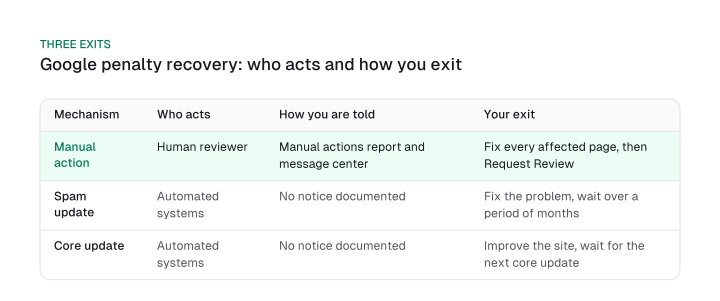
The documents use "manual action" for the reviewed kind. A manual action is issued when a human reviewer decides pages are not compliant with the spam policies. For everything else they use demotion language: effects of automated systems that learn over time.
So the precise answer to "what is google penalty in seo" is a manual action. The rest is an algorithmic demotion or a reassessment.
Searches for google penalties seo advice, google penalty removal or a google algorithm penalty all describe these three mechanisms, and only one has anything to remove.
Automated systems do most of the work. Google says its algorithms detect most spam on their own, and its spam policies describe detection through automated systems plus human review "as needed". The manual action is the backstop.
Here is the same split arranged by what you do next:
These are three exits, not two, because a core update is not a penalty at all. It reassesses everything, and a site that falls has not broken a rule.
How likely is it that your drop is a manual action? Google's own message counts give you scale and nothing more.
In 2019 Google sent more than 90 million Search Console messages, and about 4.3 million were related to manual actions. That is at most about 4.8% of messages (4.3 million divided by 90 million; the denominator is a floor, so the share is a ceiling).
In 2020 it sent over 140 million messages, and 2.9 million were related to manual webspam actions, at most about 2.1% of messages.
Don't read that as a trend. Google said the 2020 total rose largely because of new sites using Search Console and COVID-19 announcements, and the two years word the category differently. A share of messages says nothing about the odds for your site. It only shows manual actions are one category among many.
How to tell whether Google penalized your site
A Google penalty is confirmed by a notice in the Manual actions report or the Search Console message center, so you check those first and then date your first bad day against the Search Status Dashboard.
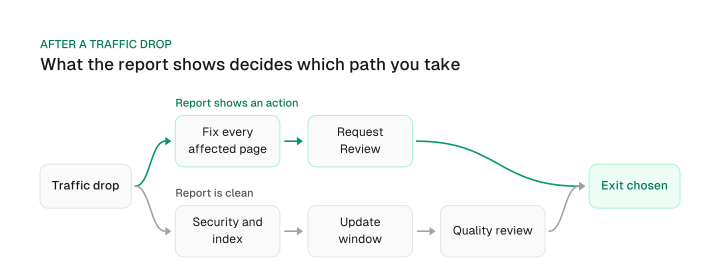
Run these five checks in order:
- Manual actions report and message center. Google says it notifies you in both places. A listed action means you are in the manual action exit.
- Security Issues report. This separate report covers hacked-site and harmful-behavior issues, and it lives apart from Manual actions.
- Index and crawl status of the pages that fell. Look for statuses such as "Crawled, currently not indexed" and for robots.txt fetch failures. A host change or a redirect change can produce a drop that no update explains.
- Update window. Date your first bad day against the table below.
- Quality review. If nothing above explains it, assume a spam or core reassessment and read the recovery sections that follow.
A clean Manual actions report rules out a manual action. In our reading it does not rule out an algorithmic demotion, because Google documents notices for manual actions and security issues and none for algorithmic demotion.
That also explains why a "penalty checker" can only guess. A tool that cannot read your Search Console sees traffic, and traffic fits every mechanism. The report is the only check with a yes or no answer.
So which signs indicate a penalty? A website penalty indicator is strongest when it is documented: an entry in the Manual actions report or a message in the message center confirms a manual action.
Weaker signs point to an algorithmic demotion: a sitewide drop whose first bad day falls inside or shortly after a dated update window, with a clean report and healthy indexing. A drop that starts after a host or redirect change points to a technical cause instead.
Step 4 needs more than "be aware of updates." Google's Search Status Dashboard lists begin and end times for each ranking update. Here are the completed core and spam update windows since December 2025, all in US/Pacific time. For core update mechanics and the other causes of a drop, the google core update guide has a six-cause table.
Download CSV (CC BY 4.0)
The three spam windows from March to August ran from 19.5 hours to 2.7 days, with a median of 2 days; the September 2026 spam update ran 13.7 days.
The three completed core windows ran 11.9 to 18.1 days, with a median of 12.2 days. Each is a sample of three, and the spam windows cover March to August 2026 while the core windows cover December 2025 to May 2026.
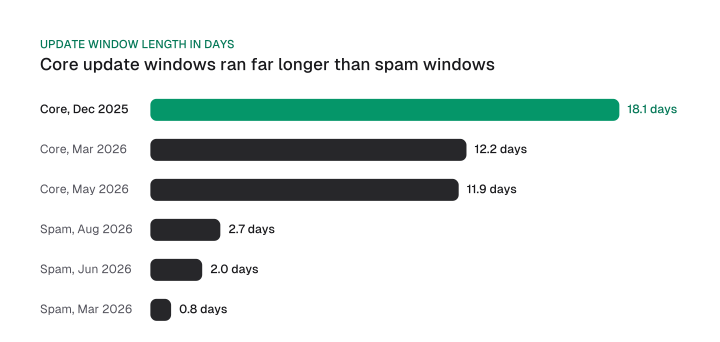
Treat the table as a lead you still have to check. Google says spam update effects can take months and core update effects several months, and it recommends waiting at least a full week after a core update completes before analyzing your site in Search Console. A first bad day shortly after a window can still belong to it.
Here is a worked example, using illustrative dates and no client data. A site whose clicks first fall on 25 June 2026 sits inside the June 2026 spam update window (24 June 09:00 to 26 June 10:00 Pacific).
A first bad day of 3 July 2026 falls after that window ended. That doesn't clear the update. It means you check the effect-lag wording above before ruling it in or out.
The most recent case is the September 2026 spam update. It was released on 24 September 2026 with a rollout estimate of up to two weeks and ended on 8 October 2026 at 01:00 Pacific, 13.7 days later. A first bad day between those dates falls inside the window, and effects can still lag it.
Manual action types and what each one asks you to fix
A manual action is Google's label for a spam policy violation a reviewer confirmed, and each label comes with its own fix list in the Manual actions report.
This table pairs the labels from Google's Manual actions report help with the fix Google requests for each:
Scope varies. An action can cover a subset of the site or the entire site, and the report lists affected URL patterns. Google adds that not all pages matching a pattern are necessarily affected, so read the examples, then check the whole pattern.
Two of these actions escalate. Google states that repeated violation of the back button hijacking policy, or of the site reputation policy, may lead to further manual actions and affect the site's overall ranking. It says nothing like that for the other labels, so fix the cause, not the symptom, on those two.
The duplicate content penalty needs its own correction, because it shows up as a supposed cause everywhere. There is no such thing as one in the way most people mean it. Google's 2008 Search Central post says duplication is not grounds for action unless the intent is to be deceptive and manipulate results.
The thin content action targets scraped content, thin affiliate pages and doorway pages. Repeated URLs inside your own site are a canonical tag job.
"Lack of E-E-A-T" is not a manual action category either, and Google says E-E-A-T isn't a specific ranking factor (the full argument is in is eeat a ranking factor). Scaled content abuse does exist as a spam policy, which is why the question of does google penalize ai content has a real answer on the manual side.
Keyword stuffing, the other cause people search for, has a short definition. Google defines it as filling a page with keywords or numbers to manipulate rankings, often in lists or groups, unnaturally or out of context.
It states no percentage or density threshold. Its own example repeats "app store credit" across two short sentences until the text sounds unnatural. If a page sounds that way read aloud, it fits Google's description.
Amazon listing titles follow different rules, which the Amazon SEO guide covers.
How to recover from a manual action
Recovering from a manual action means fixing every affected page and then selecting Request Review in the Manual actions report with a request that explains the issue, the steps taken and the outcome.
Here is the order:
- Open the Manual actions report. Read which action and which URL patterns it lists.
- Fix all of it. Google says fixing some pages earns no partial return to search results, so Request Review waits until every affected pattern is clean.
- For link actions, ask for removal first. Contact the site owners. Only then disavow what you could not remove.
- Document the work. Keep dates, messages and before-and-after evidence.
- Select Request Review. Write the request as shown below.
- Don't resubmit. Google asks you not to resubmit before you get a decision on an outstanding request.
The disavow rule trips people up. Google asks for a good-faith effort to get a link removed first. Blindly adding every backlink to the disavow file isn't one and won't make a request succeed.
The disavow tool help says most sites never need the tool. Use it only if you have a considerable number of spammy, artificial or low-quality links AND those links caused or likely will cause a manual action.
A good request does three things, in Google's words: it explains the exact quality issue, describes the steps you've taken, and documents the outcome. Here is a fill-in version for an unnatural links action. Everything in brackets is yours to supply:
Subject: Reconsideration request for [yourdomain.com]

The issue: The Manual actions report lists "Unnatural links to your site"
for [affected URL pattern]. We found [what you found, for example paid
links bought by a former agency on a set of pages].

Steps taken: We exported the links list from Search Console and contacted
[number] site owners on [dates] to request removal. [Number] links were
removed. For the rest we uploaded a disavow file on [date], with a comment
line for each domain. Evidence: [link to your shared document].

Outcome: [What now exists: links removed, a policy against buying links,
who owns the process]. We believe the site no longer violates the policy.
And the disavow file that goes with it. Comment lines start with #, individual URLs go on their own lines, and the domain: operator disavows every link from a domain:
# Contacted owner of spam-example.com on [date], no reply
domain:spam-example.com

# Single page, removal refused on [date]
https://example.net/page-with-paid-link.html
After you send the request, watch the message center and the review emails. Google says most reviews take several days or weeks, and link-related ones may take longer. Keep the Manual actions report in your weekly check afterwards, because further manual actions follow repeat violations on the two policies above.
How to recover from an algorithmic drop
Recovering from an algorithmic drop means fixing the underlying problem and waiting for Google's automated systems to relearn the site, because a reconsideration request is built for manual actions.
Google's 2013 guidance puts it plainly: if your visibility was affected only by an algorithmic change, there is no manual action to revoke and no need to file a request. The current spam and core update pages mention no request either. That is the first rule: don't file one for an algorithmic change.
The two algorithmic exits differ:
- Spam update. Google says making changes may help a site improve if its automated systems learn over a period of months that the site complies with its spam policies. Fix the problem, then wait.
- Core update. Google says it can take several months for its systems to confirm that a site as a whole is producing helpful, reliable, people-first content. If it's been a few months and nothing has moved, that could mean waiting until the next core update. For the checklist, see core update recovery steps.
A link spam update is the harsh one. When Google's systems remove the effect of spammy links, any ranking benefit those links generated is lost, and Google says that benefit cannot be regained. Cleaning up links afterwards may not bring back old positions. The realistic goal is a lower, stable baseline built on links Google counts.
Then there are the names. Panda joined the core ranking systems in 2015, Penguin in 2016, and the helpful content system in March 2024. All three are retired separate systems, so a "Penguin penalty" or "HCU penalty" names nothing you can be hit by or lifted from on its own.
If a diagnostic says you have one, it's describing history. The AI-driven causes of this kind of drop are covered in ai seo mistakes.
What about a quality demotion with no notice, the question practitioners keep asking? There is no button. Improve the site as a whole, and treat the next core update as your checkpoint.
How long Google penalty recovery takes
Google documents no day count for penalty recovery: a manual action review takes several days or weeks, an algorithmic spam demotion may improve over a period of months, and a link spam update's lost credit cannot be regained.
That wording is the whole timeline. Here it is by mechanism:
Agency pages often quote fixed windows for manual and algorithmic recovery. Google's documentation gives no such figures, so treat any day or month range you see as an estimate with no Google source behind it.
A page that promises one is guessing your fix time, your link graph and the reviewer's queue in a single number.
Build your own timeline from the steps you control: fix time, the request, and review time using Google's wording. Then name the next checkpoints from the 2026 cadence. There were spam updates in March, June, August and September, and core updates in March and May.
When the next one finishes, wait a week and then compare.
Cases that do not fit the standard path
A site you bought, a hacked site and a site with a clean report and no traffic each need a different first move than a standard manual action.
- You bought a site that already had a manual action. Fix the issues listed in the report, then tell Google in the reconsideration request that you recently acquired the site and that it now no longer violates the policies.
- Your site was hacked. The Security Issues report is separate from Manual actions. It lists signs that your site was hacked, or behavior such as phishing or installing malware that could harm a visitor. Clean the hack first, then request review in whichever report shows the issue.
- Your report is clean and traffic is gone. Start with indexing and technical causes: indexing statuses, robots.txt fetch failures, a host or redirect change. A move between domains or URL structures is a common culprit, and site migration seo covers what to check.
Google penalty recovery is three mechanisms with three exits, and the opening move is to rule out a manual action in the report.
Open the Manual actions report today, write down your first bad day, and compare it with the table in the second section. If the report is empty and the date sits inside or just after a window, fix the site and wait for the next checkpoint. If it shows an action, fix every affected page before you send the request.
Frequently asked questions
Can I recover from a Google penalty without filing a reconsideration request?
Yes, for algorithmic changes. Google says requests are intended for sites with manual spam actions. If your visibility was affected only by an algorithmic change, there's no manual action to revoke, so no request is needed. Fix the underlying problem and wait for automated systems to relearn the site.
I bought a site with a manual action. What do I tell Google?
Fix the issues listed in the Manual actions report, then say in your reconsideration request that you recently acquired the site and that it no longer violates the policies. Google gives this instruction for sites that violated its spam policies before you owned them.
Is duplicate content a Google penalty?
No. Google has said there is no such thing as one in the way most people mean it. Duplication is not grounds for action unless its intent is deceptive and manipulative. Scraped content and thin affiliate or doorway pages can still trigger the thin content manual action.
Is my website penalized by Google?
Check the Manual actions report and the message center, because Google notifies you of a manual action in both. A clean report rules out a manual action only. Then date your first bad day against the Search Status Dashboard to see whether a spam or core update window fits.
Do I need to disavow links to recover?
Usually not. Google says most sites never need the disavow tool. Use it only if you have a considerable number of spammy or artificial links and they caused, or likely will cause, a manual action. Try removal first, because blindly disavowing every backlink will not make a request succeed.
You've been penalized for buying backlinks, what's your next step?
If you've been penalized for buying backlinks, the next step is to confirm the Manual actions report lists "Unnatural links to your site," then remove the paid links and request review. Download the links list from Search Console, ask site owners to remove or nofollow each link, and disavow with domain: lines the links you can't get removed. Then select Request Review, explaining the issue, your steps and the outcome.
Cite this page
Aktaş, F. (2026, October 10). Google Penalty Recovery: Match Your Drop to Update Dates. Mission Growth. https://missiongrowth.io/blog/google-penalty-recovery
Download the data: 1 table as CSV (CC BY 4.0)
Figures we made for this post are free to reuse under CC BY 4.0 with credit to Mission Growth.
Get Mission Growth highlighted in your Google results.