Canonical Tag: Why Google Sometimes Ignores It
A canonical tag is a hint, not a rule. See the exact signals Google weighs, how to spot an override in Search Console, and canonical vs. noindex vs. redirect.

On this page
You added the tag, <link rel="canonical" href="...">, right where the documentation said it should go. Search Console still shows a different URL indexed instead of your preferred one.
Nothing about that means your implementation is wrong. Google treats a declared preference as one input among several signals, weighing it rather than obeying it automatically. The tag can be written exactly right and still lose to something else in that list.
In this guide:
- What a canonical tag actually is, and the narrower scope of its HTTP header version
- Why Google calls it a hint, and the two-step process behind that
- The full list of signals Google weighs beyond the tag itself, and why they stack
- How to read Search Console's own fields to diagnose an override yourself
- When canonical, noindex or a redirect is the right tool for the job
What a canonical tag is, and the two ways to set it
A canonical tag is a line of code that tells Google which URL among near duplicate pages you'd prefer it treat as the primary one.
Here's a canonical tag html example, the version most pages use, placed in the page's <head>:
<head>
  <link rel="canonical" href="https://example.com/product" />
</head>
For files that can't carry a <head> at all, like PDFs, Google also accepts a canonical preference through an HTTP response header:
Link: <https://example.com/whitepaper.pdf>; rel="canonical"
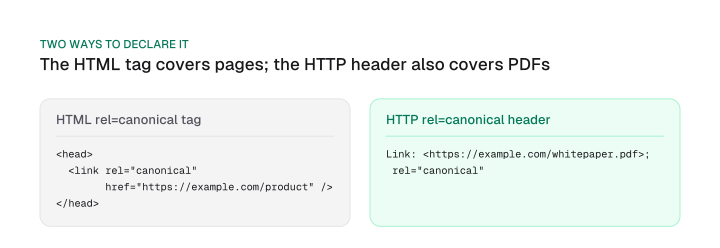
A canonical tag example like the one above always does the same job: it names one URL as the preferred version among duplicates. Google's documentation scopes the HTTP header version narrowly, though: it's supported for web search results only. It doesn't cover every other product or crawler that might touch the file.
Many CMS platforms and SEO plugins already write this tag automatically once you save a page, so before adding one by hand, view your page's actual rendered source and check what's already there.
A canonical tag in SEO work also keeps near duplicate pages from splitting your crawl budget across versions Google has to sort out separately. Without a clear preference, link equity spreads across URLs that should be pooling it in one place, and Google is left to guess which page actually deserves to rank.
When to use it, and why the best practices actually work
A canonical tag belongs on four kinds of pages: parameterized URLs, the same item filed under two categories, protocol or www variants of one page, and every unique page, where it should point at itself.
Parameterized URLs cover filters, sort order and tracking parameters, the most common source of accidental duplicates on ecommerce and SaaS sites alike.
That last case is a self-referencing canonical tag. Every unique page on your site should carry a tag pointing at its own URL, one more strong signal in the stack described later in this guide.
Every commonly repeated habit around canonical tags traces back to one goal: keep a specific signal from getting muddy or working against itself. Here's what each one actually does:
- Use absolute URLs, not relative ones. A relative href can resolve to the wrong page entirely if the tag gets copied to a different template or the site's base URL changes. That breaks the signal before Google even reads it.
- Declare exactly one canonical per page. Two conflicting
rel="canonical"tags on the same page don't average out; Google has to guess which one is real. - Keep casing and trailing slashes consistent between the canonical URL and the version Google actually crawls and links to.
/Productand/productread as two different signals about what should be the same page. - Self-reference on every unique page. Skipping it means one fewer strong signal in a system where methods stack rather than compete.
Two related situations get a pointer here rather than a full answer. If you're syndicating content across domains, say, a partner site republishing your blog post, the canonical case works differently. Our content repurposing guide covers it in full.
If your canonical tag is written by client-side JavaScript instead of baked into the server response, that's a distinct diagnostic too: the raw HTML and the rendered HTML can disagree about what the tag says. Our javascript seo guide walks through comparing them.
Why Google treats it as a hint, not a rule
Google's own documentation is direct: a canonical preference is "a hint, not a rule." Google can still select a different URL as the canonical one, regardless of what your tag says.
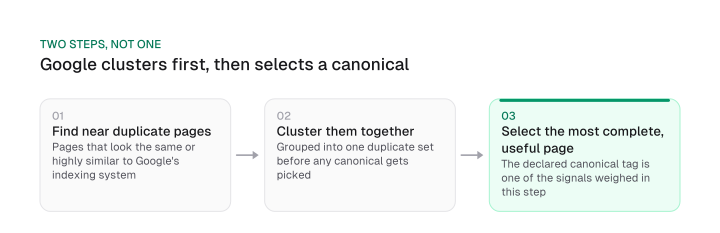
That's because canonicalization runs in two stages. First, Google's indexing system finds pages it judges to be the same or highly similar to each other, and clusters them into a single duplicate set.
Only then does it pick a winner: whichever page in that cluster its signals judge most complete and useful becomes canonical. Your declared tag is one input to that second step, and it doesn't skip ahead of the process.
This also affects something beyond ranking. The page Google settles on as canonical is the one it crawls most regularly.
Everything else in the cluster gets crawled less often, specifically to reduce crawling load on your site. An override changes more than which URL shows in results: it also changes how often Google revisits the pages you didn't want indexed.
The full list of signals Google actually weighs
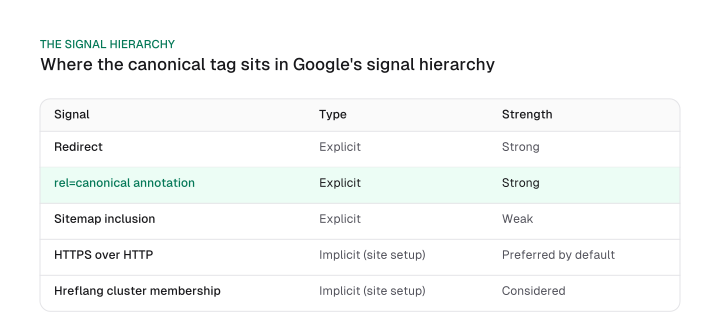
Beyond the tag itself, Google's canonicalization system weighs at least five documented signals, and they don't compete with each other. They stack.
| Signal | Type | Strength |
|---|---|---|
| Redirect | Explicit | Strong |
| rel=canonical annotation | Explicit | Strong |
| Sitemap inclusion | Explicit | Weak |
| HTTPS over HTTP | Implicit (site setup) | Preferred by default |
| Hreflang cluster membership | Implicit (site setup) | Considered |
Two of those are strong on their own: a 301 redirect pointing at a URL, and a rel=canonical annotation naming it. Sitemap inclusion is weaker by comparison, more a hint about which URLs you think are worth crawling than a canonicalization decision.
Two more signals apply without any tag at all, based purely on how your site is built. Google prefers HTTPS pages over their HTTP equivalents by default, unless something's broken: an invalid certificate, insecure dependencies, an HTTPS page that redirects through HTTP, or an HTTPS page whose own annotation points back to the HTTP version.
It also treats URLs inside the same hreflang cluster as a related signal in the same decision. Google's documentation states that combining more than one of these methods, a redirect and an annotation and a clean sitemap entry, for instance, produces a stronger signal than any single one alone.
That hreflang point is worth a beat on its own. Hreflang tags tell Google which URL serves which language or region; a canonical tag tells it which URL is the preferred version among duplicates.
They're doing different jobs, but they interact: pages inside the same hreflang cluster read as related signals to Google's canonicalization system. Conflicting hreflang and canonical declarations across the same set of pages send two different site-setup signals in different directions. That works against the stacking effect above instead of reinforcing it.
Diagnosing an override with URL Inspection
Search Console's URL Inspection tool shows two separate fields, and reading them is how you diagnose an override yourself instead of just double-checking that the tag exists.
Run the check in three steps:
- Open the page in Search Console's URL Inspection tool.
- Compare its two Page indexing fields. User-declared canonical is the URL your tag names; Google-selected canonical is the one Google chose to index. If they match, there's nothing to fix.
- If they differ, check which of two distinct statuses applies. They mean different things and call for different fixes.
| Status | What it means |
|---|---|
| "Duplicate without user-selected canonical" | This page is a duplicate of another page but doesn't indicate a preferred canonical page; Google has chosen the other page as canonical and won't serve this page in Search. |
| "Duplicate, Google chose different canonical than user" | This page is marked as canonical for a set of pages, but Google thinks another URL makes a better canonical, and has indexed that page instead. |
The first status means you never declared a preference in the first place; the fix is to add one. The second means you declared a preference and Google overrode it, which is the harder case: the tag is present and correct, and something else in the signal list from the previous section outweighed it.
That also explains why an override can hit a handful of pages on an otherwise consistent site instead of the whole site. Google evaluates canonicalization per duplicate cluster rather than site-wide.
A single inconsistent signal on a few URLs, a stray backlink pointing at the non-preferred version, an old sitemap entry that never got updated, internal links still pointing at the non-preferred URL, is enough to tip just those pages toward a different canonical. Every other cluster on the same site keeps resolving the way you declared it.
If the problem turns out to be structural rather than a handful of stray pages, our technical SEO checklist's canonical-consolidation audit steps cover the Screaming Frog crawl and Search Console filter workflow for finding every affected URL at once.
If you're working through a broader AI-readiness pass instead, this same status pair is the mechanism behind the single canonical check in our ai seo checklist, spelled out here in full.
Canonical vs noindex vs redirect: the decision
Canonical tag vs redirect vs noindex comes down to three different problems, each with its own documented fix. Picking the wrong one for your situation either wastes the fix or costs you a page you meant to keep.
| Tool | Use when | What happens |
|---|---|---|
| Canonical tag | Both URLs should stay live and one is preferred | The other URL stays live and indexable; its signals consolidate toward the preferred one |
| 301 redirect | The old URL should stop existing, permanently | Visitors and Google both land on the new URL; the old one drops out of the index |
| Noindex | The page must be kept out of search results entirely | The page is removed from Search entirely; Google's own guidance calls this the wrong tool for controlling canonical selection |
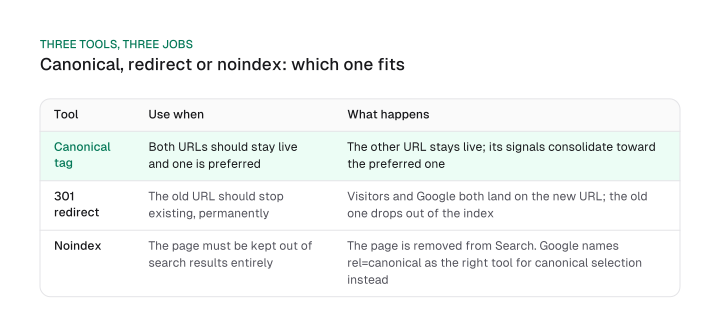
Redirects have a narrower documented job than either of the other two: Google's guidance names them for removing an existing duplicate page permanently, not for expressing a live preference while both pages stay up. Every permanent redirect method has the same effect on Google Search, and Google recommends the server-side kind when you want the change to take hold as fast as possible.
Noindex is a poor substitute for either. Google's documentation states plainly: "We don't recommend using noindex to prevent selection of a canonical page within a single site, because it will completely block the page from Search." Rel=canonical is the solution Google names for that job instead.
If your duplicate problem traces back to a specific structural cause rather than a one-off, faceted navigation, thin paginated archives, expired product variants, the right fix usually depends on which cause you're dealing with. Our guide to index bloat maps each common cause to the right one of these three tools.
A canonical tag is one signal in Google's canonicalization system, weighed alongside redirects, sitemaps, HTTPS preference and hreflang clusters rather than obeyed on its own. Once you know the full signal list Google runs, and how to read Search Console's two fields when a signal loses, an override stops being something you can only ask Google about.
Instead, it becomes something you diagnose yourself, the same way you'd diagnose any other technical SEO issue. Start with the URL Inspection check above: compare your declared canonical against Google's selected one, then work down the signal list until you find whichever one is actually out of alignment.
Frequently asked questions
Why did Google pick a different canonical only on some of my pages?
Because Google evaluates canonicalization per duplicate cluster rather than across your whole site. A handful of URLs carrying one inconsistent signal, like a stray backlink or an old sitemap entry, is enough to tip Google toward a different canonical for just those pages, even while every other page on the site keeps the version you declared.
What is a canonical URL, in one sentence?
It's the URL a site has told Google it prefers among a set of duplicate or near duplicate pages. Google treats that preference as one signal to weigh, not a command, so the URL it actually indexes as canonical can still turn out to be a different one.
Is a canonical tag the same as a redirect?
No. A redirect moves users and Google to a different URL permanently, and the old one stops existing in the index. A canonical tag leaves both URLs live and states a preference for which one should represent the pair, a preference Google can still override.
Does a canonical tag guarantee my preferred URL ranks?
No. Google's own documentation calls a canonical preference a hint the indexing system weighs alongside other signals rather than an instruction it follows automatically. Set the tag correctly and Google can still select a different URL as canonical if its other signals point elsewhere.
Can I combine noindex and canonical on the same page?
Only for their separate jobs, not for controlling which page gets selected as canonical. Google's documentation says noindex removes a page from Search entirely rather than consolidating it with another, and names rel=canonical as the correct tool for that specific decision.
Figures and images in this post are free to reuse under CC BY 4.0 with credit to Mission Growth.
Get Mission Growth highlighted in your Google results.