Multilingual SEO Guide: Languages, URLs, Hreflang and CMS
Multilingual SEO explained: how to pick languages, set URLs, localize keywords and metadata, avoid redirect traps, and measure each market separately.
By Furkan AktaşPublished Updated

On this page
Multilingual SEO is the work of making your site findable in more than one language, and it comes down to three decisions: which languages get full localization, how each language gets its own URL, and how your platform outputs the tags that connect them. The tagging is the cheap, mostly automated part. The expensive part is choosing languages that have demand.
If you run a site that ranks in English and you're weighing a second language, this guide gives you the order to decide in for multi language website SEO, with Google's own wording for each rule.
Google handles a multilingual site by treating each language version as its own page: it reads the visible content to detect the language, and you connect the versions with hreflang and links.
An effective multilingual SEO strategy runs in this order:
- Rank candidate languages from Search Console country data and the local SERP.
- Choose a URL structure per language by constraint.
- Localize keywords, titles, descriptions and slugs.
- Tag the versions and list them in the sitemap.
- Monitor each language by country and page.
In this guide:
- What changes when a site goes multilingual, and what a translation vendor's study of AI Overview citations measured
- A three-question test for ranking candidate languages with data you already own
- How to choose a URL structure, and why an IP redirect hides your languages from Google
- A worked three-locale example for one pricing page
- How many pages fit in one hreflang sitemap, with the arithmetic
- What WordPress, Shopify and Wix already output for you
What multilingual SEO is and what translation changes
Multilingual SEO is the work of making a site's content findable and servable in more than one language, where every language is a separate set of URLs that has to earn its own demand, which is why it pays only where that demand exists.
Adding a language changes three things, and each one is a separate job:
That second row matters more than it looks. Google's documentation on managing multi-regional sites says it uses the visible content of your page to determine its language, and does not use code-level language information such as lang attributes, or the URL. A page with a German lang attribute and English text is an English page to Google.
Why it pays: what one vendor's study measured
The case for adding a language is usually made with a headline number, so read the underlying counts.
A translation vendor's study of Spanish-language sites in Spain and Mexico counted Google AI Overview citations for one query set translated between Spanish and English. It started with 153 sites without English translations (98 from Spain, 55 from Mexico) and added a comparison group of 83 sites with both Spanish and English versions.
The vendor sells translation, so treat its framing as a sales case and its counts as data. Here is what the counts say once we recompute the gaps:
Sites with a second language had English-query citations much closer to their Spanish ones than sites without. They still sat below them. And these are different sites, so this is a difference between groups, and it proves nothing about the effect of translating.
The vendor's own headline is "up to 327%" more English-search visibility for translated sites. That is the best case. Its average is 24% more total citations per prompt. We computed the gaps from the raw counts because the vendor's stated percentages for the translated groups don't reproduce from them.
The practical reading: in this sample, English-query citations stayed below Spanish ones even with translation, so budget a new language to start below your first. If you want the wider picture of how AI answers change what you optimize for, what AI Overviews mean for SEO covers it.
Which languages to launch first
Launch order follows evidence you already hold: Search Console impressions by country for your existing pages, what the local results page looks like, and how much revenue a page carries.
Teams often start from analytics visitor location or a market-size list. Visitor location is the weaker signal, because it counts people who already found you in English. Impressions in Search Console show demand for pages you haven't translated yet. The Performance report's table can be grouped by query, page or country, so you can ask which countries already see your pages.
Run three questions per candidate language:
Then sort each page into a tier:
- Human translation and localization. Pages that carry revenue, in languages where the first two answers were yes. A native writer researches keywords and rewrites the page.
- Machine translation with post-editing. Pages with a yes on demand but lower revenue weight. A reviewer fixes terminology and tone before publishing.
- Machine translation only. Long-tail support content where demand exists but a mistake costs little.
- Not now. No impressions, no native-language pages in the local SERP, no revenue tie.
Machine translation quality is a real question in its own right, and is AI content bad for SEO covers where the line sits. The triage does the filtering, not the study: its counts compare different sites, so they can't tell you which language will pay for yours.
Two checks sit outside the triage. If a market's leading engine isn't Google, the plan changes; see search engine market share by country before you commit. And local backlinks are separate work from translation: plan them per market after the pages exist.
Once you've picked a language, how to choose SEO keywords gives the selection method to run in that language on its own results page.
URL structure for a multi language website
A subdirectory per language is our default pick for most sites, because a country-code domain signals one country and geotargeting trades away other locales, while a subdomain is treated as a distinct site.
A country domain is worth it only when one country needs its own legal, brand or hosting setup. Good SEO for multi language website projects starts by naming that constraint.
Pick the structure by the constraint you can't change:
Wix makes subdirectories the default when you create a new multilingual site, which tells you where the common case sits. WPML lets you format language URLs as domains, directories or parameters. Parameters are the option to skip, since they give you no readable, per-language path.
This part is our judgment. Google's table lists the trade-offs; the subdirectory default is our reading of them for a site without a country-specific constraint. If you later need to change structure, site migration SEO covers what moves with the URLs.
The redirect trap: why IP and language redirects hide versions
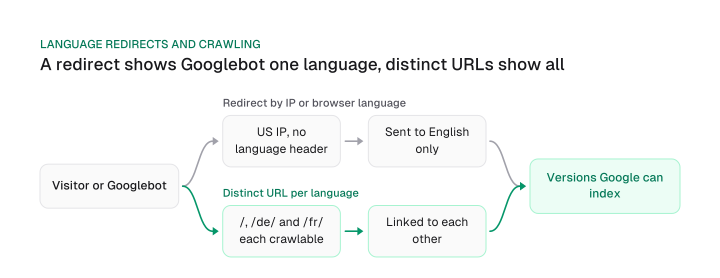
Never serve languages by IP address or browser setting alone, because Google's crawler won't see the versions you hide. Google's documentation on locale-adaptive pages says the default IP addresses of Googlebot appear to be based in the USA, and that the crawler sends requests without setting an Accept-Language header.
Walk through what that does to a site that redirects by language. Googlebot arrives from US-based IP addresses with no Accept-Language header. Your rule sees an English-speaking visitor and sends it to the English page. The German and French versions never get crawled through that path, so they don't get indexed.
You may have read that Googlebot doesn't vary its crawler source location. Google's page says it also crawls with IP addresses based outside the USA, in addition to the US-based ones.
And when Googlebot appears to come from a country, Google says to treat it like any other user from that country. So you can't rely on a US-only assumption in either direction. A locale-adaptive setup is a gamble on where the crawler happens to come from.
The fix is plain. Give every version its own crawlable URL, link between them, and let users choose.
Google's wording for the alternative is to consider adding hyperlinks to other versions of a page. Its guidance is to avoid automatically redirecting users from one version to another.
Localize keywords, metadata and slugs
Localizing means researching each language's keywords on its own results page, then rewriting the title, description and slug for that page, because Google may replace a title that does not match the page's language.
Here is the sequence for each page:
- Research native-language keywords. Don't translate your English keyword. Search the term in the target language and check the local SERP: do pages that look like yours rank, or a different page type?
- Rewrite the title and description. Write them for that searcher, in that language and writing system. Google's title link documentation says that if the title's writing system or language does not match the page's primary text, it may generate a title link that better matches the primary content.
- Write the slug in the language. A German page at
/de/preise/tells a German searcher what it is. - Localize the details. Date formats, currency, images with text in them, and fonts that cover the writing system all need a per-language pass.
- Link each version to its alternates. Tag syntax has its own dedicated guide; this step is only to make sure it happens.
A worked example: one pricing page in three locales
Take one pricing page on an illustrative site, example.com, in English, German and French. Every row is a field you change, and the last row is the reciprocal annotation:
Each page lists all three alternates and itself. The title isn't a literal translation of the slug, and the description isn't a word-for-word copy. Each was written for the language.
Before you trust a translated term like "Tarife" or "forfaits", search it. If the local results page ranks a different kind of page, your page type is wrong for that market, which is a bigger problem than wording.
Correcting the character-count rule
Fixed character caps for metadata are a rough guide, not a rule. A widely read guide on this topic says:
Keep them short. Google cuts off meta descriptions that extend over 120 characters
Google's snippet documentation is more precise: there is no limit on how long a meta description can be, but the snippet is truncated in Google Search results as needed, typically to fit the device width. A cut near that length is plausible on some devices, since truncation follows width.
That distinction matters most outside English. Wide characters take more room than narrow ones, so a different writing system can fit a different number of characters in the same space. Check widths per language in a SERP preview, and keep each title in the page's own language and script. For the rules that hold in any language, how to write title tags covers them.
Sitemaps, hreflang and monitoring at scale
A multilingual sitemap with hreflang lists every language version as its own entry, so one 50,000-URL file holds 50,000 divided by the number of languages in pages, and the 50MB cap binds once an entry passes 1,000 bytes, which depends on path length as much as on language count.
Google's localized-versions documentation spells out the layout: if you have 3 versions of a page, the sitemap has an entry for each version, and each entry has 3 identical child entries. So every language version costs you an entry, and each entry grows with the number of languages.
Google limits a single sitemap to 50MB uncompressed or 50,000 URLs. Work out bytes per entry first. Divide 50,000,000 by 50,000 and you get 1,000. An entry bigger than 1,000 bytes means the 50MB cap stops you before the 50,000 URL cap does.
In October 2026 we counted sample entries (host https://www.example.com, a two-letter folder, five-character hreflang codes) at two path lengths, then computed pages per sitemap file:
Download CSV (CC BY 4.0)
Read it this way: at 3 and 5 languages the URL limit binds first. At 10 languages, a 33-character path drops you from 5,000 to 3,930 pages per file and an 80-character path to 2,794. At 20 languages the 80-character path holds 726 pages per file, less than a third of what the URL count alone would allow.
The underlying entry sizes: a 33-character path measures 1,272 bytes at 10 languages and 2,452 at 20. An 80-character path measures 1,789 and 3,439.
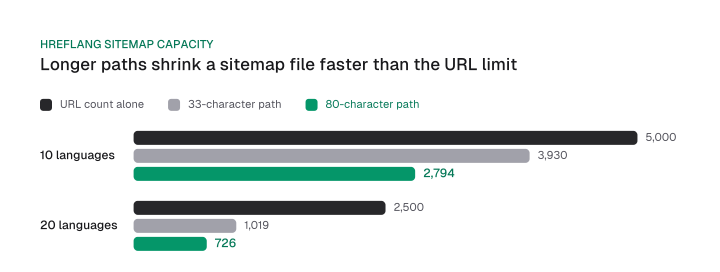
Here is a worked case. A 5,000-page site in 10 languages has 50,000 URLs. At a 33-character path one file holds 39,308 entries, so you need 2 sitemap files. At an 80-character path one file holds 27,948 entries, so you also need 2. Split with a sitemap index. It's a cheap fix, but only if you plan for it before a sitemap job fails.
What Google reads for language, and how to monitor it
Google determines a page's language from the visible content on the page and ignores lang attributes and the URL. Keep lang for screen readers and use hreflang to route users and crawlers to the right version. The tag rules, placement methods and validation live in the hreflang guide.
One related habit: point each localized URL's canonical at itself. A canonical tag that names the English page asks Google to treat the translation as a duplicate of it.
Multilingual site SEO needs monitoring per version after launch:
- Search Console performance. The table can be grouped by query, page or country, so filter by country and page for each language's folder.
- The old report is gone. The International Targeting report is deprecated, and country targeting in Search Console is no longer supported. Any audit checklist that tells you to check it is out of date.
- Sitemap coverage per language. Confirm that every language version appears as its own entry and that none was dropped by a split.
- Reciprocity. Every page should list all its alternates, including itself.
Multilingual SEO on WordPress, Shopify and Wix
Multilingual SEO on WordPress, Shopify and Wix starts from automatic hreflang, so the work left is translating titles and descriptions and making sure only one thing outputs the tags.
The three platforms behave alike on tags and differ on URL structure:
WPML is the WordPress multilingual plugin, and its own documentation says you don't have to do anything to get hreflang right.
For a Yoast SEO multilingual setup, WPML translates the Yoast SEO and Rank Math meta fields per language, so the translated title and description live in those fields. Check them page by page.
The double output rule
Audit for double output before you add any tag by hand. Shopify's documentation warns that adding your own tags on top of the automatic ones can produce duplicate or conflicting annotations, which can hurt your store's search ranking.
That warning applies to any setup with two outputs: a platform that emits hreflang plus an SEO plugin, a theme and an app, or a hand-edited template on top of a multilingual add-on. View the source of one translated page, count the hreflang links in the head, and compare them with your sitemap. One source of truth per page.
Store-level Shopify setup beyond languages sits in the Shopify SEO guide.
The decision order holds on any platform. Languages with demand come first, a URL per language second, and the tags third, because they are the part your CMS already handles. Pick one language from your Search Console country data this week, build its pages under a subdirectory, and check one translated page's source for a single set of hreflang tags before you add a second language.
Frequently asked questions
How many languages should we launch with?
One or two. Order them by the impressions your existing pages already earn in each country and by what the local results page shows for your terms. The study counts above show a smaller gap between English and Spanish citations on sites with both languages, but they compare different sites and don't show that every language pays.
Does Google Translate or a browser translate widget count as a multilingual site?
No. A widget that translates in the browser creates no crawlable URL per language, so Google has nothing to index. Google also advises against automatic redirects between versions. Give each one a distinct URL with hyperlinks between them, as the URL structure section describes.
Do we need a separate domain for each language?
No. A country-code domain is a strong signal for one country, and targeting one country can cost visibility in other locales or languages. A language folder covers languages. Use a country domain only when a country needs its own legal, brand or hosting setup.
Is hreflang enough on its own?
No. Hreflang routes users to the right version, but it doesn't translate anything or make a page rank. Google decides a page's language from its visible content and ignores code-level language information. Write real localized pages first, then tag them.
How does Yoast SEO fit a multilingual WordPress site?
With WPML and Rank Math, or WPML and Yoast SEO, WPML translates the plugin's meta fields per language and emits the hreflang tags itself. So check that each translated page has its own title and description in those fields, and avoid adding hreflang by hand on top of WPML's output.
How does Google handle a multilanguage website?
Google reads the visible content of each page to detect its language, so every version needs its own crawlable URL with real text in that language. It doesn't use lang attributes or the URL, and it advises against redirecting users automatically between versions. You connect the versions with hreflang and hyperlinks.
Cite this page
Aktaş, F. (2026, October 9). Multilingual SEO Guide: Languages, URLs, Hreflang and CMS. Mission Growth. https://missiongrowth.io/blog/multilingual-seo
Download the data: 1 table as CSV (CC BY 4.0)
Figures we made for this post are free to reuse under CC BY 4.0 with credit to Mission Growth.
Get Mission Growth highlighted in your Google results.