Marketing Automation Workflows: Build, Then Govern Well
Marketing automation workflows run on trigger, condition, action and timing steps. See where that model breaks and how to keep one from failing quietly.
On this page
The standard marketing automation workflows diagram draws four boxes in a row: trigger, condition, action, timing. Open a real platform's own builder, and one of those boxes doesn't exist as its own step.
That gap matters if you're deciding what to automate next, or trying to figure out why a workflow that ran fine for months just quietly broke.
This guide checks the model against a platform's own documentation, covers the workflow types that never touch an inbox, and gives you a way to decide what to build next and how to keep it correct once it's live.
In this guide:
- What marketing automation workflows actually are, and where the standard diagram gets one step wrong
- Why teams automate these workflows, and a common ROI stat that doesn't hold up
- Workflow types beyond email: CRM updates, internal alerts and retargeting sync
- A three-criteria score for deciding what to automate first
- How to keep a live workflow from failing quietly
What marketing automation workflows actually are
A marketing automation workflow is software that watches for a trigger, checks a condition, and runs a timed action without a person deciding to send it that day.
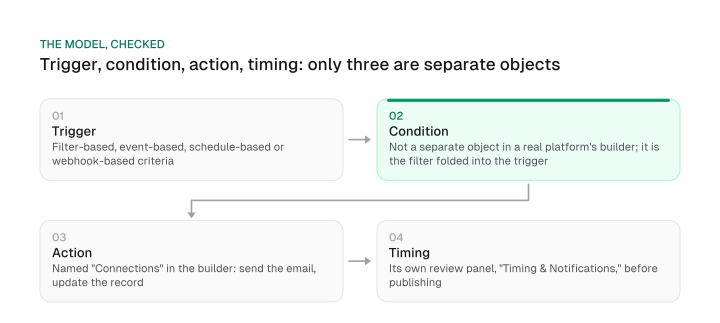
The standard diagram for that sequence draws four equal boxes: trigger, condition, action, timing. Checked against a real platform's own builder, three of those boxes hold up.
The condition box doesn't. HubSpot's own workflow documentation names enrollment triggers as filter-based, event-based, schedule-based or webhook-based criteria. Search that same page for "condition" and you get zero hits.
There's no separate condition object anywhere on it. What the diagram draws as its own box is, in HubSpot's builder, a filter folded into the trigger itself.
Timing holds up differently. The same documentation separately names "Timing & Notifications" as its own review panel, shown next to a separate "Connections" panel during that same review, while the action itself, the step that sends the email or updates the record, is added earlier in the builder under "Add actions." So the correction is specific to the condition box; the rest of the model is accurate as drawn.
Before you build one, confirm which object handles filtering in your own platform. Some evaluate a filter at the trigger, the moment a record enters; others let you add a filter step further down the chain. Check your builder rather than assume it works like HubSpot's.
Why marketing teams automate these workflows
Marketing automation workflows exist because no person can watch every customer's behavior and respond while it still matters.
A cart sits abandoned for an hour. A trial user goes quiet for three days. A lead crosses a scoring threshold at 11pm. A workflow catches each moment; a person watching a dashboard doesn't.
Cart abandonment shows the scale of the problem. Online shoppers abandon their cart 70.22% of the time on average, aggregated across 50 studies by the Baymard Institute. A workflow that reacts within minutes of that abandonment catches a moment no one is watching for at 2am.
The benefit case for automation is well established and doesn't need repeating at length. One repeated stat is worth checking before you cite it in a planning deck.
A frequently cited chart attributes a figure for hours lost each week and a figure for expected ROI, in part, to HubSpot's State of Marketing report. Checked directly against HubSpot's own State of Marketing report, neither figure appears in the 2025 or 2026 editions.
Verify a stat like that against the report it's attributed to before you use it to justify a build. The same discipline applies to any content roi number: name the pipeline stage before you repeat it, a point covered in full in content roi.
Workflow types that go past the inbox
A workflow's trigger and action define it, regardless of channel. That's why the workflows that matter most on this list never send an email.
Cart recovery, re-engagement and onboarding are the marketing workflow examples every list already covers, so they get one line each in the table below instead of a rebuild. Re-engagement and onboarding are lifecycle email sequences with their own timing across each stage, covered in full in lifecycle email marketing.
The types below rarely get named as workflows in their own right, even though they run on the exact same trigger, condition, action and timing logic.
Workflow types, side by side
The table below works as a short set of marketing automation workflow templates: adapt the trigger, condition, action and timing columns to your own platform instead of starting from a blank canvas. These marketing automation examples go beyond the email channel into CRM, ads and internal alerts.
| Workflow type | Trigger | Condition (folded into trigger) | Action | Timing |
|---|---|---|---|---|
| Cart recovery | Cart abandoned | Session inactive past a set window | Send recovery email | Delayed send |
| Re-engagement | No purchase or login in a while | Contact still subscribed | Send re-engagement sequence | Staggered over days |
| Onboarding | Signup or first login | New account, setup incomplete | Send onboarding sequence | Staggered over days |
| B2B lead routing | Score crosses threshold | Score above the set point | Update CRM, alert Slack, assign SDR | Near real time |
| Retargeting audience sync | Repeated high-intent visit | No open CRM deal | Add visitor to retargeting audience | Near real time |
| Renewal or expansion | Usage drop or renewal nears | Account is paying customer | Alert account owner | Scheduled, recurring |
| Webinar follow-up | Registers for a webinar | Attended or no-show | Send recording or a booking link | Delayed send |
| Content approval | Draft submitted | Passes brand and fact checks | Route to reviewer, then publish | Near real time |
Download CSV (CC BY 4.0)
Every row runs on the same trigger, condition, action and timing logic as an email workflow. The difference is where the action lands: a CRM field, a Slack channel or an ad platform, instead of an inbox.
The renewal or expansion row is the one built specifically to protect customer lifetime value. Its trigger is a drop in usage or a nearing renewal date, the two signals that usually show up before churn. The condition checks that the account is still a paying customer, so it doesn't fire on someone who has already left.
The action alerts the account owner instead of sending an automated email, because a renewal conversation needs a person who can address the specific reason usage dropped. That check runs on a scheduled, recurring cadence. The recurring check catches the warning sign before a customer decides to leave.
Two workflows worth building in full
For example, take the lead routing and retargeting sync rows further. Both are specified completely below, trigger through timing, which is more than a single table cell can hold.
B2B lead routing. A prospect's engagement score crosses a set threshold. That condition has two parts: the score clears the threshold, and no rep has already claimed the contact.
The action updates the CRM record's owner and lead status fields, posts a Slack alert to the assigned team, and assigns an SDR, all in the same run. Timing is near real time, because a lead left unrouted for a day is a lead a competitor's rep called first.
This is one of the first b2b marketing automation workflows a growing sales team builds. PQL scoring is one common input to that condition step; this workflow just acts once the score clears the bar.
Retargeting audience sync. A visitor views a pricing page three times in a week. The trigger fires on that behavior. The condition checks whether an open deal already exists for that contact in the CRM.
If one does, the workflow suppresses the sync. If it doesn't, the action adds the visitor to a retargeting audience. Skip that suppression condition, and ad spend chases someone your sales team already owns.
AI now handles some of this condition and timing work directly: scoring leads or predicting the best send time inside a workflow instead of a person tuning the threshold by hand. For the deeper look at what an AI agent should run alone, see ai marketing agents.
Content approval is a workflow type too, thin enough here to earn one row above. ai content workflow walks through the full production build, gate by gate.
How to decide what to automate first
A candidate task belongs at the top of your automation list when it scores high on volume, low on judgment, and cheap to get wrong.
A single heuristic, automate the repetitive task, collapses three separate questions into one. Score each candidate on all three instead, and you get a repeatable answer instead of a guess:
- Volume. How often does this trigger fire? A task that happens twice a month doesn't earn priority even if it's tedious.
- Judgment required. Does a person need context to decide the action, or is the rule mechanical? Lead routing by score is mechanical; discounting a support ticket usually needs a human call.
- Cost of a wrong action. If the automated version misfires, what does it cost? A mistimed cart recovery email is a minor annoyance. A misrouted enterprise lead costs real money.
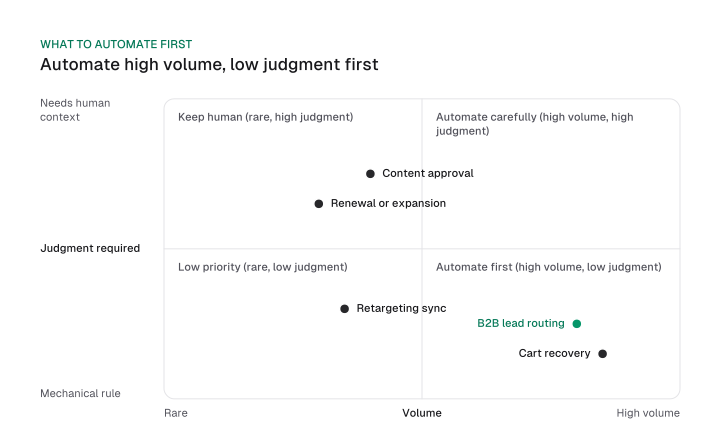
Run the two examples from the workflow types above through this score. Lead routing scores high on volume and low on judgment, which is why it's usually one of the first workflows a growing B2B team builds.
Retargeting sync scores lower on volume, but a wrong suppression condition wastes ad spend on an account you already own. That cost is what earns it a place on the list.
Governance: keeping a live workflow correct
Most marketing automation mistakes trace back to exactly this: a workflow nobody has opened since launch.
A workflow that has run correctly for six months has had zero human review in that time, which is exactly when a quiet failure goes undetected longest.
A workflow that runs quietly does not mean a workflow that runs correctly. Nothing about the trigger, condition or action steps tells you whether the underlying data has drifted, a field mapping broke, or a score threshold stopped matching how prospects actually behave.
That's a documented pattern in how people supervise automated systems. In "Ironies of Automation," published in the journal Automatica in 1983, Bainbridge found that continuous automatic control can hide a developing failure until it's past easy correction, and that a person's vigilance for rare events fades once a system has run acceptably for a while.
The paper studied real-time industrial and aviation control, a faster feedback loop and a higher stake than a marketing workflow. The transfer would stop holding if automated alerts on completion rates and drop-offs fully replaced a human check. Until your platform does that, a drifting score threshold or a broken field mapping shows no symptom until conversion or pipeline visibly drops.
The fix is a scheduled audit, set the day a workflow launches. A complaint is a lagging indicator; a schedule catches drift before a customer notices.
- Naming and ownership. A workflow named "New Workflow" with no other label is one nobody remembers the purpose of in a year, and nobody knows who to ask either. Name it by trigger and outcome, and assign one person as its owner.
- Test before launch. Run a real record through the workflow and confirm every branch fires as expected, including the branch that shouldn't fire.
- Suppression list wiring. Confirm the workflow checks the suppression or consent list live, each time it runs, and caps how often the same contact can re-enter within a set window.
- Audit cadence. On a schedule set at launch, typically monthly, sample live triggers, branches and suppression logic against current data.
That cadence gives you what a "set it and forget it" caution never does: a way to verify triggers still fire against current data, confirm branches nothing enters, and confirm the suppression list is still attached.
The trigger, condition, action, timing model looks complete on a whiteboard. Checked against a real platform's own documentation, the condition step turns out to be a filter folded into the trigger step.
The workflow types that never touch an inbox, and the governance question of keeping a live workflow correct, are the two pieces this guide adds on top of that model.
Pick one live workflow you haven't looked at in more than a month. Run it through the four checks above before you build the next one.
Frequently asked questions
How do you know a workflow is still working correctly months after you built it?
Run the same audit cadence from the governance section on a fixed schedule, rather than waiting for something to look wrong. A workflow that's stayed quiet for months is evidence nobody has checked, and nothing else.
Can a marketing automation workflow sync a website visitor into a paid retargeting audience?
Yes, and it should carry a suppression condition against CRM deal stage so ad spend doesn't chase someone sales already owns. The worked example above covers the exact trigger, condition and action.
What's the difference between B2B and B2C marketing automation workflows?
B2B workflows lean on lead scoring, territory rules and internal handoffs like CRM updates and Slack alerts. B2C workflows lean more on purchase and browse behavior across customer-facing channels like email and retargeting.
What are "the three automated workflows"?
That's one vendor's specific list: lead nurturing, post-purchase follow-up and re-engagement. The workflow types table above covers more ground, and none of its rows require an inbox.
Is AI changing how these workflows get built?
Yes, mainly inside the condition and timing steps: AI now handles lead scoring and predictive send time in some platforms. See our guide to AI marketing agents for the deeper look at deployment models and autonomy.
Will AI agents replace the team running these workflows?
That question belongs to a different guide, one built entirely around AI agents in marketing, and it answers this directly in its own FAQ.
Figures and images in this post are free to reuse under CC BY 4.0 with credit to Mission Growth.
Get Mission Growth highlighted in your Google results.