How to Track ChatGPT Mentions of Your Brand
Track ChatGPT mentions with a free, repeatable prompt-panel method plus GA4 referral setup. A 7-step DIY workflow to measure your brand's AI visibility.
By Furkan AktaşPublished Updated

On this page
To track ChatGPT mentions of your brand, run the same set of representative prompts several times through a session where you're logged out, then log a mention rate instead of a yes or no answer.
Pair that with GA4 referral tracking for chatgpt.com visits and you don't need a paid tool to get an honest baseline.
ChatGPT breaks the assumptions behind a Google ranking: it doesn't answer the same way twice, it personalizes by account memory, and its answers can vary by region.
In this guide:
- How to build a prompt panel from real buyer questions instead of vanity searches
- How many times to run each prompt to get a mention rate you can trust
- How to strip out memory bias and geographic variance
- How to connect ChatGPT mentions to GA4 referral traffic
- When it's time to graduate to a paid tracking tool
How to track ChatGPT mentions: the 7-step method at a glance
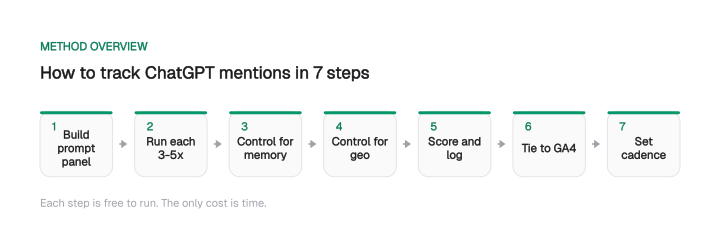
Here's the whole workflow before the detail:
- Build a representative prompt panel from real buyer questions.
- Run each prompt 3 to 5 times and record a mention rate instead of a yes/no.
- Neutralize memory by running logged out or in temporary chat mode.
- Account for geographic variance if you serve more than one market.
- Score every run on four consistent metrics in a spreadsheet.
- Connect mentions to real clicks with GA4's AI Assistant channel or a custom channel group.
- Set a fixed cadence and repeat so you get a trend line.
Each step is free to run. The only thing it costs is time, which is exactly why the last section covers when that time stops being a good trade.
Why ChatGPT mention tracking breaks traditional brand monitoring
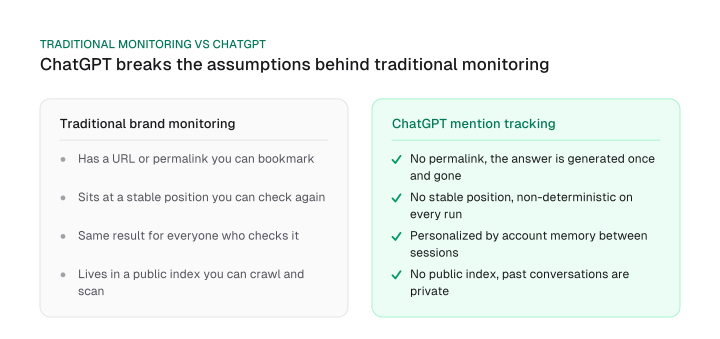
ChatGPT mention tracking breaks traditional brand monitoring because a ChatGPT answer leaves no permalink, no index and no stable position to check again.
A blog post has a URL. A press hit has a permalink. A Google result sits at a position you can screenshot today and check again next week.
None of that exists for a ChatGPT answer, so chatgpt brand monitoring needs its own method instead of a repurposed media monitoring tool.
Four things make it different:
- Non-determinism. Ask the same question twice and you can get two different answers, with different brands named and different sources cited. There is no single ranking to record.
- No permalink. A ChatGPT answer is generated for one session and then gone. Nothing to bookmark, nothing to crawl later.
- Memory personalizes the answer. An account that's logged in and has discussed your brand before can surface it more readily than a stranger's fresh session would.
- No public index. Anyone can crawl Google's results. Past ChatGPT conversations are private, so there's no corpus to scan the way you scan a SERP.
Together, these mean you can't track brand mentions in AI search the way you track backlinks or keyword rankings. You have to generate the data yourself, deliberately and repeatedly, and treat each answer as a sample rather than a fixed fact.
Step 1: build a representative prompt panel
A representative prompt panel mirrors the real questions your buyers ask, not vanity searches like "what is [brand]."
The real question behind how to monitor brand mentions in ChatGPT isn't whether it knows your brand. It's whether your brand comes up when a real buyer types the questions they actually ask, and in what light.
This panel is yours, sized to your own buyers. The market-wide estimates that prompt volume tools sell are a different object built from someone else's panel, and they answer a different question. Structure yours as a prompt universe: buyer task, stage and persona first, then several real wordings per cell.
Source your prompts from places where real questions already live:
- Google Search Console queries that already bring people to your site
- Questions your sales and support teams hear on calls
- The exact comparison phrasing prospects type, such as "[you] vs [competitor]"
Cover four prompt categories so you see the full picture:
- Category-level: "best [tools or software] for [job]"
- Comparison: "[competitor] vs [you]" and "alternatives to [competitor]"
- Branded-implicit: "is [you] good for [use case]"
- Problem-first: "how do I [solve the problem your product solves]"
For each angle, write 3 to 5 phrasing variations rather than one exact string. Ahrefs' guide to tracking ChatGPT brand mentions makes the case well: the answers sit in "near-constant flux" from session to session. One exact string measures only that string's luck.
Tracking where you stand is one job. Improving it is a separate one, covered in /blog/llm-optimization-guide. Get the measurement honest first, then optimize against it.
Scale your panel toward 30 to 50 prompts once your cadence is established.
Checklist: prompt panel starter (baseline of 10 to 15)
Here's an example panel for a project management SaaS that touches every category:
- best project management tools for agencies
- best project management software for small teams
- top task management apps for remote work
- [You] vs Asana
- [You] vs Monday
- alternatives to Trello
- is [You] good for client work
- is [You] good for a 10-person team
- how do I keep client projects from slipping deadlines
- how do I track team workload across projects
- what tool do agencies use to manage retainers
- best affordable project tool for freelancers
Step 2: control for non-determinism (run each prompt multiple times)
ChatGPT samples differently on every run, so running a prompt once tells you almost nothing.
Responses vary by session, so a single check gives you only a snapshot. Nothing about your brand changed between runs. The model just samples differently each time.
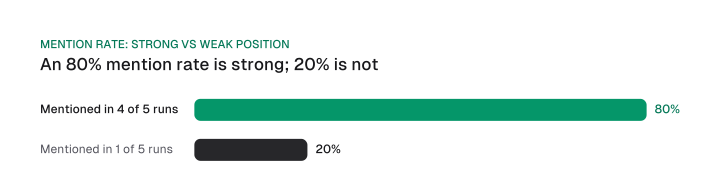
The fix is simple and free. Run each prompt 3 to 5 times per check cycle and record a mention rate, the percentage of runs that named you, instead of a binary yes or no answer.
A prompt that mentions you in 4 of 5 runs (80%) is a genuinely strong position. One that hits 1 of 5 (20%) is a weak, luck-dependent mention you shouldn't celebrate as a win.
Log every run. A plain spreadsheet does the whole job. The monthly mention rate then becomes one line of a client or leadership report; what is an SEO report covers where it sits and who reads it.
Table: per-prompt logging template
Download CSV (CC BY 4.0)
Read the rate, not the last answer you happened to see. Over several cycles those percentages become a trend line you can trust.
Step 3: neutralize memory and personalization
ChatGPT's memory is what inflates almost every DIY brand check, because an account that's logged in surfaces history a stranger would never see.
If you've ever discussed your brand in that account, ChatGPT's memory and personalization can surface it because you talked about it before, not because it's genuinely top of mind for a stranger sizing up your category. Your tracking then measures your own history instead of your market visibility.
Control for it on every run. Any one of these works:
- Log out of ChatGPT before you run the panel
- Turn memory off and use temporary chat mode
- Use a fresh account with no brand history
None of these perfectly replicate a real prospect's context, and that's worth saying plainly. A stranger in your target market carries history you can't reproduce. A clean, memory-free session is still the closest control a DIY setup can reach, and it removes the single biggest source of false positives in your log.
Step 4: account for geographic variance
ChatGPT's answer about your brand can shift by the account's region and locale, and that catches teams serving more than one market off guard.
A brand that shows up strongly for buyers in one market can be almost invisible in another market's version of the same question, and the reverse happens too.
This matters for regional brands and for any team selling into more than one market. If your positioning changes by geography, so will your ChatGPT visibility, and checking only one locale hides half the picture.
Method:
- If your brand serves more than one market, run the panel from more than one account region or locale where you can
- If you can't switch locales yourself, ask a colleague or contact in the other market to run the identical panel and send you their results
- Log market as its own column so you never blend two regions into one misleading average
Step 5: score and log results consistently
Four metrics turn a pile of ChatGPT runs into ai visibility tracking you can trust:
- Mention rate: the percentage of runs that named you, from Step 2.
- Position in the answer: named first and prominently, or buried near the bottom of a long list.
- Sentiment: positive, neutral, negative, or mentioned only with a caveat.
- Competitor share of voice: for the same prompt set, how often each competitor appears versus you.
This is the point where a plain spreadsheet becomes your actual tracking tool. You don't need to buy software to produce a usable trend line. If you want the wider measurement picture beyond ChatGPT, including how these signals sit inside a full KPI stack, AI search analytics covers that measurement layer. When a prompt you logged shows no citation for your page, ChatGPT citations walks through the four checks it has to pass.
Scoring the third column is harder than it looks, because a tool that scores it for you is running a second model over the answer. What that step does to the number, and how to correct a bad reading, is AI brand reputation in AI answers.
Step 6: connect mentions to real traffic with GA4
Knowing ChatGPT mentions you doesn't tell you whether anyone clicked, and pairing your mention log with chatgpt referral traffic ga4 tracking closes that gap.
One side tells you what ChatGPT says about you. The other tells you what that visibility actually sends to your site.
GA4's default channel group now includes an AI Assistant channel that covers ChatGPT referrals along with sources like Gemini, DeepSeek, Copilot and Grok, so start there. Build a custom channel group when you want ChatGPT on its own line. Here's how:
- In GA4, open Admin → Data display → Channel groups.
- Click Create new channel group and name it, for example "AI Assistants".
- Click Add new channel.
- Set the condition to Source matches regex.
- Enter a pattern covering ChatGPT's referring hosts, for example
chatgpt\.com|chat\.openai\.com. The same channel group can fold in other AI engines alongside these two. - Drag the new channel above Referral in the channel order so it captures matching traffic before the generic Referral bucket does.
- Save.
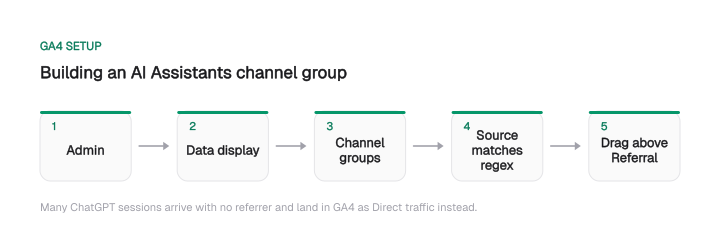
One limitation: many ChatGPT sessions arrive with no referrer data. They land in GA4 as Direct traffic instead of showing up as a chatgpt.com referral, so this channel group undercounts real AI-driven visits.
As an illustration of scale only, one site-level example measured AI referral traffic at roughly 0.19% of total sessions; treat it as one site's number.
Treat the number as a floor. Because of the Direct traffic undercount, your true number is higher than whatever GA4 shows.
Before you trust any referral figure, confirm your site is actually capturing referral and UTM data correctly in the first place. A broken or overwritten tracking setup quietly zeroes out the very signal you're trying to measure.
We built a free tracker audit for exactly this check: /tools/tracker-audit. Run it before you read anything into the GA4 numbers.
Step 7: set a cadence and repeat
A one-time check is a single data point. The value shows up in the trend, which means you need a fixed rhythm:
- Weekly: for fast-moving, competitive categories where the answer set shifts often.
- Monthly: as a baseline for everyone else.
- Ad hoc: run the panel again after a product launch, a rebrand, or a visible spike in a competitor's activity.
The discipline is the same one behind any repeatable growth practice. A fixed cadence beats occasional bursts of attention. /blog/growth-experiment-cadence makes that case in full, and the logic carries straight over to visibility tracking.
When to graduate from DIY to a paid ChatGPT tracking tool
Tracking ChatGPT mentions free of any software cost is entirely doable, and it has a ceiling: these are the concrete signals you've hit it.
Not a vague "when you're ready", the signals are concrete:
- Your prompt panel has grown past roughly 50 prompts and logging runs by hand takes more than an hour a week.
- You need more than ChatGPT in one view, tracking Perplexity, Gemini, and Google's AI Overviews next to it.
- You need alerts when your mention rate drops, instead of finding out at the next manual check.
- You need historical trend charts to show a manager or client without maintaining a spreadsheet yourself.
When those start stacking up, a paid tracker earns its cost. Our full comparison of what's available lives in /blog/best-chatgpt-seo-tools, so you can match a tool to the specific signal you're hitting rather than buying on reputation.
Mission Growth is our AI-led SEO and GEO growth service, and its platform tracks AI citations and visibility for customers: the automated version of the workflow above for teams past the point where hand-logging scales.
Frequently asked questions
Can I track ChatGPT mentions for free?
Yes. Running a repeated prompt panel by hand and logging results in a spreadsheet costs nothing but time. It won't scale past a handful of prompts checked weekly, and it won't cover Perplexity, Gemini, or AI Overviews in the same view, but it gives you a real, reproducible baseline without a paid tool.
Why does ChatGPT give a different answer every time I ask about my brand?
ChatGPT's responses are non-deterministic by design. The same prompt run twice can produce different wording, different brands named, and different citations. That's why a single check is only a snapshot. The fix is running each prompt several times and recording a mention rate instead of a one-off yes or no.
Does being logged into ChatGPT affect what it says about my brand?
Yes. Memory and personalization mean an account that's logged in, with prior brand-related chats, can surface your brand more often than a stranger's fresh session would. Run every tracking check logged out, or in temporary chat mode with memory off, to strip out that bias and measure something closer to what a real prospect sees.
How do I see ChatGPT referral traffic in Google Analytics 4?
Start with GA4's default AI Assistant channel, which includes ChatGPT referrals. To see it on its own line, build a custom channel group under Admin → Data display → Channel groups, matching chatgpt.com and chat.openai.com as the source, and place it above Referral in the channel order. Note that many of its sessions arrive without referrer data and register as Direct, so this setup undercounts real AI-driven visits.
How many prompts do I need for a reliable ChatGPT visibility baseline?
Start with 10 to 15 prompts spread across category, comparison, and problem-first phrasing for a first read. Scale toward 30 to 50 once you've established a weekly or monthly cadence and want trend data rather than a single snapshot.
When should I switch from manual tracking to a paid ChatGPT visibility tool?
When your prompt panel outgrows what you can log by hand in under an hour a week, when you need more than one AI engine tracked at once, or when you need automated alerts and historical charts instead of a spreadsheet you update yourself. Until then, the manual method gives you the same core signal for free.
Cite this page
Aktaş, F. (2026, September 17). How to Track ChatGPT Mentions of Your Brand. Mission Growth. https://missiongrowth.io/blog/track-chatgpt-brand-mentions
Download the data: 1 table as CSV (CC BY 4.0)
Figures we made for this post are free to reuse under CC BY 4.0 with credit to Mission Growth.
Get Mission Growth highlighted in your Google results.