
XML sitemap: what to put in it and what Google ignores
An XML sitemap lists the URLs you want crawled. See the 50,000-URL limit, how Google reads lastmod, which tags it ignores and how to submit it.


On this page
The usual recipe for an XML sitemap adds priority and changefreq tags, then pings Google. Google ignores the first two tags and has retired the ping endpoint. What pays is an honest lastmod date, a split that respects the file limits and a submission route that still works. Log file analysis SEO matches log URLs against your sitemap to show what Googlebot requests.
Do you need an XML sitemap?
Google says a small, well-linked site might not need an XML sitemap, which is a structured file of URLs you want search engines to crawl. The file tells crawlers which canonical pages exist and, when the dates are honest, which of them changed. Sitemap URLs that no internal link reaches are only candidates; the orphan pages guide shows how to confirm each one.
Submitting is a hint: Google does not guarantee that it downloads the file or uses it for crawling.
An HTML sitemap is a page for visitors. An XML sitemap is for crawlers, so the two don't replace each other.
Google also says that in most cases a site benefits from having a sitemap. The skip test is therefore narrow, and it only passes when three conditions hold at once.
What Google counts as a small site
Google defines a small site as about 500 pages or fewer, and only pages you want in search results count toward that total.
The other two conditions are internal linking that lets Googlebot find every important page by following links from the home page, and few media or news pages that you want to show in results.
If all three hold, you might not need a sitemap. If any one fails, the file earns its place.
Download CSV (CC BY 4.0)
The three cases that need one
Semrush lists similar situations in its sitemap guide but never gives the 500-page line or the rule for counting pages, so a reader cannot tell where "small" ends. Google's counting rule matters in practice, because tag archives and filter pages you keep out of search do not count toward the total.
Pages that miss the internal-linking condition are a separate problem, and our orphan pages guide handles finding and fixing them.

What goes inside an XML sitemap
An XML sitemap needs a urlset root element and one url entry with a required loc tag for each page, and Google ignores priority and ignores changefreq. Everything else in the file is optional, and only one optional tag does anything.
Required and optional tags
The urlset root element wraps the file, each url element wraps one page, and the loc tag holds that page's address. Google asks for fully qualified absolute URLs and crawls them exactly as listed. Order does not matter, so you can sort by template or date as you like.
The one optional tag that changes anything is lastmod. Google uses it to schedule recrawls of URLs it already knows, but only while the date keeps matching real changes to the page. A date that moves on every build teaches Google to ignore it, so the useful question is what tools write anyway.
Download CSV (CC BY 4.0)

What generators write anyway
The xml-sitemaps.com generator still produces a priority value, and it sets it by click depth, so the number describes where a page sits in the crawl and says nothing about how much the page matters. Delete such values or leave them; Google reads neither.
A plugin that exposes a "priority" control gives you a setting with no effect on Google.
The protocol also has extension tags for images, video, news and alternate languages. They are outside this guide: the image seo guide covers image entries and the hreflang guide covers language alternates inside sitemap entries.
A copyable XML sitemap example
A small blog's XML sitemap example fits in one file with absolute URLs, a lastmod on each article and no lastmod on the category page or the home page. The dates and addresses are placeholders on example.com.
<?xml version="1.0" encoding="UTF-8"?>
<urlset xmlns="http://www.sitemaps.org/schemas/sitemap/0.9">
  <url>
    <loc>https://example.com/</loc>
  </url>
  <url>
    <loc>https://example.com/blog/</loc>
  </url>
  <url>
    <loc>https://example.com/blog/first-post</loc>
    <lastmod>2026-01-12</lastmod>
  </url>
  <url>
    <loc>https://example.com/blog/second-post</loc>
    <lastmod>2026-02-03</lastmod>
  </url>
  <url>
    <loc>https://example.com/blog/third-post</loc>
    <lastmod>2026-02-20</lastmod>
  </url>
</urlset>
Reading the example line by line
The first line declares UTF-8, which keeps non-ASCII characters in URLs valid. The urlset line carries the protocol namespace. Each article carries its own date in YYYY-MM-DD form, and each address is absolute, with the scheme and host written out.
The home page and the category page show an omitted lastmod because software often cannot tell when a page that just aggregates other pages last changed. Google says it is fine to leave the date out in that case.
Where the date is unknown, leave the tag out. A missing lastmod costs nothing, while a guessed one teaches Google to distrust the rest of the file, which the next section explains. For the articles, copy the date from the record your editors change on a real edit, never from the file's timestamp.
How Google reads lastmod
The lastmod date means the day a page's content last changed in a way a visitor would notice, not the day your system rebuilt the file.
Google uses lastmod as a crawl-scheduling signal only when the date consistently matches real changes, so a date that changes on every edit costs you the signal. The value is used if it is consistently and verifiably accurate, for example by comparing it with the page's last modification.
The mechanism in three steps
First, a page changes in a way a visitor would notice. Second, your system writes that change date into lastmod. Third, Google compares the date with what it finds on the page, and when the two keep agreeing it uses the date for scheduling crawls of URLs it already discovered.
The date therefore does nothing for a brand-new URL, which Google has to find first.
Trust works in both directions. Google's own example: if a page changed 7 years ago but the file says it changed yesterday, eventually Google stops believing the date for your pages. One plugin that stamps every URL with the build time can turn the whole file into noise.

What counts as a significant modification
A significant modification is a change to the primary text, added or changed structured data, or updated links. A change to an insignificant piece of text in the sidebar or footer does not require a new lastmod.
Your CMS may touch such text on every deploy, which is why a date derived from file timestamps drifts from reality.
When to omit the lastmod
Omit the lastmod on a home page or category page that just aggregates other pages, and update it on article pages only for body text, structured data or link changes.
Download CSV (CC BY 4.0)
To check your own file, compare lastmod against Googlebot's last crawl of each URL in your server logs; our log file analysis work covers that method. Priority and changefreq need no equivalent check, because Google ignores both.
XML, text and RSS sitemap formats
A sitemap can be XML, a text file with one URL per line, or an RSS or Atom feed, and Google has no stated preference between them. All formats share one limit: 50 MB uncompressed or 50,000 URLs per file.
Download CSV (CC BY 4.0)
The shared cap sets the same per-entry budget in every format: 52,428,800 bytes across 50,000 URLs leaves about 1,049 bytes per entry. A text file of bare URLs never gets near it, while an XML entry carrying image or language extensions can. Pick XML unless a CMS feed is all you have, because a feed lists only recent URLs and leaves older pages out.
Limits, size and the sitemap index
A single sitemap holds up to 50,000 URLs or 50 MB uncompressed, so a plain entry reaches the URL cap long before the size cap.
The 50 MB limit is 52,428,800 bytes, and divided by 50,000 URLs it leaves about 1,049 bytes per entry (52,428,800 divided by 50,000, rounded to the nearest byte).
The three ceilings
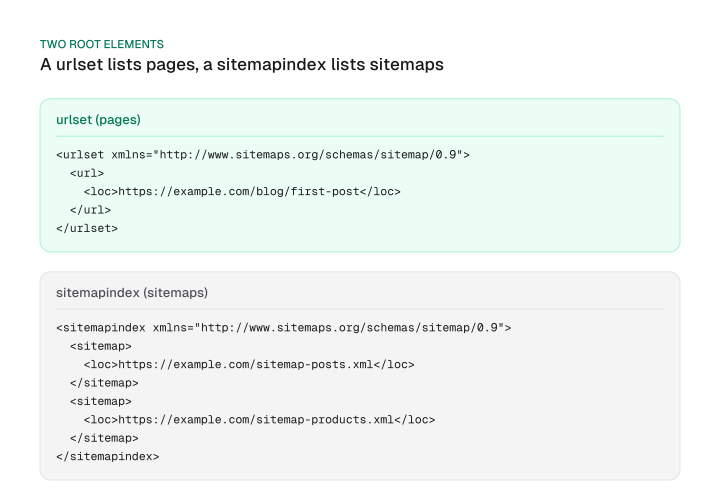
A sitemap index file lists sitemaps instead of pages, and sitemaps.org allows up to 50,000 sitemaps in one of them. Multiplying 50,000 sitemaps by 50,000 URLs gives 2.5 billion URLs behind a single index.
Search Console accepts up to 500 sitemap index files per site, so one property can reach 1.25 trillion URLs by the same arithmetic. No real site needs that. The ceilings show that the per-file cap is the one you will meet first.
Download CSV (CC BY 4.0)
A 1,049-byte budget is generous for a bare loc and lastmod pair, but extension data for images or alternate languages can eat it, so annotation-heavy entries hit the size cap before the URL cap. Gzip does not help with the limit: Google counts 50 MB uncompressed.

Splitting by section
Split by section or template, for example posts, products and categories, so that each child file stays under the limits and is readable when you debug it. A site with a million pages shards by template first and by count second.
Splitting by section also keeps a lastmod honest: a change to one product file does not touch the post files.
The index and its children must be on the same site, and each child file still covers only the URLs at or below its own directory unless you submit it through Search Console. A minimal index looks like this:
<?xml version="1.0" encoding="UTF-8"?>
<sitemapindex xmlns="http://www.sitemaps.org/schemas/sitemap/0.9">
  <sitemap>
    <loc>https://example.com/sitemap-posts.xml</loc>
    <lastmod>2026-02-20</lastmod>
  </sitemap>
  <sitemap>
    <loc>https://example.com/sitemap-products.xml</loc>
  </sitemap>
</sitemapindex>
Large files and stale entries also draw crawler requests away from pages that matter; the crawl budget guide explains that side.
How to generate an XML sitemap
Let your CMS generate the sitemap, script it from your database for more than a few dozen URLs, and write one by hand only for a handful of pages. Google notes that if you use a CMS such as WordPress, Wix or Blogger, the CMS has likely already made a sitemap available.
Pick the route by site type
Download CSV (CC BY 4.0)
WordPress wp-sitemap.xml is the sitemap index that core has exposed since version 5.5, so a WordPress site has a file even with no plugin. On a custom site, the script should take lastmod from the same record your editors change, which keeps the date tied to real edits.
What a generator leaves out
An XML sitemap generator crawls your site once and writes the file, and many free ones cap crawls at 500 URLs. That is 100x below the 50,000-URL protocol cap (50,000 divided by 500). The cap belongs to the tool, and the protocol does not impose it.
The output is also a snapshot: it cannot carry a live lastmod, and it may write the priority value that Google ignores. If you use a generator, regenerate on every release or switch to a CMS or script route.
How to submit it, and why ping no longer works
Submit an XML sitemap through the robots.txt Sitemap line or Search Console, because Google's ping endpoint returns a 404 and Bing removed anonymous ping submission in May 2022. Submitting is a hint, and Google does not promise to download or use the file.
Where the file lives
A file covers only the descendants of the parent directory it sits in, unless you submit it through Search Console. A sitemap at the site root is the safe choice, because a root file can affect every URL on the site.
The name does not matter once the file is declared, so /sitemap.xml and /sitemap are equally valid. Most sites use /sitemap.xml, and WordPress core uses /wp-sitemap.xml.
To find yours, open /robots.txt and look for Sitemap lines, then try /sitemap.xml and /wp-sitemap.xml. Google states that you can list multiple sitemap lines and that there is no limit to how many you include in robots.txt.
Routes that still work
Download CSV (CC BY 4.0)
Bing says it typically revisits submitted sitemaps at least once a day to check for updates. For faster notice it encourages IndexNow, which lets you tell Bing and other participating engines about changes in real time, and IndexNow notifies Bing in batches of up to 10,000 URLs per POST.
The ping retirement
Sitemap ping is dead. Google announced the deprecation on 2023-06-26, said the endpoint would stop functioning six months later, and ping requests to it now return a 404.
Bing removed anonymous sitemap submissions in May 2022 after finding that spammers often misused them, and it encourages every webmaster to adopt IndexNow.
Yet two pages that rank for this topic still show ping. The sitemaps.org protocol page lists it as a submission step, and Wikipedia's submission table shows a Bing ping address. Both are stale here. If a plugin or deploy script still pings an engine, remove the call.

Steps in Search Console
Steps to submit sitemap to Google in Search Console:
- Open your property in Search Console and go to Sitemaps.
- Enter the sitemap path, such as sitemap.xml, under Add a new sitemap.
- Press Submit, then read the status in the report.
- Add the same file to robots.txt as a Sitemap line so other engines find it.
What Search Console reports back
The Sitemaps report shows only sitemaps submitted through it or the API, and its status for each is Success, Couldn't fetch or a count of errors. The report does not show sitemaps discovered through a robots.txt reference or other methods, so a file that works can be missing from the list.
Reading the statuses
Download CSV (CC BY 4.0)
Three caveats apply. A file found only through robots.txt will not appear, because it was not submitted using this report. A property mismatch, such as an http file on an https property or a www and non-www split, also hides or breaks entries.
The report shows at most 1,000 submitted requests, in no particular order, so a large setup should lean on one index file. For indexing questions beyond the report, our orphan pages guide takes over.
Mistakes that waste a sitemap
A sitemap wastes Google's requests when it lists URLs you do not want in results, so list only canonical, indexable, absolute URLs. Google describes a sitemap as telling engines which URLs you prefer to show in search results, and those are the canonical URLs.
A checklist before you publish
- Canonical URLs only. Redirected, duplicate or parameter variants stay out. The canonical tag guide treats a sitemap as a weak canonical signal, so the file cannot fix a duplicate-content problem.
- Pages that return 200. Removed pages left in the file are stale entries that spend crawler requests.
- Absolute URLs with the scheme and host.
- UTF-8 encoding and a file within the 50,000 URL and 50 MB limits.
- An honest lastmod or none at all. Google stops trusting dates that do not match real changes, so a build stamp on every URL is worse than no tag.
- No leftover ping calls in deploy scripts. Google's ping endpoint now returns a 404, so the call only adds a failing step.
- During a move, submit only the new sitemap; the site migration seo checklist covers the rest.
To validate, fetch the file in a browser, confirm it parses, then submit it and read the status in the Sitemaps report.
XML sitemaps and AI search
An XML sitemap is not an AI-search requirement: Google says a page needs only to be indexed and eligible with a snippet to appear as a supporting link in AI Overviews and AI Mode.
Google's AI features guide adds that there are no additional technical requirements, and it names no sitemap or lastmod condition.
A sitemap therefore helps AI visibility in one way only, by helping a page get indexed in the first place.
Yoast says an accurate lastmod helps AI systems surface fresh pages, but Google's AI features guide names no lastmod condition, so treat that claim as unconfirmed. For Bing, the real-time route is IndexNow, which Bing recommends alongside its daily crawl of trusted sitemaps. The llms.txt file is a separate thing from a sitemap, and that guide explains how.
An XML sitemap is a hint, and the part of it that pays is an honest lastmod, while priority, changefreq and ping add nothing. Open your current file today, delete the tags Google ignores, remove any lastmod that follows deploys instead of edits, and check the Sitemaps report status.
Frequently asked questions
What is a sitemap?
A sitemap is a file that lists the URLs on a site that you want search engines to crawl. XML is the most common format, and the file can also carry dates and extension data. It is a hint to crawlers and not a guarantee that any page is crawled or indexed.
Where do I find my sitemap?
Open the robots.txt file at your site root and look for Sitemap lines, then try /sitemap.xml and, on WordPress, /wp-sitemap.xml. A sitemap submitted in Search Console appears in the Sitemaps report. The file name does not matter as long as it is declared in robots.txt or submitted.
Is an HTML sitemap the same as an XML sitemap?
No. An HTML sitemap is a page of links for visitors, and an XML sitemap is for crawlers. The XML file carries machine-readable entries with optional dates. You can have both, but only the XML file is what you submit in Search Console or reference in robots.txt.
Do I need to resubmit after every new post?
No. A submitted sitemap stays registered, and a CMS-generated file updates itself when you publish. Keep the lastmod honest so the date reflects real changes. Bing says it typically revisits submitted sitemaps at least once a day, and IndexNow can notify Bing sooner.
Does a sitemap guarantee indexing?
No. Google states that submitting a sitemap is merely a hint and does not guarantee that Google downloads the file or uses it for crawling. Pages still need to be crawlable, canonical and worth indexing. The file helps discovery, which is a smaller job than indexing.
Can I have more than one sitemap?
Yes. Split a large site into several files and list them in a sitemap index, or list several Sitemap lines in robots.txt. Google says there is no limit to the number of sitemaps in robots.txt. Search Console accepts up to 500 sitemap index files for each site.
Is 500 URLs the limit of a sitemap?
No. A single sitemap holds up to 50,000 URLs or 50 MB uncompressed. The 500-URL figure comes from free generator tools, which many cap at 500 URLs, and from Google's definition of a small site, about 500 pages or fewer. Neither is the protocol limit.
Should I gzip my sitemap?
Gzip saves transfer size and is allowed, but it does not raise the limit. Google counts 50 MB uncompressed, so a compressed file that expands past 50 MB or 50,000 URLs still has to be split into several sitemaps.
Cite this page
Aktaş, F. (2026, November 15). XML sitemap: what to put in it and what Google ignores. Mission Growth. https://missiongrowth.io/blog/xml-sitemap
Download the data: 8 tables as CSV (CC BY 4.0)
- When a site needs an XML sitemap, per Google
- What Google does with each XML sitemap tag
- lastmod rule by page type
- XML, text and RSS or Atom sitemap formats
- XML sitemap limits and derived ceilings
- How to build an XML sitemap by situation
- XML sitemap submission routes and their status
- Search Console Sitemaps report statuses and next actions
Figures we made for this post are free to reuse under CC BY 4.0 with credit to Mission Growth.