Microsoft Copilot SEO: How to Get Cited in Copilot Answers
Microsoft Copilot SEO depends on the Bing index. See how Copilot retrieves, crawls, and indexes pages, and the checklist that gets you cited in its answers.
On this page
Search teams running SEO for Copilot often start by copying ChatGPT tactics. That's the wrong model. Microsoft Copilot has no search index or crawler of its own: every public-facing surface grounds its answers in the Bing index through one crawler and one freshness protocol.
Copilot GEO, then, is Bing SEO with a citation layer on top, verified through a free tool Microsoft built for exactly this purpose. Bing Copilot optimization comes down to getting Bing's indexing fundamentals right, in the order the mechanism below actually requires, so you get cited in Copilot instead of guessing at it.
What Microsoft Copilot SEO actually means
Microsoft Copilot SEO means getting a brand's pages cited inside AI-generated answers across Edge, Windows, the consumer app, and Microsoft 365. It's not the unrelated SaaS product "SEO CoPilot," and it's not the same job as Microsoft's separate agent-builder platform, covered below.
Three separate things share the word "Copilot" in this space, and mixing them up wastes effort:
- Microsoft Copilot, the AI assistant embedded in Edge, Windows, the standalone app, and Microsoft 365.
- SEO CoPilot, a third-party SaaS product at seocopilot.ai with no connection to Microsoft. Searching "copilot seo" for a tool comparison turns this product up first, and it has nothing to do with getting cited by Microsoft's assistant.
- Copilot Studio, Microsoft's builder platform (formerly Power Virtual Agents) for custom or embedded agents across internal and external channels. It's a development tool, not a public answer surface.
Only the first one matters here. The work below is about earning citations when someone asks Microsoft Copilot a question, not about the other two products that happen to share its name.
Copilot's four surfaces, and how each one actually retrieves
Copilot runs on four distinct surfaces: Edge, Windows, the standalone app at copilot.microsoft.com, and Microsoft 365. All four ground their answers in the Bing index, but the Microsoft 365 surface handles the user's prompt differently from the other three.
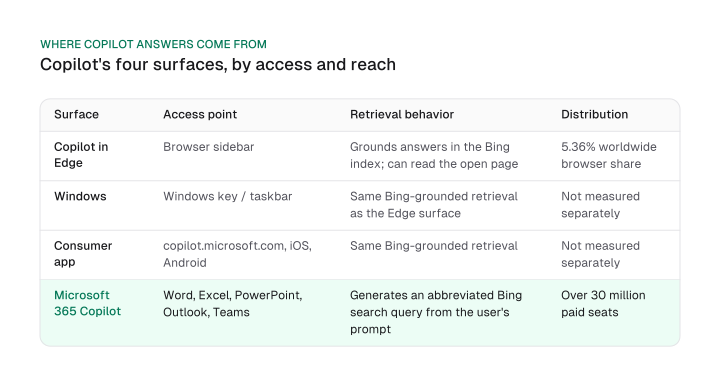
| Surface | Access point | Retrieval behavior |
|---|---|---|
| Copilot in Edge | Browser sidebar | Grounds answers in the Bing index; can read the open page |
| Windows | Windows key / taskbar | Same Bing-grounded retrieval as the Edge surface |
| Consumer app | copilot.microsoft.com, iOS, Android | Same Bing-grounded retrieval |
| Microsoft 365 Copilot | Word, Excel, PowerPoint, Outlook, Teams | Generates an abbreviated Bing search query from the user's prompt; only very short prompts are sent in full |
Microsoft's own support documentation confirms Microsoft 365 Copilot doesn't send the user's full prompt to Bing. It builds a search query from a few words in the prompt, or an uploaded file, and sends the full prompt only when the prompt is already short.
That gap matters in practice: content tuned for a long, conversational query can get missed inside Microsoft 365 even when the same page shows up fine in Copilot in Edge, because the two surfaces don't send Bing the same query.
Distribution is concentrated where the deals are. Microsoft 365 Copilot had over 30 million paid seats as of July 2026, up from 20 million in April 2026: a 50% jump in a single quarter, on Microsoft's own disclosures.
Edge, meanwhile, held 5.36% worldwide browser share as of August 2026. Together, those numbers point at the enterprise surface, not the consumer app, as where most queries against your content are actually running.
If you're only checking how your pages look inside the consumer app, you're auditing the smaller surface.
Gemini grounds in Google's own web index instead, so the retrieval mechanism behind it is a different one entirely. A fix that works there does not transfer to Copilot; Gemini SEO covers that side.
Why Copilot depends entirely on the Bing index
Microsoft Copilot has no search index of its own. Copilot Search, the feature that powers Copilot's answers inside Bing, blends traditional and generative Bing results with inline, per-sentence citations, and everything it cites first has to exist in the Bing index that Bingbot builds.
Copilot Search rolled out on April 4, 2025, building on what Microsoft called the lessons learned from the prior year's Bing Generative Search. The mechanism it replaced already leaned on the Bing index; this version formalized inline citation at the sentence level, plus an expandable source list the reader can open.
There's no parallel index running alongside Bing's. If a page isn't in the Bing index, there's nothing to cite.
That dependency has a real, calibrated upside for anyone already running a Google-first SEO program. Schema.org, the structured-data vocabulary both Bing's and Google's systems read, was founded jointly by Google, Microsoft, Yahoo, and Yandex.
Bing and Google run separate indexes, and getting cited in Copilot doesn't move your Google rankings directly. But because the two engines share the same schema vocabulary, the markup work that helps Copilot understand a page also feeds the systems Google reads: a shared technical foundation, not a ranking shortcut on either engine.
Read GEO vs SEO for the broader framework this section applies to Copilot specifically.
Bingbot and IndexNow: the crawler and indexing path Copilot depends on
Bingbot is the only crawler Microsoft documents for Bing and Copilot alike, and IndexNow is the one push protocol that gets a changed URL back in front of it without waiting for the next scheduled crawl.
Start with access. Bingbot needs to be allowed in robots.txt before anything else in this guide matters:
User-agent: bingbot
Allow: /
That's the whole requirement: no separate "Copilot" user agent exists to allow alongside it. Bingbot's user agent string tracks the current Microsoft Edge version (the base string is "bingbot/2.0"), and Microsoft updates it periodically to keep the crawler's rendering engine current. One crawler serves Bing search and Copilot both.
IndexNow, created jointly by Microsoft Bing and Yandex, launched in October 2021. Microsoft built it to address indexing delays it described as running "days or even weeks."
Get this part exactly right: an IndexNow submission that returns an HTTP 200 response confirms the search engine received the URL, and nothing more. It doesn't promise a crawl window or an indexing timeline.
Any specific timing figure you've seen attached to IndexNow claims more than Microsoft's own documentation states. Treat a 200 response as receipt confirmation, not a completion notice.
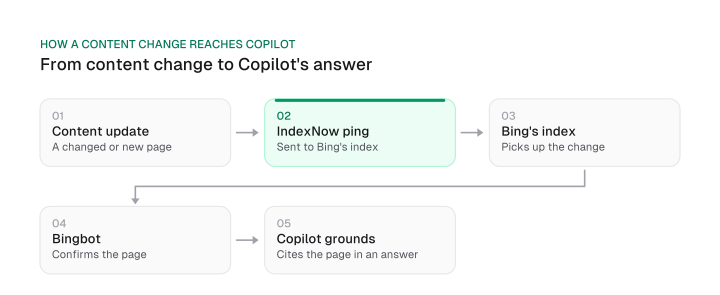
So the honest sequence is: IndexNow ping, then Bing's index picks it up on its own schedule, then Bingbot confirms the page, then Copilot can ground an answer in it. Skipping the ping doesn't block anything permanently, but it does mean you're waiting on Bingbot's normal crawl cadence instead of pushing the change forward.
For the general rules on which AI crawlers to allow across every engine, not only Bing's, see the general rules for allowing AI crawlers.
There's one check worth running before you touch robots.txt or IndexNow at all. Open a Copilot answer and click the Sources button underneath it: it shows the exact query Copilot sent to Bing and the pages it drew on to build the answer.
That's the one step here you can run in a minute, because it needs no Bing Webmaster Tools access and no crawl log. Ask the question you want your page to answer, open Sources, and read the query it actually ran.
If your page targets "enterprise SEO software pricing" and Sources shows a search for "best SEO tools 2026," you've found the mismatch yourself, in your own browser, before touching a single line of markup.
What actually gets cited: structured data, shopping, local, and trust signals
Copilot's retrieval reads the same schema.org vocabulary Google's systems do, validated through Bing Webmaster Tools' own markup validator, and Bing's shopping, local, and trust layers all shape what Copilot is willing to cite.
A few specifics that determine whether a page clears that bar:
- Structured data. Schema.org markup is the shared vocabulary Bing's and Google's crawlers both parse; validate it in Bing Webmaster Tools rather than assuming a Google-only validator covers Bing's reading of the same markup.
- Shopping queries. Product feeds that reach Bing Shopping (via Microsoft Merchant Center) are what Copilot draws on for commercial queries; a product with no feed has nothing for Copilot to cite in a shopping context.
- Local signals. Bing Places listings feed the local layer the same way Google Business Profile feeds Google's; an unclaimed or stale listing is a gap Copilot can't fill from elsewhere.
- Trust and freshness. Named authorship and visibly dated content are table-stakes trust signals; they're not Copilot-specific, but a page with no author and no date gives Copilot's retrieval less to work with than a page with both.
One more signal deserves a plain answer. Mission Growth publishes its own llms.txt and llms-full.txt, a curated plain-text knowledge base for AI crawlers.
Every step Microsoft documents between your page and a Copilot citation runs through the Bing index: Bingbot crawls it, IndexNow pushes changes into it, Webmaster Tools reports on it. An llms.txt file sits outside that chain entirely. Ship it if you want the file to exist, and leave the checklist order alone.
The Microsoft Copilot SEO checklist
The checklist below runs in dependency order: Bing index inclusion first, then Bingbot access, then IndexNow, then structured data, then measurement, because nothing later on the list works if the site isn't in the Bing index yet.
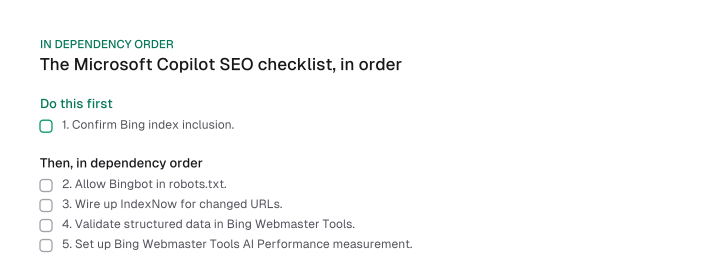
- Confirm Bing index inclusion. Nothing downstream matters if the page isn't indexed at all; check via Bing Webmaster Tools' URL inspection before touching anything else. If the site isn't verified in Bing Webmaster Tools yet, that verification is step zero, because every other check and every measurement on this list runs through that account.
- Allow Bingbot. Verify robots.txt and any CDN-level bot rules let Bingbot through; it's the one crawler that serves both Bing search and Copilot.
- Wire up IndexNow. Submit changed URLs so Bing's index picks them up without waiting for Bingbot's next scheduled pass; remember a 200 response confirms receipt, not a crawl or indexing timeline.
- Validate structured data. Run schema.org markup through Bing Webmaster Tools' validator; the same vocabulary Google reads is what Copilot's retrieval reads too.
- Set up measurement. Only after the first four steps are in place does the Bing Webmaster Tools AI Performance report have anything meaningful to show.
For the generic technical items this checklist doesn't re-list (sitemaps, canonical tags, page speed), see the technical SEO checklist.
How to measure your Copilot visibility
Bing Webmaster Tools' AI Performance report is Copilot's own native measurement surface, free inside any verified account, and it answers one question: which of your pages got cited, and how often.
Microsoft launched AI Performance in Public Preview on February 10, 2026, with four metrics:
- Total Citations: how many times your pages were cited across Copilot and Bing's AI features.
- Average Cited Pages: how many distinct pages an average citing answer draws on.
- Grounding Queries: the underlying queries Copilot ran that led to a citation.
- Page-level Citation Activity: which specific pages got cited, and how often.
Microsoft says it plainly in the blog post that introduced the report: these AI Performance metrics do not indicate ranking, authority, or the role of any page within an individual answer.
That one sentence kills the obvious misreading. A high citation count is not a rank inside Copilot the way a position is a rank in classic search results. The report shows activity, not standing.
So a rising Total Citations number is a reason to investigate. It is not a growth KPI on its own.
The report has grown since launch. In June 2026 Microsoft added four more capabilities, all in preview: Intents, which classifies grounding queries into categories such as informational, commercial and navigational; Topics, which groups citations into subject areas; Citation Share, which shows how much of the citation space your site receives for a specific grounding query; and Compare, for watching those patterns move over time.
Citation Share is the one worth opening first. It is the closest thing Microsoft publishes to a competitive measure, and it still isn't a rank: it tells you how much of a grounding query's citation space you hold, not where you sit inside any one answer.
Bing Webmaster Tools is a free product, and Microsoft introduced no separate paid tier for AI Performance, so this measurement is available to any site with a verified account.
One distinction is worth drawing before you buy anything. A Supermetrics-style connector pipes Google Search Console data into Copilot Chat, which measures Google's own search performance inside a chat window.
It tells you nothing about whether Copilot is citing your pages. Two things answer that: the AI Performance report, or a third-party prompt tracker built for the job.
For the cross-platform measurement stack beyond Bing's native reporting, AI search analytics covers the GA4 and referral mechanics this section doesn't rebuild. For third-party options, see the best AI rank tracking tools.
Microsoft Copilot vs ChatGPT, Perplexity, and Gemini: where to go next
Microsoft Copilot is the only major AI answer engine with no index or crawler of its own, which makes it the fastest engine to move on and the easiest to audit, unlike ChatGPT, Perplexity, or Gemini.
That single-index dependency cuts both ways. It is a constraint: there is no alternate index to lean on if Bing hasn't indexed a page.
It is also why Copilot is the free-win engine for a team already running a cross-engine program. The dependency chain is the shortest of the four, one crawler and one push protocol into one index, and the native reporting costs nothing.
The other three engines in this series work differently. ChatGPT SEO explains a retrieval path that doesn't reduce to a single index, Perplexity SEO runs its own separate mechanism, and Gemini grounds in Google's index instead.
So if you are deciding where the next hour of an AI-search workstream goes and you already have Webmaster Tools access, Copilot is where that hour goes furthest. For the nine-step framework across all engines, start with how to optimize for AI search engines.
Microsoft Copilot has no index or crawler of its own. It grounds every public-facing answer in the Bing index through Bingbot and IndexNow, so getting cited comes down to getting those indexing fundamentals right and verifying the result in Webmaster Tools.
Start with the checklist above, in order. If step one, index inclusion, isn't confirmed yet, nothing else on this page will move the needle.
Frequently asked questions
No. SEO CoPilot is a separate third-party SaaS tool at seocopilot.ai with no connection to Microsoft. Microsoft Copilot is the AI assistant built into Edge, Windows, the consumer app, and Microsoft 365.
Yes, materially, for freshness: it gets a changed URL back in front of Bing's index without waiting for the next scheduled crawl. It doesn't guarantee a specific crawl or indexing timeline; a 200 response only confirms the URL was received.
It sits outside the path Microsoft documents. Copilot grounds in the Bing index, Bingbot builds that index and IndexNow refreshes it, and no step in that chain is documented as reading an llms.txt file. Mission Growth publishes its own llms.txt and llms-full.txt, but that's a first-party practice, not evidence Copilot uses the file.
There's no documented ranking-position requirement. Index inclusion is the prerequisite Microsoft's own AI Performance documentation points to, not a specific ranking position.
Yes. Microsoft introduced no separate paid tier for it; it's available inside any verified Bing Webmaster Tools account.
Not directly. Bing and Google run separate indexes. But schema.org, the structured-data vocabulary both engines read, is a joint standard founded by Google, Microsoft, Yahoo, and Yandex, so the shared technical and schema work benefits both engines' systems even without a direct ranking link.
Figures and images in this post are free to reuse under CC BY 4.0 with credit to Mission Growth.
Get Mission Growth highlighted in your Google results.