Ecommerce SEO: What to Fix First on a Real Catalog
A complete ecommerce SEO guide: what to fix first on a real catalog, the technical layer, common mistakes, cost, and how to measure results.
On this page
Ecommerce SEO is standard SEO applied to a catalog that won't hold still. Prices move, items go out of stock, and new products launch every week.
The standard response is six tactics: keywords, on-page, technical, content, links, measurement. That list skips the one constraint that separates ecommerce seo vs seo for a single landing page: scale.
A catalog with a few hundred or a few thousand SKUs can't be optimized page by page in an undifferentiated order, and it creates technical problems a small site never has to solve.
In this guide:
- Which products and categories to fix first, using one prioritization rule
- The technical layer catalogs create: duplicate URLs, availability states, and the Merchant Center split
- The catalog-scale mistakes that quietly cap growth
- What ecommerce SEO costs, and which KPI to check first for which symptom
What ecommerce SEO actually means, and why it still works
"Normal SEO" usually means the six tactics guides list for any site: keywords, on-page, technical, content, links, measurement. Ecommerce SEO is that same discipline applied to a store's biggest constraint: a catalog of pages whose price, stock and season change constantly.
A five-page brochure site sets its content once and revisits it occasionally. A catalog site rewrites itself every day, and the SEO work has to keep pace with it.
This holds whether the storefront runs on Shopify, BigCommerce or a custom stack. The platform's built-in fields control what goes into a title tag or an alt-text box. None of them run backlink outreach, a technical audit, or catalog prioritization for you (more on that in the FAQ below).
If your store sells primarily to other businesses, the keyword and content strategy shifts again: buying committees, gated pricing and longer sales cycles change what "ecommerce SEO" means. Our guide on how b2b seo differs from consumer ecommerce SEO covers that case separately; this guide stays with the consumer catalog.
Is it still worth doing? The U.S. Census Bureau's own numbers say yes. E-commerce's share of total U.S. retail sales, seasonally adjusted, has climbed every quarter for five straight quarters: 16.3% in Q2 2025, then 16.4%, 16.7%, 17.0%, and 17.1% by Q2 2026.
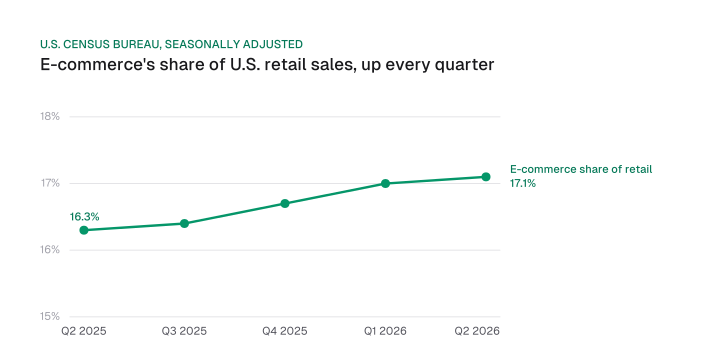
That share is also growing faster than the market it sits inside. In Q2 2026, U.S. e-commerce sales grew 12.2% year over year, seasonally adjusted, against 6.7% for total U.S. retail.
Divide the two and e-commerce grew roughly 1.82 times faster than retail overall (12.2 / 6.7 = 1.82). That's a checkable, dated U.S. figure, the kind a vendor's uncited global projection never gives you.
AI shopping surfaces haven't replaced that foundation. They sit on top of it. Mission Growth's platform tracks AI citations and visibility for customers.
The mechanics of ranking inside ChatGPT's shopping surface or a generative answer are their own guides. The reason to keep investing in organic ecommerce SEO now is the Census trend above: measurable and rising.
Which products and categories to optimize first
A large catalog can't be optimized page by page in an undifferentiated order, so a strong ecommerce SEO strategy starts by ranking products on trailing revenue times search demand.
From there, work down from the top slice first.
Trailing revenue tells you what already sells. Search demand tells you what people are actually looking for. Multiply them and the products that deserve full attention first, and the ones that don't need it yet, sort themselves.
| Priority tier | Revenue contribution | Search demand | What to do first |
|---|---|---|---|
| Tier 1 | Top slice of trailing revenue | Measurable search volume | Full on-page rewrite, complete schema, priority internal links |
| Tier 2 | High revenue, low measured demand | Little or no volume | Fix technical and schema issues only; skip hand-written copy for now |
| Tier 3 | Low revenue, high demand | Real volume, weak sales | Check pricing, imagery and conversion before spending SEO time |
| Tier 4 | Long tail | Little or no volume | Template defaults only; leave for automated rules |
This is the Pareto principle applied to a catalog rather than a task list: most of the value sits in a minority of pages, so that minority gets hand-tuned first. It's a heuristic, not a measured split specific to any one store; run your own catalog's revenue and demand numbers through it rather than assuming a fixed ratio.
Category structure feeds directly into this. Tier 1 categories usually sit one click from the homepage and pass link equity down to the products inside them, so fixing a category page's structure lifts every product beneath it at once. Content marketing and backlink work should follow the same tiers: a buying guide or an earned link aimed at a Tier 4 page is effort spent where it can't move revenue.
Keyword research works the same way, one layer down. Category pages should target the head terms buyers search before they know which product they want; product pages should target the longer, specific phrases a buyer types once they do. Auditing an existing catalog means checking that split before rewriting a single title tag.
Once you know which pages are Tier 1, run them through a general ecommerce seo checklist for the baseline technical items every page type needs, then layer the catalog-specific fixes in the next section on top.
The technical layer large catalogs need that landing pages don't
Product catalogs create duplicate URLs, out-of-date availability data and a structured-data and feed split that a five-page brochure site never has to solve. Each one has a specific, sourced fix.
Duplicate URLs from faceted navigation. Filters like color, size and sort order multiply one category into hundreds of crawlable URL variants. Google ranks the signals that consolidate them by strength: a redirect and a rel="canonical" annotation are strong signals, sitemap inclusion is a weak one, and Google is explicit that robots.txt is not a canonicalization tool.
That hierarchy matters because it's also where the crawl budget problem starts on large catalogs, and where thin, near-duplicate variant pages turn into index bloat if nobody sets a canonical at all.
Availability states, not a binary switch. schema.org's ItemAvailability enumeration defines 12 values: BackOrder, Discontinued, InStock, InStoreOnly, LimitedAvailability, MadeToOrder, OnlineOnly, OutOfStock, PreOrder, PreSale, Reserved and SoldOut. Most catalogs default everything that isn't InStock to OutOfStock, which throws away information Google can use.
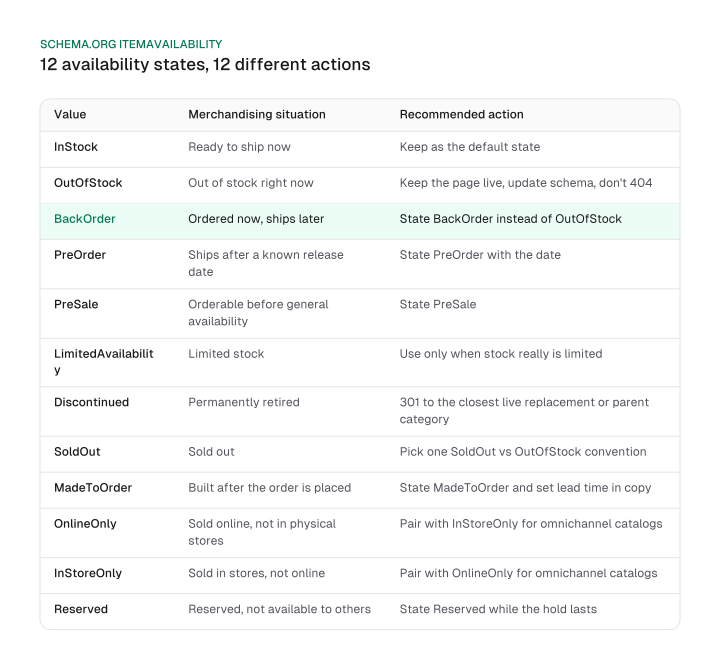
Here's what each state should trigger:
- InStock. Ready to ship now, the default state.
- OutOfStock. Out of stock right now. Keep the page live, update the schema, and skip the 404.
- BackOrder. Ordered now, ships later. State BackOrder instead of OutOfStock.
- PreOrder. Ships after a known release date. State PreOrder with that date.
- PreSale. Available to order and deliver before general availability.
- LimitedAvailability. Limited availability. Use it only when stock really is limited, so the signal stays honest.
- Discontinued. Permanently retired. Carries a 301 to the closest live replacement or the parent category.
- SoldOut. Sold out. schema.org defines it separately from OutOfStock without spelling out the difference, so pick one convention and apply it across the catalog.
- MadeToOrder. Built after the order is placed. Set the lead time in the copy.
- OnlineOnly and InStoreOnly. Sold online only, or in physical stores only. Pair the two for an omnichannel catalog.
- Reserved. Reserved, and therefore not available to other buyers.
None of that nuance shows up if every non-InStock product gets flattened to the same generic OutOfStock state.
Product schema and the shopping feed are two different channels, and they need to agree. Google's Product structured data splits into two on-page markup types by whether the page itself is purchasable: product snippets for non-purchasable pages, and merchant listings for purchasable ones.
A Merchant Center feed is a separate, supplementary channel that fills in fields missing from that on-page markup, such as price. Google's own documentation says providing both "maximizes your eligibility" to these result types. Keeping that feed accurate and in step with the page's own markup is what Google Merchant Center SEO comes down to in practice.
That means a page's structured data and its Merchant Center feed entry have to tell the same story for the same product. Here's a worked example for a backordered item:
{
  "@context": "https://schema.org",
  "@type": "Product",
  "name": "Wool hiking sock, size M",
  "sku": "SKU-1042",
  "offers": {
    "@type": "Offer",
    "availability": "https://schema.org/BackOrder"
  }
}
If the Merchant Center feed entry for SKU-1042 still says in stock while the page says BackOrder, Google has two conflicting signals for the same product. Google doesn't document availability specifically as a field it pulls from the feed the way it does price, but keeping the two channels in sync avoids the mismatch entirely.
A few more items belong in the same technical pass. Reviews need Review and AggregateRating markup to validate as schema; visible review text on the page alone doesn't earn rich-result eligibility.
Mobile rendering gets its own general treatment in the technical seo checklist, and structured data beyond the Product and Offer types covered here, including how it plays into AI-generated answers, is the subject of schema for ai search. A store selling into multiple countries or languages adds hreflang tags on top of all this, a large enough topic to need its own guide.
Mistakes that quietly cap ecommerce SEO at scale
The costliest ecommerce SEO mistakes come from single-page habits applied at catalog scale, and they rarely show up on a generic "avoid keyword stuffing" checklist. Two do the most damage:
- Blocking faceted URLs with robots.txt instead of a canonical signal. Google says plainly that robots.txt isn't a canonicalization tool. Blocking a duplicate URL with it stops Google from crawling the page at all, so Google never sees the canonical signal that would have told it which version to index. Use a redirect or
rel="canonical"instead, and reserve robots.txt for pages you truly don't want crawled. - Returning a 404 for a page that still holds backlinks. A discontinued product with earned links pointing at it stops passing that value along once it returns a 404. A 301 to the closest live replacement or the parent category keeps the link equity instead of discarding it.
Both mistakes come from applying single-page instincts to a catalog: treating one URL in isolation instead of the crawl and link graph the whole store shares.
What it costs, how to measure it, and a short checklist
Ecommerce SEO cost has no flat rate, whether an agency quotes a monthly retainer, a fixed project fee or an hourly rate. Cost is set by two variables you can check yourself before asking for a quote: catalog size (how many SKUs and category pages need attention) and technical backlog (how many duplicate URLs, missing schema fields and feed errors have piled up).
A small, clean catalog costs less to fix than a large one carrying years of unaddressed duplicate URLs and missing availability data. For what agencies, consultants and freelancers actually charge, see our seo cost breakdown. For how to think about that spend against the return it generates, see our breakdown of seo roi.
Once the work is underway, which KPI to check first depends on the symptom you're actually seeing, not a flat list of metrics to track every week.
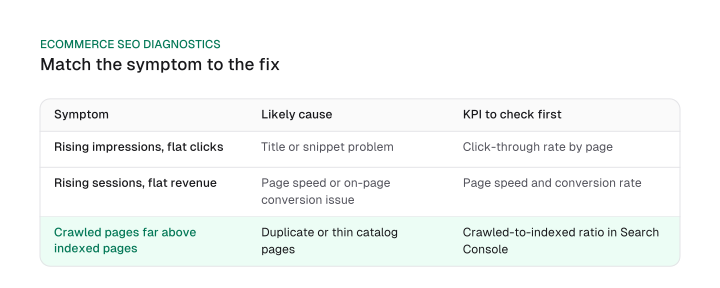
Three patterns cover most of what goes wrong:
- Rising impressions, flat clicks. Usually a title or snippet problem. Check click-through rate by page first.
- Rising sessions, flat revenue. Usually page speed or an on-page conversion issue. Check speed and conversion rate together.
- Crawled pages far above indexed pages. Usually duplicate or thin catalog pages. Check the crawled-to-indexed ratio in Search Console.
Use this ecommerce seo checklist to work the priority order end to end:
- Rank products and categories by trailing revenue times search demand.
- Fix canonical signals on faceted and parameter URLs before anything else technical.
- Set the specific
ItemAvailabilityvalue on every product, instead of a blanket OutOfStock default. - Sync the Merchant Center feed with on-page schema for price and availability.
- Check the one KPI that matches the symptom you're seeing before scanning the rest of the dashboard.
Ecommerce SEO fails less often from missing a tactic than from applying single-page advice to a catalog that never asked which pages mattered most, how to encode availability correctly, or how its feed and its schema were supposed to agree. Start with the ranked list from Tier 1 above, fix the technical layer underneath it, and let the KPI table tell you what to check next.
Frequently asked questions
Does my ecommerce platform already handle SEO for me?
No. Shopify, BigCommerce and similar platforms give you fields to fill in, title tags, alt text, basic schema, but they don't run backlink outreach, a technical audit, or the catalog prioritization this guide walks through. Those stay a deliberate, ongoing job.
Is ecommerce SEO different for a B2B storefront?
Yes. Buying committees, gated pricing and longer sales cycles change the keyword and content strategy from a typical consumer catalog. See our b2b seo guide for that case in full.
What's the difference between a Merchant Center feed and product schema markup?
They're not the same layer. On-page product schema splits into product snippets (non-purchasable pages) and merchant listings (purchasable pages). The Merchant Center feed is a separate channel that fills in fields the page's markup is missing, like price, and running both raises your overall eligibility for these result types.
Which schema.org availability value should I use for a discontinued or backordered product?
Name the specific state: Discontinued, BackOrder, PreOrder or LimitedAvailability, depending on what's actually true. Defaulting everything non-InStock to OutOfStock throws away information Google could otherwise use.
Does ecommerce SEO still matter with AI Overviews and ChatGPT shopping answering more queries?
Yes. Organic visibility still feeds those surfaces; a product that isn't well-marked-up and findable in search rarely surfaces cleanly in an AI answer either. For the shopping-feed mechanics themselves, see chatgpt shopping feed and generative engine optimization.
Figures and images in this post are free to reuse under CC BY 4.0 with credit to Mission Growth.
Get Mission Growth highlighted in your Google results.